Implement PCI-DSS compliant payment processing in Amazon Connect
Learn how to effortlessly and securely collect PCI data from customers across any channel with SequenceShift and Amazon Connect
Introduction
Advances in technology in combination with the growth of e-commerce has led to a shift towards digital payments and a demand for secure payment methods. The growth of e-commerce has also brought with it an increase in fraud associated with these online payments. Cumulative e-commerce online payment fraud is predicted to exceed $12.5 billion in 2025. As e-commerce storefronts continue to expand, demand for a personalized and human customer experience has also increased. This has led to e-commerce businesses adopting cloud contact centers such as Amazon Connect to create an omnichannel experience for customers, allowing for payments and purchases to be made through a call center agent. Whether a customer enters their credit card information through a form on a digital store front or verbally provides their information to a call center agent, merchants must meet a level of security when collecting and storing this information.
The Payment Card Industry Data Security Standard (PCI-DSS) is an information security standard founded by multiple major credit card providers. It defines a set of security requirements that must be met by businesses storing and processing payment account information. Call centers may not be prepared to meet and implement PCI-DSS standards as they collect this payment information. Noncompliance can result in penalties ranging from several thousand dollars per month to millions of dollars based on the size of the company. Today we will be walking through how Payline by SequenceShift can integrate with Amazon Connect to allow for PCI-DSS compliant payment processing.
How do we securely collect payment information?
Traditionally, call center agents collect payment information from customers verbally in a process referred to as MOTO payments (mail order/telephone order). Call center agents verbally receive the information from customers and manually enter the information into their respective payment system. Additionally, call centers are often responsible for storing telephone conversations to meet quality assurance standards as well as meet regulatory requirements. This expands the risk surface for data compromise and fraud, along with violating PCI-DSS requirements.
Collection and storage of sensitive payment information becomes a challenge for call centers utilizing Amazon Connect. Any PCI information must be encrypted at rest and in transit. Additionally, this data must be scrubbed from any recordings, logs, or transcription to maintain PCI-DSS compliance. This puts the burden of meeting these standards on the call center. How do we ensure that call center agents are not exposed to sensitive data, and that call recordings do not contain this sensitive information? Can we integrate this end to end with our third party payment providers?
Payline by SequenceShift helps to remove your Amazon Connect contact center environment from PCI-DSS scope. This is achieved by transferring callers to a digital assistant on the SequenceShift platform, where they can enter their card information through their keypad. All of this can be done while maintaining voice communication with the call center agent, and ensures that payment information is never seen or heard by the agent even in the recorded call. Payline removes the need to pause call and video recordings or manually edit these recordings to remove any sensitive information.
Payline integrates with Amazon Connect as a third-party application within the Agent Workspace, allowing agents to easily initiate the payment collection process from their Amazon Connect workspace. Payline also supports integration with external payment providers, with payment information encrypted in transit to these providers. Let’s dive into how we can integrate Payline with our Unified Agent Workspace in Amazon Connect to securely collect customer payment information and provide it to our third-party payment providers.
The architecture
Let’s dive into the architecture of our solution:
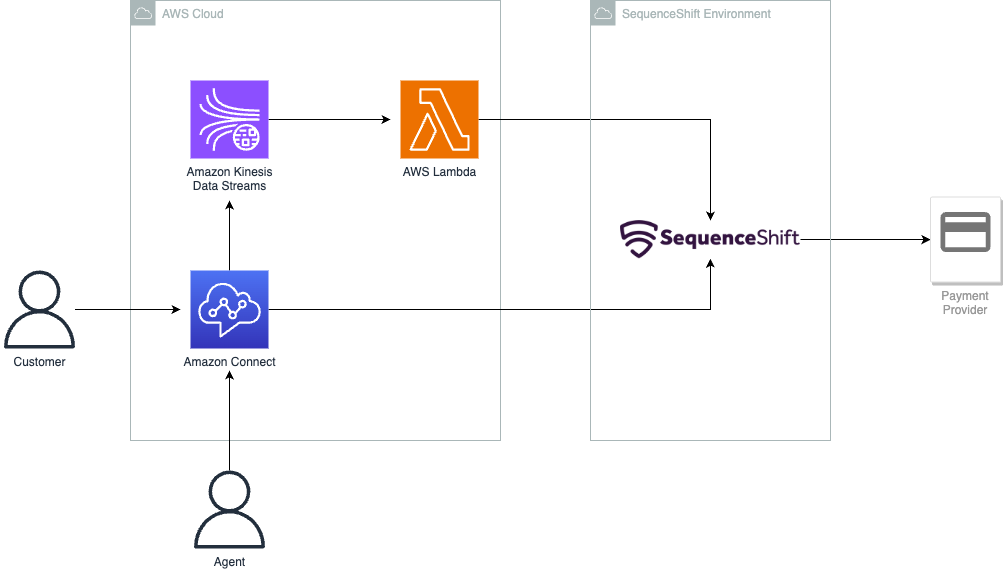
Amazon Connect serves as our cloud contact center, enabling us to provide a seamless experience across voice and chat for customers and agents. Agents will be using the Amazon Connect dashboard to manage their sessions with customers and access the SequenceShift platform.
Amazon Kinesis Data Streams enables data streaming from your Amazon Connect instance. This allows a continuous flow of data such that AWS Lambda can respond to events from Amazon Connect in real time by sending notifications to the SequenceShift platform.
These AWS services allow agents to initiate the collection of information from the Amazon Connect dashboard, to be sent to the SequenceShift platform. Let’s take a look at how we can get this set up in our own cloud environment!
Preparing your environment
Before we get started, we need to make sure we have created the resources above within our AWS environment. This includes:
- The Amazon Connect instance(s) that we are trying to integrate with Payline, with the audio prompt provided by SequenceShift uploaded in the Amazon Connect dashboard
- An Amazon Kinesis Data Stream for any agent events, connected to your Amazon Connect instance through the data streaming feature
Be sure to note the ARNs for these two resources, as we will need to input them once we have access to the SequenceShift Management Console.
Additionally, you must have an active SequenceShift account to access their online portal. You can try Payline by SequenceShift free in the AWS Marketplace.
Once you have set up the above resources, visit the SequenceShift Management Console and log in using your credentials. Follow the instructions provided to create a new Payline instance from the portal, create the required AWS Lambda function in your AWS environment, and input the ARNs of the resources we had created previously. Optionally, you can set up an existing payment provider, or proceed with the test provider to experiment with the features of Payline.
Integration with Amazon Connect
Now that we’ve prepared our AWS environment, we are ready to connect Payline to Amazon Connect. Navigate to your Amazon Connect dashboard and let’s get started.
First, we are going to have to import the contact flow from Payline. A flow defines the customer experience with your contact center from start to finish. For example, the default customer queue flow in Amazon Connect occurs when a customer is placed in a queue, and plays a prompt to the customer before playing queue music in a loop until they are in the front of the caller queue and addressed by an agent. In the case of Payline, we are creating a flow that will initiate the secure data capture from the customer.
Hover over the icons on the left side of the dashboard to find the routing section of our dashboard, and click on “Flows.”
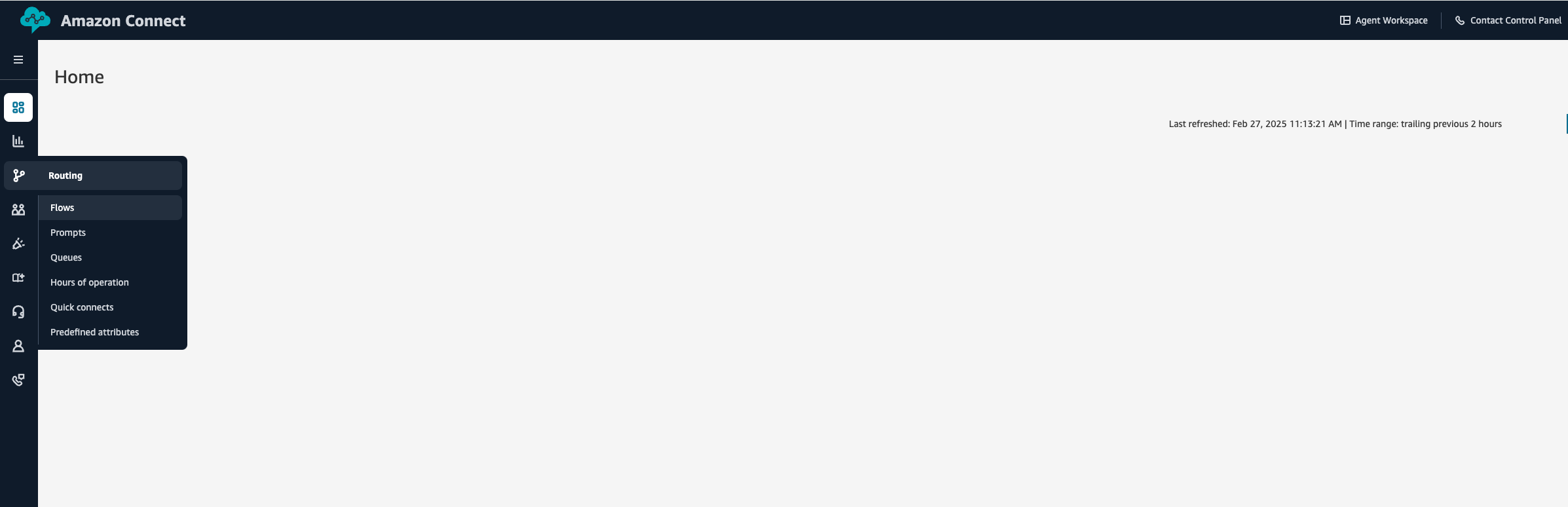
Select “Create Flow” and then select “Import (beta)” through the dropdown next to the “Save” button.
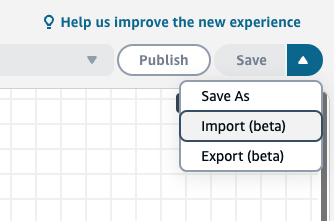
Import the Amazon Connect contact flow obtained from the SequenceShift management console:
Save the flow as new by selecting 'Save & Publish.' Next, we have to create a queue to place callers in when initiating the Payline workflow. Use the icons on the left side to navigate to the “Queues” page of the portal. Click on “Add queue” and set the name of the queue to “SequenceShiftQueue.“ Be sure to set the hours of operation to when you want the queue and Payline service to be available.
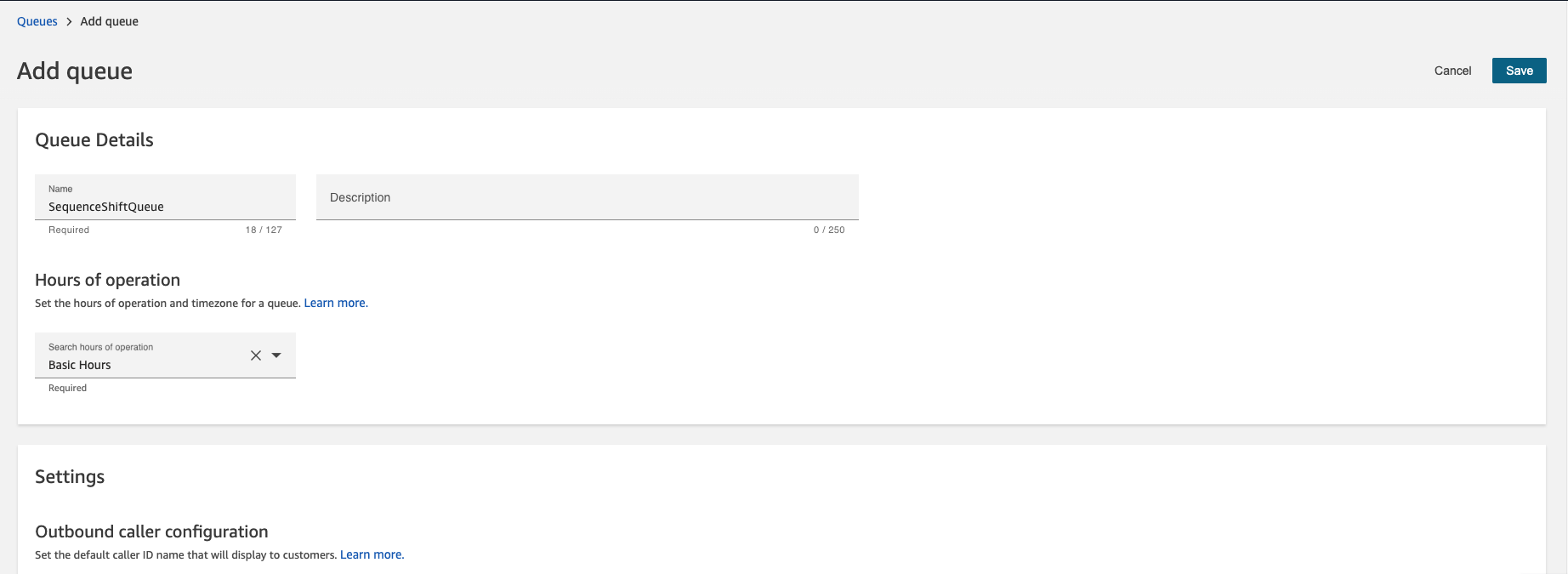
Click “Save” and return to the dashboard. Next, we have to create a quick connect for our Amazon Connect instance. Quick connects allow you to create a list of destinations for common transfers that are done within your contact center. For example, you might want to transfer callers to another support tier or department. In our case, we are creating a quick connect to allow our agents to initiate the Payline workflow. Start by navigating to “Quick connects“ and select ”Add quick connect."

Fill in the required details. For the “Name” field, keep in mind that this will appear on the agent’s phones as an option for them to select. Select “Queue” for the type and be sure to select our queue (SequenceShiftQueue) and flow (SequenceShiftSecureDataCapture) from our previous steps. Save the quick connect and return to the “Queues” page.
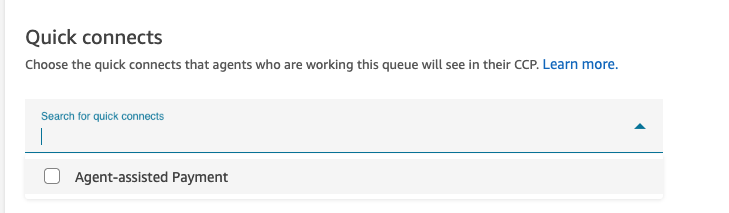
Select our queue from the previous step and scroll down to “Quick connects.” Select the one we had created in the previous step and then click “Save.”
Integrate with the Amazon Connect agent workspace
Payline should be ready to go after following the above configuration, with your agents being able to access agent-assisted payments through the quick connects option when in a call.
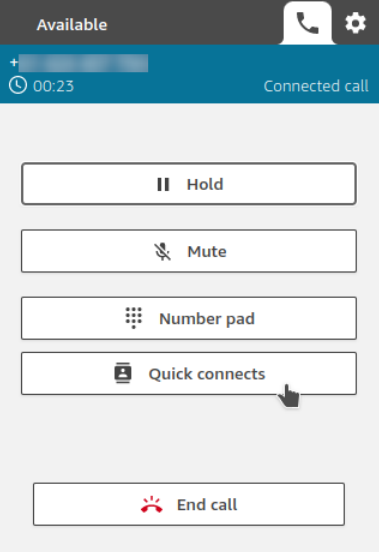
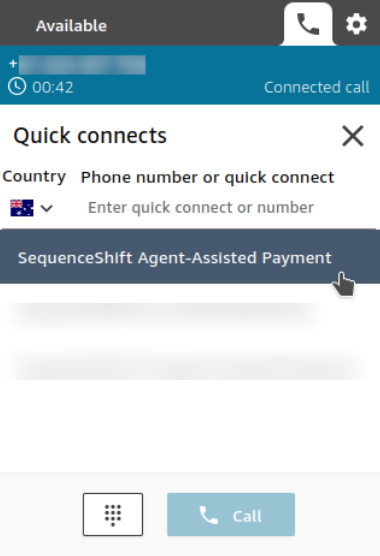
Agents can transfer callers to the payment service and then navigate to the Payline hosted page. However, if we want to integrate Payline within our Amazon Connect agent workspace to allow agents to do this all within their workspace, we are going to have to add Payline as a third-party application. Let’s return to the AWS console’s Amazon Connect page and click on “Third-party applications.”
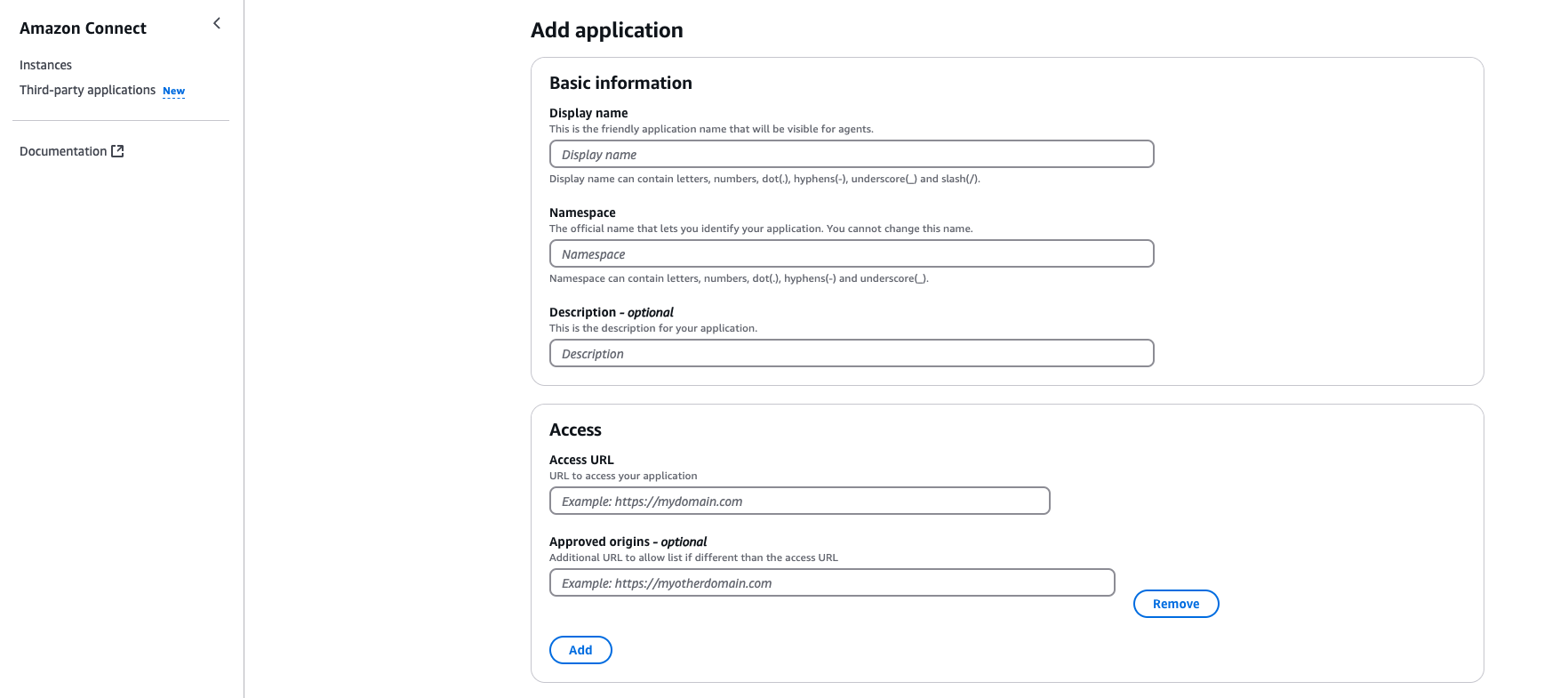
To fill out the information with your preferred display name, and with “sequenceshift.com” in the “Namespace” field. Follow the instructions provided in the iFrame Integration guide in the SequenceShift portal to create the access URL to be input in the respective section. Leave the “Approved origins” section blank and be sure to associate the application with your instance.
The last step before we can use Payline within our workspace is to give our agents permission to access the custom application. Let’s return to our Amazon Connect instance, navigate to “Users,” and then “Security profiles.” Scroll to “Agent Applications” and ensure that your agents’ profile has access to Payline.

Using Payline
After following the above steps, our call center agents can now access the Payline application within their workspace as an application.
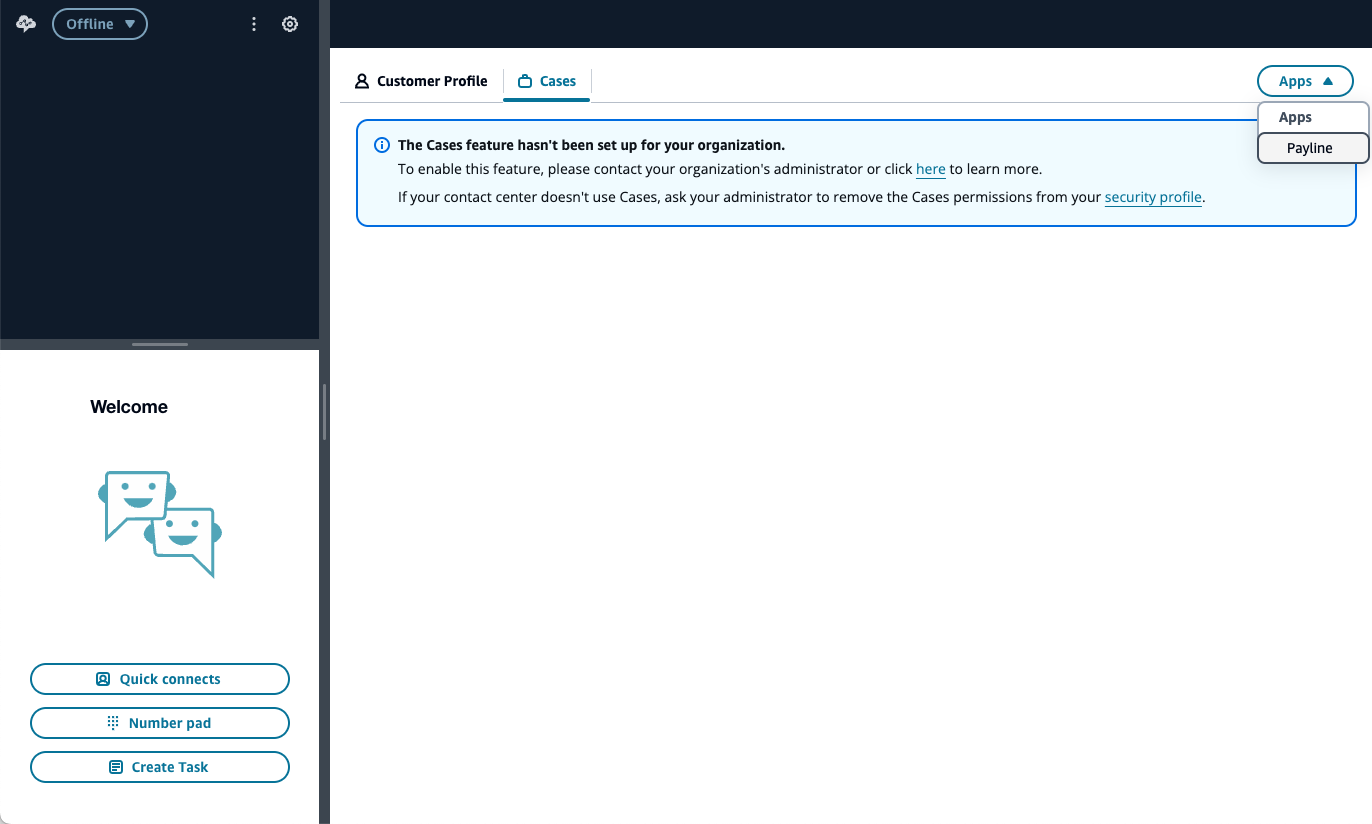
To initiate collection of payment information, first the agent will enter preliminary information such as the customer’s name and the item that will be purchased in either the i-frame that we had set up above or in the SequenceShift portal.
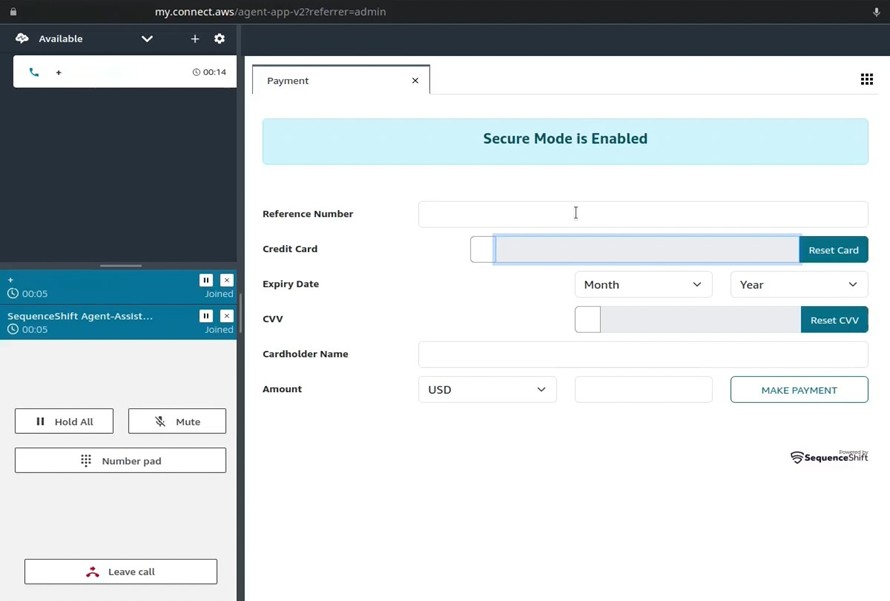
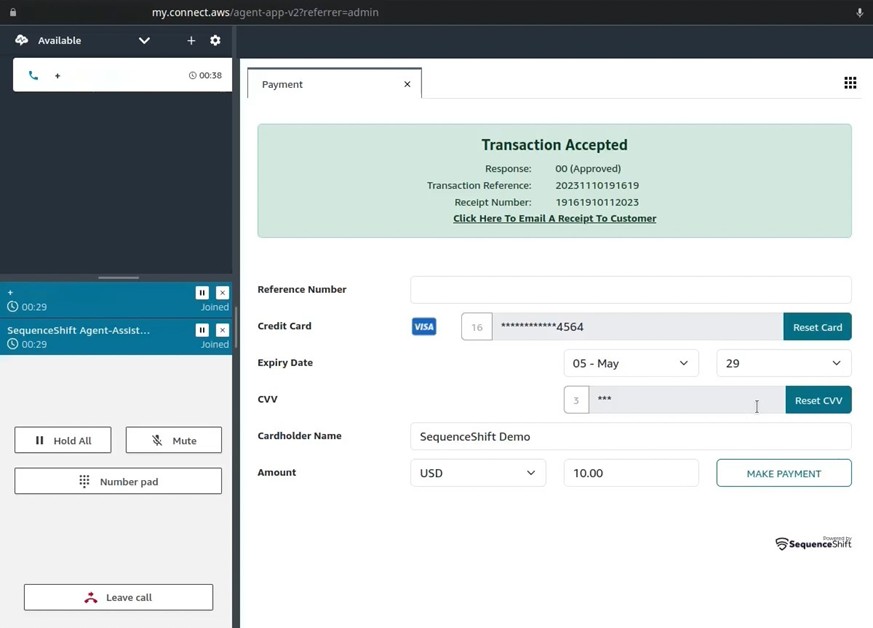
Then, the agent can use the quick connect created in the above steps to transfer the caller to SequenceShift’s agent-assisted payment service. From there, the agent can ask the customer to enter their card number and then press the pound key. The same process is also used for the CVV. The payment can then be completed once all the necessary information is collected, with the payment information sent to the payment provider specified in the SequenceShift portal.
As you can see, payment information is not visible to our agent during and after it is provided by our customer. This removes your Amazon Connect workspace from the PCI-DSS scope and reduces the risk associated with processing this information through your contact center.
Key takeaways
Implementing PCI-DSS compliant payment processing in contact centers has traditionally been complex and costly. Payline by SequenceShift provides a streamlined solution that integrates with Amazon Connect, allowing organizations to accept payments securely while maintaining the personal touch of agent-assisted transactions.
By removing sensitive payment data from your contact center environment, Payline significantly reduces your PCI scope while enhancing security and improving the customer experience. On top of that, Payline also creates a seamless payment processing experience for our agents, removing the need to pause or edit call recordings just to collect payment information.
To get started with Payline by SequenceShift, visit AWS Marketplace to try it free, then pay-as-you-go billing through your AWS account as you’re ready to scale.
Why AWS Marketplace for on-demand cloud tools
Free to try. Deploy in minutes. Pay only for what you use.
Launch directly into your AWS environment
Featured tools are designed to plug in to your AWS workflows and integrate with your favorite AWS services.
No sales cycles—start building right away
Subscribe through your AWS account with no upfront commitments, contracts, or approvals.
Free trials help you evaluate fast
Try before you commit. Most tools include free trials or developer-tier pricing to support fast prototyping.
Usage-based pricing, billed through AWS
Only pay for what you use. Costs are consolidated with AWS billing for simplified payments, cost monitoring, and governance.
Curated tools built for cloud engineers
A broad selection of tools across observability, security, AI, data, and more can enhance how you build with AWS.