Orchestrate data, MLOps, and infrastructure pipelines at scale on AWS
Modernize workflows: Streamline data pipelines with Astro by Astronomer
Building a unified workflow platform for enterprise-wide data visibility
Thanks to advancements in technology, hundreds of zettabytes of data is produced every day, and all this data is churned to produce intelligent insights, making our lives better. To handle this data, data transformation workflows have evolved as well. They have transformed from a few simplistic batch processes to complex multi-cloud workflows with 50+ steps. Today, a typical enterprise runs thousands of interdependent workflows - from real-time data pipelines and machine learning jobs to infrastructure provisioning and automated test suites. Although leaders at these organizations are happy with the outcome, they find it extremely difficult to get visibility into workflows across teams due to the diverse nature of the tooling used.
In this article, you'll learn how to build a unified workflow orchestration platform that caters to diverse enterprise organization needs around data, infrastructure, and MLOps while providing your leadership team with visibility across the organization.
Let’s dig in.
Imagine you're an enterprise architect at an organization where different teams run their own data workflows. Some teams run extract, transform, and load (ETL) workflows, some teams run machine learning (MLOps) workflows, and some groups run data workflows that include infrastructure creation or destruction. Each group works autonomously. While the senior technical leadership is happy with what the organization has achieved using the data, they don’t like having to rely on their managers for information. The senior technical leadership wants an intuitive dashboard they can dive deep into. They have asked you to propose a solution to this problem.
Navigating hundreds of unique pipelines
The problem is not as simple as it appears. The following diagram might give you a peek into what you are about to discover and why leadership struggles to get a unified view.
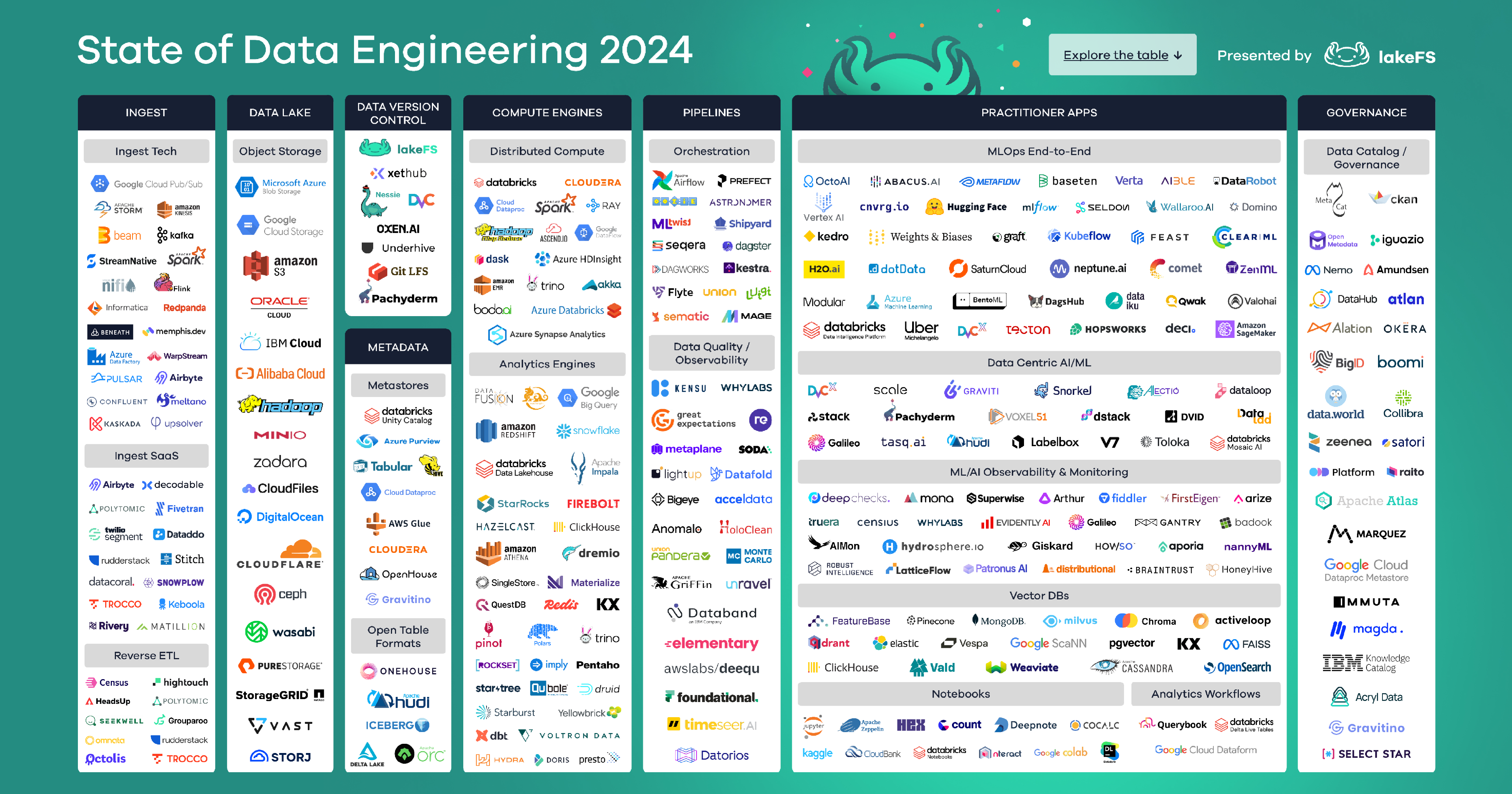
A typical data workflow consists of different stages, and for each stage, teams can choose from multiple options based on their specific set of requirements:
They can Ingest data from 45 different sources using any of the ten approved tools.
They can transform data using any of the 7 standardized tools.
They can perform data quality checks using any of the five available tools.
They can load data into any of the 30 allowed targets, such as data warehouses, data lakes, time-series databases, graph databases, etc.
They can prepare and use data as input for model building on a regular/ad hoc basis using any of the four pipeline tooling options.
You are probably calculating the number of permutations—it’s a lot! When you start your research, here is what you discover:
Most teams have complex non-cyclical workflows.
Teams are happy to give you a 30+ page document and a huge diagram that is difficult to read without zooming, even on a large screen.
Dedicated teams manage pipeline upgrades, patching, and maintenance activities.
Many have manual scripts and point solutions, making upgrades trickier and leading to an overreliance on individuals who have been managing them for years.
Often, pipelines do not fail gracefully, and teams spend many hours reinstating systems back to their happy states.
Some teams manually run Terraform scripts to create intermediary tables before triggering pipelines. They later tear down temporary tables once a week.
On the bright side, there are advanced teams in the innovation LOB. They use Apache Airflow (Airflow) to manage their workflows, which are in the form of a Directed Acyclic Graph (DAG). In case you haven’t heard the term, A DAG in Airflow corresponds to a data pipeline or workflow. DAGs contain a collection of tasks and dependencies that you want to execute on a schedule. DAGs can be as simple as a single task or as complex as hundreds or thousands of tasks with complicated dependencies. It is important to note that DAGs are non-cyclical i.e. it is a unidirectional workflow that does not loop back.
About Apache Airflow
Apache Airflow is the leading open-source DAG orchestrator that you can use to build, schedule, and monitor batch-oriented workflows using Python code. Airflow has 200+ built-in operators and hooks that integrate a large number of data-related products. Airflow provides advanced DAG orchestration functionalities such as retries, timeouts, and failure handling at a task level. It has a built-in web interface that you can use to get real-time visibility into your pipelines, their executions, and logs.
Innovation LOB managers are happy about having a view of their workflows, however, they don’t like having to manage the infrastructure that runs Airflow.
Need for standardization
It is clear that your organization needs a single workflow orchestration tool that: 1) Standardizes workflow orchestration across the organization. 2) Supports different databases, data warehouses, data lakes, or other systems your organization uses in its data stack. 3) Orchestrates different workflows such as ETL, ELT, MLOps toolchains, and workflow Infrastructure management, so customers don’t have to manually spin up temporary infrastructure before the pipeline executes. 4) Enables each LOB without asking them to manage their infrastructure, monitoring setup, or maintenance schedule. 5) Has the ability to support the organization’s 99% workflows – which are complex and non-cyclical (also known as Directed Acyclic Graphs).
Clearly, Apache Airflow is the right workflow orchestration tool for your organization. But wait, is it enough to handle an entire organization’s workload? What about enterprise-grade support? Meeting compliance requirements? How many airflow instances do you create? And who manages infrastructure, handles scaling, ensures high availability, and patching for each airflow instance? With multiple airflow instances, how does leadership get a unified view of workflows across teams and LOBs?
Introducing Astro, a fully managed DataOps platform powered by Apache Airflow
After researching and evaluating Airflow as a strong candidate, you discover Astro, built by developers behind over 50% of the Airflow code. Astro is a managed service, which means you don’t have to manage the underlying infrastructure. Furthermore, Astro meets your organization’s SOC2 compliance requirement and works with AWS PrivateLink to ensure secure connectivity.
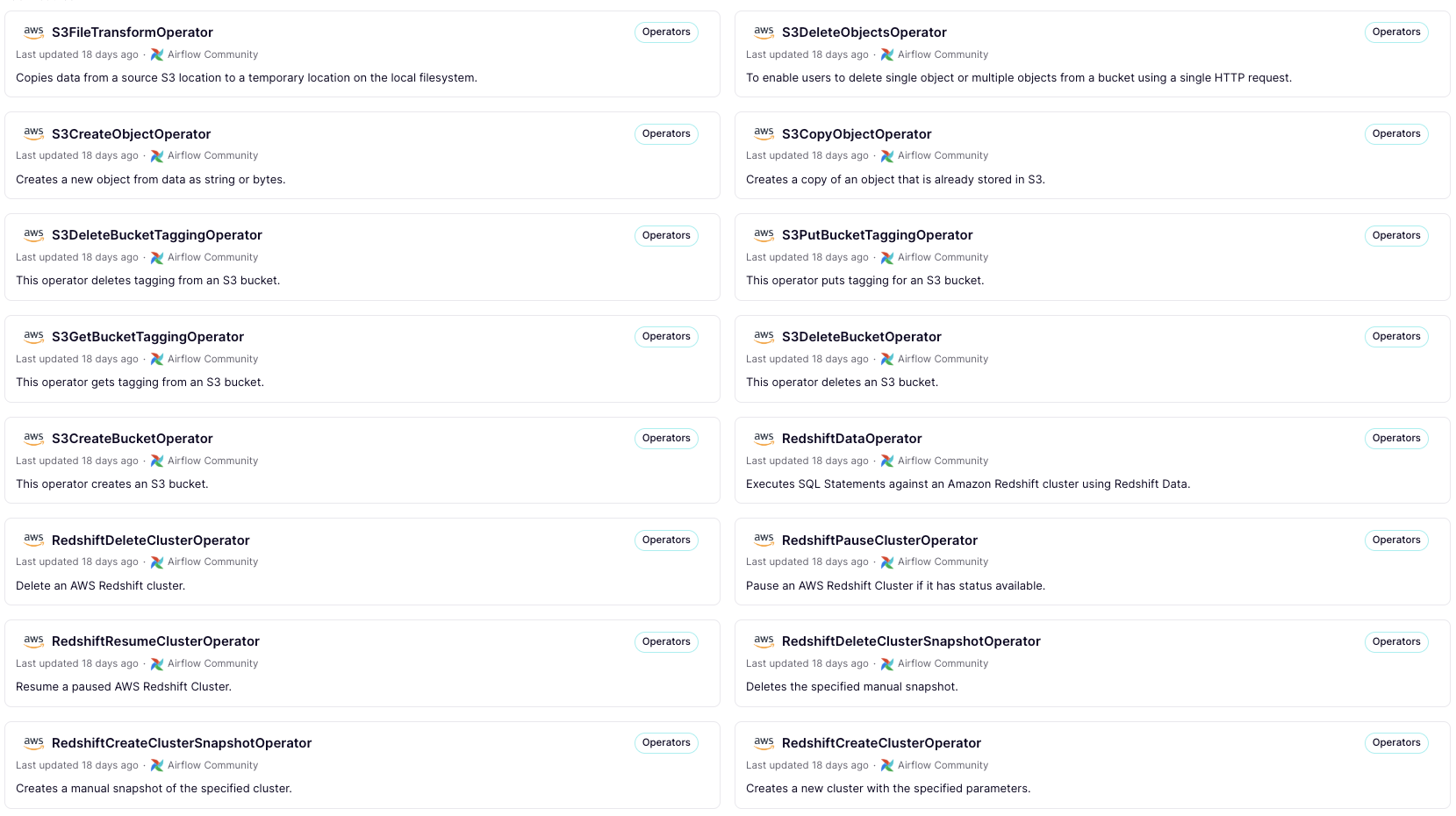
With Astro, you can use over 1,600 open source modules, such as operators and hooks, a rich AWS integration ecosystem, and a unified control plane, which is exactly what your leadership is asking for.
You decide to sign up for Apache Airflow with Astro by Astronomer - Pay As You Go in AWS Marketplace, which comes with a free trial of 14 days, enough to try the product.
Here’s how you can build and deploy a simple data pipeline and get started with Astro.
Step 1: Create a project
First, you can install Astro CLI.
brew install astroTo test Astro locally, you can create an Astro project.
astro dev initNext, you can run the project in your local airflow environment.
astro dev startAfter you build and run the project, you will see the Astro user interface.
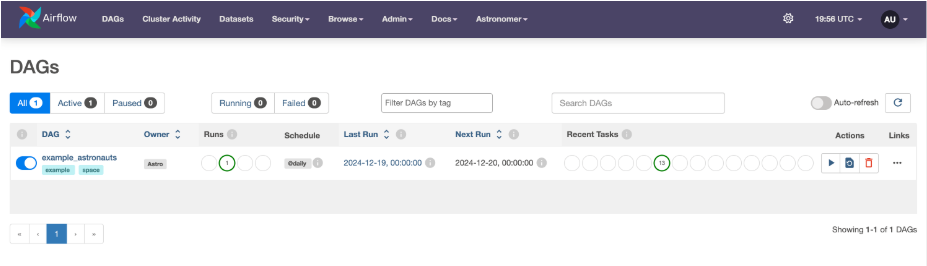
Now you are ready to create your workflow.
Step 2: Create a DAG workflow
You can author a simple DAG pipeline that covers three use cases:
Data transformation
Infrastructure provisioning
MLOps
The following pipeline gathers data from three sources, transforms it, loads it into a temporary table, trains and deploys a model, and finally drops the temporary table.
Here is how you go about it.
Step A: Instantiate a DAG
You can write following python code to instantiate a DAG and define a schedule for the same.
with DAG(
'sample-data-pipeline',
start_date=datetime(2023, 1, 1),
schedule=timedelta(days=1),
catchup=False
) as dag:
start_task = EmptyOperator(
task_id='start' )
Copy
Step B: Write tasks
Next, you write code for each task. Here is the sample code for a task that creates a table using the Postgres operator:
create_table_task = PostgresOperator(
task_id='create_table',
postgres_conn_id='postgres_conn', # Replace with your connection ID
sql="""
CREATE TABLE IF NOT EXISTS temp_data_prep (
sale_price INTEGER,
days_on_market INTEGER,
buyer_type INTEGER,
seller_type INTEGER )
"""
)
Copy
Step C: Define dependencies
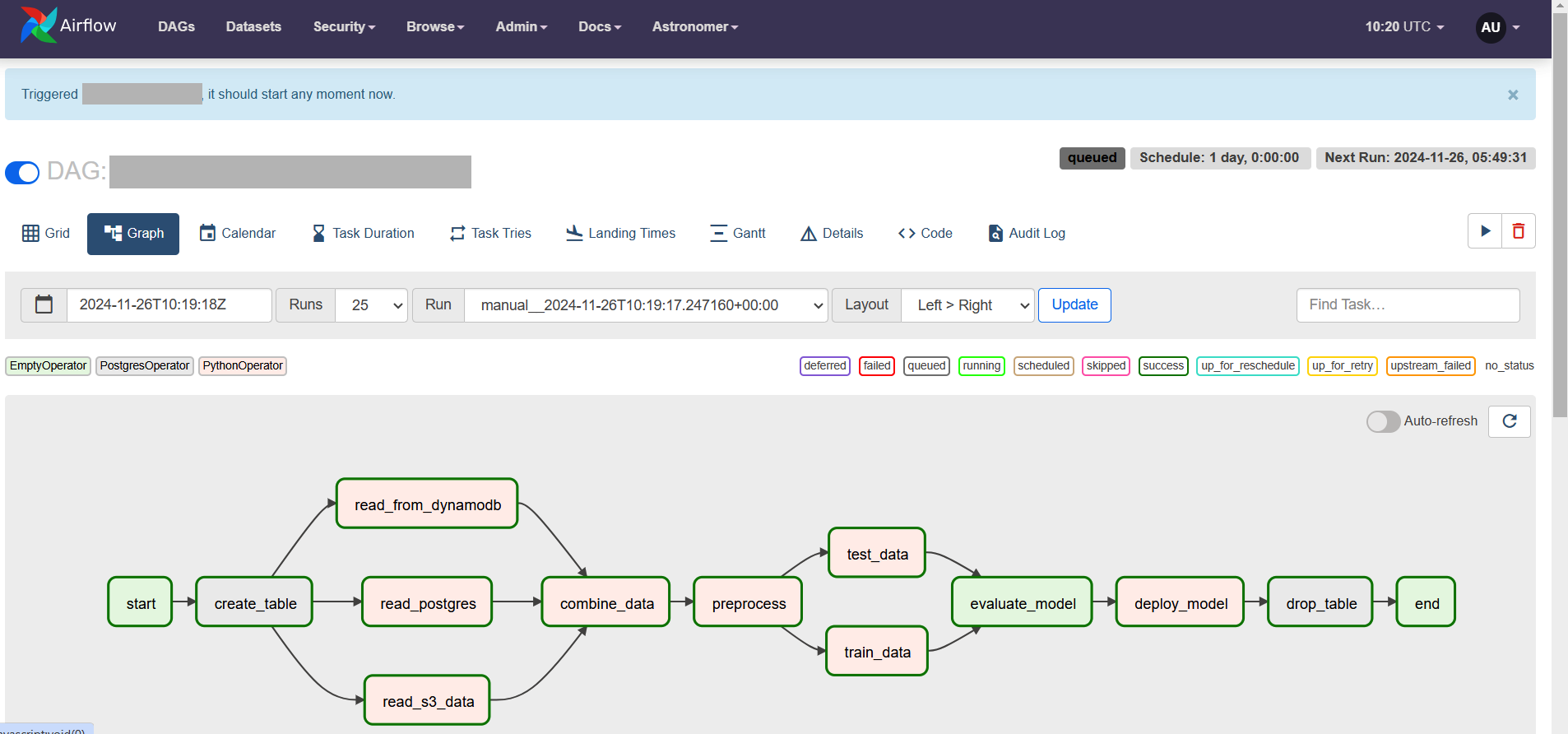
Next, you define the sequence in which different tasks would execute after the start_task. From the following structure, you can see that the start_task calls create_table_task which in turn calls three other tasks, and so on. Finally, the drop_table_task calls the end_task.
start_task
>>create_table_task
>>[read_data_from_dynamodb_task, read_data_from_s3_task, read_data_from_postgres_task]
>>combine_data_task
>>preprocess_data
>> [train_data, test_data]
>>evaluate_result
>>deploy_task
>>drop_table_task
>>end_task
Copy
Here is the visualization of the structure in the Astro console.
Step D: Run workflow
After defining the DAG and all the tasks and dependencies, you can run the workflow from the Astro console. The following screenshot shows different DAG executions and the status of each task.
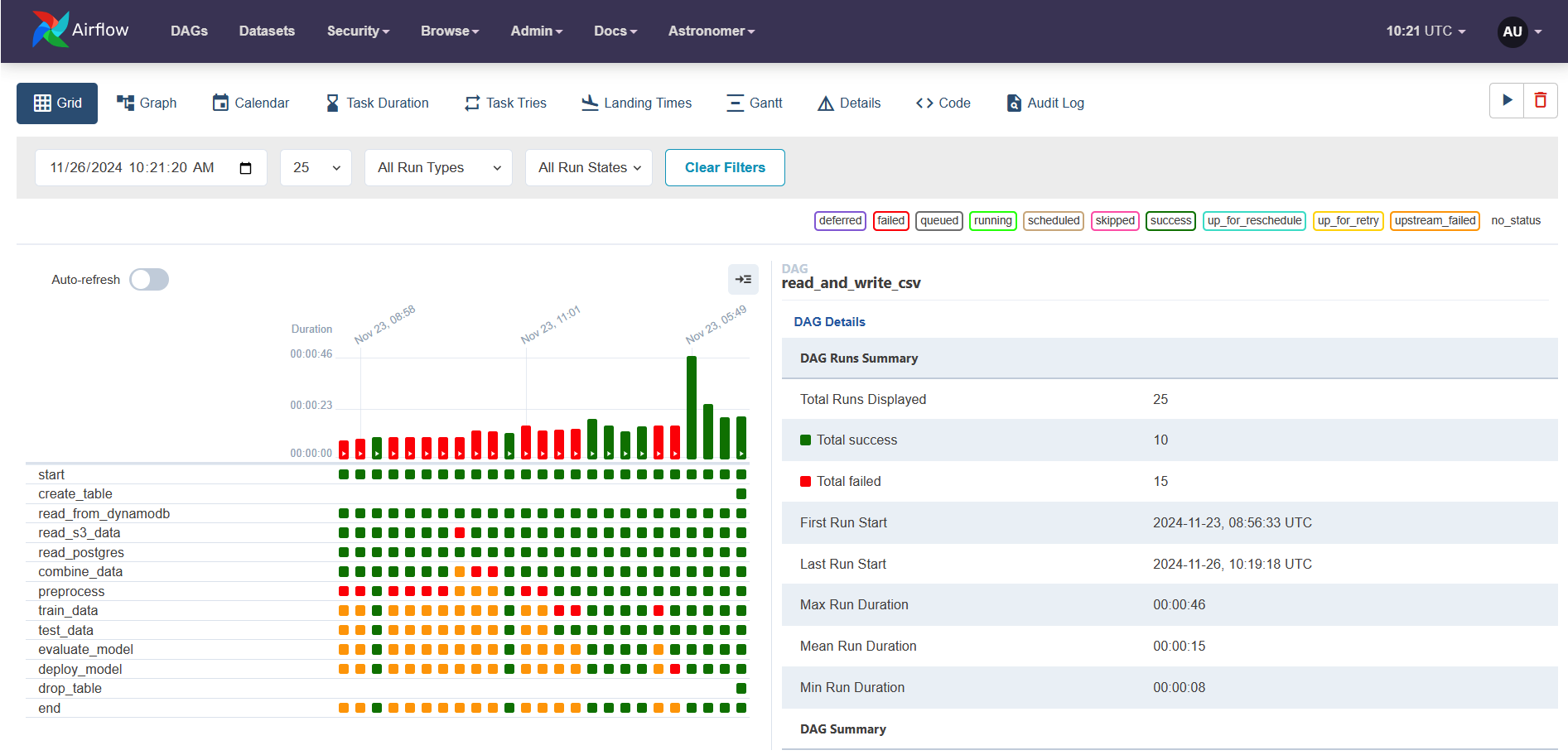
You can drill down into each execution and see logs of each task.
Here are some reference DAGs provided by Astro as part of the astronomer registry you can explore and start building your own DAG:
Congratulations, you just learned how to use Astro to build workflows. With Astro’s enterprise-grade support and ability to handle diverse workflows, you will be able to provide your leadership with a unified view of workflows while streamlining operations for the organization. Furthermore, you can introduce your organization to best practices such as maintaining and versioning data pipelines as code and automated tests to ensure data pipelines work as expected.
Key takeaways
Astro can help you centralize and streamline workflow orchestration across your enterprise. If you are starting out, here are my two cents on getting the most out of Astro:
Use Astro's free trial to explore its enterprise-grade Airflow capabilities and see how it fits your organization's needs.
Start with the Astronomer registry to accelerate your development. There are tons of sample DAGs to bootstrap your pipeline development, loads of operators, and hooks to customize per your requirement.
Take advantage of Astro's CLI and Git integration and implement best practices while writing DAGs.
Use Astro's monitoring capabilities to continuously optimize your workflow performance and resource utilization.
To get started, sign up Apache Airflow with Astro by Astronomer - Pay As You Go (with a 14 day free trial) in AWS Marketplace using your AWS account.



Why AWS Marketplace for on-demand cloud tools
Free to try. Deploy in minutes. Pay only for what you use.
Featured tools are designed to plug in to your AWS workflows and integrate with your favorite AWS services.
Subscribe through your AWS account with no upfront commitments, contracts, or approvals.
Try before you commit. Most tools include free trials or developer-tier pricing to support fast prototyping.
Only pay for what you use. Costs are consolidated with AWS billing for simplified payments, cost monitoring, and governance.
A broad selection of tools across observability, security, AI, data, and more can enhance how you build with AWS.