Securing hybrid cloud architectures
In today's rapidly evolving digital landscape, organizations are increasingly turning to hybrid cloud architectures to balance cost-efficiency, flexibility, and control. This approach allows companies to maintain sensitive data and critical applications on-premises while leveraging the scalability and innovation offered by public clouds. A key component of many hybrid deployments is on Virtual Private Cloud (VPC), which provides organizations with full control over their virtual networking environment, as well as facilitating integration between private and public infrastructure. Another key component of a hybrid cloud is AWS Outposts, which allows you to run AWS infrastructure and services privately on premises. AWS Outposts extends a VPC from an AWS Region to an outpost and makes VPC components accessible from your Outpost.
As businesses adopt hybrid networks, the importance of comprehensive intrusion detection becomes paramount. The combination of public and private clouds in a hybrid environment creates a set of attack vectors that are typically not addressed by traditional security measures. For example, the interconnection between these two environments must be secure, maintaining consistent security policies across different platforms can significantly reduce security gaps. The added complexity of managing multiple environments also introduces the potential for misconfiguration across these systems and a lack of unified visibility.
Intrusion detection and your hybrid cloud
Real-time monitoring, detection, and active response capabilities are essential across both public and private components of your network. Intrusion Detection Systems (IDS) serve as a critical security component for protecting hybrid cloud environments by continuously monitoring network traffic and searching for known threats and suspicious activities. Many intrusion detection systems are capable of notifying IT teams as well as taking action when suspicious activity is detected. As organizations deploy resources across both public and private or on-premises and cloud infrastructure, IDS solutions can be implemented as traditional software applications running on organizational hardware or as cloud-based solutions that protect cloud deployments and environments. However, having separate security systems between the various systems in your hybrid architecture leads to management complexity.
FortiGate Next Generation Firewall (NGFW) by Fortinet provides a centralized suite of security features unified under one dashboard for your entire network. FortiGate integrates with AWS services such as the Gateway Load Balancer to monitor north-south or east-west traffic in your hybrid network. It effectively enables secure networking to, from, and between clouds whether they are private or public. It also offers configurable security profiles for various unwanted traffic and network threats. This includes antivirus, web filtering, application control, intrusion prevention, data loss prevention, and more.
The architecture
Let’s take a look at the architecture for our solution:
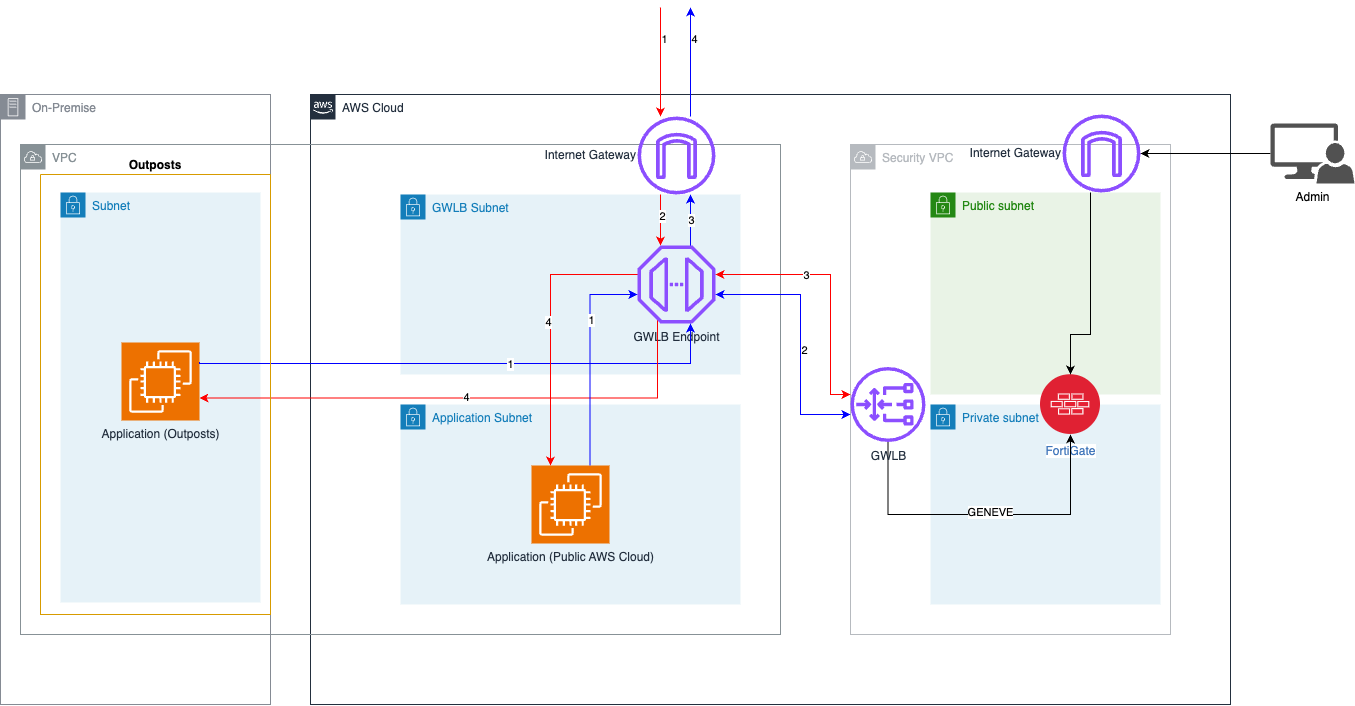
In this architecture, we utilize a Gateway Load Balancer endpoint in our main VPC that will serve as the entry and exit point for all traffic in our subnets. This endpoint forwards traffic to our security VPC, which contains our FortiGate VM. This VM will inspect all traffic before returning it to the GWLB where it is sent where it is needed. Note that although we are using a full cloud environment in today’s example, it can be configured for a hybrid AWS Outposts deployment as seen in the architecture above.
Preparing your environment
Before we get started, we need to make sure we have created the resources above within our AWS environment. This includes:
The two or more VPCs with subnets in all zones that need to be load balanced
FortiGate Next Generation Firewall with at least one management network interface and an elastic IP assigned
Any application instances as needed
Additionally, you must have an active FortiGate Next-Generation Firewall subscription to deploy the instance and access the management portal. You can try FortiGate Next-Generation Firewall for free in AWS Marketplace.
Once you have set up the above resources, be sure to set up your FortiGate-VM in the security VPC, following the instructions for set up in Fortinet’s documentation.
Integration with your VPC and Gateway Load Balancer
For our implementation, let’s set up north-south security inspection in our network. North-south security inspection refers to inspecting network traffic that is entering or exiting your network. We will be utilizing our Gateway Load Balancer to forward traffic to a VPC designated for security containing our FortiGate instance. This will grant us visibility into all traffic entering and exiting our network.
Start by following the directions from Fortinet’s FortiGate documentation to establish a security VPC along with all the necessary routing tables to ensure that traffic is first routed to our gateway load balancer. This will ensure that traffic is sent to our FortiGate instance within the centralized security VPC. Once we have configured our routing tables, we can configure the FortiGate instance to create virtual domains (VDOMs) to handle traffic from our application VPC. See the example architecture from FortiGate’s documentation below for an idea of how routing tables handle the flow of traffic.
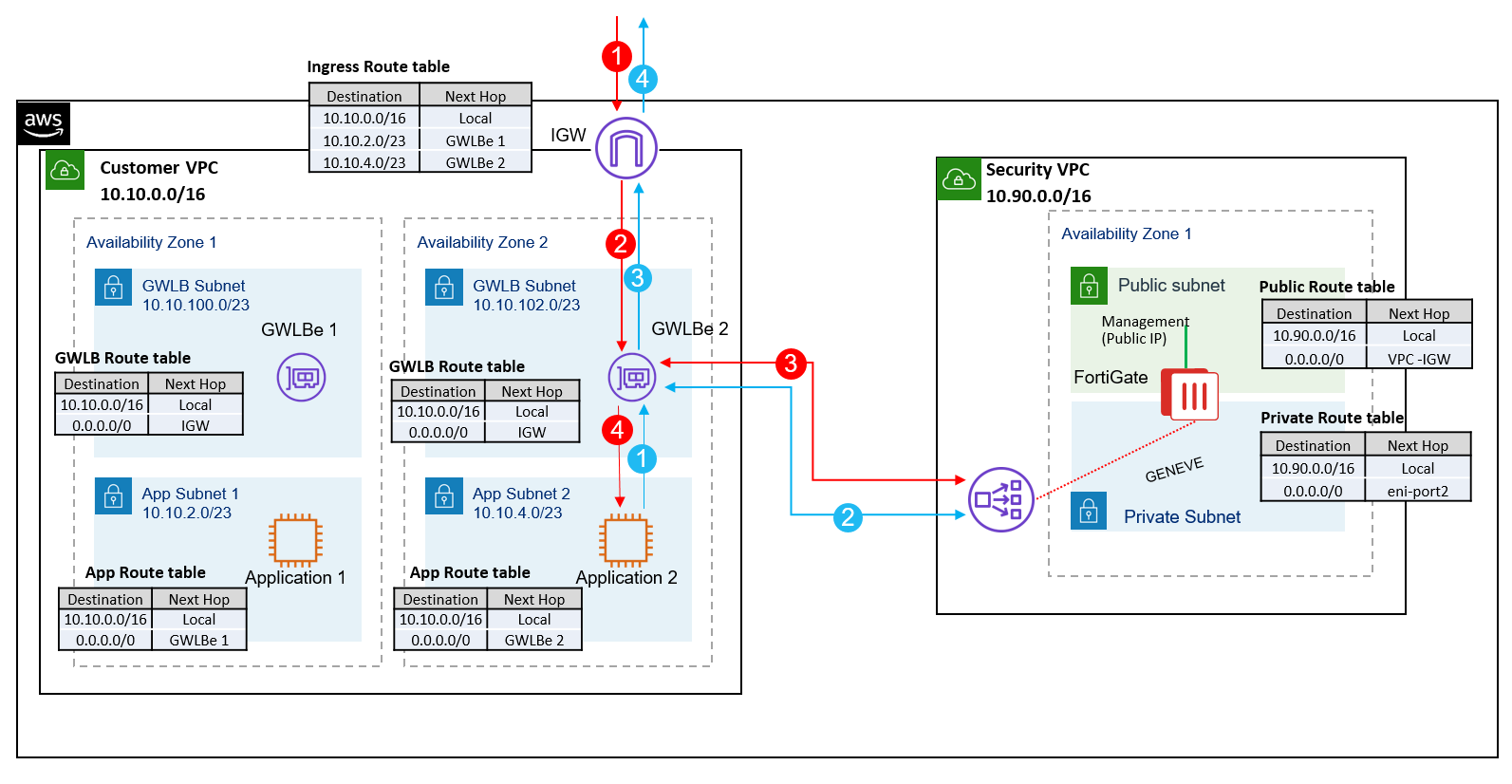
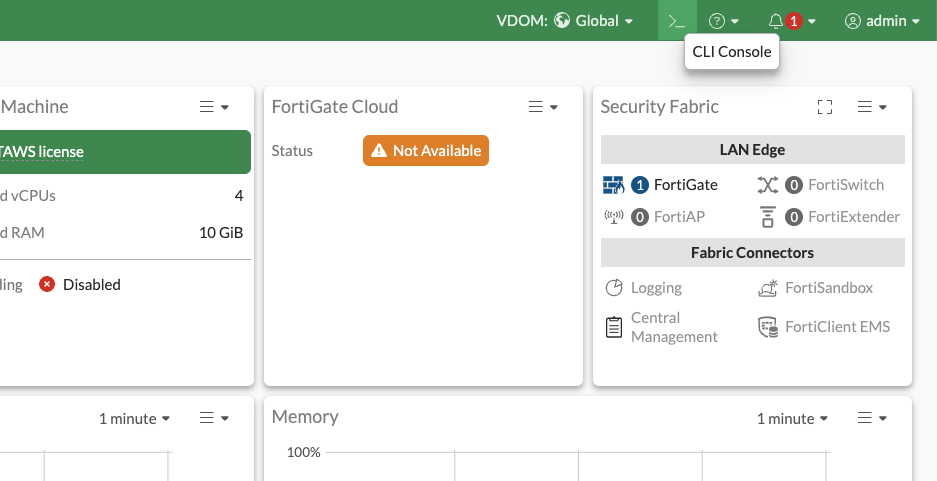
In order to divert traffic within a VPC to another appliance or cluster of appliances, we need to use the GENEVE protocol in our FortiGate instance. GENEVE stands for Generic Network Virtualization Encapsulation, which encapsulates packets traversing through your network with additional metadata allowing it to be analyzed by FortiGate. Navigate to your FortiGate instance’s console and open the CLI in order to follow the steps listed here in the FortiGate documentation.
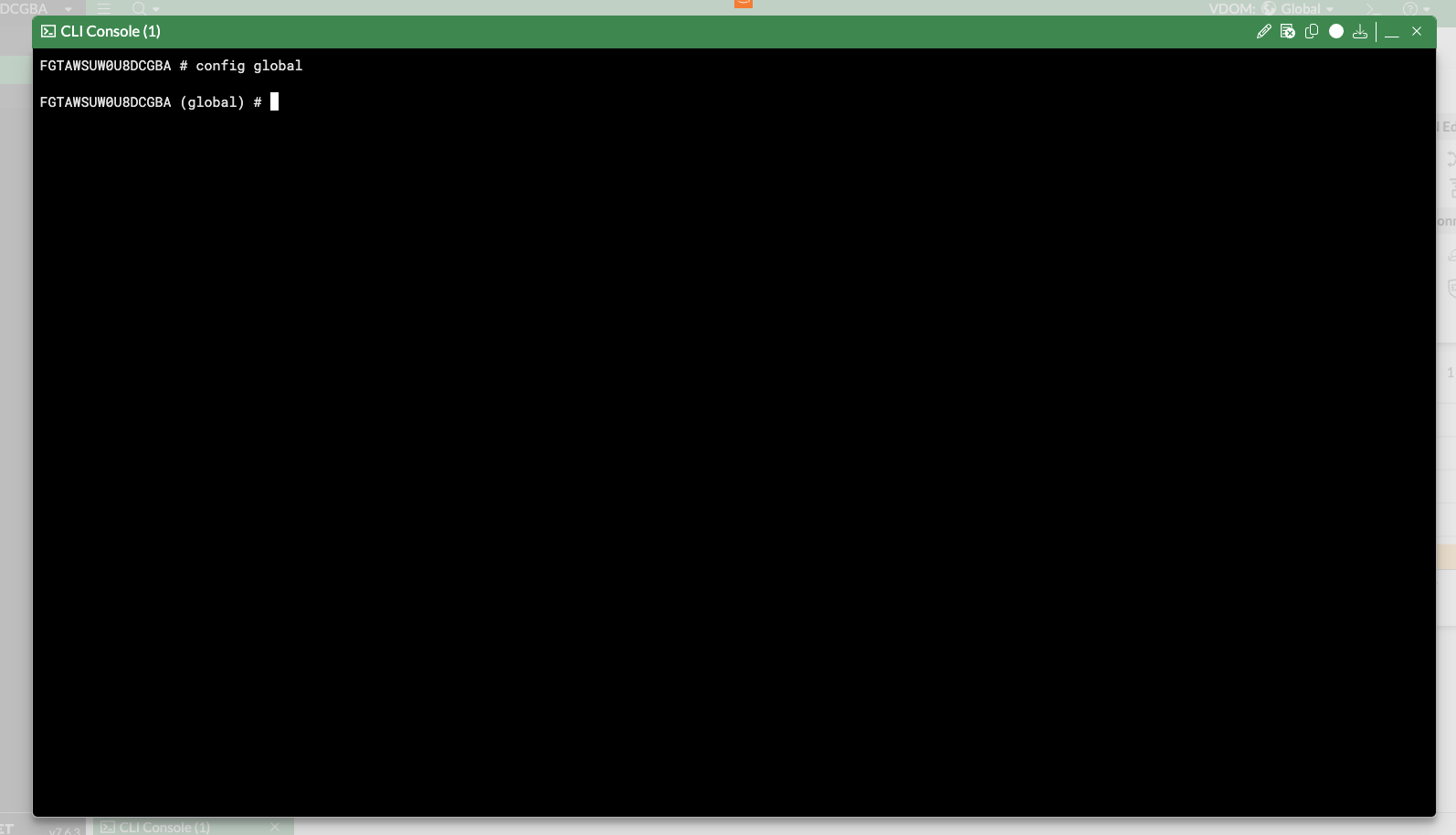
Once implemented, we can perform packet captures to ensure traffic is being passed between the FortiGate instance and the GWLB. This also serves as a great tool for diagnosing network related issues in the future.
Configuring security profiles
Now that we have established connection between our FortiGate instance and our Gateway Load Balancer, we can utilize FortiGate’s broad suite of security policies and profiles. For example, we can create a new security profile for intrusion detection. From here, we could add intrusion prevention system (IPS) signatures to be blocked. These signatures can be from a set of predefined signatures from Fortinet or you can alternatively create your own.
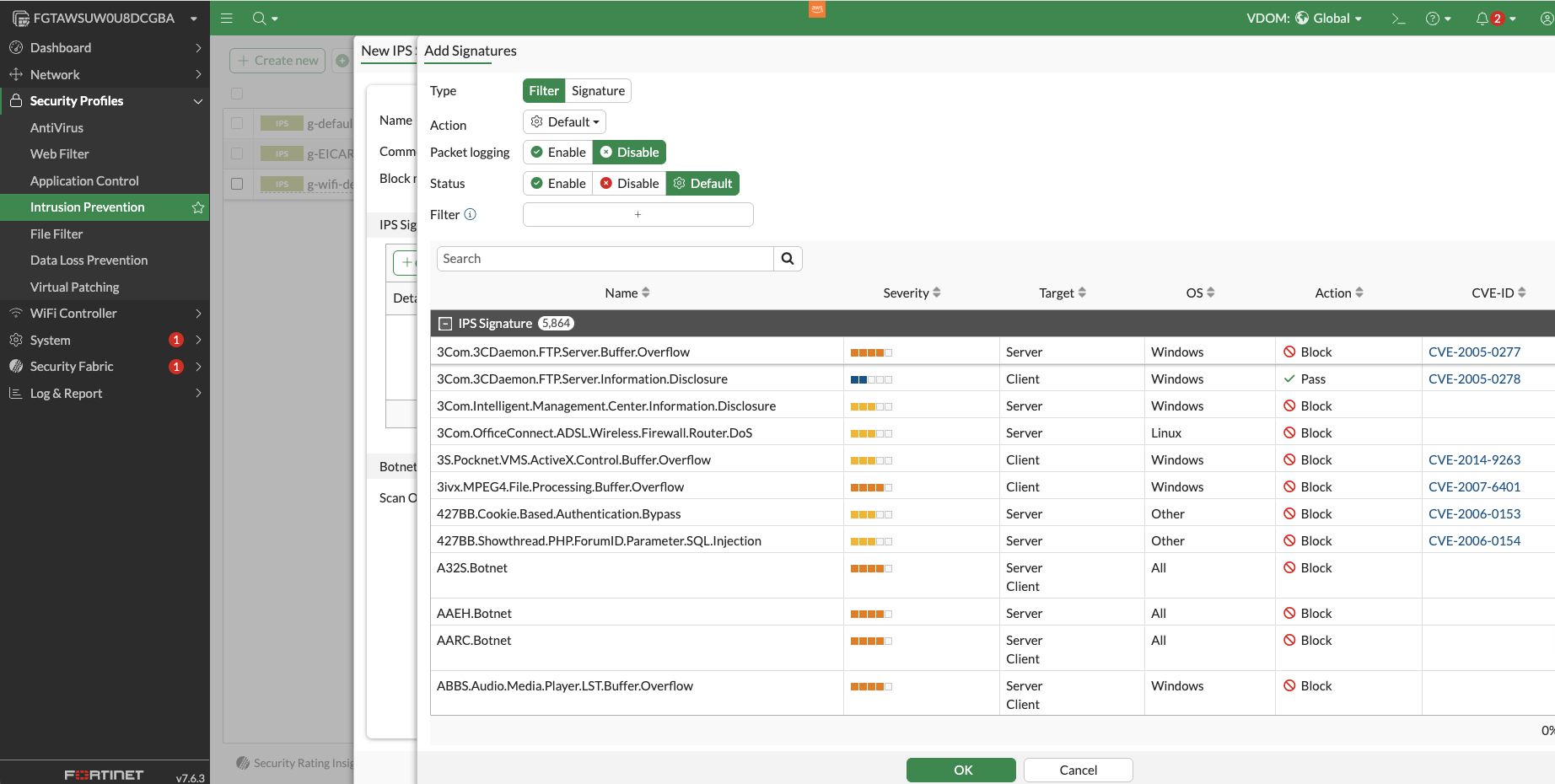
FortiGate also offers configurable security profiles for anti virus, web filtering, application control, file filtering, data loss prevention, and virtual patching. Events related to these security profiles can be logged and further explored within the FortiGate instance dashboard.
Key takeaways
FortiGate Next Generation Firewall provides a unified security solution that can be integrated in hybrid cloud environments, where organizations need to protect both on-premises infrastructure and AWS cloud resources. Through integration with Gateway Load Balancer, organizations can implement consistent security policies across their entire hybrid network. This can be achieved through the routing of traffic to a centralized security VPC containing our FortiGate instance. This centralized approach simplifies security management and ensures comprehensive protection through features like intrusion detection, antivirus, web filtering, and data loss prevention, all managed through a single dashboard. By properly configuring routing tables and customizing security profiles, organizations can achieve robust security coverage across their entire hybrid infrastructure without creating management complexity or security gaps between different environments.
You can get started with FortiGate free in AWS Marketplace and pay-as-you-go billing through your AWS account as you are ready to scale.
Why AWS Marketplace for on-demand cloud tools
Free to try. Deploy in minutes. Pay only for what you use.