
Sold by: Personalisation Hub
Deployed on AWS
Extend 1:1 personalisation from ecommerce into physical stores - in hours, not months
Overview
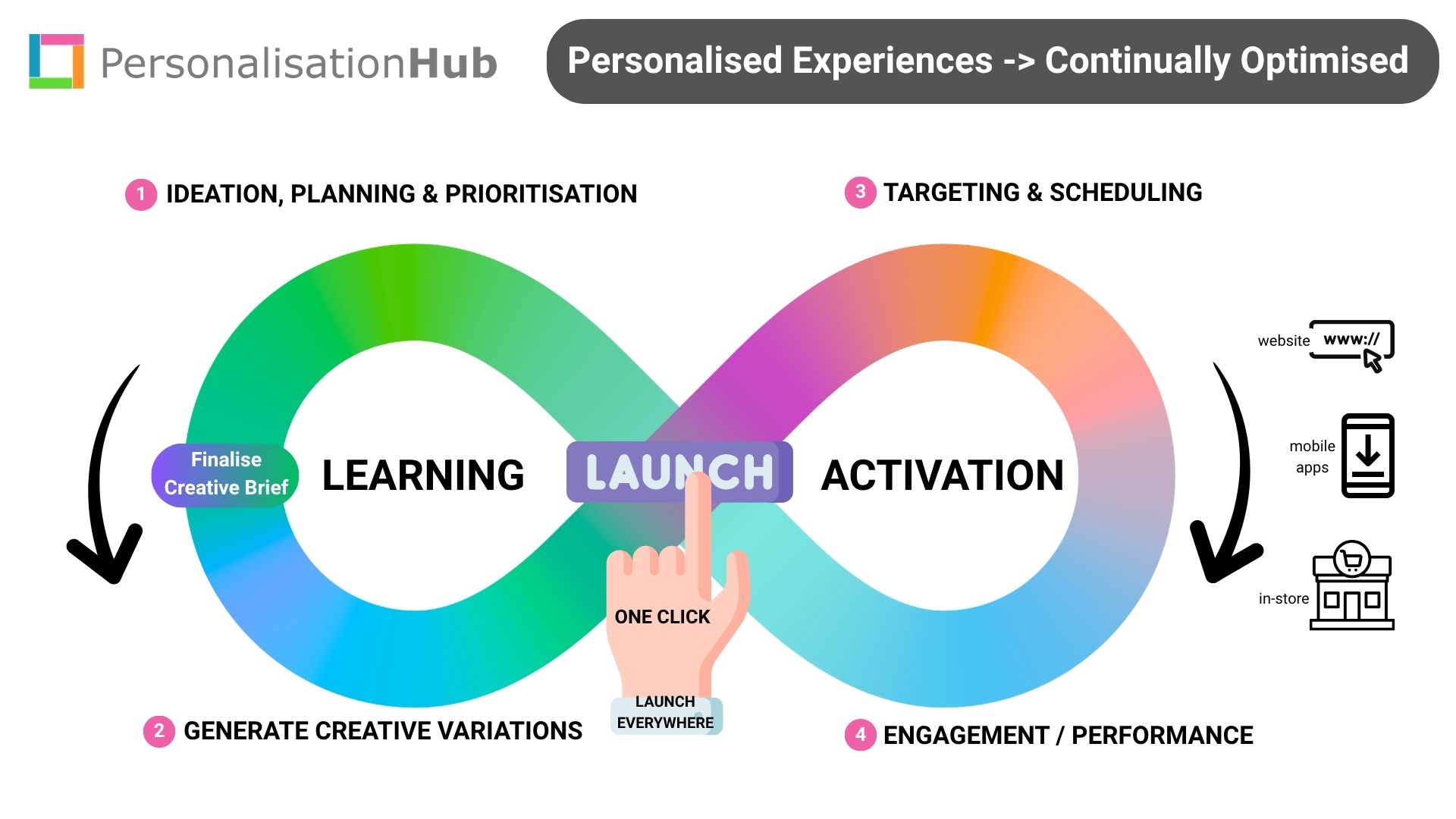
Image
Closed-loop, self-optimising campaigns

Video
Product video
Install Personalisation Hub today with a 30-day free trial (cancel anytime).
Deployed directly into your AWS VPC, running on your own domain, data, AI models and security controls.
What retailers can do immediately:
-
Automate and scale personalised creative with GenAI -> The platform automates the creative workflow - from campaign brief through to generating personalised variants for every screen, store and audience segment.
-
Identify customers on arrival in-store -> Support multiple in-store check-in options including virtual queues, QR codes on digital signage, order collection and Bluetooth beacon integrations - supporting 1:1 targeting before checkout.
-
Activate real-time personalisation in-store -> Once a customer checks in, the platform performs real-time context engineering, securely combining live data (customer, product, stock, location, weather, etc) to present the right offer, in the right place, at the right moment.
-
Deliver 1:1 personalisation on digital signage and smart shelves -> Influence purchase decisions at the shelf edge by dynamically tailoring content, offers and messaging based on customer context and intent.
-
Increase foot traffic with privacy-safe computer vision -> Built-in, edge-based computer vision improves campaign targeting and measures passer-by engagement (no facial recognition), helping retailers optimise targeting and creative to drive more store walk-ins & sales.
-
Empower store associates to deliver VIP experiences -> Surface relevant customer insights when shoppers join a virtual queue or book appointments - enabling retail staff to deliver more personalised, higher-value interactions.
-
Continually optimise campaign performance over time -> Centralise campaign history and in-store performance data, then use AI/GenAI to continuously refine creative, targeting and outcomes over time.
-
Connect digital and physical journeys -> Link mobile app, website and in-store analytics for true end-to-end journey visibility and improved marketing attribution - even for non-authenticated shoppers using first-party cookies.
-
Built-in retail capabilities include: -> Virtual queue management, appointment bookings, digital signage, smart shelves, AI-driven insights and world-class retail analytics - all from a single platform.
Highlights
- Increase foot traffic in-store -> Support geo-targeting, leverage computer vision and any local store data to optimise campaign targeting. Objective: X additional walk-ins/store/day.
- Maximise basket size and revenue -> Support in-store personalisation on signage and smart shelves to influence purchase behaviour at the shelf edge. Objective: Increase in-store conversion by Y%.
- Fast to value -> Typical installation takes ~1 hour 15 minutes, with measurable benefits delivered the same day.
Details
Sold by
Delivery method
Delivery option
PersonalisationHub Installer
Latest version
Operating system
AmazonLinux 2023
Deployed on AWS
New
Introducing multi-product solutions
You can now purchase comprehensive solutions tailored to use cases and industries.

Features and programs
Financing for AWS Marketplace purchases
AWS Marketplace now accepts line of credit payments through the PNC Vendor Finance program. This program is available to select AWS customers in the US, excluding NV, NC, ND, TN, & VT.

Pricing
Pricing is based on actual usage, with charges varying according to how much you consume. Subscriptions have no end date and may be canceled any time.
Additional AWS infrastructure costs may apply. Use the AWS Pricing Calculator to estimate your infrastructure costs.
Dimension | Cost/unit |
|---|---|
Platform license/instance (Free trial) | $0.00 |
Platform license/instance/hour | $6.94 |
Cost per connected store (Free trial) | $0.00 |
Cost per connected store/hour | $0.1375 |
Cost per connected display (Free trial) | $0.00 |
Cost per connected display/hour | $0.1375 |
Dimensions summary
Pricing has three usage-based components you can combine. You pay an hourly rate for the platform license per instance, which runs the core personalisation software in your own cloud. On top of that, you add an hourly rate for each connected store, extending experiences into physical locations. You also add an hourly rate for each connected display, powering personalisation on in-store screens. Each component scales independently with the number of instances, stores, and displays you connect. Every component offers a free trial version, letting you test the platform before charges begin.
Top-of-mind questions for buyers
A connected store is a physical retail location tied into the platform, extending personalisation to that site's customer experience. A connected display is an individual in-store screen running personalised content. You are charged per store and per display separately, so a single store with several screens accrues charges for each.
You pay one platform license per instance, so that charge stays relatively fixed. Store and display charges scale with how many locations and screens you connect. For a large network, the per-store and per-display charges add up and usually dominate, since each store and each screen bills independently on the same invoice.
They are separate. The platform license per instance runs the core personalisation software in your own cloud. Connecting stores and displays adds charges on top, metered per store-hour and per display-hour. All three components bill independently and combine into your total AWS bill.
personalisationhub.com+2
Helpful?
Vendor refund policy
We do not offer refunds, but you may terminate your Cloudformation Stack at any time.
Custom pricing options
Request a private offer to receive a custom quote.

Legal
Vendor terms and conditions
Upon subscribing to this product, you must acknowledge and agree to the terms and conditions outlined in the vendor's End User License Agreement (EULA) .
Content disclaimer
Vendors are responsible for their product descriptions and other product content. AWS does not warrant that vendors' product descriptions or other product content are accurate, complete, reliable, current, or error-free.
Delivery details
PersonalisationHub Installer
This CloudFormation template deploys the PersonalisationHub Installer into a new, isolated VPC. It provisions an EC2 instance that runs a browser-accessible installation wizard to guide you through setting up the full platform.The template also creates IAM roles and other supporting AWS resources required for the installer to provision and interact with services such as compute, storage, and orchestration. For security best practices, we recommend deploying this stack in a separate AWS account.
After the stack is deployed, access the EC2 instance using the public IP address provided in the Outputs tab. For detailed guidance, visit https://help.personalisationhub.com .
CloudFormation Template (CFT)
AWS CloudFormation templates are JSON or YAML-formatted text files that simplify provisioning and management on AWS. The templates describe the service or application architecture you want to deploy, and AWS CloudFormation uses those templates to provision and configure the required services (such as Amazon EC2 instances or Amazon RDS DB instances). The deployed application and associated resources are called a "stack."
Version release notes
Release 4.2.3.8:
- Support new region: Aukland
- Installation improvements
- Bug fixes
Additional details
Usage instructions
Step 1: Select 'View purchase options' > Select 'Subscribe' > Continue to Configuration > Select 'CloudFormation Template' & your desired region > select 'Continue to Launch' > Choose 'Launch CloudFormation' > select 'Launch'
Support
Vendor support
Need Help? Please Visit Our Support Centre:
AWS infrastructure support
AWS Support is a one-on-one, fast-response support channel that is staffed 24x7x365 with experienced and technical support engineers. The service helps customers of all sizes and technical abilities to successfully utilize the products and features provided by Amazon Web Services.
Similar products
CleverTap is the all-in-one engagement platform that helps brands unlock limitless customer lifetime value by helping them create personalized experiences to retain their most valuable customers.

The Hugging Face Hub is the leading open platform for AI builders.

Customer Data Platform, Personalisation Engine, Omni Channel Journey Builder

Customer Engagement Platform
Connected Engagement
Connected Customers
Connected Experience
Powered by Actionable AI
Customer reviews
No customer reviews yet
Be the first to review this product . We've partnered with PeerSpot to gather customer feedback. You can share your experience by writing or recording a review, or scheduling a call with a PeerSpot analyst.