Sold by: LucidLink
Deployed on AWS
Collaborate everywhere, instantly with LucidLink. Empower your team to access, edit and share files of any size in real time, without syncing or downloading. With seamless setup, familiar workflows and zero-knowledge encryption, LucidLink frees your team to collaborate without limits.
4.5
Overview
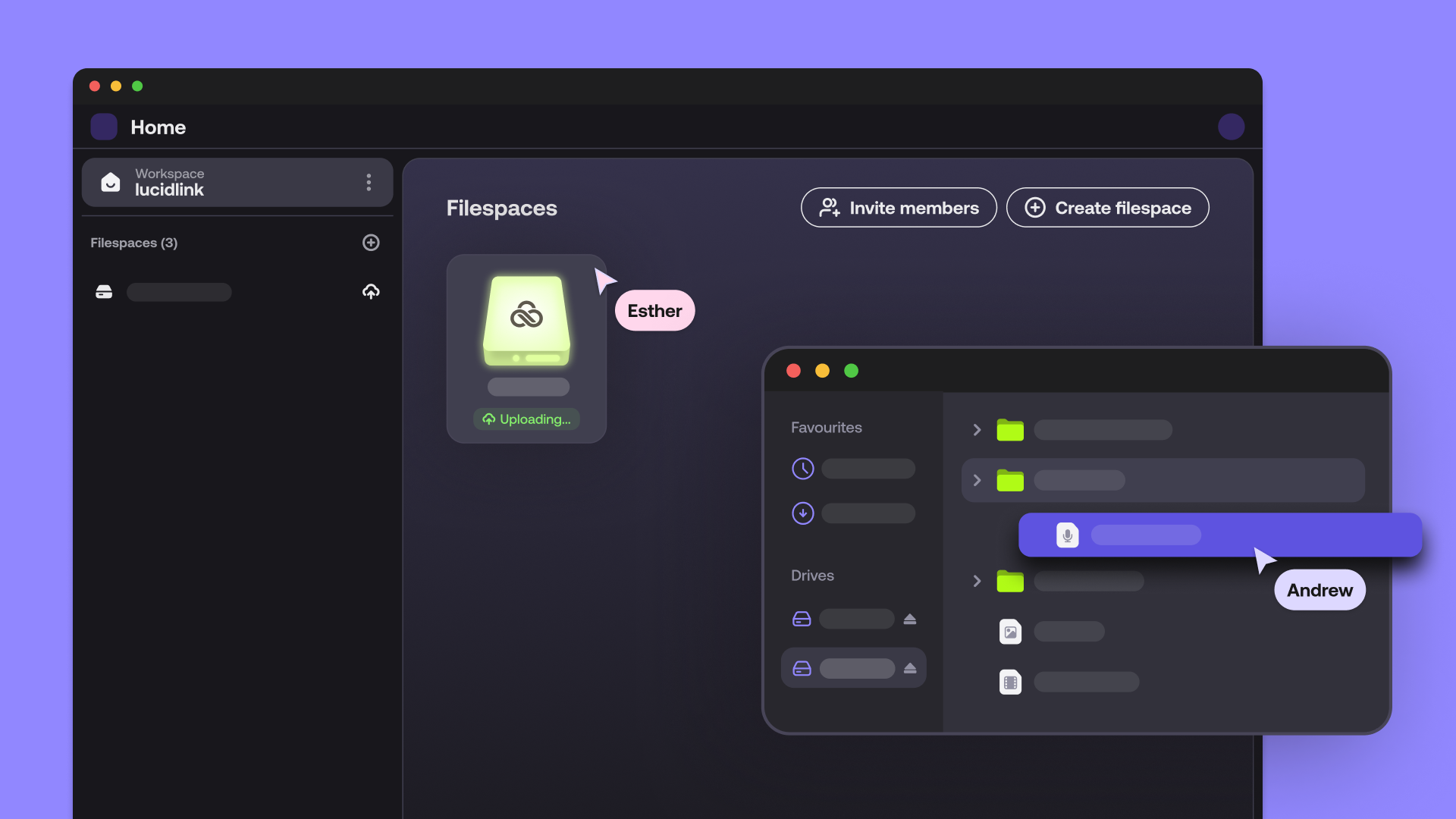
LucidLink is the storage collaboration platform that enables Enterprise companies to work from anywhere. With a single shared filespace protected by zero-knowledge encryption, your team can instantly and securely access, edit and share projects of any size.
Combining the ease of a local drive with the power of the cloud, LucidLink gives you on-demand access to your files. Now you can get straight to work without downloading, syncing or versioning disasters.
LucidLink Enterprise provides egress-free AWS storage so your team can collaborate securely across locations without unexpected costs. Scalable storage and real-time file access let you finish projects faster, while enterprise-grade security protocols ensure data is fully protected at all times.
Spotify, Paramount, Adobe and creative teams worldwide have used LucidLink to 5x productivity, access the best talent globally and free their people to focus on creating.
KEY FEATURES: SSO integration Multiple Admins Snapshot recovery Global settings Audit Trail 24/7 premium support
Highlights
- Scalable, global, & instantly accessible collaboration - Take advantage of unlimited cloud storage that scales with your team. Boost productivity, cut costs and save time with instant, secure access to data - without syncing or downloading delays. Collaborate seamlessly on projects in real-time with teammates anywhere and connect effortlessly with global talent.
- Seamless integration & effortless setup - Rapidly onboard your team with quick installation and seamless integration into your existing infrastructure. Use LucidLink with any application - no need for new hardware, extra IT support or extensive training. Drive long-term productivity with a platform designed for real-time collaboration.
- Enterprise-grade security & access control - Protect your assets with zero-knowledge encryption, centralized access controls and customizable permissions. Easily meet infosec requirements and ensure only authorized users can access your data. Stop paying for data recovery and safeguard your projects with LucidLink snapshots.
Get personalized pricing in minutes - New
If qualified, an express private offer gets you custom pricing and terms. Finalize your purchase in the AWS Marketplace console.
Details
Sold by
Delivery method
Deployed on AWS
Features and programs
Financing for AWS Marketplace purchases
AWS Marketplace now accepts line of credit payments through the PNC Vendor Finance program. This program is available to select AWS customers in the US, excluding NV, NC, ND, TN, & VT.

Pricing
Pricing is based on the duration and terms of your contract with the vendor, and additional usage. You pay upfront or in installments according to your contract terms with the vendor. This entitles you to a specified quantity of use for the contract duration. Usage-based pricing is in effect for overages or additional usage not covered in the contract. These charges are applied on top of the contract price. If you choose not to renew or replace your contract before the contract end date, access to your entitlements will expire.
Additional AWS infrastructure costs may apply. Use the AWS Pricing Calculator to estimate your infrastructure costs.
Dimension | Description | Cost/month |
|---|---|---|
Enterprise w/ Member | LucidLink's Enterprise includes 1TB of LucidLink, AWS storage, and all egress charges, along with One Member bundled into a single price. | $90.00 |
The following dimensions are not included in the contract terms, which will be charged based on your usage.
Dimension | Cost/unit |
|---|---|
Members Overage | $10.00 |
Storage Overages (in GB) | $0.08 |
Own Storage Overages (in GB) | $0.04 |
Dimensions summary
Your base contract starts with the Enterprise w/ Member unit. It bundles 1TB of LucidLink storage, AWS storage, all egress charges, and one member into a single price. Three overage units let you scale beyond that base. Members Overage bills each added member above your included count. Storage Overages (in GB) applies when your team's shared storage passes the included capacity on AWS storage. Own Storage Overages (in GB) applies the same way when you bring your own S3 storage. Overage units only charge for usage above what your base already covers, so cost grows with team size and data.
Top-of-mind questions for buyers
A user becomes a member once they accept an invitation to your workspace. Each accepted member adds to your team's shared storage allowance. Your base Enterprise unit includes one member. Members Overage bills each additional active member above that included count, even if that member stores no data.
Overage charges apply only when your team's total shared storage passes the included capacity. LucidLink combines each member's usage into one workspace total, tracked monthly. Invoices use the average storage across all filespaces over the month. Capacity uses decimal counting, so 1TB equals 1000GB.
Both charge for shared storage above your included capacity, and both bill by the GB. Storage Overages applies when you use LucidLink-provided AWS storage. Own Storage Overages applies when you bring your own S3 object storage instead. You pay one or the other based on which storage you use.
lucidlink.com+1
Helpful?
Vendor refund policy
We do not provide refunds. Refunds are only issued at the company’s discretion and may be granted in cases of billing errors or service issues. Refunds are not provided for partial months of service or unused storage
Custom pricing options
Request a private offer to receive a custom quote.

Legal
Vendor terms and conditions
Upon subscribing to this product, you must acknowledge and agree to the terms and conditions outlined in the vendor's End User License Agreement (EULA) .
Content disclaimer
Vendors are responsible for their product descriptions and other product content. AWS does not warrant that vendors' product descriptions or other product content are accurate, complete, reliable, current, or error-free.
Delivery details
Software as a Service (SaaS)
SaaS delivers cloud-based software applications directly to customers over the internet. You can access these applications through a subscription model. You will pay recurring monthly usage fees through your AWS bill, while AWS handles deployment and infrastructure management, ensuring scalability, reliability, and seamless integration with other AWS services.
Support
Vendor support
Standard Support availability is 24x5 (Mon-Fri).
*The weekend is from Saturday 0:00 UTC to 0:00 UTC Monday (2:00AM EEST, 6:00PM CST, 9:00AM AEST).
Email: support+ticket@lucidlink.com
AWS infrastructure support
AWS Support is a one-on-one, fast-response support channel that is staffed 24x7x365 with experienced and technical support engineers. The service helps customers of all sizes and technical abilities to successfully utilize the products and features provided by Amazon Web Services.
Similar products
Collaborate everywhere, instantly with LucidLink. Empower your team to access, edit and share files of any size in real time, without syncing or downloading. With seamless setup, familiar workflows and zero-knowledge encryption, LucidLink frees your team to collaborate without limits.

Lucid Software is the leader in visual collaboration and work acceleration, helping teams see and build the future by turning ideas into reality.
Founded in 2010, Lucid supports more than 100 million users in over 180 countries. Customers range from small businesses to 99% of the Fortune 500, spanning industries such as technology, healthcare, finance, manufacturing, government, and education.

Buoyant Enterprise for Linkerd is a production-ready distribution of the Linkerd service mesh that provides critical security and reliability features to Kubernetes applications.

Drive your products with the fastest, cheapest search APIs out there. Get started in minutes.
Customer reviews
Jeremy N.
LucidLink Makes Cloud Storage Feel Like a Local Drive for Massive Files
Reviewed on Oct 29, 2026
Review provided by G2
What do you like best about the product?
LucidLink effectively turns cloud storage into a real-time, local hard drive. Instead of the traditional "sync-and-wait" model used by OneDrive or Dropbox, its block-level streaming lets us open and work on massive multi-gigabyte project files—including complex CAD models, 3D scenes, and high-res video assets—directly off the cloud with zero lag.
Here is how it impacts our day-to-day workflow across key areas:
• Performance & Local Feel: It genuinely feels like reading and writing to a local NVMe drive or an enterprise on-premise NAS. We can open multi-gigabyte project files, load external references/XREFs, and pull large texture libraries without waiting for full files to sync down first.
• UI / UX: The client app is lightweight, unobtrusive, and stays completely out of your way. Once mounted, you interact with your cloud files using native OS file explorers (Windows File Explorer / macOS Finder). There is virtually no learning curve for team members or external collaborators.
• Integrations & Tool Compatibility: Because LucidLink mounts as a standard local drive letter or mount point, standard desktop applications treat it like local storage. Applications that traditionally struggle or corrupt when pointed directly at standard cloud drives (like AutoCAD, 3ds Max, or Adobe Creative Cloud) work flawlessly without file lock errors.
• Pricing & ROI: Eliminating the need to purchase, maintain, and secure expensive on-site NAS hardware or private VPN tunnels provided an immediate return on investment. Furthermore, saving team members 30–60 minutes per day previously wasted on downloading/uploading massive assets easily justifies the subscription cost.
• Support & Onboarding: Setting up new users or external vendors takes under 5 minutes. Granular access controls make it effortless to lock down specific client folders while giving team members instant access to shared workspace roots.
• Unexpected Benefits & AI/Workflow Synergy: An unexpected benefit has been the complete elimination of local drive capacity anxiety—remote team members working on laptops don't need multi-terabyte internal drives anymore. Additionally, having a centralized, real-time shared repository makes feeding local AI asset workflows, script automation, and centralized asset tagging completely seamless without data drift across team machines.
What do you dislike about the product?
• Internet Bandwidth Bound: Performance is closely tied to network quality. If a remote worker has low bandwidth or high latency, working on heavy unpinned project assets can slow down compared to a local NAS.
• Not Ideal for Long-Term Cold Storage: Pricing is structured for active, high-performance collaboration. Using it for inactive project archiving can become expensive over time if you don't periodically migrate old data to cold storage.
• Cache Management: Teammates working on laptops with limited local drive space need to be mindful of setting appropriate cache size limits in the client app to prevent local SSD storage warnings.
What problems is the product solving and how is that benefiting you?
Here is a breakdown of the core problems LucidLink addresses and the tangible workflow benefits it delivers for data-heavy creative and technical teams:
1. The "Sync-and-Wait" Bottleneck
The Problem: Traditional cloud services (Dropbox, Google Drive, OneDrive) require you to fully download massive files before you can open them. For multi-gigabyte project files, 3D scenes, CAD drawings, or high-res video, this leads to long upload/download wait times and frequent file transfer delays.
How LucidLink Solves It: LucidLink streams data at the block level on demand directly from cloud storage to a local mount point.
The Benefit: You don't wait for a 20GB project file to sync down. Your operating system accesses only the specific bytes or frames requested by your application in real time, making remote files open almost instantly.
2. Local SSD Exhaustion & Drive Sprawl
The Problem: Teams working on large files quickly run out of internal drive space on workstations or laptops, forcing people to constantly delete, move, or manage local caches.
How LucidLink Solves It: Files live directly in the cloud and mount as a standard virtual disk volume (Windows Drive Letter / macOS Finder volume).
The Benefit: You get virtually unlimited cloud capacity without clogging up local SSDs. Only actively read/written data is cached locally according to custom cache limits you define.
3. Versioning Chaos & File-Locking Conflicts
The Problem: When multiple remote users edit synced local copies of files, conflicting copies, broken file paths/XREFs, or accidental overwrites are common.
How LucidLink Solves It: Everyone connects to a single source of truth directly in the cloud. Applications see the shared filespace as native local storage, allowing standard file-locking protocols to function across distributed team members.
The Benefit: Broken links, duplicate file versions, and overwritten work are eliminated. Team members can collaborate in parallel on shared project directory structures.
4. Hardware Maintenance & Expensive VPN Infrastructure
The Problem: Traditional remote setups rely on physical on-premises NAS/SAN hardware, port forwarding, or slow VPN connections that require ongoing IT maintenance and capital expenditure.
How LucidLink Solves It: It operates as a cloud-native file space with zero-knowledge encryption built-in, accessible securely over standard internet connections.
The Benefit: Eliminates the overhead of managing hardware servers, configuring complex VPNs, or shipping physical hard drives to remote workers and external clients.
Computer & Network Security
A Strong OneDrive/Dropbox Alternative with Full Data Ownership
Reviewed on Oct 29, 2026
Review provided by G2
What do you like best about the product?
Provides an alternate to OneDrive and DropBox which allows data ownership when you bring your own storage.
What do you dislike about the product?
As an early adopter, we have clients still running 'Classic' which does not have mobile apps or other new features reserved for the v3 LucidLink client.
What problems is the product solving and how is that benefiting you?
As a Swiss IT integrator working with startups, LucidLink allows collaboration without forcing everyone into the same office. Data at rest resides on our Swiss Storage and is end-to-end encrypted for security.
Mathias J.
Simple, Streamlined, and Great Snapshots Feature
Reviewed on Oct 28, 2026
Review provided by G2
What do you like best about the product?
The Simplicity and The Snapshots function.
What do you dislike about the product?
I see no downside in using the application.
What problems is the product solving and how is that benefiting you?
It syncs between multiple devices really quick.
Valeria A.
Easy to organize and with great capacity, although synchronization may fail
Reviewed on Oct 28, 2026
Review provided by G2
What do you like best about the product?
I like that LucidLink is easy to use and very organizable, and that it has a lot of capacity for all the assets we use. I can store everything there: photos, videos, audios, and editable projects of our videos made in Adobe apps. Since we manage more than 10 brands, it allows me to store the graphic data of each one without them being corrupted or uploaded damaged, which avoids future problems. I also like that it has more security processes than Dropbox and that it works very well connected to iconik.
What do you dislike about the product?
Perhaps I would like LucidLink to improve synchronization with other platforms a bit. When connecting it to Frame.io, some link and synchronization failures may occur. The configuration doesn't seem difficult to me, but it requires patience because you have to restart the computer in a specific way for the security protocols to work correctly.
What problems is the product solving and how is that benefiting you?
I use LucidLink as our main cloud: it is easy to use and organize, and it has a lot of capacity to store assets from more than 10 brands —photos, videos, audios, and editable projects— without them being corrupted or uploaded damaged, avoiding future problems.
Construction
Familiar Shared Drive Experience With the Flexibility of Cloud Storage
Reviewed on Oct 27, 2026
Review provided by G2
What do you like best about the product?
What I like best about LucidLink is that it gives our team a familiar shared drive experience with the flexibility of cloud storage. People can access the same files from different offices or when working remotely without changing how they work. From an IT perspective, having one central place for those files makes managing access much simpler.
What do you dislike about the product?
One area I’d like to see improved is compatibility with traditional backup tools. We ran into limitations backing up our larger LucidLink drive with Commvault, which required a separate backup approach. Clearer guidance on supported backup configurations for large filespaces would make the IT side easier to manage.
What problems is the product solving and how is that benefiting you?
We have a large volume of company files, and LucidLink makes that data available without needing to download everything onto each computer. That helps us manage local storage and gives us room to grow without constantly adding storage at each office.