
Sold by: Elastic
Deployed on AWS
Free Trial
Vendor Insights
Address your search, observability, and security challenges with Elastic's leading vector database, built for generative AI, semantic search, and hundreds of open, pre-built integrations. Start a 7-day free trial and harness the power of your data, securely and at scale.
4.3
Overview
Video
Video 1

Video
Product video
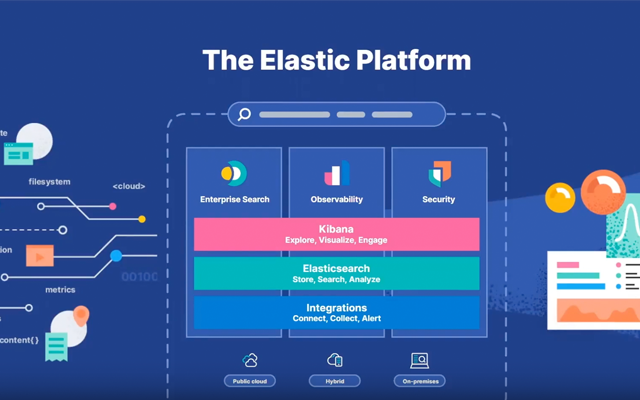
Elastic's Search AI Platform combines world-class search with generative AI to address your search, observability, and security challenges.
Elasticsearch - the industry's most used vector database with an extensive catalog of GenAI integrations - gives you unified access to ML models, connectors, and frameworks through a simple API call. Manage data across sources with enterprise-grade security and build scalable, high-performance apps that keep pace with evolving business needs. Elasticsearch gives you a decade-long head start with a flexible Search AI toolkit and total provisioning flexibility-fully managed on serverless, in the cloud, or on your own infrastructure.
Elastic Observability resolves problems faster with open-source, AI-powered observability without limits, that is accurate, proactive and efficient. Get comprehensive visibility into your AWS and hybrid environment through 400+ integrations including Bedrock, CloudWatch, CloudTrail, EC2, Firehose, S3, and more. Achieve interoperability with an open and extensible, OpenTelemetry (OTel) native solution, with enterprise-grade support.
Elastic Security modernizes SecOps with AI-driven security analytics, the future of SIEM. Powered by Elastic's Search AI Platform, its unprecedented speed and scalability equips practitioners to analyze and act across the attack surface, raising team productivity and reducing risk. Elastic's groundbreaking AI and automation features solve real-world challenges. SOC leaders choose Elastic Security when they need an open and scalable solution ready to run on AWS.
Take advantage of Elastic Cloud Serverless - the fastest way to start and scale security, observability, and search solutions without managing infrastructure. Built on the industry-first Search AI Lake architecture, it combines vast storage, compute, low-latency querying, and advanced AI capabilities to deliver uncompromising speed and scale. Users can choose from Elastic Cloud Hosted and Elastic Cloud Serverless during deployment. Try the new Serverless calculator for price estimates: https://cloud.elastic.co/pricing/serverless .
Ready to see for yourself? Sign into your AWS account, click on the "View Purchase Options" button at the top of this page, and start using a single deployment and three projects of Elastic Cloud for the first 7 days, free!
Highlights
- Search: Build innovative GenAI, RAG, and semantic search experiences with Elasticsearch, the leading vector database.
- Security: Modernize SecOps (SIEM, endpoint security, cyber security) with AI-driven security analytics powered by Elastic's Search AI Platform.
- Observability: Use open, extensible, full-stack observability with natively integrated OpenTelemetry for Application Performance Monitoring (APM) of logs, traces, and other metrics.
Details
Sold by
Delivery method
Deployed on AWS
New
Introducing multi-product solutions
You can now purchase comprehensive solutions tailored to use cases and industries.

Features and programs
Skip the manual risk assessment. Get verified and regularly updated security info on this product with Vendor Insights.
Security credentials achieved
(2)

ISO27001

AWS Security Specialization
Buyer guide
Gain valuable insights from real users who purchased this product, powered by PeerSpot.

Financing for AWS Marketplace purchases
AWS Marketplace now accepts line of credit payments through the PNC Vendor Finance program. This program is available to select AWS customers in the US, excluding NV, NC, ND, TN, & VT.

AWS PrivateLink
Get next level security. Connect VPCs and AWS services without exposing data to the internet.
Pricing
Free trial
Try this product free according to the free trial terms set by the vendor.
Pricing is based on actual usage, with charges varying according to how much you consume. Subscriptions have no end date and may be canceled any time.
Additional AWS infrastructure costs may apply. Use the AWS Pricing Calculator to estimate your infrastructure costs.
Dimension | Cost/unit |
|---|---|
Elastic Consumption Unit | $0.001 |
Dimensions summary
Elastic Consumption Units (ECUs) represent Elastic's unified pricing metric across both their Cloud Hosted and Serverless offerings on AWS Marketplace. For Cloud Hosted solutions, ECUs measure infrastructure resource consumption, while for Serverless offerings, ECUs quantify usage based on service-specific dimensions such as data ingestion, search operations, and security events. This flexible pricing model ensures customers pay only for their actual usage, whether they're using Elasticsearch, Observability, Security, or other Elastic services.
Top-of-mind questions for buyers like you
What is an Elastic Consumption Unit (ECU) and how is it calculated?
An ECU is Elastic's standardized billing metric that measures usage across their services. For Cloud Hosted deployments, ECUs are calculated based on infrastructure resources consumed, while for Serverless offerings, ECUs are determined by service-specific usage metrics like data ingestion volume, search operations, or security events processed.
How can I estimate my monthly costs for Elastic Cloud on AWS Marketplace?
Elastic provides a pricing calculator on their website where you can estimate costs based on your expected usage patterns. You can also monitor your actual ECU consumption through Elastic Cloud console's usage monitoring features, and the billing interface shows detailed breakdowns of usage by service and deployment.
Does Elastic Cloud on AWS Marketplace require any upfront commitment?
Elastic Cloud on AWS Marketplace follows a pay-as-you-go model with no upfront commitments required. However, customers can opt for annual commitments to receive volume discounts, and usage is billed monthly through your AWS account based on actual consumption of ECUs.
Vendor refund policy
See EULA above.
Custom pricing options
Request a private offer to receive a custom quote.

Legal
Vendor terms and conditions
Upon subscribing to this product, you must acknowledge and agree to the terms and conditions outlined in the vendor's End User License Agreement (EULA) .
Content disclaimer
Vendors are responsible for their product descriptions and other product content. AWS does not warrant that vendors' product descriptions or other product content are accurate, complete, reliable, current, or error-free.
Delivery details
Software as a Service (SaaS)
SaaS delivers cloud-based software applications directly to customers over the internet. You can access these applications through a subscription model. You will pay recurring monthly usage fees through your AWS bill, while AWS handles deployment and infrastructure management, ensuring scalability, reliability, and seamless integration with other AWS services.
Resources
Vendor resources
Support
Vendor support
Visit Elastic Support (https://www.elastic.co/support ) for more information. If you are a customer, go to the Elastic Support Hub (http://support.elastic.co ) to raise a case.
AWS infrastructure support
AWS Support is a one-on-one, fast-response support channel that is staffed 24x7x365 with experienced and technical support engineers. The service helps customers of all sizes and technical abilities to successfully utilize the products and features provided by Amazon Web Services.
Updated weekly
By Elastic

By ChaosSearch, Inc.
Top
10
In Databases & Analytics Platforms
Top
10
In Generative AI, Log Analysis
Top
100
In Log Analysis, Analytic Platforms
Sentiment is AI generated from actual customer reviews on AWS and G2
Functionality
Ease of use
Customer service
Cost effectiveness
Positive reviews
Mixed reviews
Negative reviews
AI generated from product descriptions
Vector Database Capabilities
Elasticsearch functions as a vector database with extensive GenAI integrations, providing unified access to ML models, connectors, and frameworks through API calls for semantic search and RAG applications.
Observability and Monitoring
Full-stack observability solution with OpenTelemetry native integration supporting 400+ integrations including AWS services like Bedrock, CloudWatch, CloudTrail, EC2, Firehose, and S3 for comprehensive visibility across environments.
AI-Driven Security Analytics
Security operations platform powered by Search AI Platform delivering AI-driven security analytics for SIEM, endpoint security, and cyber security with advanced automation features for attack surface analysis.
Serverless Architecture
Serverless deployment option built on Search AI Lake architecture combining vast storage, compute, low-latency querying, and advanced AI capabilities without infrastructure management requirements.
Enterprise-Grade Data Management
Unified data management across multiple sources with enterprise-grade security, flexible provisioning options across serverless, cloud, and on-premises infrastructure deployments.
AI-Powered Root Cause Analysis
Automatically investigates alerts and pinpoints root causes with 5x faster analysis capabilities.
Natural Language Query Interface
Enables querying of observability data using conversational natural language to identify issues and receive actionable insights.
Real-Time Anomaly Detection
Detects system anomalies in real-time to prevent incidents before they impact users.
OpenTelemetry Integration
Supports standardized OpenTelemetry integration for unified data collection across logs, metrics, and traces in cloud-native environments including Kubernetes, serverless, and microservices.
Multi-Tiered Storage Architecture
Implements multi-tiered storage and data management capabilities to optimize telemetry costs and achieve 30% to 50% cost savings.
Direct S3 Data Indexing
Indexes Amazon S3 data without transformation or schema changes, enabling immediate access to all data as-is
SQL and Search Query Support
Enables SQL queries and search workloads on indexed S3 data through open APIs compatible with analytics tools
Machine Learning Workload Capability
Supports machine learning workloads on indexed data stored in Amazon S3 with infinite scalability
Unlimited Data Retention
Provides unlimited retention of indexed data, enabling historical analysis across any time horizon without data purging or archival requirements
Fully Managed Service Architecture
Operates as a fully managed service eliminating administrative overhead including re-indexing, sharding, load balancing, and compute/storage management
Validated by AWS Marketplace
FedRAMP
GDPR
HIPAA
ISO/IEC 27001
PCI DSS
SOC 2 Type 2
-
-
-
-
-
-
-
No security profile
Standard contract
No
No
No
Customer reviews
reviewer2817942
Logging and vector search have transformed observability and empowered reliable ai agents
Reviewed on Apr 19, 2026
Review provided by PeerSpot
What is our primary use case?
I have been using Elastic Search for the last five years.
I have a couple of use cases. First, I use it for logging purposes and observability logging of our product. In Azure , Elastic Search has good support. Whenever I deploy any application, it automatically detects the application and tags the elastic log with it. This provides proper logging and observability to our application. That is my main use case. Another use case is making AI agents. In AI agents, I use it for vector search. Vector search means whenever I am searching anything in Elastic Search, which is a database, I can perform vector search on whatever I store in the database. Vector search is similarity search. For example, if I ask what are the petrol prices today, it will try to find similar items such as petrol, diesel, or similar things. If I ask about petrol, it will not only search for petrol but can also search for diesel because they are both liquid forms. Elastic Search has this search capability. I take the similarity search and after that add some of my algorithms to create the AI agent using that.
In traditional search, I get some log file and have to manually find information in it. For example, with text search, I type some keyword and manually have to open it in Notepad++ or any other similar tool. With Elastic Search, it is much better. I can search based on date ranges. For example, if I want to check the last one hour of data, I give the time frame and my application data appears there. If I want to search history, such as what happened one week ago with this application, and some customer provided some issue saying that one week back they received this issue, I can search the logs from one week back and go through those logs. Elastic Search has more search criteria. With different search criteria I can search it. I can also search based on context, where if I select the search in that time frame, it will search just before and after some context for me. That is also available in Elastic Search.
Hybrid search can be used programmatically as well. In Elastic Search, there is one user interface where I can provide a lot of things. That is one part of search. Hybrid search means if I want to search programmatically, I can search and get some data from Elastic Search and use it in my application. For example, if I am developing one agent, I definitely have to write some code and search some data using my program in Elastic Search. In that way, hybrid search is very useful. I can directly connect with Elastic Search database where I store all the data and get the data and use it in my application, wherever I want to use it. For example, if I am developing the AI agent, that is fine. If I want to just apply similarity search, I can also use it in my application.
Observability is one part when I am deploying my application. When I deploy my application on the server in Azure , observability comes into the picture. Whenever I deploy my application, I need the log. Logging means observability, how my application is going on, whether I am getting any issues or whether I am getting any exception in the backend. That comes into the observability bucket. That is one use case of observability. The second is whenever I am developing RAG or AI agent. Whenever I am working on RAG, hybrid search comes into the picture, vector search, hybrid search. For security purposes, whenever it is deployed on Azure, it automatically handles security. I have worked with the cloud only, so I cannot tell much about security on this.
Regarding how I use Elastic Search in generative AI, I mostly use it for observability and RAG. Whenever I am deploying or creating the AI agent, I use RAG. Vector similarity search has been very helpful for me. I have different search criteria based on KNN or cosine similarity that I can use to search on Elastic Search database. The second is observability, which is also very good because most people are using Elastic Search because it is easy to use. As I explained before, I can give criteria by providing a date and time, and I can also see the graphs as well. Whenever I deploy the application, I can see usability graphs. It also shows the flow of data. Flow of data means if much data or some more operations are performed in this time frame, that graph will show as darker. I can easily see this because of small user interface presentations that are very good. I find it very useful in observability, log observability, and RAG development and AI agent development.
What is most valuable?
Hybrid search will be valuable.
Elastic Search is easy to use in Azure cloud. Mostly, my full company uses Azure cloud, so it is easy to use. Cost-wise, my company found Elastic Search is good. Cost matters. Based on cost and use cases, I found Elastic Search is good. Even compared to Splunk, Elastic Search has good easy-to-use user interface. Even non-technical people can easily search and easily observe the logs and easily track the applications. With Splunk, I found I have to be a little more technical in that area. There are key-based searches and some criteria that I have to remember. I found that difference between Splunk and Elastic Search.
Support-wise, it is good because I did not get much support work. Mostly my DevOps team handles it, but one or two times I did get support. There is a ticket creation option. Within the available time zone, somebody will be there to support me. Within two to three hours, somebody can help and try to resolve the issue.
What needs improvement?
Elastic Search is not specifically being used for certain purposes. I deploy Elastic Search database on the cloud and use cloud services so that nobody can attack. However, I do not use Elastic Search to resolve attack issues.
The basic main purpose of Elastic Search, as of now, I feel it can do more in the AI area. Sometime I saw that when I am developing RAG and have to generate the embeddings, which I call metadata, sometimes it tries to fail. That durability or issue handling should be improved, but apart from that, I did not find anything as of now. As per my use case, whatever I am using seems pretty good. Apart from that, some definitely improvement will be there. One improvement is that it should be faster. Whenever I am searching any logs, it takes much time. For example, if I open my log in Notepad or a similar tool, I can search the text within a second. With Elastic Search, it takes a little bit of time, ten to fifteen seconds. That can be improved. Sometimes, engineers take time to assign when I create a ticket.
What do I think about the stability of the solution?
Till now, I did not face any issue with the stability and availability of Elastic Search. It is not that the server is down. I faced issues such as some slowness. Whenever heavyweight logging will be there or heavyweight operations are performed, at that time, it will be a little slow. That sometimes also depends on cloud connectivity. Sometimes the cloud is only down, so it is very hard to perform my application better. I did not face any issue related to availability and other things. It is pretty good till now. The slowness is the one part, otherwise it is good.
What do I think about the scalability of the solution?
Definitely, because I have very big applications in my company. It auto-scales up. Whenever I am deploying multiple instances of my application on a server, as I told, no need to give any configurations. For example, if I have five instances of my application I am deploying, automatically it will configure the five Elastic Search logs. Automatically it will create five Elastic Search configurations. Every application will have their own Elastic Search log. Auto-scaling wise, it is pretty good.
How are customer service and support?
Support-wise, it is good because I did not get much support work. Mostly my DevOps team handles it, but one or two times I did get support. There is a ticket creation option. Within the available time zone, somebody will be there to support me. Within two to three hours, somebody can help and try to resolve the issue.
Sometimes, engineers take time to assign when I create a ticket.
Which solution did I use previously and why did I switch?
I used Splunk. I have Splunk. Kibana, I think, merged with Elastic Search. I used Splunk and Kibana before. I am using pure Elastic Search now. For the last four to five years, I have been using pure Elastic Search. Before that, I was using Kibana and Splunk.
How was the initial setup?
I am not aware of licensing and cost because I am not from the DevOps team. From a usability point of view, it is very easy to use and easy to plug with my application. I do not need extra configuration. Whenever I deploy my application on the server, I have to give the path of any observability tool such as Splunk or Kibana. Initially, I have to provide some extra configuration so that my log will appear on Elastic Search or Splunk. But nowadays, whenever I deploy my application, whatever logging I am doing is it will automatically connect with Elastic Search because Elastic Search has the capability to track. Whatever logging I am doing, whether it is SLF logging in Java, or in Python, whatever logging I am doing, basic logging is easily tracked by Elastic Search. No extra configuration is needed. It is just easy to plugin. I just deploy my application, and that is it. Automatically Elastic Search will track my log. No extra configuration is needed. I just have to make sure that I have Elastic Search services in my cloud and it should be enabled. That is all. Otherwise, it is easy to plugin.
What's my experience with pricing, setup cost, and licensing?
Elastic Search is easy to use in Azure cloud. Mostly, my full company uses Azure cloud, so it is easy to use. Cost-wise, my company found Elastic Search is good. Cost matters. Based on cost and use cases, I found Elastic Search is good.
Which other solutions did I evaluate?
Elastic Search is easy to use in Azure cloud. Mostly, my full company uses Azure cloud, so it is easy to use. Cost-wise, my company found Elastic Search is good. Cost matters. Based on cost and use cases, I found Elastic Search is good. Even compared to Splunk, Elastic Search has a good easy-to-use user interface. Even non-technical people can easily search and easily observe the logs and easily track the applications. With Splunk, I found I have to be a little more technical in that area. There are key-based searches and some criteria that I have to remember. I found that difference between Splunk and Elastic Search.
What other advice do I have?
Stack discovery is something I did not use till now. Whenever I am deploying my application on the cloud, and any attacks happen, I have some monitoring services in the cloud. Whenever something happens, if any attack happens to my Elastic Search database, it can happen through log injection. Something attackers can do a direct attack on my Elastic Search database and change some logs. This kind of scenario can come into the picture. I have some monitoring services deployed on the cloud. Whenever outside my company, outside of my company IP is trying to access my database or my data, that time automatically that monitoring alerts will be triggered and it will go to whoever is tagged into the mail. It will go to my higher manager and that mail will go to them. Regarding generative AI and how it will protect, nowadays, what is happening is that if I want to monitor this kind of attack, for that also, cloud is providing GenAI solutions. If this kind of attack comes, how automatically this GenAI resolves my problem, or how it suggests me to resolve the problem. That kind of solution I have already deployed on cloud.
I did not see much or connect with the support people much, but based on my experience, I would rate customer service as a four out of ten.
My overall rating for Elastic Search is eight out of ten.
Banking
End-to-End Coverage from Ingestion to Observability, ML, SIEM/XDR, and Reporting
Reviewed on Apr 15, 2026
Review provided by G2
What do you like best about the product?
Everything from handling ingestion to observability + ML + SIEM +XDR + reporting
What do you dislike about the product?
it is good and bad in the same time , it is hard to follow all new features at time.
plus if more concret application is added o doc this would be great for better understanding of functialities
plus if more concret application is added o doc this would be great for better understanding of functialities
What problems is the product solving and how is that benefiting you?
Log & Metric managemnt across Observability/SIEM this is giving the user a clear view on what is going on
Venkat S.
Best-in-Class Scalability for Centralized Metrics and Logs
Reviewed on Apr 15, 2026
Review provided by G2
What do you like best about the product?
Best and scalable am using at central cluster which pipes the metrics and logs from several other clusters
What do you dislike about the product?
shards /documents runs out of limit more often
What problems is the product solving and how is that benefiting you?
Best tracability and logging
Meraj Rasool
Search capabilities have handled complex queries quickly and support ongoing hybrid search analysis
Reviewed on Apr 08, 2026
Review from a verified AWS customer
What is our primary use case?
I am a customer, and I use Elastic Search to enhance our search capabilities in our applications.
What is most valuable?
Elastic Search has excellent features, particularly its scalability and speed. What I appreciate most about Elastic Search is the ability to handle complex queries efficiently. I assess the relevancy of the search results by comparing it to hybrid search methods, such as vector and text searches, which helps ensure the accuracy of the results.
What needs improvement?
I see that there are areas in Elastic Search that have room for improvement, such as user documentation and onboarding processes.
What do I think about the stability of the solution?
Regarding the stability of Elastic Search, I find it to be quite robust, and I rate it a 9.
How are customer service and support?
Regarding technical support, I would rate it an 8 because they are responsive and helpful.
How was the initial setup?
The deployment took about two weeks, as we needed to ensure everything was configured correctly.
Which other solutions did I evaluate?
I compare Elastic Search with other solutions, such as OpenSearch or Algolia , in terms of features and performance, which are quite impressive.
What other advice do I have?
Elastic Search requires regular maintenance, including updates and patching to keep it running smoothly, and upgrades are straightforward to implement.
I have used Elastic Stream for log investigation, which has been very helpful in diagnosing issues. We have about 50 active users in our organization.
Abhishek g.
Simplifies Data Management, But Upgrade Challenges
Reviewed on Apr 06, 2026
Review provided by G2
What do you like best about the product?
I find managing data in Elasticsearch very easy compared to other databases, as it doesn't require the hectic re-indexing and maintenance that others do. Setting up an ILM policy lets it take care of Elasticsearch growth, and I particularly like the feature that allows managing the hot, warm, and cold phases based on data requirements. The ability to set how data moves from one tier to another and store historical data in snapshots that can be searched from archival is the best feature for me. Also, the initial setup of Elasticsearch was easy, which is a big plus.
What do you dislike about the product?
Elasticsearch upgrade from version to another is always a problem. They don't allow you to jump 2 versions using a rolling upgrade, as any particular version like V1 does not allow you to have any index which was created in V1-2 version.
What problems is the product solving and how is that benefiting you?
I use Elasticsearch for fast search and data archival, storing trading data for 7 years. Managing Elasticsearch is easy with ILM, allowing efficient data tier management without constant re-indexing.