Data pipelines and lineage for AI agents on AWS
Engineer ingestion, chunking, incremental refresh, source-to-response lineage, and access control at retrieval: the pipeline that keeps AI agent knowledge accurate, fresh, and governed.
Overview
Technical workshop: Engineer the data pipeline behind accurate AI agents
When an AI agent answers confidently and wrong, the cause is usually the data pipeline, not the model. This workshop walks the whole pipeline: chunking that protects retrieval quality, incremental hash-based refresh that keeps knowledge current without re-embedding the whole corpus, and source-to-response lineage. It’s built with Amazon Bedrock Knowledge Bases, AWS Glue, and tools from across the AI landscape in AWS Marketplace.

AI agent data pipelines: from prototype scripts to governed, traceable knowledge
An AI agent’s answers are no more accurate than the data pipeline that built its knowledge base. This is the data-pipeline layer of context engineering: before you tune what the model sees, you govern what gets ingested, chunked, embedded, and refreshed. We’ve watched prototype pipelines (PDFs in a vector DB) work in a demo and become a liability in production. The architecture guide shows how to engineer past that, tradeoffs included.
Topics covered:
- Ingestion that protects retrieval quality: extraction, per-corpus chunking with the fixed vs semantic vs hierarchical tradeoff (optimal settings are task-dependent), metadata enrichment, and embedding at scale
- Freshness without full re-embedding comes from event-driven, scheduled-full, and incremental hash-based refresh, each carrying its own freshness vs latency vs cost tradeoff, plus real-time access for values that can’t wait
- Lineage, governance, and operations cover source-to-response provenance back to the exact source document, document-level IAM plus row-level security at retrieval, schema evolution and tombstoning, and pipeline observability
- Tools from across the AI landscape in AWS Marketplace for the lakehouse, transformation, streaming, integration, and orchestration; the guide maps which tool fits which stage

Featured AI tools in AWS Marketplace
Build the agent data pipeline with tools from across the AI landscape: a governed lakehouse, transformation, real-time streaming, source-system integration, and orchestration, available in AWS Marketplace. The guide maps which tool fits which stage.
Featured tools in this module:

- Introduction
- How agents consume data: A unified model
- The knowledge base ingestion pipeline
- The knowledge base ingestion pipeline
- Real-time data access: streaming and live APIs
- Data lineage: from source to agent response
- Data quality for agent knowledge bases
- Access control for data: who can the agent access and what can it see?
- Handling evolving data over time
- Data pipeline observability
- Worked example: the DevOps companion data pipeline
- Conclusion
Introduction
An agent's knowledge is only as good as the data it was built on. You can pair the most capable reasoning model with sophisticated multi-agent orchestration and a beautifully designed memory architecture, and it will still give you bad answers if the knowledge base underneath is stale, incomplete, badly structured, or pulled from sources it was never cleared to use. And the way these problems show up is sneaky. An agent confidently cites a deployment procedure that was replaced six months ago. A retrieval system keeps missing the one document that actually answers the question, because it got chunked the wrong way on ingestion. A compliance violation slips through because the pipeline swept in a document the agent had no business touching.
None of those are model problems. They're data problems. That distinction matters, because model problems need retraining or a model update to fix, while data problems you can just engineer away by building the pipeline correctly from the start. This module is a systematic look at how to build, run, and govern the data pipelines that feed agent knowledge bases. The focus is on what separates a production-grade pipeline from the throwaway script that populates a prototype.
We'll start with a single, unified view of how agents actually consume data, which gives us the vocabulary for the pipeline and governance discussion that follows. From there we walk through the ingestion pipeline itself, covering extraction, transformation, embedding, and loading, and then move on to the operational stuff that separates a pipeline that runs once from one that runs reliably in production: freshness management, real-time data access, lineage tracking, data quality monitoring, access control, and handling data that keeps changing after it lands.
The whole way through, we stay close to the decisions teams actually have to make. When is semantic chunking worth the extra complexity? How do content hashes drive an incremental refresh? What lineage metadata does a compliance audit really need? Which metrics should an on-call engineer watch so they catch a broken pipeline before agents start handing out degraded answers? Every idea here is grounded in specific AWS services and the partner solutions that extend them.
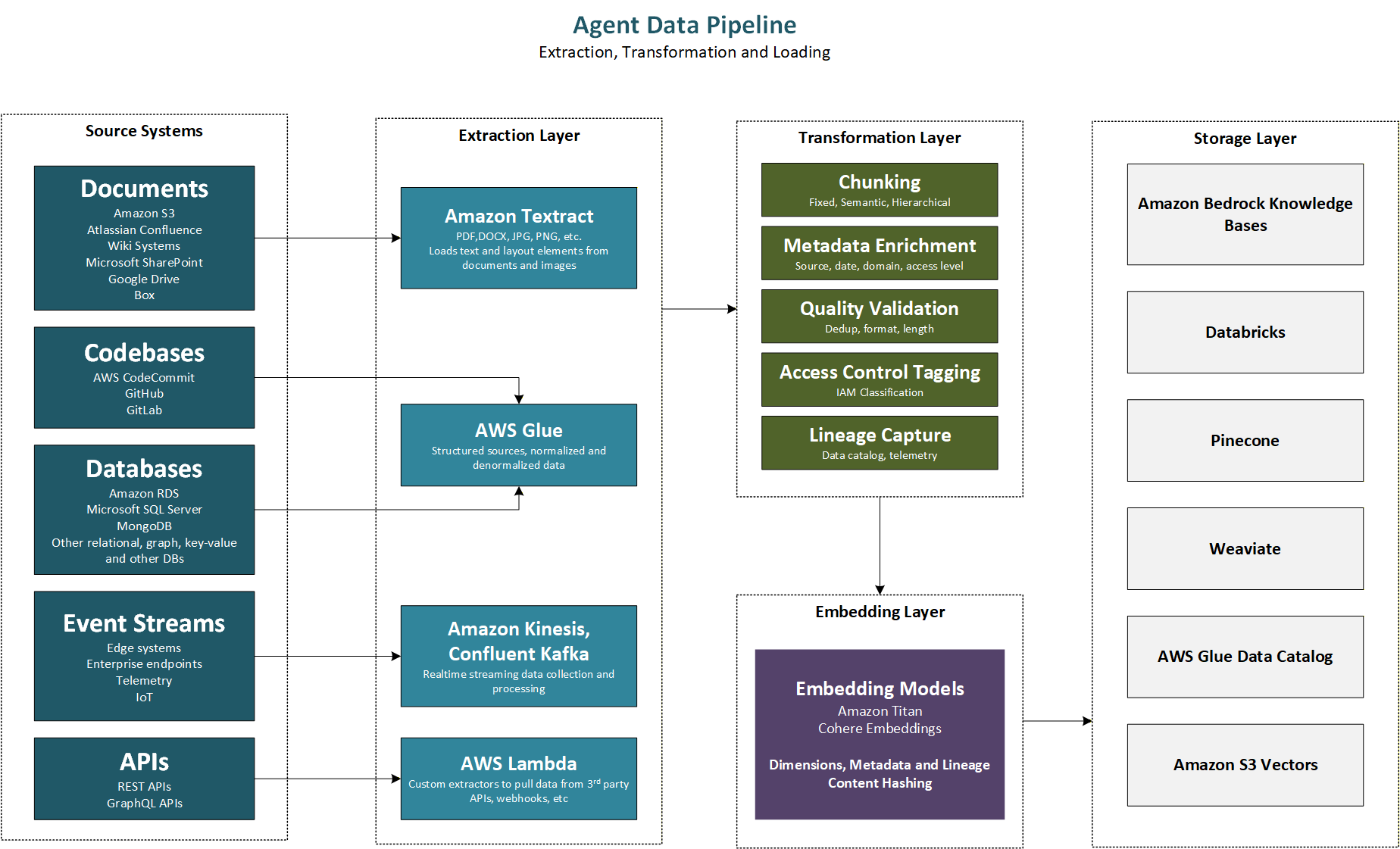
Figure 9.1 Agent data pipeline: extraction, transformation, embedding, and knowledge base storage
How agents consume data: A unified model
Before you build a pipeline, you need to be clear on what it's for, and that means understanding every way the agents in your system will actually consume data. Different consumption patterns come with different freshness requirements, different governance implications, and different failure modes when the underlying data is wrong or missing. Getting a unified view of data consumption first is what makes a coherent pipeline architecture possible.
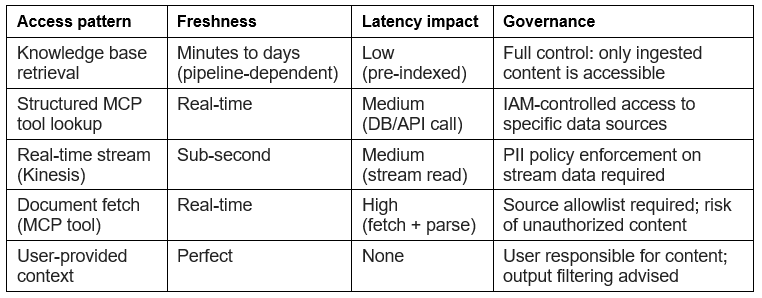
The five data access patterns
Agents get their data through five patterns, and it helps to see all five before we walk through them one at a time:
- Knowledge base retrieval: the agent embeds a query and pulls the most similar chunks from a vector store (the RAG pattern).
- Structured lookup through an MCP tool: the agent calls a tool that queries a database, an API, or a key-value store and gets a structured result.
- Real-time stream consumption: the agent reads from a live data stream through a tool that wraps a streaming source.
- Document fetching: the agent pulls a specific document (a web page, an S3 file, a database record) at inference time.
- User-provided context: the user includes the relevant material directly in their message.
The first pattern is knowledge base retrieval. The agent embeds a natural language query, pulls back the k most similar document chunks from a vector store, and drops them into its context window. This is the RAG pattern that Module 7 and this module both cover in depth. How fresh the data needs to be depends entirely on how often the source documents change: policy documents that get revised quarterly have very different refresh needs than live system documentation that turns over weekly. The failure mode here is quiet, which is what makes it dangerous. The agent cites an outdated procedure with full confidence, and nothing in the retrieved content signals that it might be wrong.
The second pattern is structured lookup through an MCP tool. The agent calls a tool that queries a database, an API, or a key-value store and gets back a structured result. Unlike knowledge base retrieval, this is direct and real-time, so the data is always as fresh as the source. The failure mode is availability: if the source system is down, the tool call fails, and the agent has to handle that error gracefully.
The third pattern is real-time stream consumption. The agent reads from a data stream (stock prices, system metrics, IoT sensor data, live event feeds) through a tool that wraps a streaming source. You only reach for this when the data changes too fast to pre-ingest into a knowledge base. Streaming brings a set of problems the other patterns don't, and it's worth naming them up front. Performance comes first: pulling and processing a large window of records at inference time adds latency, so you usually read a bounded window or a pre-aggregated view rather than the raw firehose. Duplication is next: most streaming systems deliver at least once, so the same record can arrive more than once, and the tool (or the consumer behind it) has to be idempotent or dedupe on a record key. The data is also inherently time-series: records are timestamped events, so the agent usually cares about windows and aggregates (the last hour, a rolling average) rather than individual rows, and it needs a consistent notion of event time versus processing time. Ordering is the fourth angle: streams guarantee order within a partition or shard but not across them, so if global ordering matters you need sequence numbers or a single-partition key. On top of that, late and out-of-order data, retention limits, backpressure, and PII in the payload all have to be handled. Later in this guide we will cover the consumption mechanics; the point here is that streaming is a genuinely different data problem, not just a faster knowledge base.
The fourth pattern is document fetching. The agent uses a tool to grab a specific document (a web page, a file from Amazon S3, a database record) at inference time. You get maximum freshness, but you pay for it in latency, because the document has to be fetched, parsed, and processed before the agent can use it. For large documents, that can add seconds to the response. The governance risk is that fetching can reach content nobody reviewed during knowledge base ingestion, which might mean unauthorized or low-quality material.
The fifth pattern is user-provided context. The user includes what's relevant directly in their message: a code snippet, a config file, a description of the problem. That context is already in the agent's context window, so it needs no pipeline, and its freshness is perfect. The challenge is more nuanced than whether the user knows what to attach. Size is a real constraint: a large document pasted or uploaded into the turn can eat a big share of the context window, which may force you to chunk it, summarize it, or persist it to a session store and retrieve from it on later turns rather than carrying the whole thing every time. The type of content matters just as much. A code file, a spreadsheet, an image, and a PDF each need different processing before the model can reason over them: code may need parsing or syntax-aware chunking, an image needs a vision-capable path, a PDF needs text extraction first. So even though this pattern has no ingestion pipeline in the usual sense, the added file still has to be processed appropriately, and user-provided is not the same as free. We'll come back to this pattern with the handling it needs in a later section.
Choosing the right pattern
Three things drive the choice between these patterns: how often the data changes, how much latency the agent can tolerate, and what governance controls the data needs. Knowledge base retrieval is right for stable, large corpora that have been reviewed and approved for agent access. Structured lookup is right for live operational data (inventory levels, account balances, system status) that has to be current and can absorb the latency of a database query. Real-time streams are only worth it for genuinely high-frequency data where even a one-minute-old value would be meaningfully wrong. Document fetching should be used sparingly, and always behind guardrails that block access to unauthorized sources.
Most production agentic systems mix these patterns. The knowledge base carries the stable foundational knowledge, and MCP tools supply the live operational data the agent needs to ground its reasoning. Your pipeline architecture has to account for all the patterns the system uses, not just the knowledge base ingestion pipeline.
The knowledge base ingestion pipeline
The knowledge base ingestion pipeline is how source documents, in whatever format they happen to live in across the enterprise, get turned into vector embeddings that agents can retrieve from at inference time. Getting this pipeline right is one of the highest-value investments you'll make in an agentic system. Build it well and you get a knowledge base with strong retrieval quality, low maintenance overhead, and clean lineage. Build it poorly and you get one that returns irrelevant content, goes stale, and can't be audited.
The pipeline runs in five stages: extraction, transformation (chunking and metadata enrichment), quality validation, embedding, and loading into the vector store. Each stage has its own technical concerns and its own ways of failing.
Document extraction: getting content out of enterprise formats
Enterprise knowledge lives in a messy spread of formats: PDFs from documentation tools, Word files from policy teams, Confluence wiki pages from engineering, Jira tickets from project managers, Slack messages kept for compliance, database exports from internal systems, and HTML pages from internal portals. Each one needs its own extraction approach to produce clean, structured text that can be chunked and embedded.
Amazon Textract is the AWS service for pulling structured text out of document images and PDFs. Plain PDF text extraction only works when the text is embedded as characters. Textract goes further, using computer vision to read scanned documents, images, and PDFs where the text is rendered as pixels. What comes back preserves the document's layout: paragraphs, tables with their cell boundaries intact, key-value pairs from forms, and reading order. If your knowledge base includes scanned policy documents, contracts, or procedure manuals, Textract is what makes accurate extraction possible.
AWS Glue handles ETL for structured and semi-structured sources. Glue crawlers can discover and catalog the schema of structured sources like CSV exports, JSON API responses, and Parquet files sitting in S3 data lakes, and Glue ETL jobs can transform and normalize that data into the text format the chunking stage expects. For Confluence pages, a custom Glue job calls the Confluence API, pulls page content as HTML, converts it to plain text with an HTML parser, and writes the result to S3 for the next stage.
Maia by Matillion, available in AWS Marketplace, gives you a cloud-native data integration platform with a managed connector library for the SaaS sources that are difficult to extract with custom code. Its connectors for Jira, Salesforce, GitHub, Zendesk, and other platforms handle authentication, pagination, incremental sync, and schema normalization, and its ELT transformations can shape the extracted data before it lands as a consistent output in Amazon S3 that the transformation stage can process without any source-specific logic. If you need to ingest knowledge from a lot of SaaS platforms and don't want to build and maintain custom extractors for each one, Maia removes most of that work.
Connectors like these work on a poll-and-sync cadence, which is fine for content that changes on the order of minutes. Some sources need something different. When you have to capture changes from a transactional database the moment they happen, a streaming approach fits better than polling. Confluent Cloud, available in AWS Marketplace, is one example: its managed Kafka platform and change-data-capture connectors can stream row-level changes out of source systems and into the pipeline in near real time, so the knowledge base reflects source changes without waiting for the next batch extraction. Confluent here is just one example of a streaming ingestion platform; the same pattern applies to any Kafka-compatible source, and we will come back to streaming from the consumption side.
With several extraction options in play, the table below is a quick guide to which one fits which kind of source.
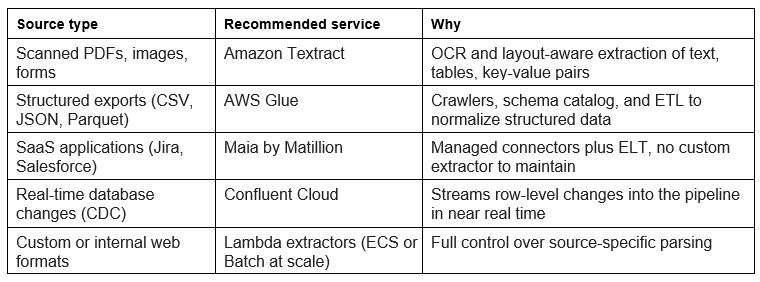
For web-based sources like internal portals, documentation sites, and GitHub repositories, custom Lambda extractors give you the flexibility to handle source-specific formats. An AWS Lambda function, triggered by an Amazon EventBridge scheduled rule or an S3 event, grabs the content, applies the parsing logic that source needs, and writes the extracted text to an S3 staging prefix. Lambda's 15-minute timeout and 512 MB of memory are plenty for most single-document extraction jobs. For large-scale web crawls, an ECS Fargate task or an AWS Batch job gives you the resources and parallelism you'll want.
Chunking strategy: the most consequential transformation decision
Chunking is how you split a source document into smaller segments, the chunks, that each get embedded independently and stored in the vector index. It's the single most consequential decision in the pipeline, because it directly sets retrieval quality. A chunk that's too big dilutes the embedding with irrelevant content, so the retrieval system has a harder time matching it to a query. A chunk that's too small strips away the context that made the content meaningful, so what comes back is hard for the agent to reason about.
Fixed-size chunking cuts documents into chunks of a set token length, usually with a bit of overlap between neighbors to keep some context across the boundaries. It's the simplest approach, and it's a fine starting point when your source documents all have a uniform structure. Its weakness is that it ignores meaning: a fixed-size cut can slice a sentence mid-clause, separate a procedure step from the explanation right above it, or split a table across two chunks that are useless on their own.
Semantic chunking uses the document's own structure to find natural boundaries. In Markdown and HTML, headers do the work: each section under a heading becomes a chunk. In numbered procedures, each step becomes a chunk. In source code, each function or class becomes a chunk. You end up with chunks that are individually coherent and readable, at the cost of variable sizes that can occasionally run very large (a long section) or very small (a short one). Amazon Bedrock Knowledge Bases supports semantic chunking through its built-in configuration, using the document's heading structure to set the boundaries.
Hierarchical chunking builds a two-level structure: large parent chunks that carry broad context, and small child chunks that carry specific content. At retrieval time, the system matches on the child chunks for precision but injects the parent chunk into the agent's context so the surrounding context comes along too. You get the precision of small-chunk matching with the richness of large-chunk context, and you pay for it with a more complex index and higher storage. This is the strategy to reach for with technical documentation, where people frequently query an individual step or parameter that only makes sense in context.
Metadata enrichment
Every chunk that lands in the knowledge base has to carry metadata describing its provenance, freshness, access permissions, and domain. That metadata does three jobs at once. It enables filtered retrieval (pull only chunks from the infrastructure domain). It supports lineage tracking (trace a retrieved chunk back to its source document). And it gives the agent the context it needs to judge how reliable the retrieved content is.
At a minimum, a production knowledge base needs the source URI (the S3 path, Confluence URL, or other identifier for the source), the ingestion timestamp (when the pipeline processed the chunk), the source modification date (when the source was last updated, if you can get it), the domain or category (infrastructure, policy, history), the access level (which agent roles are allowed to retrieve the chunk), and the content hash (a SHA-256 hash of the chunk text, used to detect changes on incremental refresh).
A few extra fields noticeably improve retrieval. The document title and section heading give the retrieval system a keyword-searchable sense of what the chunk is about. The document version or revision number lets the agent qualify what it retrieved with version information. And the source system enables domain-specific filtering, like “retrieve only from Confluence policy pages, not from GitHub README files.”
Embedding with Amazon Bedrock batch inference
For large-scale initial ingestion or a periodic full refresh, Amazon Bedrock batch inference gives you a cost-efficient, high-throughput way to generate embeddings. You hand it a JSONL file of input records in S3, it processes them asynchronously with the model you specify, and it writes the output embeddings back to an S3 destination. Compared to synchronous InvokeModel calls, batch inference cuts cost by up to 50% and takes throughput-throttling logic out of your pipeline code entirely.
A Lambda function or a AWS Step Functions state machine step kicks off the batch job, watches its status, and moves on to loading once it finishes. For incremental refreshes of a small set of changed documents, though, synchronous embedding is the better fit, because a batch job's submission-to-completion latency is measured in minutes, not seconds.
One operational constraint you cannot get wrong is embedding model consistency. The model you use to embed documents at ingestion time has to be the exact same model, same version, that you use to embed queries at retrieval time. Swap the embedding model and you invalidate every existing embedding in the knowledge base, because the new model maps the same text into a different vector space, which makes cosine similarity between old embeddings and new query embeddings meaningless. Migrating a knowledge base to a new embedding model means re-ingesting all of your source documents from scratch.
Multimodal content: images, audio, and video
Everything so far has assumed the source content is text, and most enterprise knowledge still is. But agents increasingly need to work with content that isn't: architecture diagrams, screenshots, scanned forms, recorded meetings, support-call audio, product photos. The text chunking and embedding problem is well understood at this point. Working with everything else is less so, and it's worth treating as its own problem rather than forcing it through a text-only pipeline.
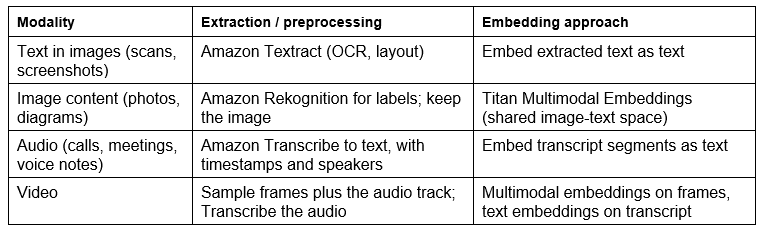
There are two broad ways to bring non-text content into a knowledge base. The first is to convert it to text and embed the text: run OCR on an image with Amazon Textract, transcribe audio with Amazon Transcribe, or generate a caption or label set with Amazon Rekognition, then treat the result like any other document. This is simple and lets you reuse the whole text pipeline, but it's lossy. A transcript drops tone and timing; a caption drops everything in the image the caption didn't mention. The second approach is to embed the content natively with a multimodal embedding model such as Amazon Titan Multimodal Embeddings, which maps images and text into a shared vector space. That shared space is what makes cross-modal retrieval possible: a text query like “network diagram with a NAT gateway in a public subnet” can match an actual diagram image, because the image and the query land near each other in the same space. When the visual content itself carries the meaning, native embeddings beat transcribe-then-embed.
The chunking question changes shape with each modality. An image usually isn't chunked at all; it's embedded whole, though a large diagram may be tiled into regions. Audio and video are inherently time-based, so they get segmented along time rather than along headings: transcribe with speaker diarization and timestamps, then chunk at natural boundaries like speaker turns or topic shifts, and carry the start and end time on each chunk so the agent can point back to the exact moment. Video is really two streams, a sequence of frames and an audio track, so a common pattern is to sample frames for visual embedding and transcribe the audio for text embedding, then link both back to the same source and timecode. Across all of these, the metadata schema needs a modality field plus modality-specific attributes: timestamps and speaker for audio, bounding boxes or frame numbers for images and video.
Two practical notes. Multimodal embedding and media processing cost more in both dollars and latency than text, so it pays to be selective about what genuinely needs native handling versus a cheap transcribe-then-embed pass. And retrieval has to stay consistent: if you embed images with a multimodal model, the text queries that search them must be embedded with that same model. It's the same consistency rule from the embedding section, now spanning modalities. The table below maps each modality to a sensible extraction and embedding path.
The knowledge base ingestion pipeline
A knowledge base that was accurate on day one becomes a liability as its source documents move on. Policy documents get revised. Infrastructure patterns shift. New AWS services ship. Deployment procedures get rewritten after an incident. An agent that cites outdated information isn't just unhelpful, it can do real harm by recommending a procedure that's no longer correct or citing a constraint that's since been relaxed.
Freshness management is the set of processes that keep the knowledge base in sync with its sources. The right strategy comes down to how often the sources change, how fast those changes need to reach the knowledge base, and what the freshness mechanism costs you to run.
Event-driven refresh
Event-driven refresh wires a source change event straight to a knowledge base sync. When a source document changes (a Confluence policy page gets saved, an S3 config file gets overwritten, a GitHub repo gets a push), an event goes to EventBridge. An EventBridge rule matches it and invokes a Lambda function that calls the Amazon Bedrock Knowledge Bases sync API for the specific data source that changed.
That sync API does an incremental sync of the data source you point it at. It figures out which documents were added, modified, or deleted since the last sync, re-embeds and re-indexes the ones that changed, and drops the stale embeddings for anything deleted. It runs asynchronously and usually finishes within a minute or two for small change sets, which makes event-driven refresh a good fit anywhere freshness within a few minutes is acceptable.
Event-driven refresh gives you the lowest freshness lag of any strategy, but it depends on your source systems emitting reliable change events. S3 PutObject and DeleteObject events are reliable and natively supported by EventBridge. Confluence page-update webhooks are reliable for content changes, though they may not fire for metadata-only edits. GitHub push events are reliable for repository changes. For sources that don't publish change events at all, like internal databases or legacy content management systems, event-driven refresh just isn't an option unless you build the event emission into the source system yourself.
One thing to watch with event-driven refresh is high-churn sources. A document that gets updated dozens of times a day will fire dozens of sync operations, each with its own embedding cost. A debounce pattern fixes this: wait for a quiet period, say five minutes after the last change, before triggering the sync. You cut the number of syncs way down without meaningfully hurting freshness for those busy documents.
Scheduled full refresh
Scheduled full refresh re-ingests every source document on a fixed cadence (nightly, weekly, monthly) whether or not anything actually changed. It's the simplest strategy to build and operate, and it's the right call for sources that don't publish change events, or where the operational overhead of event-driven refresh just isn't worth it for the freshness you need.
Amazon EventBridge Scheduler fires the refresh on whatever cron expression you set. It invokes a Step Functions workflow that calls the Amazon Bedrock Knowledge Bases sync API for each data source in turn, watches each sync job, logs the results, and raises a Amazon CloudWatch alarm if any of them fail. Step Functions gives you the durable execution guarantees from the Module 6 patterns: if the scheduler invocation fails, you can retry the workflow, and if one data source sync fails, that error gets logged while the rest keep going.
The main cost of a full refresh is embedding compute, because everything gets re-embedded, including the documents that didn't change. For a large knowledge base with hundreds of thousands of documents, that adds up fast. The incremental hash-based approach in the next section brings that cost down to embedding only what actually changed.
Incremental hash-based refresh
Incremental hash-based refresh gives you the operational simplicity of scheduled refresh together with the cost savings of only touching what changed. On each cycle, the pipeline computes a SHA-256 hash of every source document's content and compares it against the hash it stored last time in an Amazon DynamoDB hash store. Documents whose hash changed get re-ingested; documents whose hash matches get skipped.
The hash store is a DynamoDB table keyed on the source document URI, with attributes for the content hash, the last ingestion timestamp, and the pipeline run ID. The comparison runs in a Lambda function driven by a Step Functions map state over the list of source documents, producing two lists: re-ingest and skip. The re-ingest list flows through the standard extraction, chunking, embedding, and loading path. Before loading new embeddings for a changed document, the pipeline deletes that document's stale embeddings from the vector store using their stored vector IDs.
The savings scale with how much of your corpus stayed put. If 90% of your documents are stable between weekly refreshes, incremental refresh costs roughly 10% of what a full refresh would. That's what makes weekly, or even daily, refresh cycles affordable for large knowledge bases.
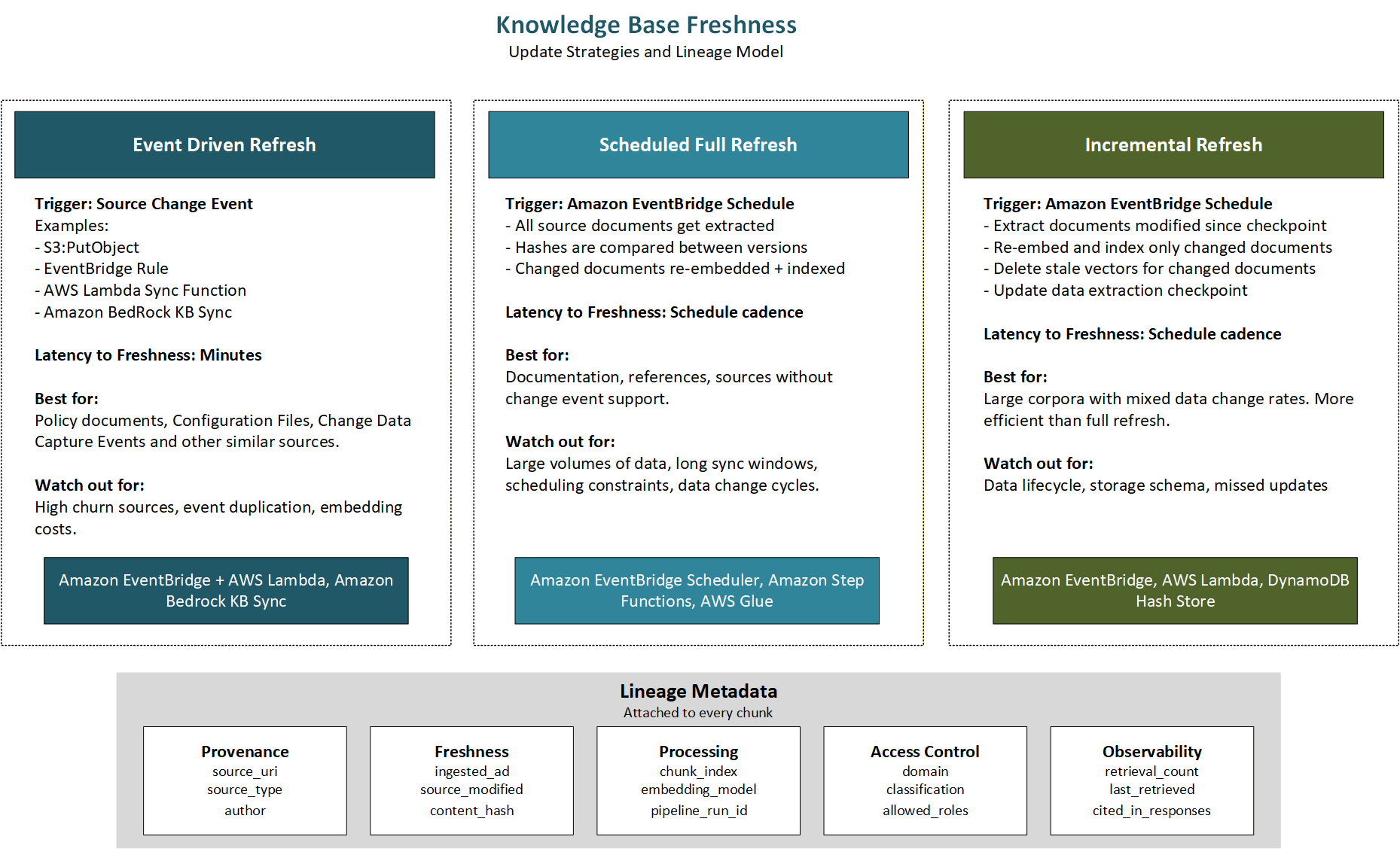
Figure 9.2 Knowledge base freshness strategies and the lineage metadata schema attached to every chunk
Real-time data access: streaming and live APIs
Some agent tasks need data that's just too dynamic to pre-ingest. A deployment agent checking the current health of a Kubernetes namespace can't lean on a knowledge base entry from the last refresh; it needs the live status. An infrastructure agent checking whether a CloudFormation stack is currently in progress can't trust a document ingested an hour ago. These cases call for real-time access through the tool layer, not pre-ingested knowledge base retrieval.
Amazon Kinesis for high-frequency event streams
Amazon Kinesis Data Streams gives you a managed, durable, ordered log of events that an agent can consume through an MCP tool. When an agent needs to reason about recent system events (security alerts, deployment notifications, infrastructure state changes, application error patterns), it queries a Kinesis stream through a tool that reads the most recent records and hands them back as structured data.
The Kinesis MCP tool wraps a GetRecords call that pulls the latest records off the stream, with configurable limits on record count and time window. It handles shard management for you, merging records from every shard into one sorted response. Rate limiting lives in the MCP server, implemented with a token bucket, so the agent can't blow through Kinesis read throughput limits by firing off tool calls in quick succession.
When an agent needs to reason about events in aggregate rather than one at a time (“how many deployment failures in the last hour?”), a Lambda function consuming the Kinesis stream can keep running statistics in DynamoDB that the agent queries through a separate lookup tool. That way you skip the latency of reading and crunching a big pile of raw stream records at inference time.
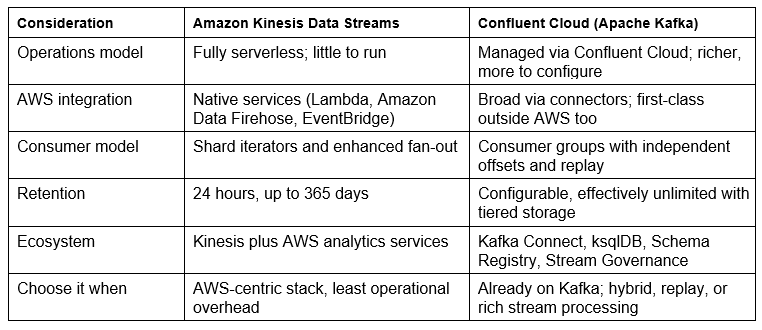
Kinesis is the AWS-native default here, and the same MCP tool pattern works over other streaming platforms. Teams standardized on Apache Kafka can point the tool at Confluent Cloud, available in AWS Marketplace, and keep the rest of the design unchanged. Amazon MSK is the AWS-managed Kafka option if you want Kafka without leaving AWS-native services; Confluent Cloud adds a broader managed ecosystem on top of Kafka.
The choice between Kinesis and Kafka is worth making deliberately, because it shapes how the agent consumes events. Kinesis is shard-based and fully serverless: you provision throughput, consumers read with shard iterators or enhanced fan-out, records are retained from 24 hours up to 365 days, and ordering holds within a shard. It integrates tightly with Lambda, Amazon Data Firehose, and the rest of the AWS analytics stack, which keeps operations light for an AWS-centric pipeline. Kafka, delivered through Confluent Cloud, is built around topics, partitions, and consumer groups. Each consumer group tracks its own offsets, so several agents or services can read the same stream independently and replay history from any point, and tiered storage makes long or effectively unlimited retention practical. Confluent Cloud layers on the parts of the Kafka ecosystem that matter for agent pipelines: Kafka Connect for source and sink connectors, a Schema Registry that enforces event contracts so a malformed producer can't quietly corrupt what the agent sees, and stream processing for aggregating or filtering events before they reach a tool. Pick Kinesis when your stack is AWS-centric and you want the least operational overhead for moderate throughput. Pick Confluent Cloud when you already run Kafka, need to span AWS and other environments, want independent replaying consumers, or need Schema Registry and richer stream processing.
Amazon DynamoDB for low-latency structured lookups
Amazon DynamoDB is the store to reach for when agents need structured data at inference time with low latency. Its single-digit-millisecond reads mean a DynamoDB lookup through an MCP tool adds only a few milliseconds to a tool call, which makes it a great fit for data that has to be fresh and has to come back inside the latency budget of a synchronous agent turn.
The MCP tool pattern for a DynamoDB lookup is simple. The tool takes a structured query spec from the agent, validates it against an allowed query schema (so the agent can't run arbitrary DynamoDB queries outside its intended scope), runs it with the MCP server's IAM-scoped DynamoDB client, and returns structured JSON. The IAM policy on the server's execution role locks GetItem and Query down to specific table names and key ranges.
DynamoDB shines when the data has a natural key structure: deployment records keyed by service name and environment, configuration parameters keyed by parameter name, service health records keyed by service ID and timestamp. When there's no natural key, like full-text search or similarity search, DynamoDB isn't the right tool. Lean on the vector store's semantic retrieval or Amazon OpenSearch's full-text search instead.
Live API access through MCP tools
Plenty of enterprise sources expose live data through REST APIs. GitHub serves live repository and pull request data, Jira serves live ticket status, monitoring platforms serve live metrics. Agents can reach all of it at inference time through MCP tools that wrap the relevant API calls.
Building live API MCP tools that hold up in production means dealing with a few things you never hit with a database lookup. Rate limiting comes first: most external APIs enforce per-token limits, and an agent that fires calls in rapid succession will trip them and start getting 429s. The MCP server needs exponential backoff with jitter on retries, and it should cache responses for a configurable TTL to cut down on live calls for frequently queried data. Authentication comes next: credentials for external APIs get pulled from Secrets Manager just-in-time, exactly as Module 8 described. Then error handling: external APIs return malformed responses, unexpected status codes, and pagination errors, so the tool has to handle all of that cleanly and return structured error information to the agent instead of throwing an unhandled exception.
Response shaping matters just as much. External API responses are usually formatted for a human reader or for some specific client library, not for an agent's context window. The tool should compress and restructure them into something the agent can reason over efficiently, dropping any fields that don't matter for the task at hand.
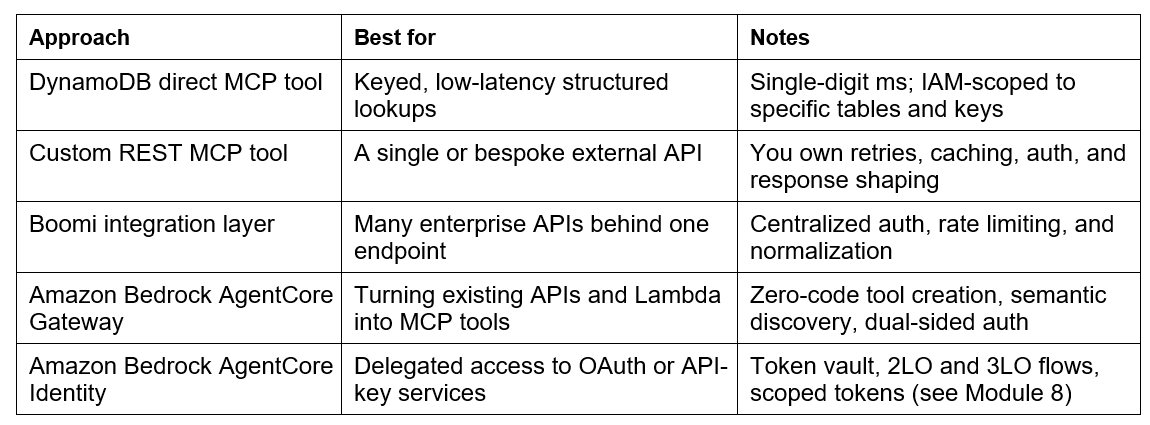
For teams that already run an enterprise integration platform, there's a cleaner alternative to hand-building a client for every external API. Boomi, available in AWS Marketplace, is one example: its managed integration and API management layer can sit in front of these external services, centralizing authentication, rate-limit handling, retries, and response normalization. The MCP tool then calls a single consistent Boomi endpoint instead of a dozen bespoke API clients, which keeps the tool code simple and moves the messy per-source integration logic into a platform built to manage it.
AWS offers a native path to the same goal through Amazon Bedrock AgentCore. Amazon AgentCore Gateway is a managed service that turns existing APIs, Lambda functions, and Amazon API Gateway REST APIs into MCP tools without writing an MCP server. It runs as a single trusted entry point in front of your tools, so instead of maintaining a fleet of bespoke MCP servers, the agent connects to one gateway that handles tool discovery, invocation, and security. It also provides semantic tool selection, letting an agent find the right tool from a natural language description rather than needing every tool wired into its prompt, which matters once you have hundreds of tools. Gateway enforces authorization on both sides: it validates the caller coming in and controls how it authenticates to the backend going out.
AgentCore Identity handles the credential half of that problem, and it connects directly to the access-control patterns from Module 8. It gives each agent a workload identity and a secure token vault that stores the OAuth tokens and API keys the agent needs to reach external services. It supports both machine-to-machine access (the two-legged client-credentials grant) and user-delegated access (the three-legged authorization-code grant, the same flow Module 8 built with PKCE), and it works with identity providers you already run, such as Amazon Cognito, Microsoft Entra ID, or Okta. Tokens live in the vault and are retrieved just in time, so raw credentials never sit in the agent's code or in the model's context window. For a data-access tool, that means an agent can call a governed API on behalf of a specific user, with scoped and auditable permissions, without the MCP tool ever handling the secret itself.
These options are not mutually exclusive. A DynamoDB lookup stays a direct MCP tool, a small set of external APIs might sit behind Boomi, and AgentCore Gateway and Identity can front the rest with managed discovery, authorization, and credential handling. The table below summarizes when to reach for each.
User-provided context
The last way an agent gets data isn't a tool call at all. The user simply includes it in their message: a pasted stack trace, an attached CloudFormation template, a screenshot of a failing dashboard, a config file. This is the fifth access pattern, and it's the one with no pipeline behind it. Nothing was extracted, chunked, deduplicated, quality-checked, access-reviewed, or given a lineage record. That's exactly why it's both the freshest data the agent can get and the riskiest, and it deserves the same engineering attention as the other four patterns even though there's no ingestion job to point at.
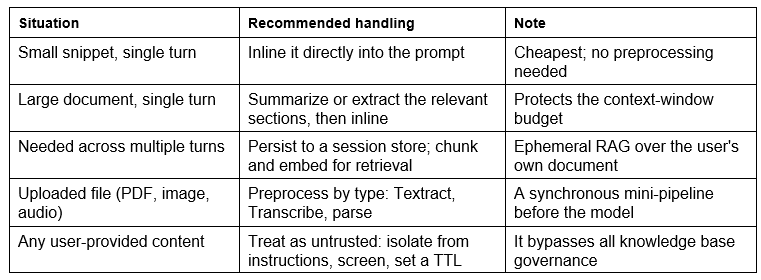
The first concern is the context window. User-provided content competes for the same finite budget as the system prompt, the tool definitions, the retrieved knowledge base chunks, and the conversation history. A short snippet is fine to drop in directly. A large document is not: paste a 40-page runbook into the turn and it can crowd out the retrieved policy chunks the agent actually needs, or exhaust the window entirely. So the runtime has to budget. Estimate the token cost of the attachment, and if it's large, don't inline it whole. Summarize it with a cheap model pass, pull only the sections relevant to the query, or chunk and embed it into a session-scoped index and retrieve from that. That last option is worth naming plainly: it's the same RAG machinery we discussed already, run ephemerally over one user's document for the length of one session.
The second concern is that an attachment is rarely ready to use as-is. A PDF needs text extraction before the model can read it, and Amazon Textract is the same tool you'd use in the batch pipeline, just invoked synchronously per request. An image needs a vision-capable path or OCR, audio needs Amazon Transcribe, a spreadsheet needs parsing, and code benefits from syntax-aware handling. So user-provided context has a pipeline after all. It's just a small, synchronous one that runs inside the request, routing by content type before anything reaches the model. Building that preprocessing step deliberately, rather than assuming everything is already text, is what keeps this pattern from silently breaking on the first non-text upload.
The third concern is trust, and it's the most important. User-provided content is untrusted input, and it bypasses every control that governs the knowledge base: the source allowlist, the access-control review, the quality gates. Two things follow. First, it's a primary vector for prompt injection, because an uploaded document can carry instructions aimed at the model. Treat it as data, not as instructions, keep it clearly separated from the system prompt, and never let it override the agent's guardrails. This is the same lesson as the server-side retrieval filter we will cover later in this guide: a control the model can be talked out of isn't a control. Second, users paste things they shouldn't, including PII and regulated data. If you persist an attachment across turns, you've quietly taken on a data-retention obligation, so scope it to the session, set a TTL, and clean it up.
When a document is needed across several turns, re-sending it every turn wastes both the context window and money. Persist it once to a session-scoped store, an S3 prefix keyed to the session or an ephemeral vector index, and reference it on later turns instead of re-injecting it. This connects back to the memory patterns in Module 7 and forward to lineage: even though the content is user-provided, you often want to record that a given response was grounded in user-supplied material, tagged as such, so an audit can tell an answer built from governed knowledge apart from one built on whatever the user pasted in. User-provided provenance is still provenance.
How you handle a piece of user-provided context comes down to its size, its type, and whether it's needed again. The table below is a quick guide.
Data lineage: from source to agent response
Data lineage is the full provenance record for every fact an agent uses: where it came from, how it got processed on the way to the agent, when it was last confirmed accurate, and which agent responses it shaped. Lineage pulls double duty. It's operational, letting teams answer “which knowledge base chunks are affected by this source update?”, and it's about compliance, letting you show auditors that agent responses are grounded in authorized, version-controlled sources.
Lineage capture at each pipeline stage
You capture lineage by attaching provenance metadata to documents and chunks at every stage, so the metadata rides along all the way to the vector store. At extraction, the extractor records the source URI, the extraction tool and version, and the extraction timestamp in the document's metadata envelope. At transformation, the chunking parameters (strategy, max tokens, overlap) get added to each chunk. At embedding, the model ID and version get recorded. At loading, the vector IDs assigned to each chunk get written back into the lineage record in DynamoDB, which is what lets the pipeline find and delete specific chunks when the source document changes.
What you end up with is a DynamoDB lineage record tying every vector in the knowledge base back to its origin: the source document URI, the pipeline run that produced it, the chunking parameters, the embedding model, and the date range during which it was the active embedding for that content. This is what powers the core lineage query: given a source document that just changed, find every vector ID produced from it so they can be deleted before the new embeddings go in.
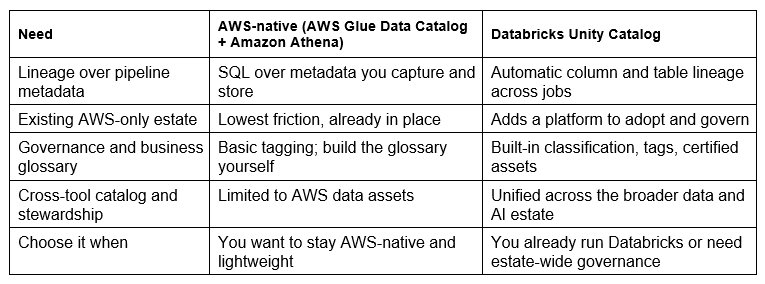
AWS Glue Data Catalog as the lineage registry
The AWS Glue Data Catalog gives you a central metadata registry for every data asset in the AWS environment, knowledge base source documents included. Each source is registered as a Glue table with a schema describing the document structure, the extraction method, and the metadata attributes. The Glue crawler can automatically pick up new documents dropped into S3 source prefixes and register them, so you always have an up-to-date inventory of everything that's been ingested or is eligible for it.
The Data Catalog plugs into Amazon Athena, which lets you run SQL over the lineage metadata sitting in S3 or DynamoDB. A compliance auditor who needs to answer “which agent responses in the last 30 days cited a document from this source?” can run an Athena query that joins the CloudTrail retrieval log against the lineage metadata and get back a complete list, no custom application code required.
Databricks Unity Catalog for enterprise data intelligence
If your organization already runs a data intelligence platform, the move is to extend it to cover the agentic system's knowledge base rather than stand up a parallel lineage system. Databricks Data Intelligence Platform, available in AWS Marketplace, offers this through Unity Catalog, its governance layer for data and AI assets. Unity Catalog classifies data assets against your taxonomy, captures column- and table-level lineage automatically as data moves through jobs, and enforces access policies centrally, so the knowledge base's source tables and the pipelines that process them sit under the same governance model as the rest of your data estate. Stewardship and approval workflows make sure content is reviewed before any agent can retrieve from it.
Unity Catalog also covers the cataloging and business-glossary side. Its catalog and search make knowledge base data assets discoverable, and its tags and certified-asset markers let data stewards link business terms to their technical representations. That linkage is what keeps an agent honest about meaning: when it retrieves chunks about “gross margin,” the catalog ties that term to your organization's specific definition rather than a generic one. Because Unity Catalog reaches across the broader AWS data estate, the same lineage and governance extend over S3 sources, Glue tables, and the vector store the knowledge base is built on.
If you are choosing between staying with the AWS-native lineage tooling and adopting Unity Catalog, the trade is mostly about how much governance you need and whether Databricks is already in your estate.
Data quality for agent knowledge bases
If data quality problems cause bad agent behavior, and these really are data problems rather than model problems, then it follows that quality has to be engineered into the pipeline rather than discovered later through agent evaluation. A knowledge base built without quality controls fills up with duplicated content that skews vector distances, malformed text that produces poor embeddings, stale content that contradicts current policy, and low-signal content that drags down retrieval quality across the board.
Deduplication
Duplicate content hurts retrieval in two ways. First, duplicate chunks have nearly identical embeddings, so when a query matches one, all the copies show up together in the top-k results, crowding out more diverse and often more relevant content. Second, duplicates inflate the effective size of the knowledge base without adding any information, which drives up storage costs and retrieval latency for nothing.
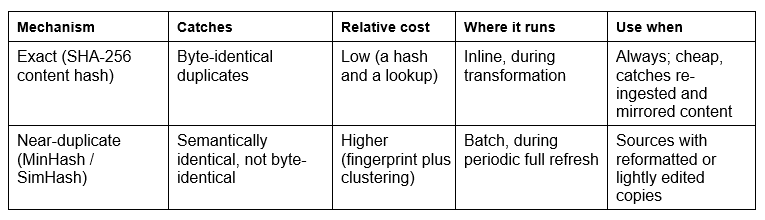
Exact deduplication uses content hashing. You compute a SHA-256 hash of each chunk during transformation, and any chunk whose hash already exists in the dedup hash store gets dropped before embedding. That catches the true exact duplicates: the same document ingested twice, the same policy showing up in both Confluence and S3, the same README appearing across multiple repository branches.
Near-duplicate deduplication catches the ones that are semantically the same but not textually identical, like a policy document with minor formatting differences or a README with an updated version number. It works by computing a MinHash or SimHash fingerprint of the content, clustering documents with similar fingerprints, and keeping one representative per cluster. It costs more compute than exact dedup, so it's usually run as a batch operation during a periodic full refresh rather than inline in the real-time ingestion path.
The two mechanisms solve different problems at different costs, so most pipelines run exact deduplication everywhere and reserve near-duplicate detection for the periodic full refresh.
Format and content validation
Not everything that makes it through extraction is worth ingesting. A chunk under a minimum token threshold (a header-only page, a stub article, an empty document template) produces a weak embedding that will match queries it shouldn't. A chunk that's mostly non-textual (base64-encoded binary in a config file, a CSV with no header row, an image rendered as ASCII art) produces a meaningless one.
A validation step sits between transformation and embedding and runs a series of quality checks on each chunk: minimum token count (reject anything under 50 tokens), text language detection (reject languages the embedding model doesn't support), structural validity (reject chunks that are mostly numbers, whitespace, or special characters), and a source authority check (reject chunks from sources that aren't on the approved allowlist).
Astronomer for pipeline observability
Static rules catch the quality problems you already know about, but a knowledge base can degrade in ways no static rule anticipates: a Confluence webhook that starts delivering HTML encoding artifacts, a Textract extraction that begins failing on a new document template, an S3 prefix that quietly stops receiving new documents because an upstream process changed. The pipeline itself can't see any of this. It only surfaces later as a slow, hard-to-diagnose decline in agent response quality.
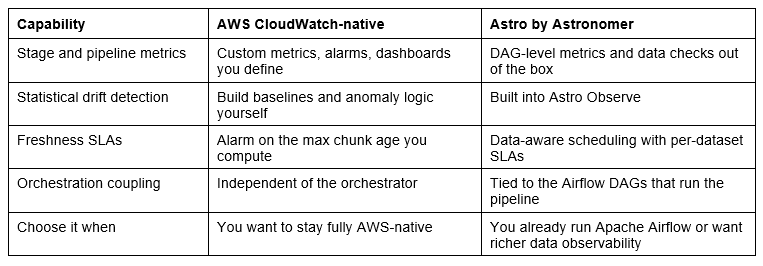
That slow, hard-to-diagnose decline is exactly what a data observability layer is meant to catch. Astro by Astronomer, available in AWS Marketplace, provides managed Apache Airflow with pipeline observability built in through its Astro Observe capability. Because the ingestion pipeline runs as Airflow DAGs, Astronomer sees every stage and can track the statistical properties of the data flowing through each one: document count, chunk size distribution, metadata completeness, and freshness lag. When any of them drift from their historical baseline, it raises an alert. If the average chunk size for one data source suddenly drops 40%, that points you straight at the Textract extraction stage for that source, so you diagnose it fast without digging through logs by hand.
Astronomer's data-aware scheduling is what makes freshness monitoring natural. You attach a freshness SLA to each corpus and let the platform alert when a scheduled job misses it. A freshness SLA on the DevOps Companion's history corpus fires if the nightly consolidation job hasn't produced new records by 6 AM, well ahead of the first agent interaction of the workday, so the operations team has time to investigate and rerun the job before any user is affected. Running the pipeline under managed Airflow also gives you dependency-aware retries and DAG-level visibility, so a partial failure in one stage doesn't quietly cascade into stale knowledge.
Astronomer isn't the only way to get this. Much of it can be built on CloudWatch. The table below shows where each option fits.
Access control for data: who can the agent access and what can it see?
An agent knowledge base is not a public information repository. It might hold confidential product plans, references to sensitive customer data, internal cost figures, or regulated personal data. Both the ingestion pipeline and the retrieval layer have to enforce access controls, so agents only reach content they're authorized to reach, and users only retrieve content that fits their authorization level.
Document-level access control during ingestion
Access control starts at extraction. The Lambda extractor or Glue ETL job that pulls source documents has to run under an IAM role scoped to only the documents it's allowed to ingest. For S3 sources, that means IAM policies with s3:prefix conditions limiting access to specific path prefixes. For AWS Lake Formation-governed sources, the Glue job's IAM role needs the right Lake Formation permissions for the exact tables and columns it touches.
There is a subtlety worth getting right. The s3:prefix condition key constrains s3:ListBucket, which is what limits the keys an ingestion role can enumerate. It does not constrain s3:GetObject; object reads are scoped by the resource ARNs in the policy. A correct ingestion policy does both: it allows ListBucket only for the approved prefixes, and it allows GetObject only on the object ARNs under those prefixes. The policy below scopes an ingestion role to two approved prefixes and nothing else.
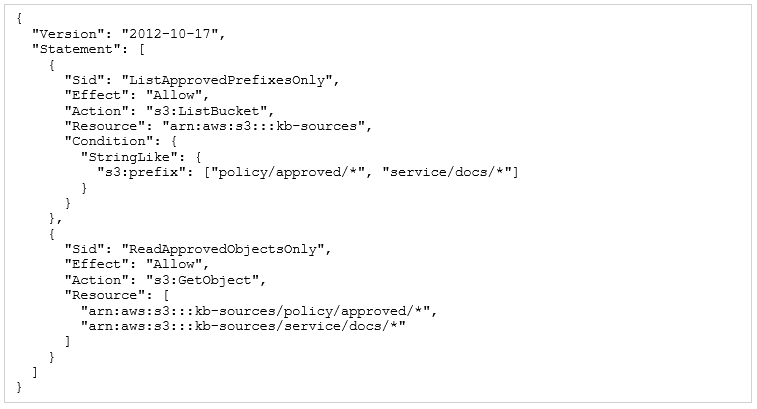
With this in place, an extraction job running under the role can list and read documents under policy/approved/ and service/docs/, and any attempt to reach another prefix returns access denied, which the pipeline catches and routes to the quarantine prefix rather than ingesting. If the same bucket also holds content no ingestion role should ever see, add an explicit Deny on those prefixes, since an explicit deny overrides any allow.
Before ingesting anything, the pipeline confirms the document's source is on the approved allowlist and that the ingestion role actually has permission to read it. Anything that isn't on the allowlist, or that throws an access-denied error during extraction, gets quarantined: written to a rejection S3 prefix along with the reason, never silently skipped. A CloudWatch alarm watches the object count on that rejection prefix and pages the operations team to investigate.
Row-level security in the retrieval layer
Row-level security in the retrieval layer means the set of chunks a query returns depends on the authorization level of the agent or user making the request. Basic authorization retrieves only public-classification chunks. Elevated authorization retrieves public and internal chunks. Only agents with specific elevated roles retrieve sensitive-classified chunks.
Amazon Bedrock Knowledge Bases does this with metadata filters applied to retrieval queries. The filter spells out one or more metadata conditions (access_level: public, or access_level in [public, internal]) that a chunk has to satisfy on top of the semantic similarity match. The agent's calling code builds the filter from the requesting user's authorization level, which is available as a claim in the user's IAM session context.
It helps to see what that filter looks like on the wire. A Bedrock Knowledge Bases Retrieve call carries the filter inside its vector search configuration, and the service applies it in the vector store before scoring, not after. The request below retrieves only policy-domain chunks the caller is cleared to see:
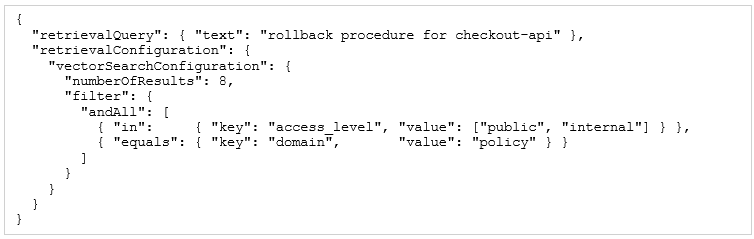
The calling code builds that filter from the caller's authorization claims rather than hard-coding it. A principal's clearance, read from an IAM session tag or a Cognito group, maps to the set of access levels they are allowed to retrieve:

Applying the filter in the vector store, as a pre-filter, matters for more than tidiness. Amazon Bedrock Knowledge Bases runs the metadata condition as a boolean constraint alongside the k-nearest-neighbor search in OpenSearch, so unauthorized chunks are excluded before similarity scoring. A naive post-filter, fetching the top k and then dropping what the caller can't see, has two failure modes: it can return fewer than k usable results, and it leaks information about how many restricted documents exist. Pre-filtering avoids both, and because the service enforces it, the guarantee holds even if the agent's own reasoning has been manipulated.
The important part is that the Bedrock Knowledge Bases service applies this filter server-side, not the agent code. So even if the agent's context window contains injected instructions to ignore the filter, the filter still gets enforced at the retrieval layer before any content reaches the agent. The agent can only reason about content it was authorized to retrieve in the first place.
AWS Lake Formation for governed data sources
For knowledge bases that pull in structured sources like database tables, data warehouse exports, or data lake content, AWS Lake Formation gives you fine-grained, column-level access control over what the ingestion pipeline can reach. Lake Formation permissions are expressed as database, table, and column names rather than IAM resource ARNs, which makes them a lot easier to manage for data that has clear business ownership.
A Lake Formation data filter can also restrict the pipeline to specific rows of a table, say, ingesting only records where the data_classification column is public, so sensitive records stay out of the knowledge base even when they share a source table with public content. Lake Formation applies that row-level filter before returning any data to the Glue ETL job, and the pipeline code has no way to bypass it.
In practice you express that with Lake Formation rather than an IAM resource policy. The grant names the database, table, and columns the ingestion role may read, and a data-cell filter adds the row-level condition:
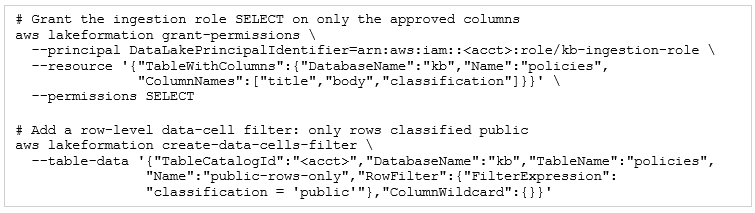
Because Lake Formation resolves these permissions before returning data to Glue, the ingestion job only ever sees the columns and rows it was granted, and there is no code path in the pipeline that can widen that scope.
Handling evolving data over time
Enterprise data doesn't hold still. AWS ships new services and updates existing ones. Your organization revises its deployment procedures after incidents. The CDK construct library introduces breaking changes. Security requirements shift in response to new threats. A knowledge base that doesn't track any of this will serve outdated information with exactly the same confidence as current information, and neither the agent nor the user gets any hint that the content might be stale.
Document versioning
Document versioning means keeping a record of every version of every source document you've ingested: when it was active, when it was superseded, and what changed between versions. That record lets the agent answer questions like “what was the deployment procedure as of three months ago?”, which comes up in incident post-mortems, and it lets compliance auditors verify exactly what content was active when a given agent response was produced.
S3 versioning handles this automatically for documents stored in S3. With versioning enabled on a source prefix, every PutObject creates a new version instead of overwriting the old one. The pipeline records the S3 version ID in the lineage metadata for each chunk, which means you can precisely reconstruct the knowledge base state at any historical point by querying the chunks tied to the version IDs that were active back then.
Tombstoning deprecated content
When a source document gets deprecated (a procedure that's no longer valid, an API that's been retired, a service that's been decommissioned), the matching chunks in the knowledge base shouldn't just get deleted on the spot. Deleting them pulls the content out of future retrievals, sure, but it also erases any record that the content ever existed, which breaks historical audit queries and trips up agents mid-workflow if that workflow started while the content was still active.
Tombstoning is the better move. You mark the deprecated chunks with an is_deprecated: true attribute and a deprecated_at timestamp, but you leave them in the index. A default metadata filter keeps tombstoned chunks out of normal retrieval, so they never show up in agent contexts, but they're still there and can be retrieved by explicitly setting is_deprecated: true in the filter, which is what makes historical queries work. Once the tombstone retention period is up (usually six months), a batch cleanup job deletes them for good.
Schema evolution in structured sources
When a structured source changes its schema (a new column on a database table, new fields in a JSON API response, a reordered CSV export), the Glue ETL job extracting from it can start producing differently shaped output. If your transformation logic depends on specific column names or field positions, a schema change can make it fail silently, quietly producing chunks with missing or wrong content.
The Glue Data Catalog's schema evolution tracking catches this. When a crawler discovers a schema change in a registered source, it creates a new table version in the catalog. A CloudWatch Events rule on the table-version-change event triggers a Lambda function that validates the new schema against the expected one and raises an alert if the change is breaking (a column removed, a type changed), forcing manual review before the next ingestion cycle.
Coordinating knowledge base updates with agent releases
When a knowledge base update changes what agents retrieve, that change can shift agent behavior in ways that require the agent's system prompt or tool definitions to change at the same time. A deployment runbook that gets restructured to separate pre-deployment and post-deployment steps might need the agent's prompt updated to reference the new section structure. Ship the knowledge base update without the matching agent update and you get an agent that's out of step with its own knowledge base.
The way to coordinate this is to treat behavior-affecting knowledge base updates as part of the agent's deployment pipeline, not as independent data operations. Each agent's CI/CD pipeline includes a step that validates the agent's behavior against the updated knowledge base in staging before either the agent update or the knowledge base update gets promoted to production. If that validation fails, both are held until the mismatch is sorted out.
Data pipeline observability
A pipeline that fails silently is more dangerous than one that fails loudly. When it fails loudly (throws an exception, returns a Lambda error, fails a Step Functions execution), the operations team gets paged and can start diagnosing right away. When it fails silently (Textract starts producing lower-quality output after a format change, the Matillion connector starts dropping records because of an API pagination bug, the freshness job runs but syncs nothing because a permission got revoked), agents just keep running on degraded knowledge with no signal that anything's wrong.
So pipeline observability means instrumenting every stage to emit metrics you can watch for deviations from expected behavior, not just for outright failures.
Stage-level metrics
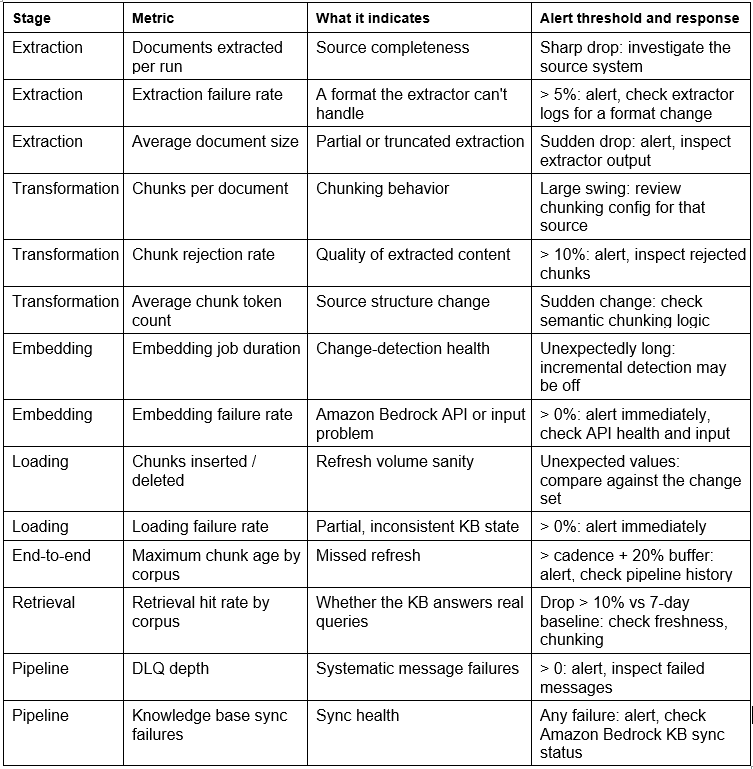
At extraction, the metrics that matter are documents extracted per run, extraction failures per run, and average document size. A drop in documents extracted per run means the source has fewer documents than expected, which might be a source-system issue. A rise in extraction failures means a format change the extractor can't handle. A sudden drop in average document size can mean the extractor is returning partial content.
At transformation, the metrics are chunks produced per document, chunks rejected by quality validation per run, and average chunk token count. A big jump in the rejection rate points to a systematic quality problem in the extracted content. A sudden change in average chunk token count points to a change in the source document structure that may have broken the semantic chunking logic.
At embedding, the metrics are embeddings generated per run, embedding job duration, and embedding failures. More failures can mean a Bedrock API issue or a problem with the input format. An unexpectedly long job can mean more documents got processed than expected, which is often a sign that incremental change detection isn't working right.
At loading, the metrics are chunks inserted, chunks deleted (for incremental refresh), and loading failures. Any loading failure rate above zero should trip an alert immediately, because it means the knowledge base is only partially updated and might be in an inconsistent state.
Taken together, these stage metrics form the instrumentation contract for the pipeline. Emit each one as a CloudWatch metric at the stage that produces it, and attach an alarm so a deviation pages the on-call engineer instead of surfacing later as degraded answers. The table below consolidates what to instrument, what each metric tells you, and how to alarm on it.
End-to-end freshness monitoring
End-to-end freshness monitoring tracks the age of the oldest content in each corpus: the maximum time since any chunk's ingestion timestamp, broken out by data source. A CloudWatch metric tracking the maximum chunk age per corpus gives you an at-a-glance read on how fresh things are. Put an alarm on it that fires when the maximum chunk age exceeds the expected refresh cadence plus a buffer (say, alarm when any chunk is older than 25 hours for a corpus on a 24-hour refresh) and you get early warning of a missed refresh before agents start serving stale content.
Retrieval quality monitoring
The metrics above tell you whether the pipeline is healthy, but not whether it's actually producing a knowledge base that supports good agent responses. Retrieval quality monitoring closes that gap by measuring the fraction of agent queries that find at least one highly relevant chunk (the retrieval hit rate) along with the average similarity score of retrieved chunks.
A sudden drop in the retrieval hit rate for a specific corpus is a strong signal that the corpus has a quality problem: its chunks don't match the queries agents are running against it. That can come from a freshness lag (the content agents need got updated at the source but not yet in the knowledge base), a chunking issue (the content is there, but it's chunked in a way that scatters the relevant information across several chunks, each individually below the similarity threshold), or a content gap (the knowledge base just doesn't hold anything relevant to what's being asked).
Worked example: the DevOps companion data pipeline
This section puts every pipeline concept to work on the DevOps Companion's three knowledge base corpora from Module 7: the service corpus, the policy corpus, and the history corpus. Each one has different sources, different extraction needs, different freshness strategies, and different access controls. The goal is to lay out the complete pipeline design for each, with the reasoning spelled out, and to point out where each pipeline connects to the broader agentic architecture.
The service corpus pipeline
The service corpus holds AWS service documentation, CDK construct reference, EKS configuration patterns, and CloudWatch alarm templates. All of it is relatively stable (AWS ships new services and updates docs on a cadence of weeks to months), and all of it comes from S3 or public web locations that can be mirrored to S3 on a schedule.
Extraction: A weekly AWS Glue ETL job pulls the HTML source of the relevant AWS documentation pages from an S3 mirror, strips out tags and navigation elements with an HTML parser, and writes clean Markdown-formatted text to the extraction staging prefix. The CDK construct reference comes out of the CDK GitHub repository's documentation directory via a Lambda function that calls the GitHub API and converts TypeDoc HTML to Markdown. Both jobs run Sunday at midnight, writing to a date-partitioned S3 prefix.
Chunking: Hierarchical chunking. The section-level parent chunk captures each major documentation topic (an entire CloudFormation resource type reference, an entire CDK construct class reference), while the subsection-level child chunk captures individual parameters, properties, and examples. The parent stores the child chunk IDs as metadata, so the retrieval layer returns the child for similarity matching and the parent for context injection.
Freshness: Incremental hash-based refresh runs as part of that Sunday Glue job. It computes a SHA-256 hash of each extracted document and compares it against the hash in the service corpus hash DynamoDB table, so only changed documents get re-embedded and re-indexed. The hash table gets updated at the end of the run. An Astronomer freshness SLA alerts if the corpus has no chunks newer than 8 days, which catches a Sunday job that failed silently.
Access control: All agent roles can read the devops-service-kb knowledge base. The access_level: internal metadata filter is applied to every chunk to keep out external access. No row-level filtering is needed within the corpus, since all service documentation is fine for all agents.
The policy corpus pipeline
The policy corpus holds deployment runbooks, security requirements, approved IaC patterns, and organizational coding standards. These change more often than service docs (a runbook might get updated after every significant incident, a security requirement might get tightened in response to a new threat), and they live in Confluence and GitHub rather than S3.
Extraction: A Matillion Confluence connector syncs updated Confluence pages to S3 on a 15-minute schedule, writing each page as a Markdown file with metadata attributes pulled from the Confluence API (author, last modified, space, labels). A Lambda function triggered by GitHub webhook push events extracts updated files from the approved-patterns repository into the same S3 prefix. Both paths land in a shared S3 staging prefix that kicks off the transformation pipeline.
Chunking: Semantic chunking by heading hierarchy. Deployment runbooks get chunked at the step level, so each numbered procedure step becomes a child chunk with the runbook's name and purpose as the parent context. Security requirements get chunked at the requirement level, so each individual requirement statement becomes a child chunk with the requirement category as the parent. The result is chunks specific enough to retrieve precisely but with enough context to stay interpretable.
Freshness: Event-driven refresh. The S3 PutObject event from the Matillion or GitHub Lambda extractor triggers an EventBridge rule that invokes a Lambda calling the Bedrock KB sync API for the policy corpus data source. A debounce mechanism using EventBridge event targets with a 5-minute delay keeps high-frequency Confluence edits from firing redundant syncs. Freshness lag stays under 10 minutes for any policy change.
Access control: All agent roles can read the corpus. The approved-source allowlist limits ingestion to the specific Confluence spaces and GitHub repository that hold approved policy content, and documents from unapproved Confluence spaces get quarantined even if the Matillion IAM role can technically reach them.
The history corpus pipeline
The history corpus is the odd one out: its content is generated by the agentic system itself, not extracted from external sources. It holds the structured memory records produced by the nightly consolidation workflow from Module 7: past deployment records, resolved incident records, and configuration decisions distilled from historical sessions.
Extraction: None needed externally. The nightly consolidation Lambda writes structured JSON records to S3 in the history corpus landing prefix. Each record is a self-contained summary of a past event: a deployment record carries the service name, deployment date, success or failure status, environment, and any anomalies observed; an incident record carries the incident ID, affected services, root cause, and resolution steps.
Chunking: Fixed-size chunking with one record per chunk. Each structured JSON record gets converted to a natural language description (“On March 1, 2025, service checkout-api was deployed to production in us-east-1. The deployment succeeded after 12 minutes. CloudWatch alarm checkout-api-5xx-error-rate fired during the deployment but resolved after traffic stabilized.”) and stored as a single chunk. The structured JSON rides along as chunk metadata for programmatic access.
Freshness: Scheduled nightly refresh through EventBridge Scheduler at 3 AM. The scheduler triggers a Step Functions workflow that calls the Bedrock KB sync API for the history corpus data source once the consolidation Lambda has finished writing new records. A dependency check in the workflow confirms new records actually landed in the prefix before triggering the sync, so you never fire a sync with nothing new to ingest.
Access control: Only the Deploy+Observe agent role and the Orchestrator role can read this corpus. Its operational details aren't relevant to the Repository Analysis or Infrastructure Generation agents and shouldn't be available to them. The agent_scope: operations metadata filter is applied to every history corpus chunk, and only the Deploy+Observe and Orchestrator knowledge base configurations include that scope in their retrieval filters.
Cross-corpus observability dashboard
A CloudWatch dashboard named DevOps-Companion-DataPipeline gives the operations team one unified view across all three corpus pipelines. It shows the last successful sync timestamp per corpus (with color-coded freshness indicators), the chunk count per corpus (with an alarm if it drops more than 5% day-over-day, which flags unexpected deletions), the retrieval hit rate per corpus over the last 24 hours, the pipeline DLQ depth for each corpus's ingestion Lambda, and the Astronomer freshness and data-quality alert count for the last 7 days.
A separate Athena workgroup holds the named queries for lineage operations: find all chunks from a specific source document, find all agent responses that cited a specific chunk in the last 30 days, list all chunks ingested in the last 24 hours by corpus, and identify chunks that haven't been retrieved in the last 90 days (candidates for tombstoning if the source document hasn't changed).
Conclusion
Data pipelines and lineage are the supply chain of the agentic system. Every decision in this module has a direct, measurable effect on agent response quality and on your ability to govern and audit the system: the chunking strategy that sets retrieval precision, the freshness mechanism that decides how fast updates reach the agent, the lineage metadata that makes audit and compliance possible, the quality validation that keeps low-signal content from diluting retrieval, and the access controls that keep unauthorized content out of the knowledge base entirely.
If you take one thing from this module, take this: data quality has to be engineered in, not tested out. A knowledge base built from an ungoverned pipeline will produce poor responses that no amount of model tuning or retrieval tweaking can fix. Invest early in extraction quality, thoughtful chunking, comprehensive metadata, incremental refresh, and pipeline observability, and you get a knowledge base that improves over time as content is added and consolidated, instead of one that rots as content grows stale and noise piles up.
Module 10 moves to the next operational boundary: how agents get exposed to external callers. Where this module was about the data flowing into the agentic system, Module 10 is about the requests flowing in from applications, users, and other systems, covering API gateway patterns, routing strategies, failover, rate limiting, and the operational practices for safely exposing production agent capabilities through standardized interfaces.
Try the tools you learned about in this module




Explore more AI tooling
Build the agent data pipeline with tools from across the AI landscape, all available in AWS Marketplace.







Why AWS Marketplace for on-demand cloud tools
Free to try. Deploy in minutes. Pay only for what you use.
Featured tools are designed to plug in to your AWS workflows and integrate with your favorite AWS services.
Subscribe through your AWS account with no upfront commitments, contracts, or approvals.
Try before you commit. Most tools include free trials or developer-tier pricing to support fast prototyping.
Only pay for what you use. Costs are consolidated with AWS billing for simplified payments, cost monitoring, and governance.
A broad selection of tools across observability, security, AI, data, and more can enhance how you build with AWS.
Continue your journey
Each workshop in the Building Agentic Systems on AWS series covers a standalone topic. If data pipelines and lineage interest you, these related workshops cover complementary patterns: agent memory architecture and agent identity and access management.