- AWS Marketplace›
- Developer tools & tutorials›
- Data, analytics, & machine learning
MongoDB Atlas microservices API with semantic search
Deploy a production-ready multi-tier microservices architecture with MongoDB Atlas featuring AI-powered semantic search, todo management, and automated Terraform infrastructure
Overview
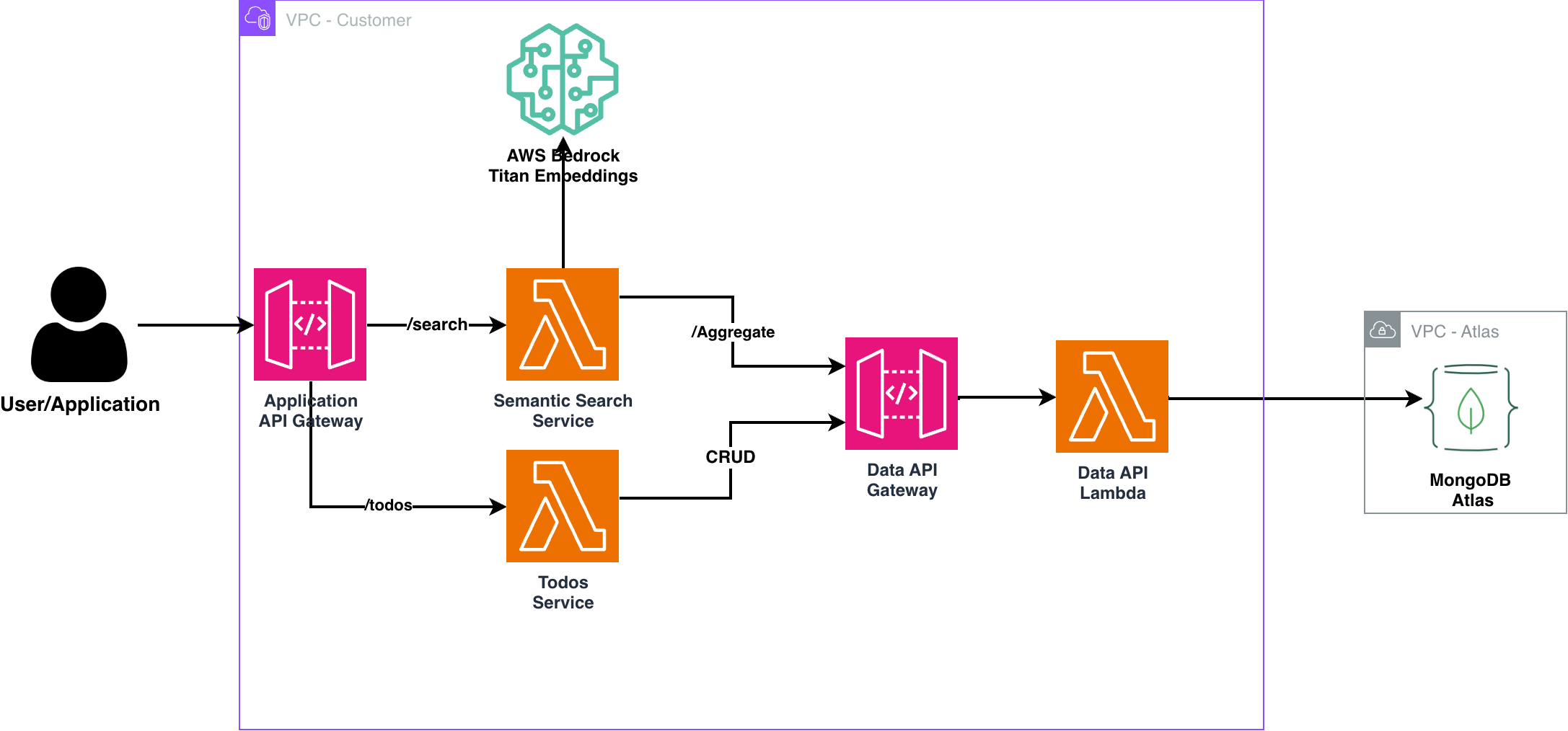
- Multi-tier microservices architecture with three Lambda services and two API Gateways
- Data layer with MongoDB Data API Lambda and dedicated API Gateway for direct database operations
- Application layer with Semantic Search and Todos Service Lambda functions sharing a common Application API Gateway
- AI-powered vector search using AWS Bedrock for semantic search, recommendation engines, and RAG applications
- Automated infrastructure deployment through Terraform Infrastructure as Code
- Production-ready security with AWS IAM authentication and MongoDB Atlas security features
- Real-world patterns demonstrating layered microservices with data access and business logic separation
Page topics
- Introduction
- An optimized microservices foundation for AWS
- Solution overview
- Architecture
- Deploying this template
- Deployment steps
- Building microservices with this foundation
- Testing and using the solution
- From monolith to microservices
- Security considerations
- Monitoring and observability
- Scaling your microservices architecture
- Cleanup
- Conclusion
Introduction
Modern application development has fundamentally shifted from monolithic architectures to microservices-based systems that enable organizations to build, deploy, and scale applications more efficiently. At the heart of this transformation are REST APIs that serve as the communication backbone between services, enabling loose coupling, independent deployment, and technology diversity across your application stack.
Microservices architecture offers compelling advantages for today’s development teams:
- Service independence: Each microservice can be developed, deployed, and scaled independently
- Technology flexibility: Different services can use different programming languages and databases
- Fault isolation: Issues in one service don’t cascade to bring down the entire application
- Team autonomy: Small, focused teams can own and iterate on specific services rapidly
For microservices to deliver on their promise, they require a database solution that matches their flexibility and scalability requirements. MongoDB Atlas excels in microservices environments due to its document-based model that adapts to changing schemas, horizontal scaling capabilities, and managed service approach that reduces operational overhead.
An optimized microservices foundation for AWS
Building microservices from scratch involves numerous architectural decisions and infrastructure setup challenges. Teams must consider service discovery, API gateways, database per service patterns, authentication, monitoring, and deployment automation—all before writing the first line of business logic.
This solution addresses these challenges by providing a production-ready microservice template that implements industry best practices:
- Serverless compute with AWS Lambda eliminates server management overhead
- Managed database with MongoDB Atlas provides automatic scaling and backup
- API Gateway integration handles request routing, throttling, and authentication
- Infrastructure as Code ensures consistent, repeatable deployments
- Security by default with AWS IAM and MongoDB Atlas security features
The tutorial below provides detailed information about how the solution works and complete deployment instructions. This solution expands on microservices patterns and REST API design principles to create a foundation you can replicate across your service portfolio.
Solution overview
Components required for production microservices
Let’s examine the essential components needed for building scalable, maintainable microservices:
- REST API Layer:
A well-designed REST API serves as the contract between your microservice and its consumers. It should follow REST principles with resource-based URLs, appropriate HTTP methods, and consistent response formats. API versioning and documentation are crucial for service evolution. - Serverless compute:
Modern microservices benefit from serverless compute platforms that automatically scale based on demand, eliminate server management overhead, and provide cost-effective execution models. This enables teams to focus on business logic rather than infrastructure. - Managed database per service:
Each microservice should own its data to maintain service independence. A managed database service reduces operational complexity while providing the scalability, backup, and security features required for production workloads. - API Gateway:
An API Gateway provides a single entry point for client requests, handling cross-cutting concerns like authentication, rate limiting, request/response transformation, and monitoring. This simplifies client integration and provides operational visibility. - Infrastructure automation:
Microservices multiply infrastructure complexity. Infrastructure as Code tools enable consistent, repeatable deployments across environments while reducing manual configuration errors and deployment time.
Architecture
MongoDB Atlas for microservices data management
MongoDB has become a preferred choice for microservices architectures due to its flexible document model that adapts to evolving service requirements without rigid schema constraints. MongoDB Atlas in AWS Marketplace provides a fully managed MongoDB service that eliminates database administration overhead while providing enterprise-grade security, backup, and scaling capabilities.
Key benefits for microservices:
- Schema flexibility: Services can evolve their data models independently
- Horizontal scaling: Automatic sharding supports growing data and traffic
- Multi-region deployment: Global applications can deploy data close to users
- Built-in security: Encryption, authentication, and network isolation by default
- Vector search capabilities: Native support for semantic search, similarity matching, and retrieval-augmented generation (RAG) applications
AWS Lambda for serverless microservices
AWS Lambda provides the ideal compute platform for microservices with its event-driven, serverless execution model. Lambda functions automatically scale based on request volume, execute in isolated environments, and integrate seamlessly with other AWS services.
Benefits for REST API microservices:
- Automatic scaling: Handle traffic spikes without capacity planning
- Cost efficiency: Pay only for actual execution time
- Zero server management: Focus on business logic, not infrastructure
- Built-in monitoring: CloudWatch integration for observability
API Gateway for microservices entry point
Amazon API Gateway serves as the front door for your microservices, providing a managed service that handles API lifecycle management, security, and monitoring. It integrates directly with Lambda functions to create a complete serverless REST API.
Key capabilities:
- Request routing: Direct requests to appropriate Lambda functions
- Authentication: Integrate with AWS IAM, Cognito, or custom authorizers
- Rate limiting: Protect services from traffic spikes and abuse
- Monitoring: Built-in metrics and logging for API usage analysis
Terraform for infrastructure automation
Infrastructure as Code is essential for microservices success, enabling teams to version, test, and deploy infrastructure changes alongside application code. Terraform provides a declarative approach to infrastructure management with strong AWS integration.
This solution includes Terraform modules for:
- MongoDB Atlas project and cluster provisioning
- AWS Lambda function deployment and configuration
- API Gateway setup with proper IAM integration
- Network security and access control configuration
Deploying this template
The template is fully automated using Terraform and will deploy all resources needed for a production-ready microservice, as shown in the architecture diagram.
Development environment requirements - set up SageMaker AI Code Editor
1. Navigate to Code Editor
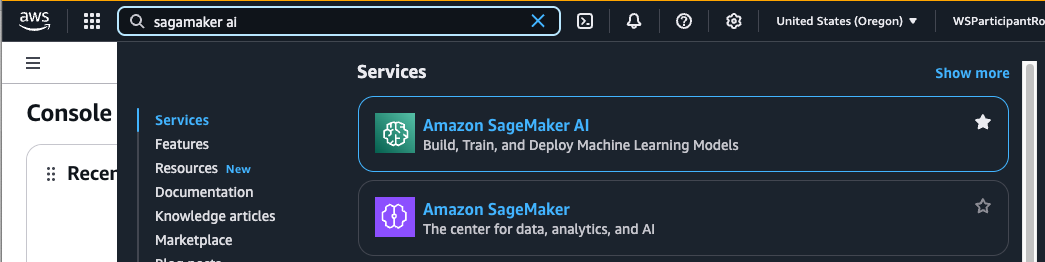
Type sagemaker ai in AWS Console search bar and select Amazon SageMaker AI:
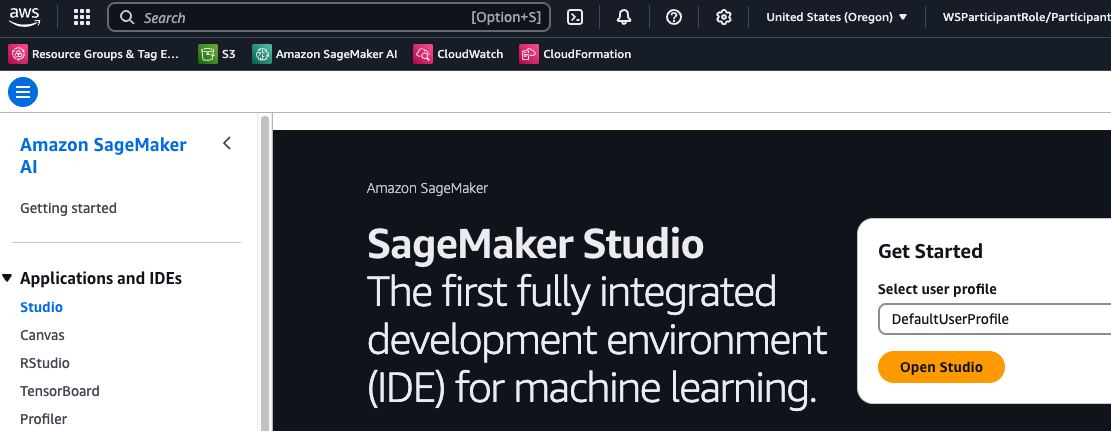
Navigate to Studio and select Open Studio:
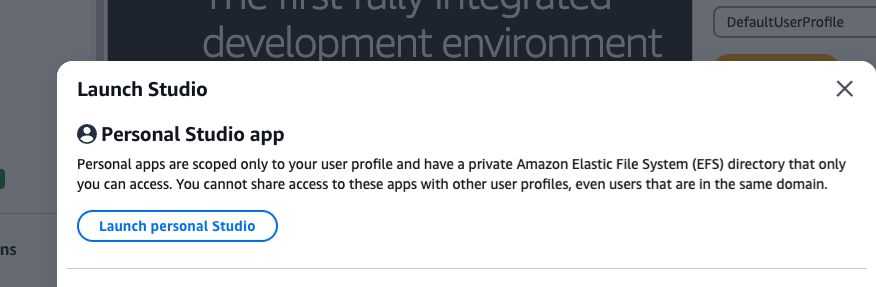
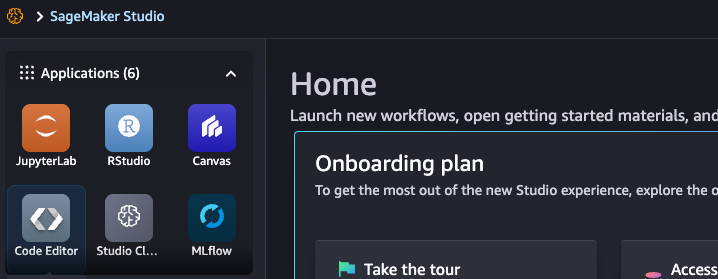
Select Code Editor:
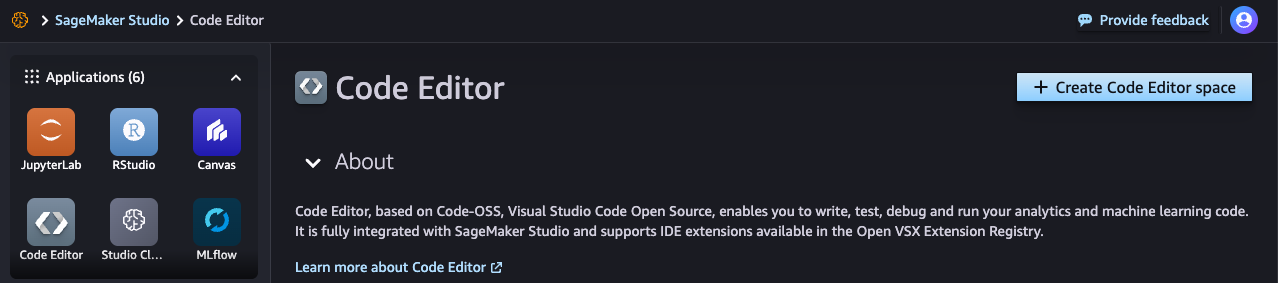
Select Create Code Editor space:
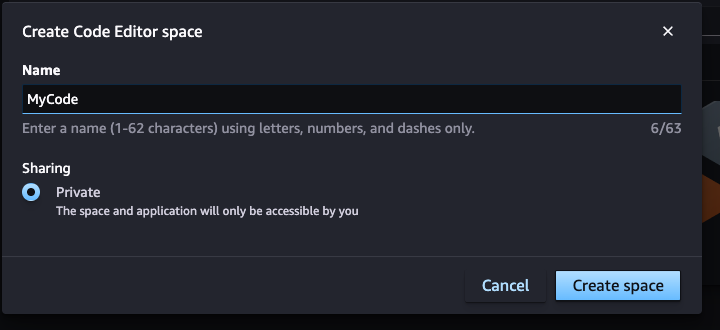
Give it a name and select Create Space:
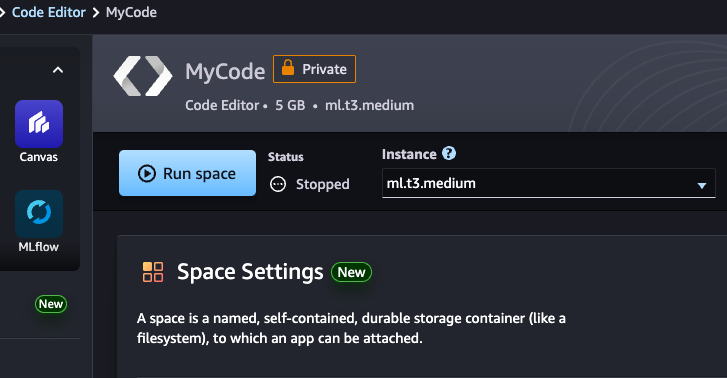
Select Run Space:
Select Open Code Editor once started successfully:
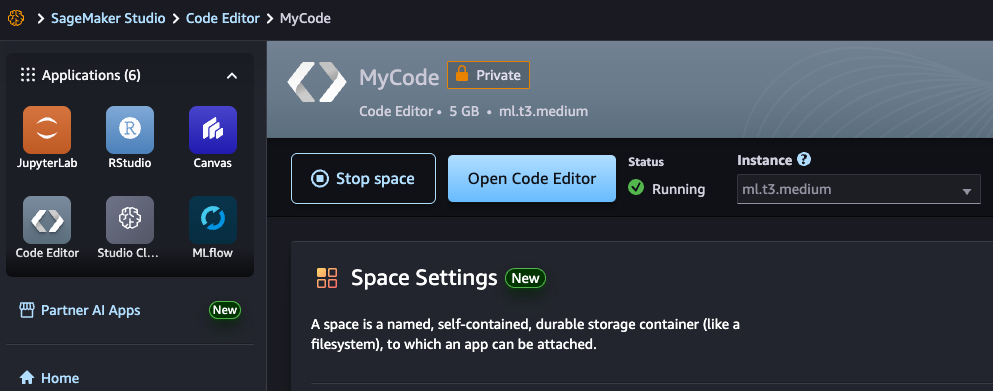
Observe it open in a separate browser tab:
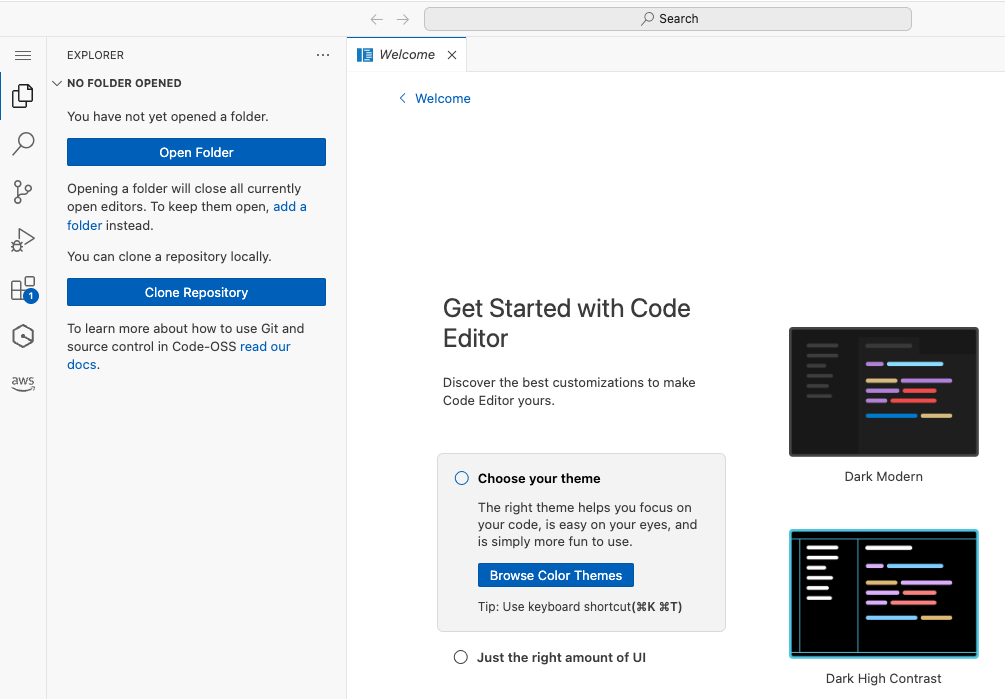
Open Terminal:
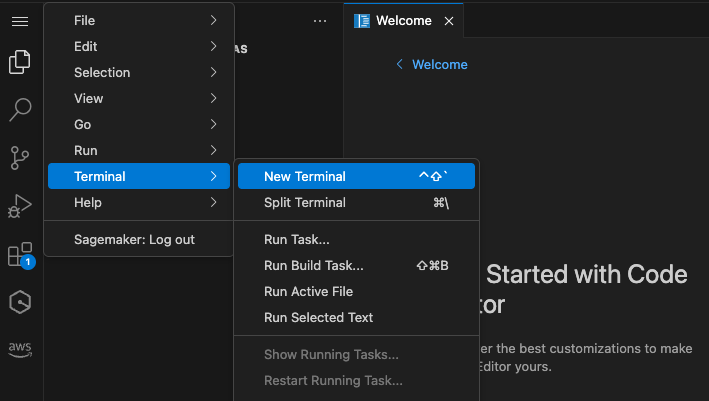
2. Install Terraform
# Get the Hashicorp GPG key wget -O- https://apt.releases.hashicorp.com/gpg | sudo gpg --dearmor -o /usr/share/keyrings/hashicorp-archive-keyring.gpg
# Add the hashicorp repo to apt echo "deb [arch=$(dpkg --print-architecture) signed-by=/usr/share/keyrings/hashicorp-archive-keyring.gpg] https://apt.releases.hashicorp.com $(grep -oP '(?<=UBUNTU_CODENAME=).*' /etc/os-release || lsb_release -cs) main" | sudo tee /etc/apt/sources.list.d/hashicorp.list
# Update apt and install terraform sudo apt update && sudo apt install terraform
3. Set Up Python Environment
python3 -m venv venv
source venv/bin/activate
pip install boto3 requests
4. MongoDB Atlas account (created through AWS Marketplace)
Prerequisites
- Subscribe to MongoDB Atlas in AWS Marketplace
- AWS account with the following least-privilege permissions:
- arn:aws:iam::aws:policy/AWSCloudFormationFullAccess - For infrastructure deployment
- arn:aws:iam::aws:policy/AWSLambda_FullAccess - For serverless function management
- arn:aws:iam::aws:policy/AmazonAPIGatewayAdministrator - For REST API management
- arn:aws:iam::aws:policy/AmazonSageMakerReadOnly - For SageMaker development environment
- arn:aws:iam::aws:policy/IAMFullAccess - For role creation (required for Lambda execution roles)
- Custom policy for Serverless Application Repository access
- Security Note: These managed policies provide the necessary permissions while being significantly more restrictive than PowerUserAccess. For production environments, consider creating custom policies with even more granular permissions scoped to specific resource ARNs.
- Generate MongoDB Atlas API credentials for Terraform automation
Terraform module description
The solution consists of several Terraform modules that work together to create a complete microservice infrastructure:
MongoDB Atlas Module
Creates a MongoDB Atlas project with an M0 free tier cluster, database user with appropriate permissions, and network access configuration. The module uses the MongoDB Atlas Terraform provider to automate cluster provisioning.
Data Layer - MongoDB Data API Lambda
Deploys the MongoDB Data API Lambda function from AWS Serverless Application Repository with its dedicated API Gateway, providing direct database CRUD operations. The function includes proper error handling, logging, and security configurations.
Application Layer - Semantic Search Lambda
Deploys a custom Lambda function that integrates with AWS Bedrock for AI-powered semantic search. Connects to the shared Application API Gateway at the /search endpoint. Uses MongoDB Data API for vector search aggregation queries.
Application Layer - Todos Service Lambda
Deploys a custom Lambda function implementing a higher-level todo management service. Connects to the shared Application API Gateway at the /todos endpoint with full CRUD operations (GET, POST, PUT, DELETE). Demonstrates business logic microservice pattern by calling MongoDB Data API as its data layer.
API Gateway Module
Creates two API Gateways:
- Data API Gateway: Dedicated gateway for MongoDB Data API Lambda
- Application API Gateway: Shared gateway hosting Semantic Search (/search) and Todos Service (/todos) endpoints
Security Module
Configures IAM roles and policies following the principle of least privilege, ensuring each Lambda function has only the permissions needed to access MongoDB Atlas, invoke other APIs, and write logs.
Deployment steps
1. Get MongoDB Atlas credentials
After subscribing to MongoDB Atlas through AWS Marketplace, obtain your API credentials:
Organization ID
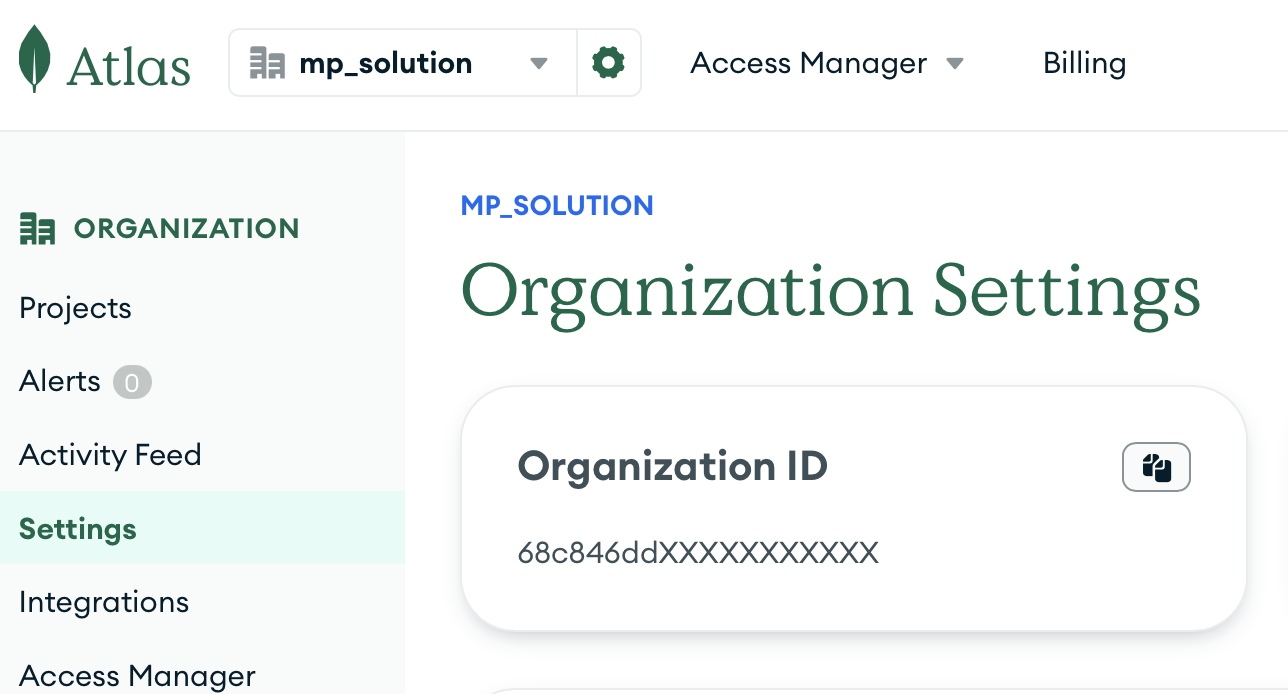
MongoDB Atlas Organization
API Keys (Public and Private)
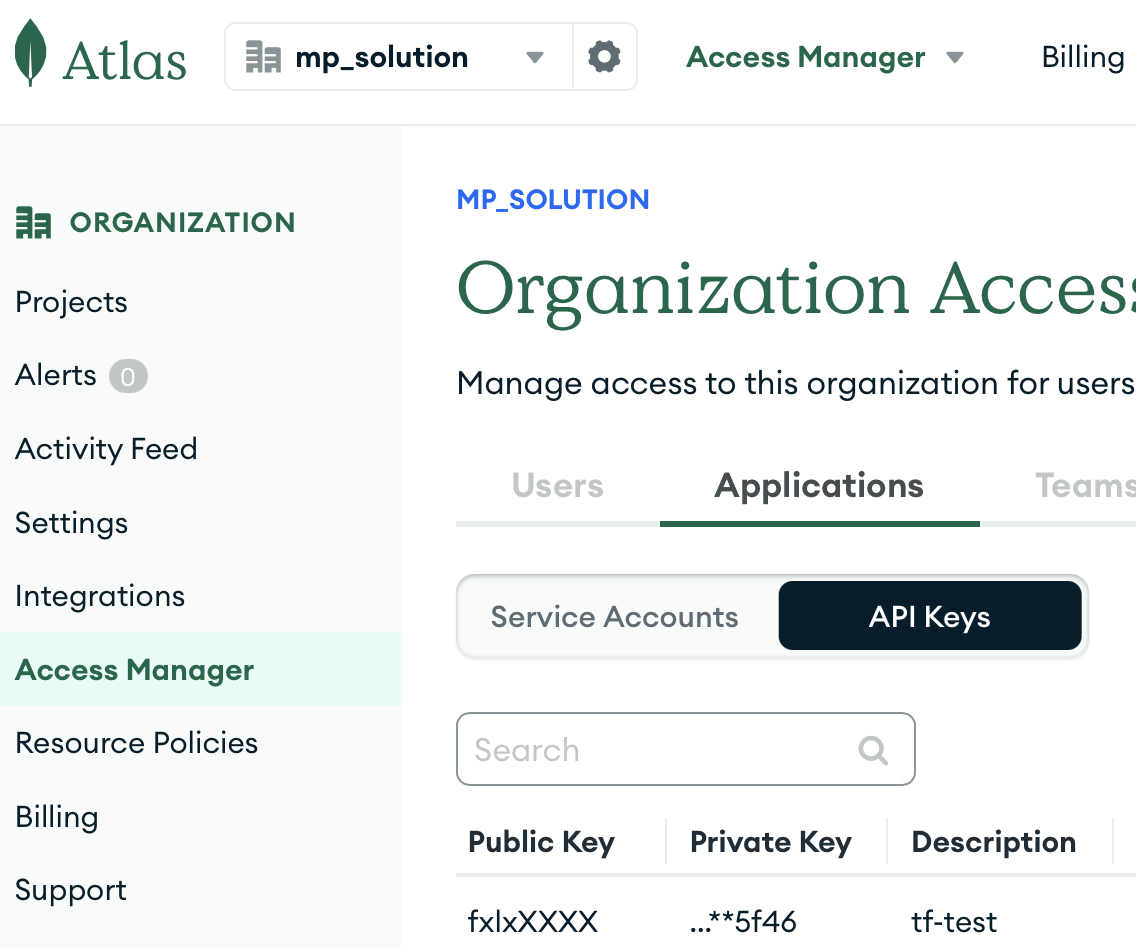
MongoDB Atlas API Keys
2. Configure environment variables
Set your MongoDB Atlas API credentials as environment variables:
export TF_VAR_mongodbatlas_public_key="your_public_key"
export TF_VAR_mongodbatlas_private_key="your_private_key"
export TF_VAR_mongodbatlas_org_id="your_org_id"
3. Deploy with Terraform
Deploy the infrastructure:
# Initialize Terraform
terraform init
# Review the deployment plan
terraform plan
# Deploy the infrastructure
terraform apply
4. Retrieve deployment outputs
After successful deployment, get the connection details:
# Get the API Gateway URL
terraform output -raw api_gateway_url
# Get the MongoDB connection string
terraform output -raw connection_string
5. Test the APIs
Test the deployed services to verify functionality:
# Test semantic search
python3 semantic_search_test.py
# Test todos service
python3 todos_service_test.py
Building microservices with this foundation
Service-per-database pattern
This solution implements the database-per-service pattern, a fundamental microservices principle where each service owns its data. The MongoDB Atlas cluster can host multiple databases, with each microservice using its own database and collections.
# Example: Deploy additional microservices
terraform apply -var="service_name=user-service" -var="database_name=users"
terraform apply -var="service_name=order-service" -var="database_name=orders"
terraform apply -var="service_name=inventory-service" -var="database_name=inventory"
terraform apply -var="service_name=recommendation-service" -var="database_name=recommendations"
AI-powered microservices with vector search
MongoDB Atlas Vector Search enables you to build intelligent microservices that leverage semantic similarity for advanced use cases:
Recommendation engines
Build microservices that suggest relevant products, content, or connections based on user behavior patterns and item similarities. Vector embeddings capture complex relationships that traditional filtering cannot detect.
Semantic search services
Create search microservices that understand intent and context, not just keyword matching. Users can search using natural language queries and find relevant results even when exact terms don’t match.
RAG (Retrieval-Augmented Generation) applications
Develop chatbots and AI assistants that can retrieve relevant context from your knowledge base before generating responses, ensuring accurate and contextually appropriate answers.
Service communication patterns
While this solution focuses on external API access, microservices often need to communicate with each other. Consider these patterns:
Synchronous communication
- REST API calls: For real-time data requirements
- GraphQL: For complex data fetching scenarios
- gRPC: For high-performance internal communication
Asynchronous communication
- Event-driven: Using Amazon EventBridge or SNS/SQS
- Message queues: For reliable, ordered processing
- Event sourcing: For audit trails and eventual consistency
Testing and using the solution
API endpoints
The deployed solution provides three sets of REST API endpoints across two API Gateways:
MongoDB Data API Gateway (Direct Database Operations)
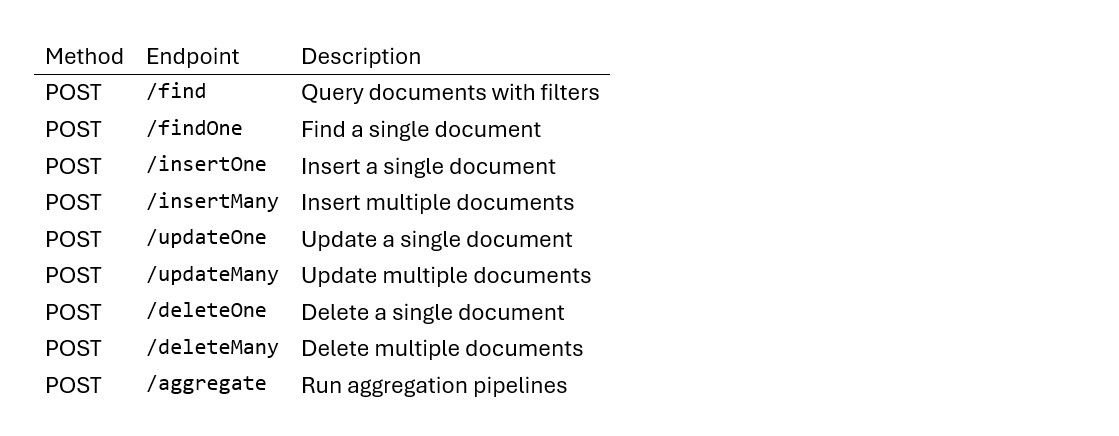
Application API Gateway - Semantic Search Service

Application API Gateway - Todos Service
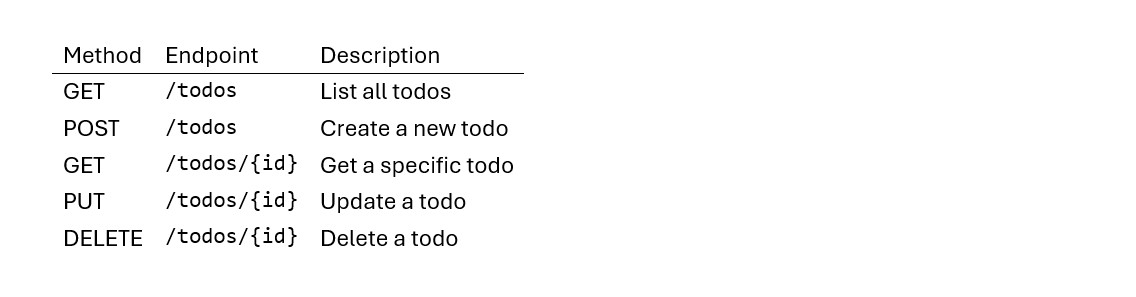
Request format
All endpoints expect JSON payloads following this structure:
{
"database": "your_database_name",
"collection": "your_collection_name",
"document": {...}, // for insert operations
"filter": {...}, // for query/update/delete operations
"update": {...}, // for update operations
"pipeline": [...] // for aggregation operations (including vector search)
}
Example usage
MongoDB Data API - Creating a user
curl -X POST https://your-data-api-gateway-url/insertOne \
-H "Content-Type: application/json" \
-H "Authorization: AWS4-HMAC-SHA256 ..." \
-d '{
"database": "users",
"collection": "profiles",
"document": {
"name": "John Doe",
"email": "john@example.com",
"role": "developer"
}
}'
MongoDB Data API - Querying users
curl -X POST https://your-data-api-gateway-url/find \
-H "Content-Type: application/json" \
-H "Authorization: AWS4-HMAC-SHA256 ..." \
-d '{
"database": "users",
"collection": "profiles",
"filter": {
"role": "developer"
}
}'
Semantic Search API - Natural language search
curl -X POST https://your-application-api-gateway-url/search \
-H "Content-Type: application/json" \
-H "Authorization: AWS4-HMAC-SHA256 ..." \
-d '{
"query": "beach vacation in tropical paradise",
"limit": 5
}'
Todos Service API - Creating a todo
curl -X POST https://your-application-api-gateway-url/todos \
-H "Content-Type: application/json" \
-H "Authorization: AWS4-HMAC-SHA256 ..." \
-d '{
"title": "Complete MongoDB workshop",
"description": "Finish all modules and deploy the solution"
}'
Todos Service API - Listing all todos
curl -X GET https://your-application-api-gateway-url/todos \
-H "Authorization: AWS4-HMAC-SHA256 ..."
Todos Service API - Updating a todo
curl -X PUT https://your-application-api-gateway-url/todos/{todo-id} \
-H "Content-Type: application/json" \
-H "Authorization: AWS4-HMAC-SHA256 ..." \
-d '{
"completed": true,
"description": "Workshop completed successfully!"
}'
Vector search for travel recommendations
curl -X POST https://your-api-gateway-url/aggregate \
-H "Content-Type: application/json" \
-H "Authorization: AWS4-HMAC-SHA256 ..." \
-d '{
"database": "travel",
"collection": "asia",
"pipeline": [
{
"$vectorSearch": {
"index": "vector_index",
"path": "details_embedding",
"queryVector": [0.1, 0.2, 0.3, ...1536 dimensions],
"numCandidates": 100,
"limit": 5
}
},
{
"$project": {
"_id": 1,
"index": 1,
"Place Name": 1,
"score": { "$meta": "vectorSearchScore" }
}
}
]
}'
Note: Vector search requires AWS Signature Version 4 authentication. The query vector should be generated using AWS Bedrock Titan Text Embeddings V1 model (1536 dimensions). The workshop includes automated data import with pre-generated embeddings for travel destinations in Asia.
Authentication
The API endpoints are secured through the AWS Lambda function and API Gateway integration. Authentication and authorization are handled at the infrastructure level through AWS IAM roles and policies, ensuring secure access to the MongoDB Atlas backend.
From monolith to microservices
Migration strategies
This solution provides an excellent foundation for migrating from monolithic applications to microservices:
1. Strangler Fig Pattern
Gradually replace monolith functionality by routing specific requests to new microservices: - Deploy this solution for a specific domain (e.g., user management) - Update API Gateway to route user-related requests to the new service - Gradually migrate additional domains using the same pattern
2. Database Decomposition
Use MongoDB’s flexible schema to extract domain-specific data: - Identify bounded contexts within your monolithic database - Create separate MongoDB databases for each microservice - Use MongoDB’s migration tools to move data between databases
3. API-First Development
Design new features as microservices from the start: - Use this solution template for new service development - Implement service contracts using OpenAPI specifications - Test service integration before monolith integration
Data consistency strategies
Microservices introduce distributed data challenges that require careful consideration:
Eventual Consistency
- Accept that data will be eventually consistent across services
- Use event-driven patterns to propagate changes
- Implement compensation patterns for failed operations
Saga Pattern
For complex transactions spanning multiple services: - Implement choreography-based sagas using events - Use orchestration-based sagas for complex workflows - Include compensation logic for rollback scenarios
Security considerations
Network security
- Private connectivity: Use AWS PrivateLink for production deployments
- Network access control: Restrict MongoDB Atlas access to specific IP ranges
- VPC integration: Deploy Lambda functions within VPCs for additional isolation
Authentication and authorization
- API Gateway authentication: Leverage AWS IAM, Cognito, or custom authorizers
- Service-to-service auth: Use IAM roles for internal service communication
- Database security: Enable MongoDB Atlas authentication and encryption
Data protection
- Encryption in transit: All communications use TLS encryption
- Encryption at rest: MongoDB Atlas provides automatic encryption
- Backup and recovery: Automated backups with point-in-time recovery
Production recommendations
# Example Terraform configuration for production
resource "mongodbatlas_network_peering" "main" {
project_id = mongodbatlas_project.main.id
container_id = mongodbatlas_cluster.main.container_id
provider_name = "AWS"
route_table_cidr_block = "10.0.0.0/16"
vpc_id = aws_vpc.main.id
aws_account_id = data.aws_caller_identity.current.account_id
}
resource "mongodbatlas_project_ip_access_list" "main" {
project_id = mongodbatlas_project.main.id
cidr_block = "10.0.0.0/16"
comment = "VPC CIDR"
}
Monitoring and observability
Built-in monitoring
- CloudWatch Logs: Automatic Lambda function logging
- CloudWatch Metrics: API Gateway and Lambda performance metrics
- MongoDB Atlas Monitoring: Database performance and health metrics
Advanced observability
Consider implementing additional monitoring for production:
- Distributed tracing: AWS X-Ray for request flow analysis
- Custom metrics: Business-specific metrics using CloudWatch custom metrics
- Alerting: CloudWatch Alarms for proactive issue detection
- Vector search metrics: Monitor search performance, relevance scores, and index utilization
Vector search performance optimization
- Index configuration: Optimize vector index parameters for your use case
- Embedding quality: Monitor and improve embedding model performance
- Search relevance: Track and optimize similarity thresholds and result quality
Scaling your microservices architecture
Horizontal scaling
- Lambda concurrency: Automatic scaling based on request volume
- MongoDB Atlas: Automatic cluster scaling and sharding
- API Gateway: Built-in scaling for API requests
Multi-region deployment
# Example multi-region deployment
module "us_east_service" {
source = "./modules/microservice"
region = "us-east-1"
# ... other configuration
}
module "eu_west_service" {
source = "./modules/microservice"
region = "eu-west-1"
# ... other configuration
}
Cleanup
To remove all deployed resources and avoid ongoing charges:
terraform destroy
This command will remove:
- AWS Lambda functions and API Gateway
- MongoDB Atlas cluster, database users, and project
- All associated IAM roles and policies
- CloudWatch log groups and metrics
Conclusion
This solution demonstrates how to rapidly deploy production-ready microservices using MongoDB Atlas through AWS Marketplace and modern AWS serverless technologies. The Infrastructure-as-Code approach ensures consistent, repeatable deployments while implementing security and scalability best practices.
Key benefits of this approach:
- Rapid development: Deploy new microservices in minutes, not days
- Cost efficiency: Pay only for actual usage with serverless technologies
- Enterprise ready: Built-in security, monitoring, and scaling capabilities
- Technology flexibility: Use this pattern across different programming languages and frameworks
By following the patterns and practices outlined in this solution, development teams can focus on delivering business value rather than managing infrastructure complexity, accelerating their journey to modern, scalable application architectures.
Why AWS Marketplace for on-demand cloud tools
Free to try. Deploy in minutes. Pay only for what you use.
Featured tools are designed to plug in to your AWS workflows and integrate with your favorite AWS services.
Subscribe through your AWS account with no upfront commitments, contracts, or approvals.
Try before you commit. Most tools include free trials or developer-tier pricing to support fast prototyping.
Only pay for what you use. Costs are consolidated with AWS billing for simplified payments, cost monitoring, and governance.
A broad selection of tools across observability, security, AI, data, and more can enhance how you build with AWS.