
Sold by: Pexip AS
Free Trial
AWS Free Tier
Pexip Infinity provides a secure, self-hosted video collaboration platform that enables seamless interoperability between Microsoft Teams, Zoom, Google Meet, and standards-based SIP/H.323 video conferencing systems.
Designed for classified communications in high-security environments where complete control is mandatory.
4.4
Overview
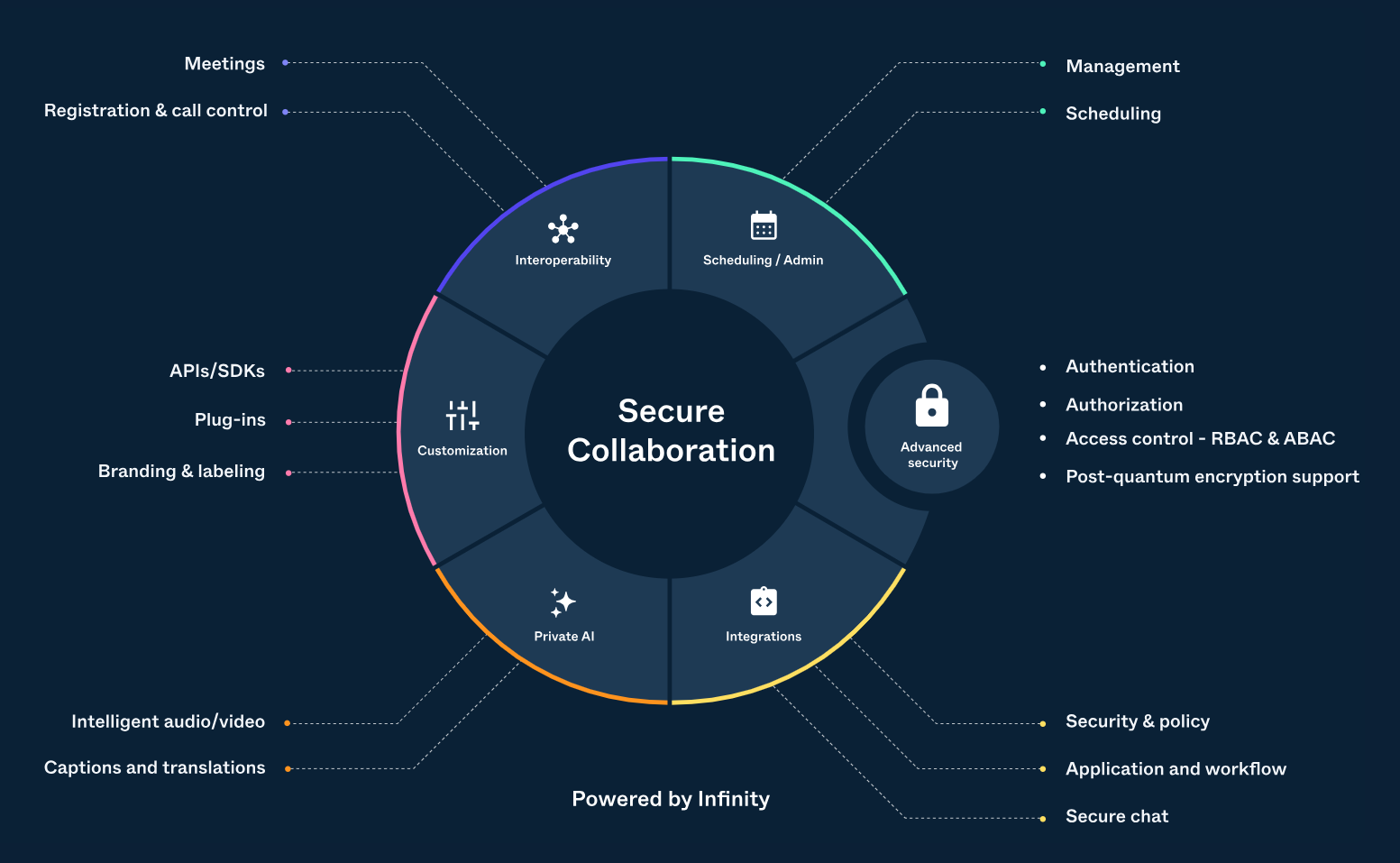
Pexip Infinity is a highly scalable, virtualized multipoint conferencing platform designed for organizations with strict security and data sovereignty requirements. It allows users to host high-definition video, audio, and web conferences in their own private AWS cloud environment.
Key Features & Capabilities:
- Broad Interoperability: Connects diverse communication tools including Microsoft Teams (CVI), Zoom, and legacy hardware endpoints.
- Flexible Deployment: Distributed architecture that allows for global scaling and "dynamic bursting" to handle peak conferencing demand.
- Advanced Security: Supports self-hosting for full data control, integration with internal authentication services, and secure meeting rooms (VMRs).
- Customization: Includes APIs for external policy control and custom integrations into existing workflows.
Value Proposition: Organizations benefit from a unified meeting experience that bridges technology silos while maintaining the highest levels of security and operational control.
Highlights
- Protect meetings: Make sure the right person is in the right meeting at the right time Control data: Take complete control of your data and privacy Collaborate freely: Collaborate on your terms, anywhere, for any mission
- Pexip Infinity is a self-hosted software solution, enabling customers complete control by deploying it in their private AWS account. Note that the AWS infrastructure charges are separate from the Pexip Infinity licensing procured through the AWS Marketplace transaction and the sole responsibility of the customer.
Details
New
Introducing multi-product solutions
You can now purchase comprehensive solutions tailored to use cases and industries.

Features and programs
Financing for AWS Marketplace purchases
AWS Marketplace now accepts line of credit payments through the PNC Vendor Finance program. This program is available to select AWS customers in the US, excluding NV, NC, ND, TN, & VT.

Pricing
Free trial
Try this product free according to the free trial terms set by the vendor.
Pricing is based on the duration and terms of your contract with the vendor, and additional usage. You pay upfront or in installments according to your contract terms with the vendor. This entitles you to a specified quantity of use for the contract duration. Usage-based pricing is in effect for overages or additional usage not covered in the contract. These charges are applied on top of the contract price. If you choose not to renew or replace your contract before the contract end date, access to your entitlements will expire.
Additional AWS infrastructure costs may apply. Use the AWS Pricing Calculator to estimate your infrastructure costs.
Dimension | Description | Cost/month |
|---|---|---|
Pexip Infinity | Base Platform | $2,000.00 |
Dimension | Cost/unit |
|---|---|
Pexip Infinity Capacity License | $1,000.00 |
Dimensions summary
Pexip Infinity uses a contract model built from two parts you buy together. The Base Platform provides the core software you deploy and run in your own AWS environment. You then add Capacity License units to scale how much concurrent video meeting capacity the platform supports. Both are priced per unit, so your total cost grows with the number of capacity units you commit to. Purchases run through AWS Marketplace, letting you consolidate billing under your existing AWS agreement and apply spend toward commitments. Final pricing and terms are set through a private offer.
Top-of-mind questions for buyers
Each Capacity License unit adds concurrent video meeting capacity to the platform. Capacity is measured by simultaneous calls the platform can handle at once, not by named users. You add units to match the peak number of concurrent connections your deployment needs to support.
Both charges apply together. The Base Platform covers the core software you deploy in your AWS environment. Capacity License units add concurrent meeting capacity on top. Your total scales with the number of Capacity License units you commit to, while the Base Platform stays constant.
This is a contract model, so your committed Base Platform and Capacity License fees apply for the term regardless of active meeting minutes. You deploy and run the software in your own AWS environment, so underlying AWS compute and storage charges apply separately based on the resources you run.
www.pexip.com
Helpful?
Vendor refund policy
As required by law.

Legal
Vendor terms and conditions
Upon subscribing to this product, you must acknowledge and agree to the terms and conditions outlined in the vendor's End User License Agreement (EULA) .
Content disclaimer
Vendors are responsible for their product descriptions and other product content. AWS does not warrant that vendors' product descriptions or other product content are accurate, complete, reliable, current, or error-free.
Delivery details
Software as a Service (SaaS)
SaaS delivers cloud-based software applications directly to customers over the internet. You can access these applications through a subscription model. You will pay recurring monthly usage fees through your AWS bill, while AWS handles deployment and infrastructure management, ensuring scalability, reliability, and seamless integration with other AWS services.
Support
Vendor support
AWS infrastructure support
AWS Support is a one-on-one, fast-response support channel that is staffed 24x7x365 with experienced and technical support engineers. The service helps customers of all sizes and technical abilities to successfully utilize the products and features provided by Amazon Web Services.
Similar products

Nexthink Infinity - the market's first automation and remediation platform - delivers unparalleled visibility across all environments so all IT teams can continuously improve the digital workplace to optimize productivity and cost.

Nexthink Infinity is a cloud-native digital employee experience (DEX) platform that gives IT teams real-time visibility into devices, applications, and employee sentiment across the enterprise. It combines endpoint telemetry, employee feedback, and AI-driven insights so IT can detect issues early, automate remediation, and improve productivity. Deploy it through AWS Marketplace to speed up procurement and consolidate billing.

Nexthink Infinity is a cloud-native digital employee experience (DEX) platform that gives IT teams real-time visibility into devices, applications, and employee sentiment across the enterprise. It combines endpoint telemetry, employee feedback, and AI-driven insights so IT can detect issues early, automate remediation, and improve productivity. Deploy it through AWS Marketplace to speed up procurement and consolidate billing.

Nexthink Infinity - the market's first automation and remediation platform - delivers unparalleled visibility across all environments so all IT teams can continuously improve the digital workplace to optimize productivity and cost.
Customer reviews
Jasper C.
Seamless Integrations for HIPAA-Compliant Meetings
Reviewed on Sep 04, 2026
Review provided by G2
What do you like best about the product?
I really appreciate Pexip's capability to integrate seamlessly with our existing SIP/H.323 hardware and Microsoft Teams CVI at our Charlotte pharma sites. This avoids costly hardware upgrades and provides a smooth connection. The detailed meeting audit logs are a major plus, simplifying my preparations for HIPAA quarterly regulatory audits. In particular, Pexip's flexible recording-purge workflows let me set custom retention periods or fully clear sensitive recordings, and its clean log metadata integration with Splunk SIEM reduces stress during audit evidence collection. Overall, these features significantly reduce my workload during audit cycles.
What do you dislike about the product?
During high peak webinar traffic, I've noticed occasional metadata drop-offs when forwarding logs to Splunk SIEM. Troubleshooting legacy H.323 endpoint glitches also lacks granular built-in diagnostic tools. I need to pull separate debug dumps manually, which adds extra labor, especially during busy HIPAA audit-prep cycles. Onboarding our fleet of older SIP/H.323 lab room endpoints required a lot of manual tuning, and configuring recording purge rules and Splunk SIEM log forwarding took careful work to get everything HIPAA-ready before our audits.
What problems is the product solving and how is that benefiting you?
Pexip bridges our legacy video hardware with Microsoft Teams, unifying communication across campuses and simplifying audit prep with robust logging. It prevents costly hardware refreshes and eases regulatory compliance with flexible workflows for confidential meetings.
Recommendations to others considering the product:
To enhance the user experience, consider implementing more robust diagnostic tools for legacy H.323 endpoints and improving metadata handling during peak traffic. Streamlining the onboarding process for older hardware and simplifying the configuration of recording purge rules could also be beneficial.
Legal Services
Zoom Room for Teams Calls Made Easy
Reviewed on Aug 19, 2026
Review provided by G2
What do you like best about the product?
The ability to use Zoom Room for Teams calls.
What do you dislike about the product?
Support documents on Pexip website is not very good. We had hard times integrating Polycom Group Series and the documentation was not very good.
What problems is the product solving and how is that benefiting you?
Connecting Teams with our older technology, Polycom Group Series.
Mental Health Care
Pexip Delivers the Best of Both Worlds for Video Infrastructure
Reviewed on Aug 08, 2026
Review provided by G2
What do you like best about the product?
Pexip offers the best of both worlds: old-school SIP/H.323 video infrastructure, along with modern options and choices.
What do you dislike about the product?
Upgrades can take quite a bit of time, and can be a bit nerve-wracking.
What problems is the product solving and how is that benefiting you?
Pexip lets us see patients via video, even in very rural areas where doctors are scarce or sometimes not available at all.
Sanket T.
Stable, Easy-to-Use Experience for Admins and Users
Reviewed on Aug 06, 2026
Review provided by G2
What do you like best about the product?
Stability and ease of use for admins and users
What do you dislike about the product?
Innovations. your product is great but will like to see more innovations offering entire suite like provisioning and managing endpoints from pexip cloud
What problems is the product solving and how is that benefiting you?
Interoperability between different platforms & External Collaboration
Banking
Outstanding Support and Seamless Microsoft Teams Integration
Reviewed on Aug 05, 2026
Review provided by G2
What do you like best about the product?
The best thing about Pexip is the quality of their support. Besides constantly providing updates on the status of the case, they do everything possible to investigate it and find a solution.
Another great advantage of Pexip is its seamless integration with Microsoft Teams, which is constantly updated to guarantee top performance. On top of that, it offers amazing UI/UX customization, allowing you to tailor the environment with your company's branding and give users a smooth, one touch join experience.
And the centralized monitoring in Pexip Control Center, the detailed data and analytics it provides are extremly useful for troubleshooting.
Another great advantage of Pexip is its seamless integration with Microsoft Teams, which is constantly updated to guarantee top performance. On top of that, it offers amazing UI/UX customization, allowing you to tailor the environment with your company's branding and give users a smooth, one touch join experience.
And the centralized monitoring in Pexip Control Center, the detailed data and analytics it provides are extremly useful for troubleshooting.
What do you dislike about the product?
There is still a room for improvement in Pexip's reporting and analytics. It would be very helpful to have more granular data export options, allowing us to select specific metrics before exporting, as well as tha ability to schedule automated reports. Additionally, simplifying the administration UI for complex routing configurations would make day to day management even better.
What problems is the product solving and how is that benefiting you?
Pexip allow us to make calls from non-Microsoft videoconferencing systems using SIP protocol, which provides better troubleshooting and call insights. On top of that, for the end user, the look and feel is the same as regural Teams meeting.