
Sold by: IBM Software
Deployed on AWS
IBM Cloudability is a FinOps platform that helps finance, engineering, and cloud operations teams allocate, govern, forecast, and optimize multi-cloud spending.
4
Overview
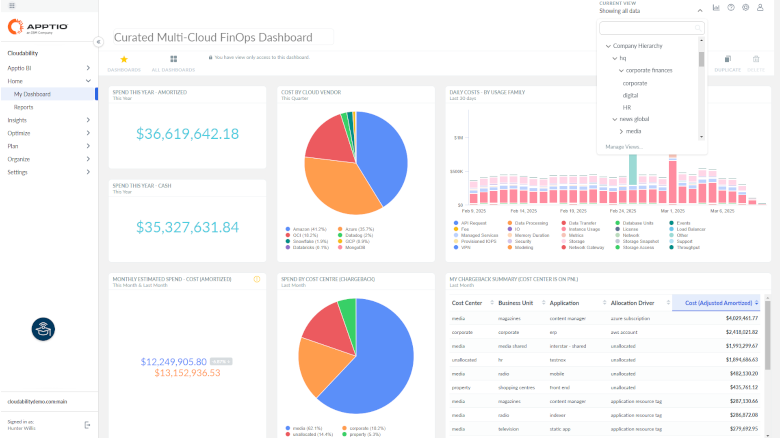
Image
IBM Cloudability product screenshot

Image
IBM Cloudability product screenshot 2

Video
Allocate and Optimize Cloud Resources

Video
Enable Team Ownership of Cloud Spend

Video
Cloudability Overview
IBM Cloudability is a flexible FinOps tool that provides cloud cost management and optimization capabilities to enable IT, finance, and business teams to optimize their costs and communicate the business value of the cloud.
Built to support the organizational adoption of cloud financial management or FinOps, IBM Cloudability streamlines the process of bringing financial accountability to the scalable, variable, and distributed nature of the cloud.
IBM Cloudability normalizes, and structures cloud billing and usage data from across your public cloud ecosystem so that you can actively manage spend and consumption to continuously improve the unit economics of cloud services, enabling your team to:
-
Adapt cloud cost structures to the business by fully and accurately allocating your cloud spend, including containers and support charges, to ensure a full chargeback of cloud costs.
-
Optimize cloud costs, leveraging rightsizing recommendations across major cloud service providers to reduce operating expenses and fund future innovation investments.
-
Improve business agility and decision making with speed and confidence, enabling team ownership and accountability of cloud spend to better align cloud investments to business objectives.
To request a free trial: https://www.apptio.com/cloudability-free-trial-request/
For buyer information, please visit:https://www.ibm.com/docs/en/announcements/apptio-cloudability-essentials-standard-premium?mhsrc=ibmsearch_a&mhq=IBM%20finops
Highlights
- Cloud cost transparency and control with comprehensive analytics, flexible reporting and forecasting
- Optimize cloud costs with operational efficiency
- Establish collaborative FinOps and enable practitioners across IT, Finance and DevOps
Details
Sold by
Categories
Delivery method
Deployed on AWS
New
Introducing multi-product solutions
You can now purchase comprehensive solutions tailored to use cases and industries.

Features and programs
Buyer guide
Gain valuable insights from real users who purchased this product, powered by PeerSpot.

Financing for AWS Marketplace purchases
AWS Marketplace now accepts line of credit payments through the PNC Vendor Finance program. This program is available to select AWS customers in the US, excluding NV, NC, ND, TN, & VT.

Pricing
Pricing is based on the duration and terms of your contract with the vendor, and additional usage. You pay upfront or in installments according to your contract terms with the vendor. This entitles you to a specified quantity of use for the contract duration. Usage-based pricing is in effect for overages or additional usage not covered in the contract. These charges are applied on top of the contract price. If you choose not to renew or replace your contract before the contract end date, access to your entitlements will expire.
Additional AWS infrastructure costs may apply. Use the AWS Pricing Calculator to estimate your infrastructure costs.
Dimension | Description | Cost/12 months |
|---|---|---|
CLDY1MYEAR | Manage up to $1M of annual cloud spend. Addl fees above $1M/year | $30,000.00 |
CLDY3MYEAR | Manage up to $3M of annual cloud spend. Addl fees above $3M/year | $76,680.00 |
CLDY6MYEAR | Manage up to $6M of annual cloud spend. Addl fees above $7M/year | $132,480.00 |
Cloud spend above contracted amount in a Commercial Billing total commit model | Cloud spend above contracted amount in a Commercial Billing total commit model | $1,104.00 |
Cloud spend above contracted amount in a Commercial Billing annual commit model | Cloud spend above contracted amount in a Commercial Billing annual commit model | $1,104.00 |
Dimension | Cost/unit |
|---|---|
Cloud Spend above contracted amount in an Annual Commit Model | $3,300.00 |
Cloud spend above contracted amount in a Total Commit model | $3,300.00 |
Cloud spend above contracted amount in a Financial Planning Annual Commit model | $1,650.00 |
Cloud spend above contracted amount in a Financial PlanningTotal Commit model | $1,650.00 |
Cloud spend above contracted amount in an Essentials Annual commit model | $1,930.00 |
Cloud spend above contracted amount in an Essentials Total commit model | $1,930.00 |
Cloud spend above contracte amount in a Standard Annual commit model | $2,760.00 |
Cloud spend above contracted amount in a Standard Total commit model | $2,760.00 |
Cloud spend above contracted amount in a Premium Annual commit model | $4,410.00 |
Cloud spend above contracted amount in a Premium Total commit model | $4,410.00 |
Dimensions summary
Pricing is based on the cloud spend you manage under a contract. You commit to a spend amount, and separate dimensions charge for cloud spend above that contracted amount. Overage dimensions come in two commit types: Annual Commit and Total Commit. These overage options exist across product editions, including Essentials, Standard, Premium, Financial Planning, and Commercial Billing. Fixed tiers (CLDY1MYEAR, CLDY3MYEAR, CLDY6MYEAR) manage set annual spend levels, with added fees above each threshold. Separate dimensions cover Advanced Containers, billed per virtual processor core per year, plus a matching core overage charge.
Top-of-mind questions for buyers
It refers to the amount of cloud infrastructure spend the platform tracks and optimizes. You commit to a spend level under your contract. The platform monitors that spend to find waste, rightsize resources, and align costs to business metrics. Your billing is tied to the volume of cloud spend under management.
Separate overage dimensions apply once your managed cloud spend passes the contracted amount. Each commit type has its own overage charge for the spend above the threshold. Fixed tiers like CLDY1MYEAR, CLDY3MYEAR, and CLDY6MYEAR also add fees when your annual spend exceeds their stated levels.
Advanced Containers bills per virtual processor core per year, not by cloud spend managed. A core is a processing unit assigned to your container workloads. A matching core overage charge applies if usage passes your committed core count. This charge runs alongside any cloud spend dimensions on the same contract.
www.apptio.com
Helpful?
Vendor refund policy
Refunds, cancellations, and credits are issued on a case-by-case basis.
Custom pricing options
Request a private offer to receive a custom quote.

Legal
Vendor terms and conditions
Upon subscribing to this product, you must acknowledge and agree to the terms and conditions outlined in the vendor's End User License Agreement (EULA) .
Content disclaimer
Vendors are responsible for their product descriptions and other product content. AWS does not warrant that vendors' product descriptions or other product content are accurate, complete, reliable, current, or error-free.
Delivery details
Software as a Service (SaaS)
SaaS delivers cloud-based software applications directly to customers over the internet. You can access these applications through a subscription model. You will pay recurring monthly usage fees through your AWS bill, while AWS handles deployment and infrastructure management, ensuring scalability, reliability, and seamless integration with other AWS services.
Resources
Support
Vendor support
Open a new case or review existing cases:
AWS infrastructure support
AWS Support is a one-on-one, fast-response support channel that is staffed 24x7x365 with experienced and technical support engineers. The service helps customers of all sizes and technical abilities to successfully utilize the products and features provided by Amazon Web Services.
Updated weekly

Top
10
In Cloud Governance, Planning and Forecasting, Cloud Financial Management
Top
10
In Analytic Platforms
Top
25
In ML Solutions
Sentiment is AI generated from actual customer reviews on AWS and G2
Functionality
Ease of use
Customer service
Cost effectiveness
Positive reviews
Mixed reviews
Negative reviews
AI generated from product descriptions
Cloud Cost Analytics and Reporting
Provides comprehensive analytics, flexible reporting, and forecasting capabilities for cloud cost transparency and control
Multi-Cloud Billing Data Normalization
Normalizes and structures cloud billing and usage data across public cloud ecosystems to enable active spend and consumption management
Cloud Cost Rightsizing Recommendations
Delivers rightsizing recommendations across major cloud service providers to optimize operating expenses
Cloud Spend Allocation and Chargeback
Supports full and accurate allocation of cloud spend including containers and support charges for complete cost chargeback
FinOps Governance and Collaboration
Enables collaborative FinOps practices with governance capabilities across IT, Finance, and DevOps teams for cloud spend accountability
Unified Cost Aggregation
Consolidates cost data from multiple sources including AWS, Azure, GCP, OCI, Kubernetes, Snowflake, Databricks, Datadog, OpenAI, and Anthropic into a single real-time view without requiring code changes or agent deployments.
Retroactive Cost Allocation
Applies cost allocation logic retroactively across any dimension such as team, environment, customer, product feature, transaction, or AI model using Virtual Tags engine without modifying original cloud tags.
Automated Waste Detection
CostGuard module continuously scans for idle resources, rightsizing opportunities, commitment underutilization, and cost anomalies with actionable recommendations prioritized by savings impact.
AI-Powered Query Interface
Billy AI FinOps assistant enables natural language queries for cost-related information and surfaces spending patterns, anomalies, and budget comparisons through live data visualizations.
Unit Economics Calculation
Computes cost per customer, feature, transaction, or AI inference call with automatic and custom unit economics capabilities to connect cloud spend to revenue and inform pricing strategy.
Real-time Cost Monitoring and Anomaly Detection
AI-powered anomaly detection continuously monitors cloud and SaaS spend in real time to surface unexpected cost spikes before they become costly issues.
Multi-cloud Cost Aggregation and Unified Visibility
Unified cost data aggregation across AWS, Azure, and GCP with accurate billing data available within 24 hours, enabling tracking of costs across all cloud providers in a single platform.
Kubernetes and EKS Cost Allocation
Correlates Kubernetes metrics with AWS CUR and pricing data to reveal pod and node utilization, application-level costs, and waste, enabling accurate allocation of EKS spend including shared and idle resources.
Demand Forecasting and Cost Prediction
Runs forecast models on historical CUR files to generate demand forecasts for future cloud resource consumption and spending patterns.
Standard contract
No
No
Customer reviews
Shivakant Mishra
Cloud cost visibility has improved and guides data-based budgeting and optimization
Reviewed on Oct 21, 2026
Review from a verified AWS customer
What is our primary use case?
My main use case for Apptio Cloudability is cloud cost management and optimization, as I use it to track cloud spending, understand where my budget is going, and identify services or resources that are costing more than expected. On a day-to-day basis, I review cost reports, monitor spending trends, compare costs across different teams or projects, and look for opportunities to reduce unnecessary cloud expenses, which helps improve cost visibility and make better decisions about cloud resources.
One specific example of how I used Apptio Cloudability to identify and reduce unnecessary cloud expenses involves a scenario where I noticed that some cloud resources were running continuously, even during periods when they were not being used much. I used Apptio Cloudability to review cloud spending and identify resources with higher costs than expected, and based on the reports, I reviewed those resources with my team to look for opportunities to right-size them or reduce unnecessary uses. This helped my organization become more cost-conscious, and the biggest benefit was making every decision based on actual cost data rather than assumptions.
Apptio Cloudability helps bring transparency and control to our cloud spending, as I use it to monitor trends, understand spending patterns, and identify areas where we can optimize resources efficiently. It aids in having more informed discussions with my team on cloud budgets and resource allocation, making it an important part of our cloud cost management process as we continue looking for ways to use it more effectively.
Apptio Cloudability interacts with my data from AWS and other cloud environments by connecting with the AWS environment and collecting cost and usage data through billing reports and integration. This information is pulled into the dashboard and reporting, which improves my understanding of which resources are driving costs and gives my team better visibility into spending patterns, making it easier to spot cost increases and optimization opportunities, ultimately streamlining cost tracking and budget planning under one central dashboard.
How has it helped my organization?
Since I started using Apptio Cloudability, there have been many positive impacts on my organization, including gaining better visibility into cloud spending and improving how I monitor costs. My team can identify areas where spending is higher than expected and explore opportunities to optimize resource uses, making budget planning and cost reporting more structured and allowing us to make more informed decisions based on actual spending data, leading to becoming more cost-conscious overall.
What is most valuable?
The best features of Apptio Cloudability include cloud cost visibility, cloud cost allocation, budgeting, and cost optimization recommendations, with the cost reporting and dashboard being particularly useful in helping me understand where my cloud budget is going and identify areas for improvement. Another useful feature is the ability to allocate costs across different teams and projects, which improves accountability, and overall, these features help me make better decisions about cloud spending and manage resources more effectively.
The feature I rely on the most is cost visibility, while the reporting dashboard is also the most useful, as it helps me track cloud spending, understand which services are driving costs, and identify unusual spending patterns for my team. It makes cost reviews much easier because I can use actual data instead of relying on assumptions, and it also helps me prioritize optimization opportunities and make better decisions about resource allocation, improving my understanding of cloud costs and making my cost management process more structured.
What needs improvement?
Apptio Cloudability could be improved by making its dashboard more customizable and easier to navigate, as sometimes it would be helpful to have more actionable recommendations that clearly explain which resources I should optimize and what the potential cost savings could be. I would also like to see more accurate cost forecasting for detailed reports, so while the platform is useful, these improvements could enhance its efficiency for day-to-day cost management.
For how long have I used the solution?
I have been personally using Apptio Cloudability for around eight months, and my company has been using it for approximately one year, during which I have gained hands-on experience with its features, specifically in cloud cost management, cost visibility, and analyzing cloud spending.
What other advice do I have?
On a scale of one to ten, I would rate Apptio Cloudability an eight, as it provides good visibility into cloud spending, useful cost reporting, and practical optimization insights, making it valuable for day-to-day cost management. I'm giving it an eight because I believe there is still room for improvement in customization, reporting speed, and more actionable cost-saving recommendations, but overall, it is a reliable tool that delivers good value for my team.
I chose an eight out of ten specifically because I think it provides good visibility into cloud spending, but for practical optimization insights, I find it a little less valuable for day-to-day cloud cost management. I believe there is still room for improvement in customization, reporting speed, and actionable cost-saving recommendations.
Regarding Apptio Cloudability's AI capabilities, I think security and governance are crucial factors for me when using it, especially when dealing with sensitive cloud cost and infrastructure information. The platform provides user access control, which helps manage cloud financial data in a structured way and, combined with following my company's internal security policy, ensures that the right people have access to the right information. Overall, I feel comfortable, although I believe security and AI governance should always be reviewed and improved.
Apptio Cloudability is deployed in my organization mainly as a hybrid cloud, used as a cloud-based SaaS platform to monitor and manage cloud spending. My cloud infrastructure operates primarily in a public cloud, and I use Apptio Cloudability to get a consolidated view of costs across my cloud resources, which helps my team track spending, analyze usage, and identify optimization opportunities from a central dashboard.
I am using AWS and Azure while also setting up Google Cloud; my organization primarily uses Amazon Web Services with Apptio Cloudability to monitor and analyze cloud spending. I leverage it to track resources, as it is hybrid, allowing me to integrate Google Cloud, AWS, and potentially other resources to optimize the cloud budget.
Which deployment model are you using for this solution?
Hybrid Cloud
If public cloud, private cloud, or hybrid cloud, which cloud provider do you use?
Amazon Web Services (AWS)
reviewer2900961
Cost visibility and governance have improved but cost accuracy and interface still need work
Reviewed on Sep 19, 2026
Review from a verified AWS customer
What is our primary use case?
My main use case for Apptio Cloudability is cost optimization, governance, and cost visibility across different clouds.
A specific example of how I use Apptio Cloudability for cost optimization and governance is that I access the platform to verify that the agent has been connected from different clouds to Apptio Cloudability, where I can confirm how the costs are reflected across different clouds, providing a clearer picture of the cost. I can then compare which services to disable and cancel out resources that are not needed.
On a daily basis, Apptio Cloudability creates different ephemeral sandboxes that scale up, and I need to monitor those costs because if any are left orphaned, the prices of the resources continue to escalate. I must ensure that there are no orphaned sandboxes, as each sandbox has infrastructure on the cloud. To remove those, I use Apptio Cloudability for visibility and then determine which sandboxes are not needed before removing them.
What is most valuable?
The best features Apptio Cloudability offers are dashboarding, cloud visibility, and governance. It ensures compliance with HIPAA and helps me follow industry standards.
Apptio Cloudability has positively impacted my organization primarily through cloud cost optimization, where I can have visibility across teams, see those costs, audit them, and remove unnecessary resources. This helps with cost optimization. Currently, I am mostly using the cost optimization and dashboarding features along with the data analysis features they provide.
What needs improvement?
Sometimes, I find the user interface of Apptio Cloudability a little complicated, as it has extra data and options that become difficult for visibility, but overall, it is good to have.
For how long have I used the solution?
I have been using Apptio Cloudability for around two years.
What do I think about the stability of the solution?
In my experience, Apptio Cloudability is stable; however, sometimes there are issues with cost parity.
What do I think about the scalability of the solution?
I think Apptio Cloudability's scalability is good.
How are customer service and support?
I have never used customer support for Apptio Cloudability, as we are using it as an open-source tool.
Which solution did I use previously and why did I switch?
I do not remember which tool we were using before Apptio Cloudability. Since I joined, it has been Apptio Cloudability, although I am aware of the OpenCost tool and am considering it.
What was our ROI?
I have seen a return on investment with money saved and time saved since using Apptio Cloudability.
What other advice do I have?
My advice to others looking into using Apptio Cloudability is that it is a good platform, well-organized, and great for dashboarding and cost visibility, but sometimes I feel there is not parity with exact costs and the visibility on the platform. I would rate this review seven out of ten.
Nicholas Stephens
Cloud cost dashboards have empowered detailed reporting and driven ongoing savings decisions
Reviewed on Aug 27, 2026
Review from a verified AWS customer
What is our primary use case?
My main use case for Apptio Cloudability is performing ad-hoc reports and monthly and quarterly reporting in Apptio BI, which help us to do number presentations with our large customers in our company. I have some experience building dashboards.
A specific example of a report I built using Apptio Cloudability is in Apptio BI, where dashboard functionality allows users to create dashboards that show monthly and month-to-date numbers based on usage and services, as well as how much savings we get from savings plans and RIs. Recently, I also built a report to look at one service in a certain region for a customer, and that service was some kind of compute service.
Regarding my use case and experience building dashboards and reports in Apptio Cloudability, it provides standard AWS features. I quite like it for building dashboards and doing ad-hoc reports. It is amazing to be able to track AWS or whatever cloud spending down to the penny and know where it is going. In many ways, we underutilize it at Southwest because we do not have unit economics set up yet, so it can help with those types of detailed reporting. Apptio Cloudability is a very powerful tool and very impressive.
What is most valuable?
The best features Apptio Cloudability offers, in my opinion, include the BI tool, which is great, and also their right-sizing feature and optimization feature that help teams and users of Apptio see what they should focus on in terms of saving money. If someone could get most of their right-sizing and optimization recommendations completed, there is a really great case for being able to save a lot of money quickly. I think that is really underutilized at a lot of organizations, at least at Southwest Airlines.
Getting teams to incorporate optimization and right-sizing work into their sprints would be huge. Apptio Cloudability being able to show it and present it in an easy way is great. I know they are working on something called Turbonomic, which I think allows FinOps teams to see those recommendations and then make some of those changes in different development environments. We have not quite got that fired up yet, and I do not know that our development organization would be okay with us doing that, but it seems Turbonomic is an extension to that and could allow FinOps teams to make the first move instead of waiting for a development organization. This would be turning that FinOps group into an engineering team in a way.
Apptio Cloudability has positively impacted my organization by providing us with a wonderful tool to visualize and track our spend in AWS. If you can measure it, you can fix it, and Apptio Cloudability does a great job of measuring things so that we can fix them.
Compared to the infrastructure organization, it is great to be able to talk to our executives and very quickly get the cost and spending information that they request because it is completely simple with Apptio Cloudability. In contrast, many of our other teams have to go talk to project managers and their FP&A people to figure out what their costs are. We can just click a button and figure it out in a few seconds.
Out of the BI tools, right-sizing, and optimization features I mentioned, I find myself using Apptio BI most often on the FinOps team as we are doing reporting monthly and showing people our dashboards in monthly meetings that we have on a regular basis with the same teams. It is difficult to act on the recommendations and see them to fruition, just because it requires our organization's developers and the dev organization to make those first moves in production or in their dev, QA, and production environments.
We have FinOps analysts who are dedicated to those teams and serve as points of contact, and we build those relationships and work with those teams to get optimization done, right-sizing done, and also be aware of spending. We help them with anomaly detection and that kind of monitoring.
What needs improvement?
I find that Apptio Cloudability is one of those things where I just poke around until I have what I am looking for. I would not say it is the most user-friendly system; there is a lot to it, so it can take some getting used to. Although it has a great UI, you just have to really understand what the different filters mean. There are a lot of filters based on usage, cost, vendor, and many different things, and it is a lot to take in. It takes some time to figure out what you are trying to do. I do not bother some of my more senior teammates who have more experience with it just because I am trying to learn it through doing, or I have been in the last year as I have gotten on the team.
Apptio Cloudability is a powerful tool, and I am more of a novice with it, so I would not want to suggest anything. I am not a super user of Apptio Cloudability.
For how long have I used the solution?
I have been using Apptio Cloudability for one year.
What other advice do I have?
I would advise that if you can create a team of analysts and engineers to use the tool alongside AWS, you can have a potent team that can save the organization a lot of money. There is a lot of wasteful spending in the cloud, and many customers and users do not know how to use it in an optimized way. Apptio Cloudability is a fantastic tool to help FinOps teams and engineering teams focus on cost reduction, cost savings, measuring, displaying, and telling the story about their numbers. It provides great actionable data, making it a fantastic tool in that respect. I would rate this product a 9 out of 10.
Which deployment model are you using for this solution?
Public Cloud
If public cloud, private cloud, or hybrid cloud, which cloud provider do you use?
Amazon Web Services (AWS)
Suky Singh
Cloud cost visibility has empowered major savings while multi-cloud insights still need to grow
Reviewed on Aug 27, 2026
Review provided by PeerSpot
What is our primary use case?
My main use case for Apptio Cloudability is optimization, cloud cost management, and container management.
I have a cloud environment that hosts containers, and I use information around the CPU requests and limits and memory requests and limits to size my infrastructure correctly.
Cloud optimization is very key for me, and I am using that to embed into my cloud cost optimization recommendations process which I send out to my engineers, and I track against the implementation of those recommendations.
What is most valuable?
The best features that Apptio Cloudability offers are the cloud optimization for the AWS field and the Azure field, which are probably the best.
What makes the cloud optimization for AWS and Azure stand out for me is the broad range of tactics that are available there, which allows my teams to really concentrate on the core infrastructure elements.
Apptio Cloudability has positively impacted my organization by providing cloud cost visibility, allowing there to be trust in those numbers, providing showback and chargeback capabilities, and ensuring that cloud costs are fully understood. Additionally, it has allowed me to identify cloud cost optimization opportunities, enabling my organization to utilize savings to reinvest in adding further value for my customers.
What needs improvement?
Apptio Cloudability can be improved as the range of optimization opportunities for Google is very limited in comparison to competitors in the market.
Additionally, the fact that Alibaba Cloud is not incorporated in the tool has meant that I have had to create a Power BI ecosystem outside in order to get the total TCO view for all my cloud providers.
Other improvements needed for Apptio Cloudability include the ability to forecast down at the SKU or at least at the service level, which would be quite useful to have. Additionally, more visibility around input, output, cash token usage would be very important on the AI side, as would more visibility around egress costs and retry costs.
Apptio Cloudability needs to evolve and develop much faster in comparison to competitors in the market. On the Google side, numerous other vendors have three to four, if not five, different optimization tactics, but within Apptio Cloudability, there are only two, and even the native console at Google has more optimization tactics. The cadence and speed of development must improve on a tool such as Apptio Cloudability, especially as AI usage and AI capabilities increase.
For how long have I used the solution?
I have been using Apptio Cloudability for five years.
What do I think about the stability of the solution?
Apptio Cloudability does have its issues, and I have been experiencing a few outage issues; the communication around those outage issues has been quite poor.
What do I think about the scalability of the solution?
Regarding Apptio Cloudability's scalability, on a scale of one to 10, I would rate it probably a seven to eight, as it also depends on the complexity of the business dimensions I have introduced, which can make it a bit unwieldy if I am doing too much in there.
How are customer service and support?
The customer support is probably a six to seven; it has been quite slow, and getting resolution can be quite slow, although I do have monthly governance meetings where I highlight these outstanding cases that I do have.
I would rate the customer support as seven out of 10.
Which solution did I use previously and why did I switch?
I previously used Excel because my cloud spend was quite small, but after seeing the exponential growth in cloud coming in 2019, that is when I decided to move to Apptio Cloudability.
How was the initial setup?
I did not purchase Apptio Cloudability through the AWS Marketplace.
What about the implementation team?
My advice to others looking into using Apptio Cloudability is to have a view of what hyperscalers or vendors they are going to be using over the next few years and marry that in with Apptio Cloudability. I would recommend they ensure that they have enough people trained up to implement the tool and to understand the billing concepts at the front. Additionally, any team that is going to implement this should be FinOps experts, because that is what is needed. One of the biggest issues in a regulated environment is to check the references of Apptio's other clients to see how easy it was for the tool to get implemented in such an environment.
What was our ROI?
I have seen a return on investment; the issue was that before I purchased Apptio Cloudability, I just had two people running it in an Excel spreadsheet. Obviously, five years down the line, I now have an ecosystem that is looking after in excess of 350 million dollars a year of cloud spend going through the tool. Therefore, the employees have actually gone up because the demand on the team has gone up. The return on investment is definitely substantial because the level of savings that I have achieved are significant, and my team is seen as a resource to come to in order to make those savings. The numbers have become the trusted source and are used in vendor negotiations and forecasting discussions at the board level.
What's my experience with pricing, setup cost, and licensing?
My experience with pricing, setup cost, and licensing was limited because it was done centrally by procurement.
Which other solutions did I evaluate?
Before choosing Apptio Cloudability, I evaluated building something myself first and foremost, and then I looked at a number of other products at the time, although I cannot remember who they were, as it has been five or six years ago. I am constantly evolving and having discussions with tooling providers over the last five years as well.
What other advice do I have?
Regarding Apptio Cloudability's AI capabilities, governance and security are improving, but they could be better; it seems to be a slow-evolving process to get that capability there.
The issue with Apptio Cloudability's AI capabilities regarding its accuracy and reliability of output is really on the data, as the tool itself can deliver some good features, but if the data is not good enough, then it renders the functionality meaningless.
I would rate this product overall a six out of 10.
Keighley Williams
Finops platform has uncovered waste, supports right-sizing, and improves contract negotiations
Reviewed on Aug 26, 2026
Review from a verified AWS customer
What is our primary use case?
My main use case for Apptio Cloudability was for a project called Project Apollo that had a target of saving a million Australian dollars by April 2026. It had a lot to do with contract renewals, and we needed to save a certain amount of money for the budget so that we could get a better negotiation price on our contract renewals. We were able to achieve this through the use of detection of rogue spending through Apptio Cloudability.
There was a lot of rogue spending we detected through Apptio Cloudability. We found out there were multiple Direct Connects that we were using and we did not need as many. We were able to find those through Apptio Cloudability and rationalize those Direct Connects, which saved us a lot of money. We also found wasted, very old EBS snapshots that were costing us a lot of money. They could be anywhere between seven to ten years old and had never been cleaned up before. They were costing us a lot of money. Additionally, we identified opportunities for EC2 right-sizing, RDS right-sizing, and OpenShift right-sizing. Right-sizing across all the different platforms was something we were able to utilize and detect through Apptio Cloudability to find out what the cost efficiencies were and the savings going forward. These were the harder projects to complete and take to fruition because there was a lot of communication needed with application owners. There was also a lot of agreement needed on timings and windows when these things could be done. Nonetheless, we were able to keep pushing the project, keep on top of it, and continue following up. The hardest part was keeping the communications open and ensuring that the people involved understood why we were doing what we were doing and why it needed to be done. If it ain't broke, do not fix it is very much a mantra across industry and life in general. Many of these production loads were not broken, but they were costing us a fortune. Communication was absolutely one of the biggest things here.
What is most valuable?
The best features Apptio Cloudability offers are the advanced right-sizing capabilities after Turbonomic was integrated into Apptio Cloudability Premium, which is a fantastic feature. You get really good savings outcomes, and you are able to see quickly by changing generations and EC instance types. Recently, they changed the default on the costing when you go into these windows, whether it is right-sizing or reporting or whatever. The default for costing has changed, and that default is what we use all the time, which has benefited us from that perspective.
I like the new dark layout. It is much better on your eyes. Recently, I have been pushing for information about the MCP for Apptio Cloudability and the AI integration that is coming extremely soon. I have seen some private preview on that, so I am very excited about those coming forward. The core business mappings and the dimension side of Apptio Cloudability is really good to set up ownership and chargeback and showback. We are sorely lacking in chargeback and showback at the moment. We have created a center of excellence that includes cyber and different teams in CloudOps to ensure that we have a FinOps lens across everything we do going forward. Apptio Cloudability is a huge part of that because it also means that it is really easy to give RBAC control, that is, view access to different teams so that they can see what is happening with their costing really clearly. They can see from a granular point of view exactly what they are spending on and how they can fix it going forward and what they can improve and change from a different instance type or a different way of turning on and off machines and all these different things. Apptio Cloudability was really good from that perspective, being able to help us with those detections.
The support that we have had throughout has been exemplary. The consultation when we set up Apptio Cloudability was excellent. I worked one-on-one with the consultants for quite a few weeks. I then took over the project to onboarding Apptio Cloudability into the company. The one-to-one relationship I had with the engineers and the project managers from IBM/Apptio Cloudability was second to none. It was always a matter of going out of the way to help us make sure that we had everything set up as we needed so that we could use the product as fast as we could and in the best way that we could. I want to give a shout out to support and the professional services.
I would put support and EC2 right-sizing right up with each other because without the support, it would not have been as easy to understand how to leverage these capabilities and get the most out of Apptio Cloudability. I would be able to use the EC2 right-sizing ability of Apptio Cloudability and to understand the reporting and the view side. I would definitely be putting the onboarding experience and the consultation experience right up there.
What needs improvement?
I think Apptio Cloudability is a really very good platform for costing. I do understand it can be cost-prohibitive to buy the license to use Apptio Cloudability because of the way it charges. If you are not a big enough company, I can understand that. Apptio Cloudability might want to look at costing models for smaller businesses that cannot afford Apptio Cloudability or Apptio Cloudability Premium. I believe Premium is about one hundred thousand dollars or so in US dollars, and Apptio Cloudability I believe is a little bit less than that. However, there are small businesses out there that will not be able to afford either option. I wonder if that is a market to target, to look at a smaller model of Apptio Cloudability or at least a smaller costing model that could help those businesses as well.
The other thing is that there are just a few anomalies inside Apptio Cloudability that I think can definitely be improved. It seems a really small thing, but when you are using it, it can actually be quite a big thing. Since Turbonomic has been integrated with Apptio Cloudability, as good as that is to be able to get those different costing figures and larger savings, it does not give the ability to have an instant Jira ticket integration with the Turbonomic costings or the advanced costing, if you would call it, inside Apptio Cloudability Premium. In the basic costings, you can use Jira and you can open up a Jira ticket and you can have all this information straight from Apptio Cloudability straight in the Jira ticket, assign it to someone, and then someone is working on it. You cannot do that in Turbonomic at the moment. I am not really sure why. Obviously, there is some sort of development issue behind the scenes, I imagine, with the way that Turbonomic works compared to the basic costing. It would be a huge advantage to be able to do that, to just open a Jira ticket, have someone assigned to it, and then proceed forward. I definitely think they should look at that.
For how long have I used the solution?
I have been using Apptio Cloudability for about a year and a half or just under a year and a half.
What do I think about the stability of the solution?
I have not experienced any stability issues.
What do I think about the scalability of the solution?
I have not experienced any scalability issues. It absorbs our new accounts quite easily. As for completely new resources, time will tell. We have only had Apptio Cloudability for about seven to eight months, and many people still do not know about it. They know of it, but they have not really used it, and they have not used it in its entirety. It is early days.
How are customer service and support?
The support that we have had throughout has been exemplary. The consultation when we set up Apptio Cloudability was excellent. I worked one-on-one with the consultants for quite a few weeks. I then took over the project to onboarding Apptio Cloudability into the company. The one-to-one relationship I had with the engineers and the project managers from IBM/Apptio Cloudability was second to none. It was always a matter of going out of the way to help us make sure that we had everything set up as we needed so that we could use the product as fast as we could and in the best way that we could. I want to give a shout out to support and the professional services.
I would put support and EC2 right-sizing right up with each other because without the support, it would not have been as easy to understand how to leverage these capabilities and get the most out of Apptio Cloudability to be able to use the EC2 right-sizing ability of Apptio Cloudability and to understand the reporting and the view side. I would definitely be putting the onboarding experience and the consultation experience right up there.
Which solution did I use previously and why did I switch?
We did not have any other platform doing proper FinOps. We did have a platform that probably could do some FinOps, but it was not being leveraged properly, and it was not socialized properly. People did not really get it. When you have new leadership that comes into the company that has a preference for a certain product, they normally push that product, especially if they have had favorable and particularly good experiences with that product.
How was the initial setup?
It was fine. It absorbs our new accounts quite easily. As for completely new resources, time will tell. We have only had Apptio Cloudability for about seven to eight months, and many people still do not know about it. They know of it, but they have not really used it, and they have not used it in its entirety. It is early days.
What about the implementation team?
I have been one-on-one with Apptio professional services for a while and I have been pushing a few things and they are coming to fruition. The MCP server for Apptio Cloudability was one that I thought was sorely lacking, but obviously they were working on that in the background and it is in private preview now. It is going to be really interesting to see how we can leverage that and utilize that. I have used an MCP server but I do not think it is necessarily the absolute official MCP of Apptio Cloudability, but it is one that is being used widely. I used it for documentation and it was particularly good.
What was our ROI?
Apptio Cloudability helped us save a million dollars up until the contract renewal. It was a large catalyst to why we were able to get a really good contract renewal with AWS going forward. We needed to save a certain amount of money so that we had it in the budget to have leverage in the CloudOps area.
We reduced our waste by at least twenty percent really quickly because we were able to jump onto EBS snapshots straight away for these sort of things. That saved us anywhere between one hundred fifty and two hundred thousand dollars really fast because we had a lot of snapshots in a lot of accounts. It was just wasted storage. We also had some accounts that were sitting there and needed to be decommissioned. They were non-production accounts but they were taking up a lot of project dollars. Apptio Cloudability helped us ensure that because we could see the cost so clearly, we got these accounts decommissioned as soon as possible, rather than saying we would get to that. It was made a priority because we could see what it was costing us so clearly.
What's my experience with pricing, setup cost, and licensing?
I was consulted on pricing and setup cost because we already had a governance tool that was costing us about seventy thousand dollars a year. I knew that tool had the ability to do pricing and cost savings and efficiencies. I also knew that the company was not leveraging it anywhere near the ability and capacity that it had. When people came to me and asked what I thought about this from a cost perspective, I said I was not sure. The product looked great, but one hundred thousand dollars, I did not know. I think if the only tool you have is Apptio Cloudability, maybe that is a fair pricing. It is very hard for me to judge when it comes to pricing. I did not have a lot to do with the negotiation of buying. I was just consulted a little on what my opinion was on going forward, whether we should get Premium or Apptio Cloudability.
Premium is particularly good with the advanced Turbonomics, but you do pay for that. I think if you are not going to use a lot of the automation that comes with the Turbonomics, with the cost findings and the ability to turn machines on and off and all these different things, it is probably not worth paying for Premium. But if you are going to utilize that, it definitely is worth paying for Premium.
Which other solutions did I evaluate?
I looked at Vanta in the past, and I looked at CloudCheckr, and there are a few other options we looked at. One of the main reasons that we came down to Apptio Cloudability is mainly because we had new leadership come in, and they had used Apptio Cloudability quite a lot. They really enjoyed the product. They had a relationship with the people pushing the product, not a personal relationship but a work relationship through a vendor relationship with these people before. They thought it was worth bringing in because of such a good experience before, which makes sense. I have seen this happen many times.
What other advice do I have?
If you are a small business and you are thinking about Apptio Cloudability, probably err on the side of Apptio Cloudability rather than Apptio Cloudability Premium. Also, check your pricing models and have a chat with your professional services and sales and the rest of them to find out the best deal you can possibly get because they are very good to deal with. They believe in their product and they want to get a good price for their product, but also they want to make sure that you are happy with their product and utilizing it to the best of your ability. Support has really been good from that perspective.
Apptio Cloudability does not give the ability to have an instant Jira ticket integration with the Turbonomic costings or the advanced costing inside Apptio Cloudability Premium at the moment. You cannot do that in Turbonomic right now. It would be a huge advantage if you could.
I would rate this review as an eight out of ten.