AI-assisted coding and verification
Write, review, and validate code faster with AI coding assistants, intelligent API management, and automated security scanning embedded directly in the developer workflow.
About the series
This article is part of a multi-part Amazon Web Services (AWS)–authored series that explores the use of modern DevOps tools and AI-based features to accelerate software development and maintenance on AWS. The first article in this series introduces a fictional scenario, with detailed background on the example.com application and the team managing it. This article focuses on the code and verify phases of the software development lifecycle (SDLC). You will learn how modern functionalities and AI-based features provided by independent software vendors (ISVs), when used alongside AWS services, can help you fix the application’s highly coupled architecture, expedite coding, offload the test case and documentation generation, and help you get ahead of security issues.
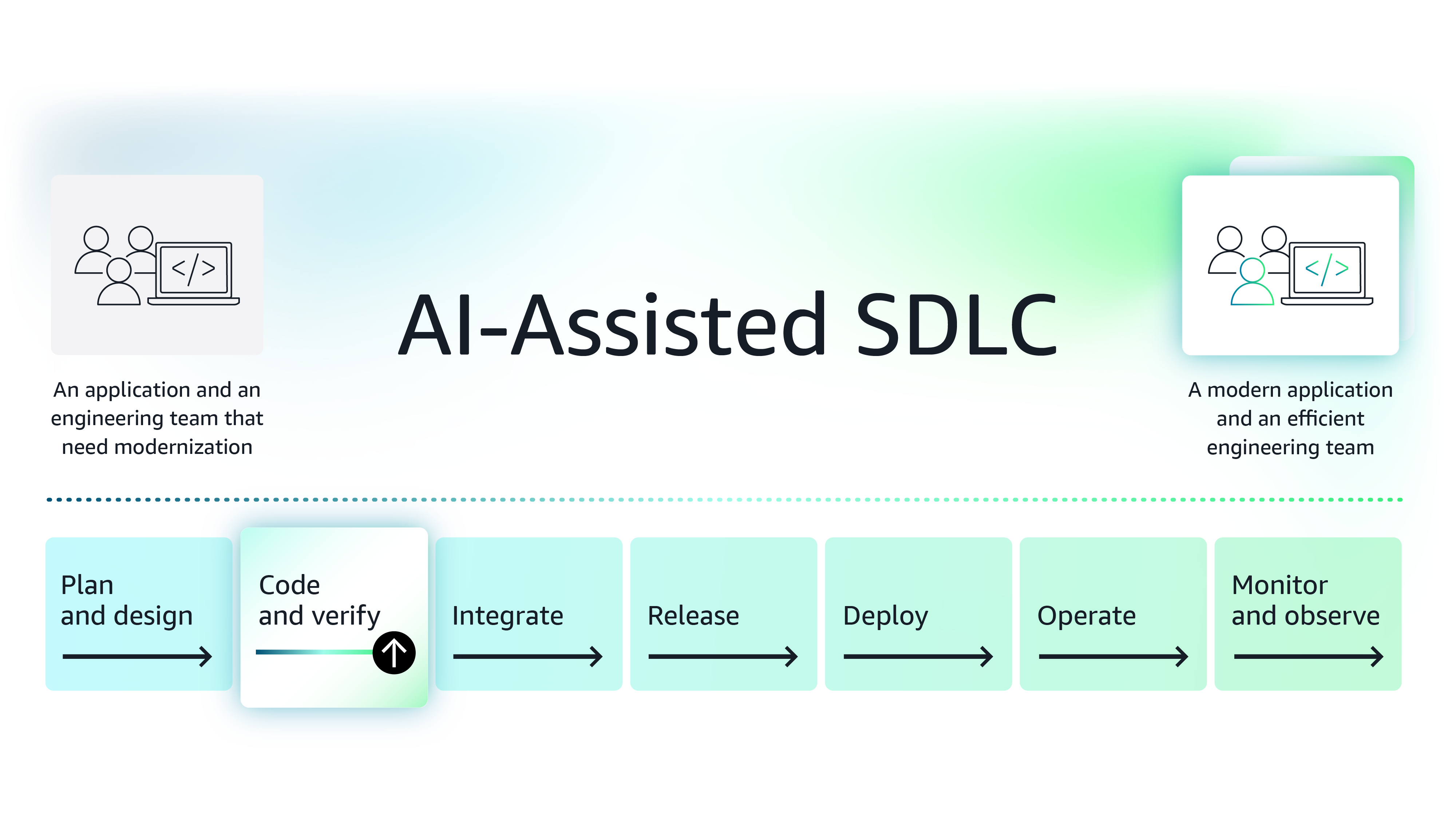
Figure 1: The modernization journey of the example.com application
Background –You are a principal engineer brought on board to support and optimize a legacy application, example.com. Since joining, you have assembled a small team of junior and mid-level engineers and gained access to shared resources such as a site reliability engineer (SRE) and a product manager. While the junior engineers are focused on day-to-day activities, you and the mid-level full-stack engineers are working to identify the right modernization approach, as well as the tools you will need to develop and implement new features.
After diving deep into the application code and the operating procedures followed by the junior engineers, you identify multiple issues with the current approach and must address the following issues:
- Fix the application’s highly coupled architecture - The current application has tens of thousands of lines of code and is quite complex. The codebase is packaged and deployed as a single Web Application Archive (.WAR) file and must be debugged locally. This increases the time required for debugging the application significantly.
- Accelerate coding and offload the test case generation - Engineers have to write code from scratch using a traditional integrated development environment (IDE) for software development that only offers simplistic autocomplete functionality, such as creating getters/setters. As engineers spend significant cycles writing boilerplate code, they often consider unit tests and documentation as afterthoughts. As test coverage is low, issues are often missed in lower environments.
- Get ahead of security issues in the code - The legacy application has been in maintenance mode for a long time. There are multiple dated packages referenced only by commented/dead code. As packages are not updated, they often appear in the form of a P0/S0 from the security team.
Fix highly coupled architecture
Use-case 1: Fix the application’s highly coupled architecture
The highly coupled architecture is the root cause of many issues faced by the current engineering team. You need to convert it into a microservices-based architecture, but the application is large, and your team has already committed to building new features. This means you must take a step-by-step approach toward migrating the application to a microservices-based architecture.
Note: Microservices are part of a development approach in which software is composed of small, independent services that communicate over well-defined APIs. A loosely coupled, microservices-based architecture can help the team improve software manageability, scalability, testability, and maintainability. Leveraging this approach can accelerate innovation.
To incrementally migrate a monolithic or highly coupled application into a microservices architecture, you can use the Strangler Fig pattern. This design pattern involves extracting existing modules or building new features in the form of a microservice around the existing system. It operates in three phases:
1. Transform - The transformation starts by intercepting all calls to the application using a proxy, such as an API gateway in front of the current application, to redirect all traffic.
2. Co-exist - During this phase, you migrate or build new functionality as a microservice to which the proxy directly points.
3. Eliminate - Over time, the entire application is decoupled into microservices running behind the proxy.
As shown in Figure 2, you can use the Strangler Fig pattern to fix your application architecture:
- During the Transform phase, you put a proxy in front of the current application and then convert the module in which the most issues occur, in this case, the search/filter module, into a microservice.
- As you start migrating modules, you move into the Coexist phase. Customer calls made to the search/filter module with the proxy will be redirected to the newly migrated microservice. This will help you reduce the time required for module maintenance activities.
- By the time you move into the Eliminate phase, you will have migrated the entire application into a microservices-based architecture and built new features on the side.
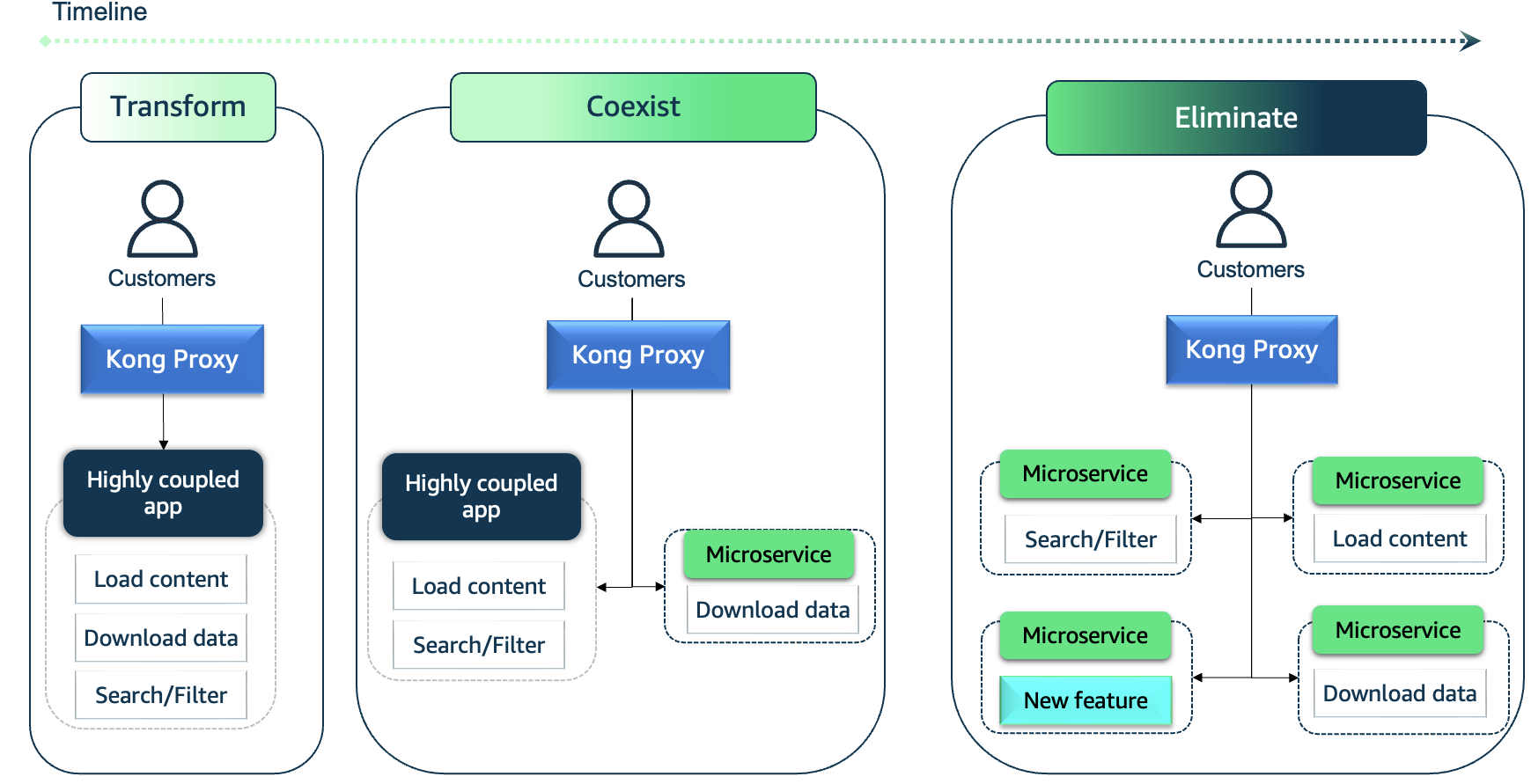
Figure 2: Enabling microservices-based architecture using the Strangler Fig pattern
When building a microservices-based architecture, you must carefully select the API gateway or Proxy.
API gateway/proxy considerations
The API gateway should enable you to build a flexible architecture where the backend can run on-premises or in the AWS. The architecture should be optimized for microservices and support features like authentication, rate-limiting, and request payload transformations. If these capabilities are provided by the proxy, you won’t need to worry about implementing them within the microservices themselves. As you explore gateway solutions in AWS Marketplace, you discover Kong Gateway, a mature cloud-native API gateway from Kong.
About Kong Gateway Enterprise
Kong Gateway is an end-to-end service control platform that supports complex infrastructure setups. Kong Gateway offers a comprehensive suite of enterprise-grade API features, including out-of-the-box TLS authentication, OpenID support, OpenTelemetry for logging, security features such as Cross-origin Resource Sharing (CORS) and IP protection, and traffic control-related functionality such as advanced rate limiting—all while maintaining high performance.
By abstracting infrastructure-related code from the microservice, your engineering team can focus on business logic. As shown in Figure 3, you start by putting the current application behind the Kong Proxy and, over the next few months, you can migrate existing code and build a new microservices-based architecture.
Figure 3: Kong Gateway enabling microservices-based architecture using the Strangler Fig pattern
By addressing the highly coupled architecture—the primary cause of the legacy application’s slowness, regression issues, and maintenance issues—you can enable engineers to debug and develop faster, while scaling individual microservices based on their actual hardware requirements.
Accelerate coding
Use-case 2: Accelerate coding and offload the test case generation
As a principal engineer who is experienced with modern, AI-assisted integrated development environments (IDEs), you know that AI has made significant advances in coding-related tasks. Using an AI-powered IDE can help the example.com engineering team offload manual tasks, such as generating test cases, boilerplate code, and documentation, while helping them understand code.
You decide to introduce IntelliJ IDEA, a popular Java IDE, to your team. In IDEA, you discover JetBrains IDE Services’ integrated AI-based plugin, which offers seamless, context-aware support within the IDE.
About JetBrains AI
JetBrains IDE Services is a developer experience suite that accelerates software development while making developer tools easy to manage at scale. JetBrains IDE Services provides a centralized way to provision IntelliJ-based IDEs to developers’ machines, securely and consistently, across the entire organization.
Since your team members are ramping up on AI, you show them how easily they can generate code that invokes an LLM from Amazon Bedrock with a simple prompt such as the following:
Write a java function that accepts a prompt and invokes Claude 3.7 model available via Amazon Bedrock.
As shown in Figure 4, the plugin creates clean code that invokes an LLM along with the appropriate documentation.
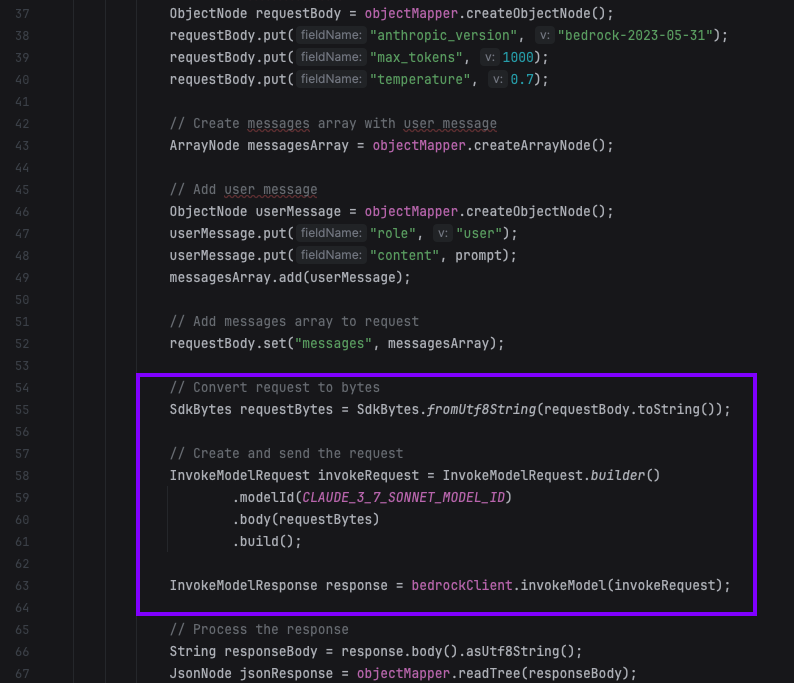
Figure 4: Code generated by JetBrains AI
The plugin can also help engineers read and understand code quickly. As you can see in Figure 5, the plugin provides details such as key components and overall information about what the relevant methods do.
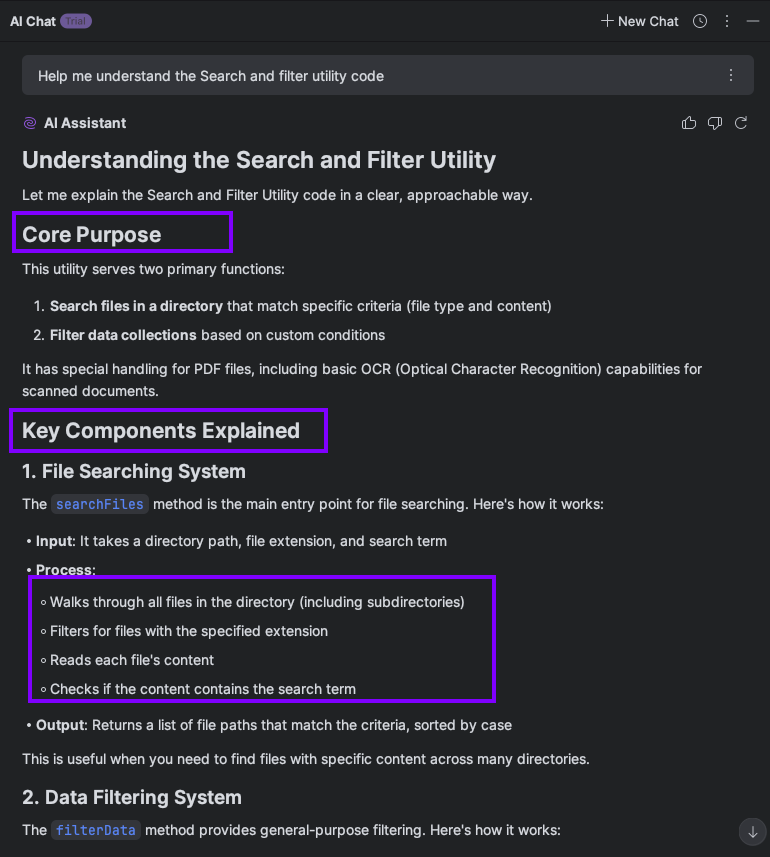
Figure 5: Using the JetBrains AI assistant to explain code, in this case, the search/filter utility.
The JetBrains AI assistant can also perform the following tasks:
- Generate unit tests—enabling engineers to address testing debt more quickly.
- Refactor code—making it more maintainable.
- Suggest issue fix—helping engineers save significant time on resolving issues.
With a powerful IDE, your team can offload mundane tasks, such as writing simple code and writing unit tests. This will help add efficiencies into your new feature development process.
Security scanning
Use-case 3: Get ahead of security issues in the code
Your team receives many security issue tickets from the central security team. Because example.com is a legacy application, it has references to stale and unused libraries, which cause the team to be pulled into P0 and P1 issues related to security vulnerabilities. Your team needs a way to proactively identify vulnerabilities in the code. You need a security solution that scans code and containers, detects vulnerabilities, and manages open-source risks.
You discover Mend AppSec Platform, a security scanning solution that meets your needs.
About Mend AppSec Platform
Mend.io offers the first AI-native AppSec platform, purpose-built to help organizations secure AI-generated code, embedded AI components, and traditional application elements, so they can move beyond chasing vulnerabilities and start proactively reducing real application risk.
As shown in Figure 6, you can directly install the Mend Advice plugin from your IDE. This enables engineers to scan code directly, even before committing. With this functionality, your team can identify vulnerabilities proactively.
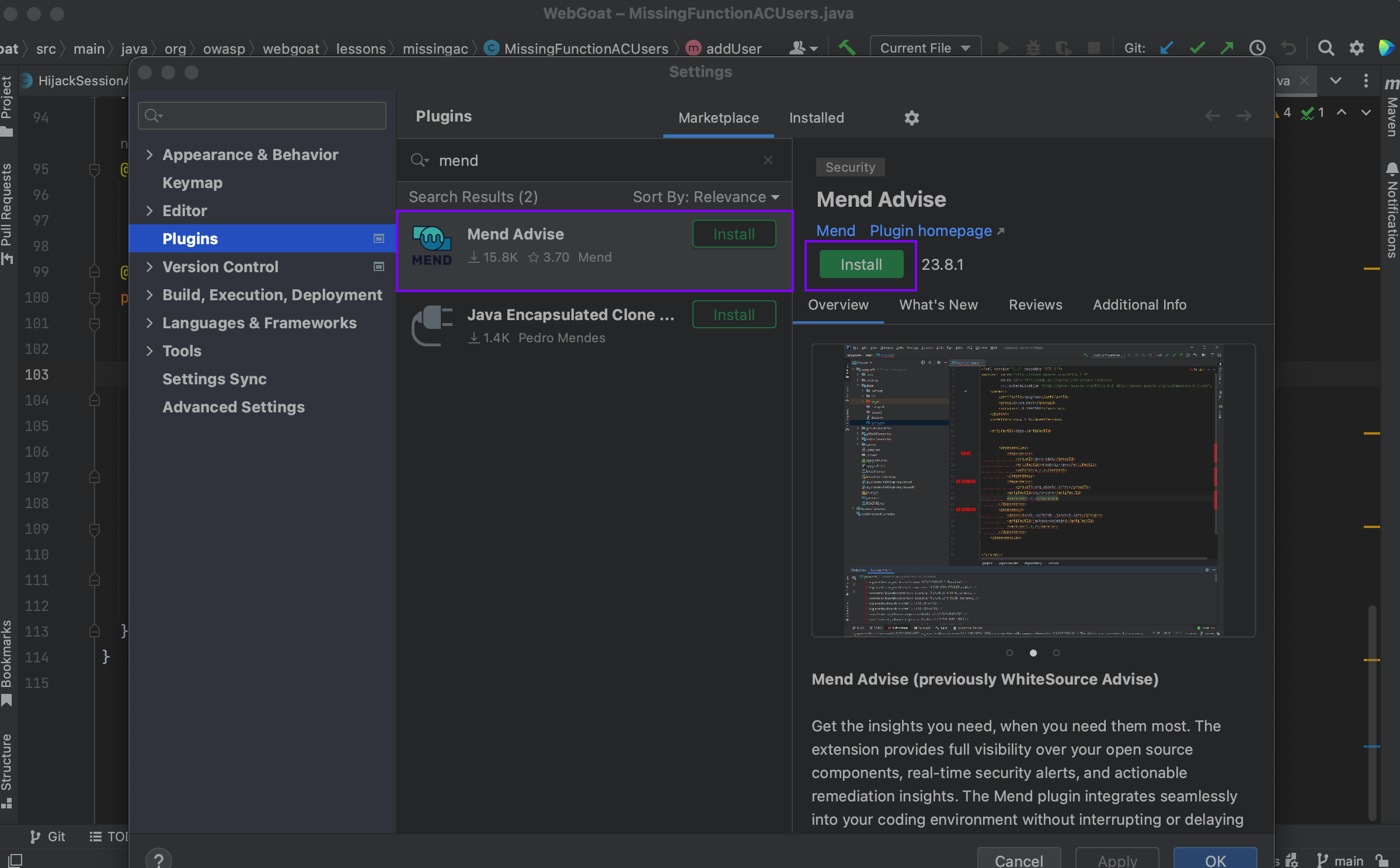
Figure 6: Security scanning through IntelliJ IDEA using the Mend Advise plugin.
Figure 7 shows how your team can view all security vulnerabilities associated with libraries referenced in pom.xml. This functionality will make it easy for engineers to proactively address any issues before tickets are raised by the central security team.
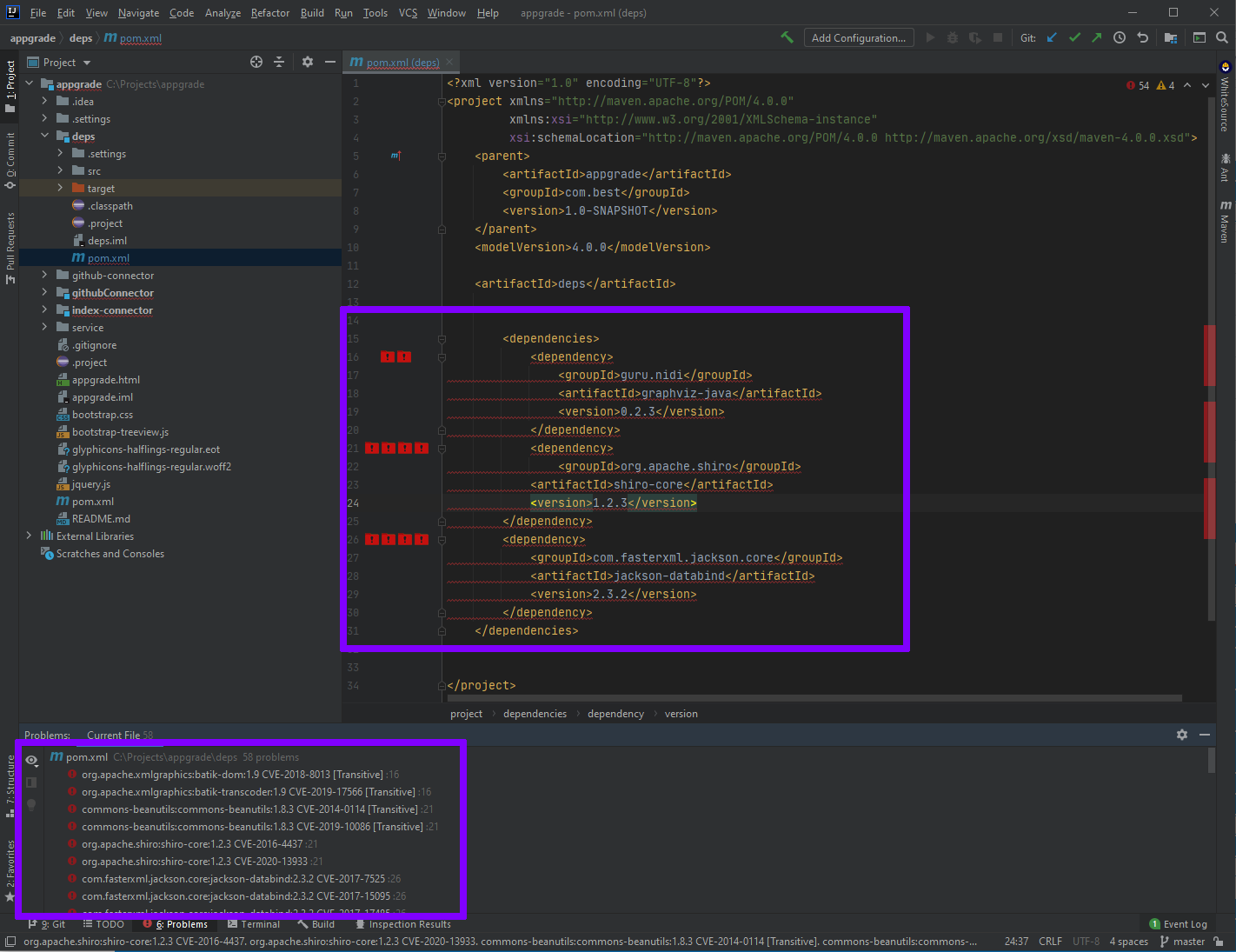
Figure 7: Security vulnerabilities identified inpom.xml [Mend Advise for PyCharm]
Furthermore, as shown in Figure 8, the Mend AppSec security plugin enables you to further drill down and explore details such as Common Vulnerabilities and Exposures (CVE) information, as well as the potential fix that is required.
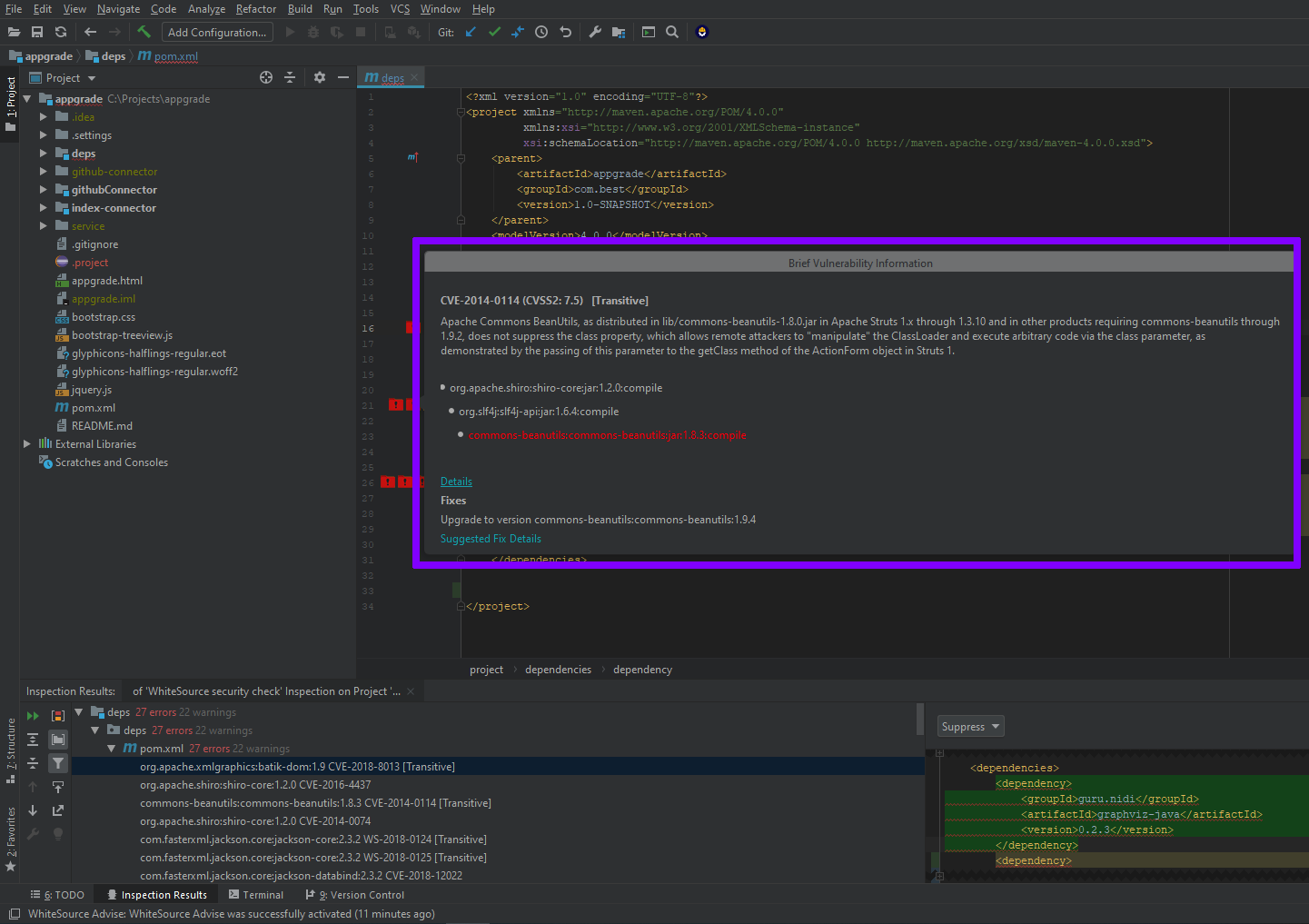
Figure 8: Details of the security vulnerability [Mend Advise for PyCharm]
By identifying and fixing security vulnerabilities in both the existing application and new features your team builds, it can stay ahead of security escalations.
Key takeaways
This article explained how implementing an AI-augmented approach with humans in the loop can help you address the following use cases efficiently:
- Address architectural debt by converting the example.com application’s highly coupled architecture into an AWS-native microservices-based architecture.
- Expedite coding speed while increasing test coverage and addressing documentation debt.
- Proactively address security debt by identifying P0 and P1 issues related to security vulnerabilities in the code.
- Combining third-party software solutions from AWS Marketplace with your AWS-native tooling to add efficiency in the code and review stage.
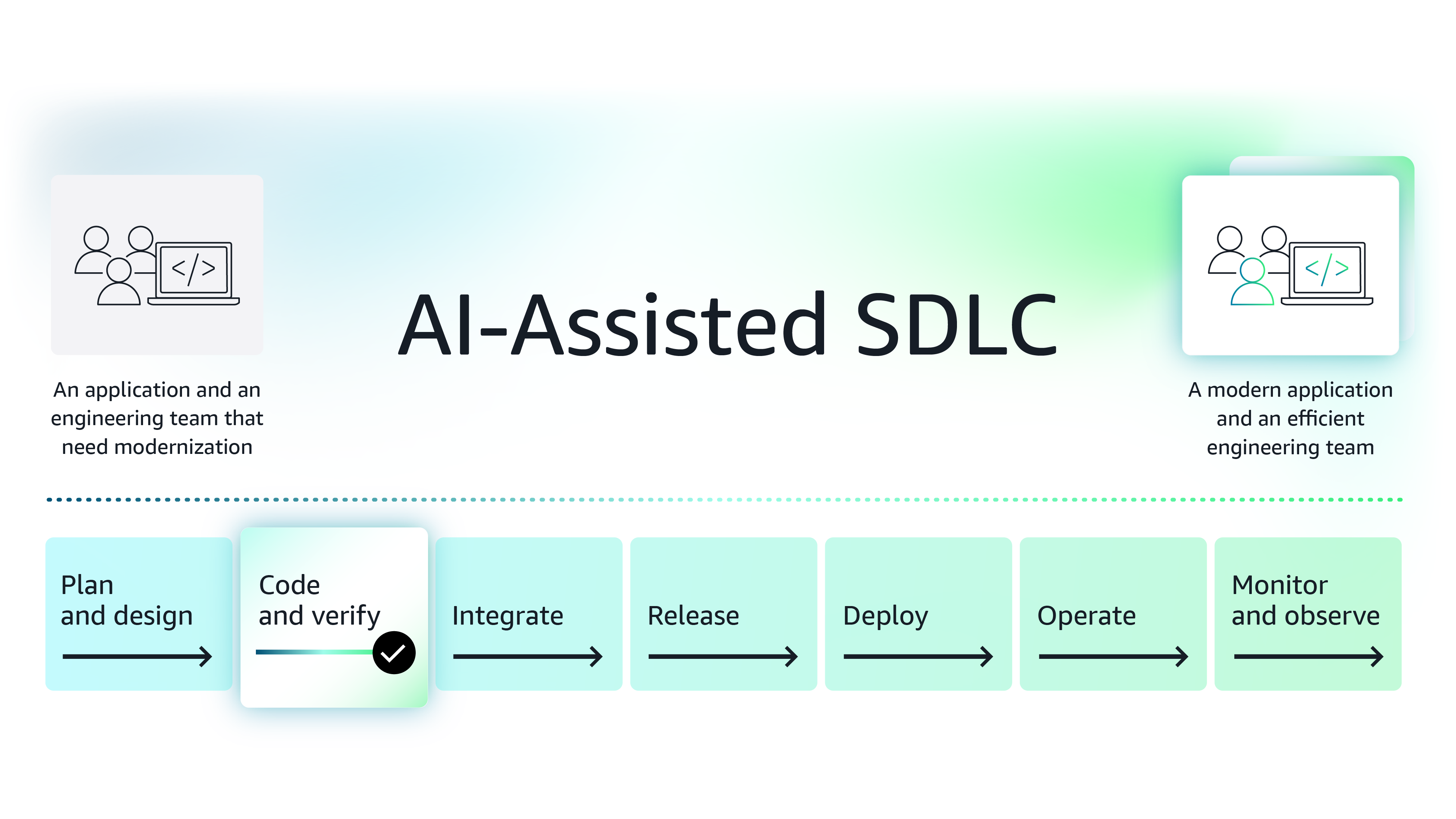
Figure 9: Enhance code and verify stage of the software development lifecycle using modern AI-based tools
Next Steps
While this article introduces three solutions, AWS Marketplace is a curated digital storefront, comprised of Agentic and Generative AI third-party software that can help you make the code and verify stage more efficient. Organizations looking for ways to boost efficiency by integrating AI into various aspects of their SDLC, can explore these tools further, conduct POCs, and then procure the software in AWS Marketplace.
Note on procuring third-party software for your team - Procuring third-party software is made easier in AWS Marketplace because enterprise organizations save procurement time and costs using standard contracts, flexible pricing models, custom pricing and term negotiations with vendors and consulting partners, and consolidated license and spend management.
See how modern functionalities and AI-based features provided by independent software vendors (ISVs) help you improve integration phase of SDLC.
Featured tools

Explore the series
Why AWS Marketplace for on-demand cloud tools
Free to try. Deploy in minutes. Pay only for what you use.
Featured tools are designed to plug in to your AWS workflows and integrate with your favorite AWS services.
Subscribe through your AWS account with no upfront commitments, contracts, or approvals.
Try before you commit. Most tools include free trials or developer-tier pricing to support fast prototyping.
Only pay for what you use. Costs are consolidated with AWS billing for simplified payments, cost monitoring, and governance.
A broad selection of tools across observability, security, AI, data, and more can enhance how you build with AWS.