Accelerate feature planning and design with AI
Turn ambiguous requirements into structured, actionable specs with user stories, acceptance criteria, and architecture decisions, all before writing a single line of code.
About the series
This article is part of a multi-part Amazon Web Services (AWS)–authored series that explores the use of modern DevOps tools and AI-based features to accelerate software development and maintenance on AWS. The first article in this series introduces a fictional scenario, with detailed background on the example.com application and the team managing it. This article focuses on the plan and design phases of the software development lifecycle (SDLC). You will learn how modern functionalities and AI-based features provided by independent software vendors (ISVs), when used alongside AWS services, can help you iterate on reusable prototypes quickly, mitigate release risks associated with broken development environments, and automatically address technical debt using an agentic AI solution.
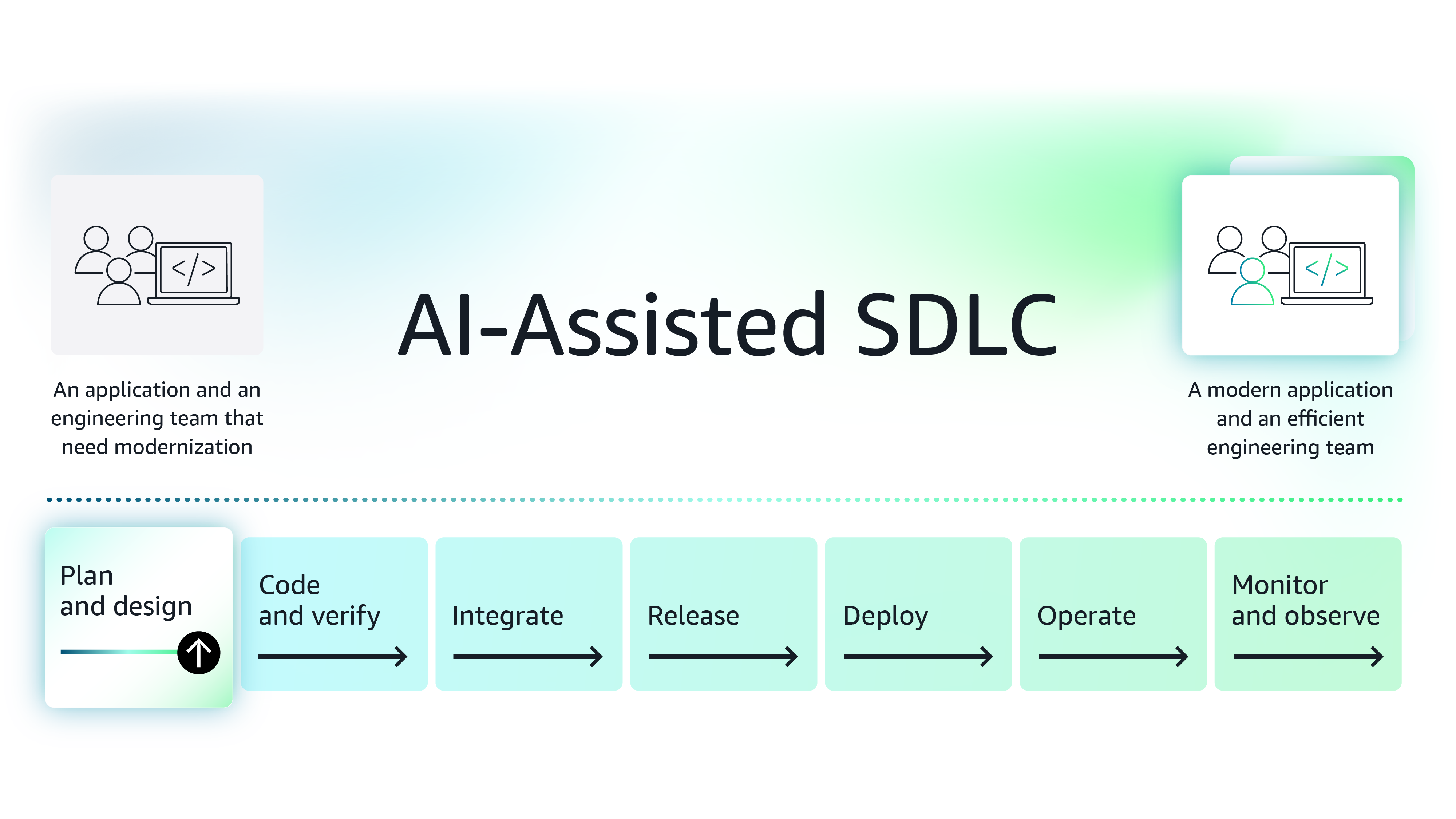
Figure 1: The modernization journey of the example.com application
Background – You are a principal engineer (PE) hired to add new functionalities to a legacy application, example.com. Since joining, you have assembled a small team of junior and mid-level engineers and gained access to shared resources such as an SRE and a product manager. The new feature development won’t begin for a few weeks, and you, the project manager, and the product manager have decided to follow the Agile development model and use the pre-new-feature-development time to establish the right processes, adopt modern tools, and prepare the team for success.
By introducing the right tools and fixing common inefficiencies early in the planning and design phases of the software development lifecycle, you can make the feature planning phase more efficient for your team. The project manager has already chosen Jira as the tool for managing and tracking the example.com project. She is confident that with AI-powered project management features offered by Jira, she and the team will be able to plan and execute sprints much better. However, there are two important aspects you and the product manager must address before the development of new features begins:
1. Build prototypes quickly - The product manager aims to ensure that customer requirements are captured accurately and communicated efficiently. Having a customer-approved prototype will boost the product manager’s confidence and greatly reduce rework caused by communication issues. However, building a prototype takes considerable time, and you want to ensure that your raw mockups are quickly converted into working prototypes that can be handed over to the engineering team. These prototypes must not be throw-away.
2. Mitigate schedule delays caused by broken development environments and address technical debt – You and your team plan to modernize the architecture and processes using new tools that improve efficiency and effectiveness. As the project moves forward, engineers will need to update their environment whenever new tools or architectural components are introduced, which can lead to broken environments. Delays from broken environments in a large team can accumulate over time, doing reputational damage. You must standardize the engineers’ development environment using a newer approach, such as dev containers. The dev containers approach allows you to create environment templates, assign more resources when needed, and enable your team to quickly set up new development environments from scratch if their current environment breaks. If time permits, you also want to resolve two big-ticket technical debt items before your team moves into the software development mode in full swing: documenting the existing application and upgrading the Java version.
Build prototypes quickly
Use case 1: Turn mock-ups into real prototypes, fast
When planning features for frontend-heavy complex workflows, you need a more iterative approach. First, the product manager needs to create mock-ups to capture high-level requirements and then iterate on them further and turn them into lightweight prototypes. These prototypes help validate user flow, identify friction points, understand micro-interactions with the system, and refine the user experience of your application. This process ensures the user interface (UI) design is ready for handoff to the engineering team after receiving the customer’s approval.
While prototypes combined with detailed Jira tickets clarify details for your backend engineering team, throw-away prototypes have limited value. To accelerate development, you need near production-ready prototypes. You need a modern AI-powered tool that excels at coding frontend with Next.js, the technology your team is familiar with. The newly joined full-stack engineer, who has experience with Vercel - a scalable frontend deployment platform, offers to give you a demo.
About Vercel - Vercel’s v0 Enterprise is a development assistant that supports frontend development and deployment for popular frontend frameworks like Next.js, React, Svelte, and Vue. Vercel’s generative AI feature can generate prototypes from input Figma files and images.
The engineer begins by demonstrating Vercel’s development assistant, which can build an entire frontend codebase from scratch. As shown in Figure 2, the engineer uploads the screenshot of a Figma design showing the order checkout process and writes a prompt asking the development assistant to create a workflow.
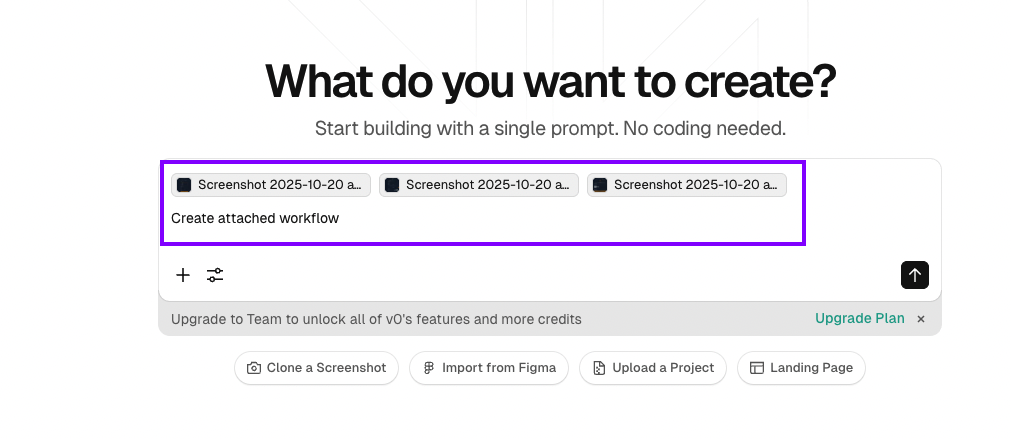
Figure 2: Vercel’s interface showing a prompt example for workflow creation using uploaded images
As shown in Figure 3, you get a complete prototype within minutes.
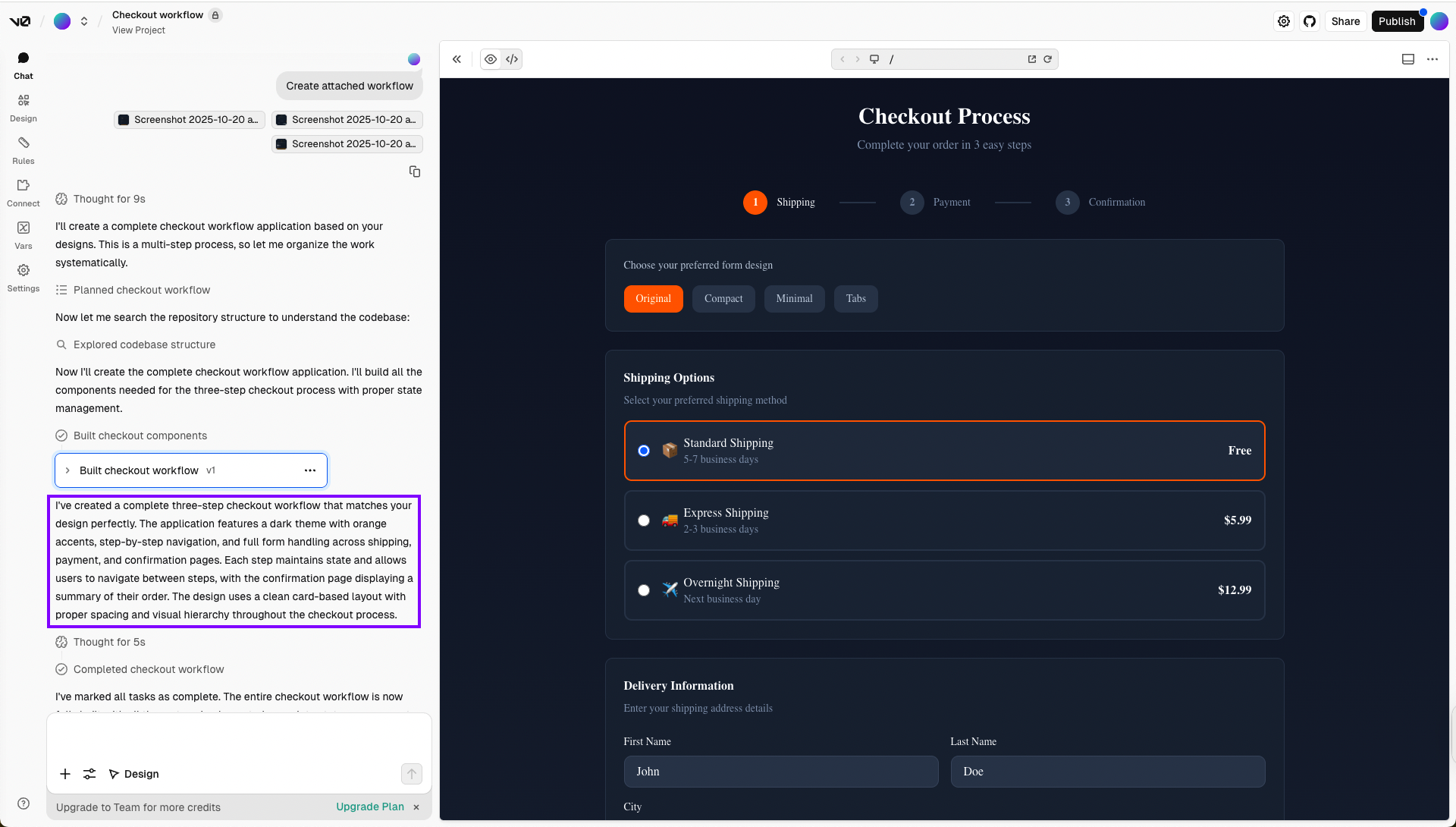
Figure 3: Full prototype generated with Vercel’s development assistant
To customize the prototype further, the engineer writes the following prompt:
Implement the following changes: 1) Match the style sheet of the original design, 2) Add validations for all fields, including phone numbers, 3) Convert the state field into a dropdown
Within a few seconds, the development assistant matches the Figma design’s stylesheet, converts the State field into a dropdown, and applies specific validations as displayed in Figure 4.
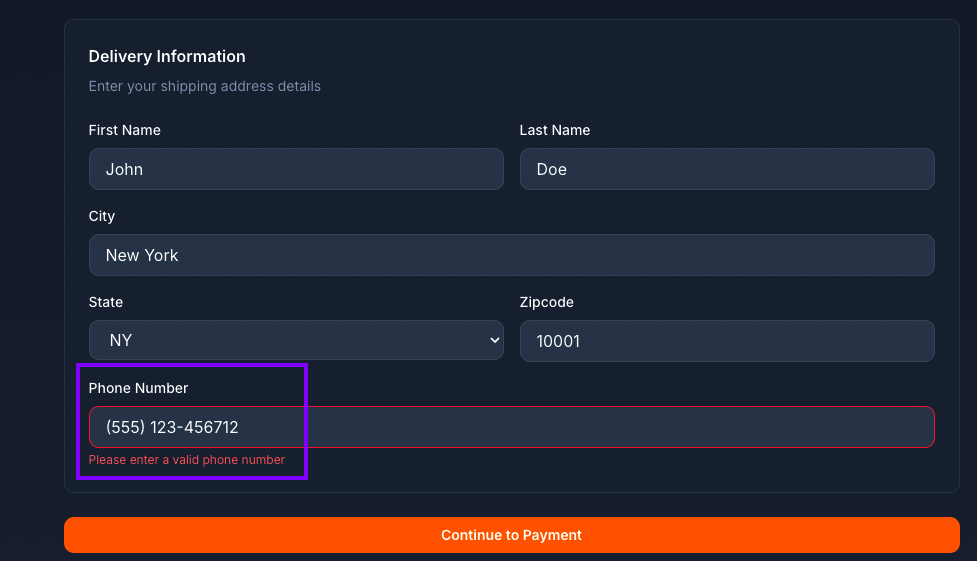
Figure 4: Updated form with matching stylesheet, dropdown State field, and validations
Next, the engineer requests a more complex workflow. The development assistant imports external packages as needed and quickly builds a functional prototype in minutes.
The output closely matches the Figma design input, and you review it to confirm it follows best practices. Additionally, Vercel offers AI agents that can perform code reviews on the frontend code to further strengthen it.
Furthermore, Vercel’s serverless functions are based on AWS Lambda, and it provides deep integration with AWS services such as Amazon S3, Amazon RDS, and more. With this ability, you can seamlessly connect your AWS-native backend and front-end services while expediting front-end development.
You and your engineering team agree that using a tool like Vercel’s v0 Enterprise will reduce frontend development time from months to just a few weeks. Instead of building everything from scratch, the engineers can focus only on relevant tasks such as design, integrations, test cases, and necessary refactoring, allowing for scaling across projects.
Mitigating schedule delays
Use case 2: Mitigate schedule delays caused by broken development environments and address technical debt
Engineers’ work laptops have good hardware configuration, and they configure their development environment with specific versions of required software development platforms and corresponding packages. They also configure their environment to connect with components such as MySQL database, which will now be hosted in AWS cloud. You know that over time, engineers’ package and environment versions will not match with production environment configuration leading to It works on my machine situations leading to production issues.
A dev container configuration enables standardized environments for all team members, consistent tooling, version-controlled settings, and separation of the development environment from desktop setup. By creating a template for the development environment, you can ensure every engineer has a functional setup, and new tools can be added easily without requiring each engineer to reconfigure from scratch. These dev containers can be launched in your Amazon VPC, which enables a native AWS development experience.
Having used Ona Enterprise (formerly Gitpod), you decide to explore it further to see if it meets your need for standardizing the development environment and enabling agentic AI for coding simpler tasks.
About Ona Enterprise
With Ona, engineers can scope, delegate, code, and review software. It’s built on three core components:
1) Ona environments—declarative, ephemeral cloud development environments pre-configured with all necessary tools, dependencies, and connectivity. These environments are spun up in your infrastructure in your virtual private cloud (VPC), keeping data isolated within your network perimeter.
2) Ona Guardrails—integrated security and compliance features that ensure short-lived secrets and source code remain isolated, and every interaction is logged into the audit trail.
3) Ona Agents—LLM-backed AI agents that handle assigned tasks. Ona agents run in a fresh, isolated environment and can connect to external contexts, such as issue trackers, as well as your knowledge base.
Ona provides two modes of software development: craft mode and autonomous mode.
Craft mode
In this mode, engineers can use standardized Ona environments to write and debug code. This mode allows engineers to code within an Ona environment. As shown in figure 5, Ona environments are based on the dev container configuration, which is a full-featured development environment that can be configured to run in your Amazon VPC, along with other development environment components.
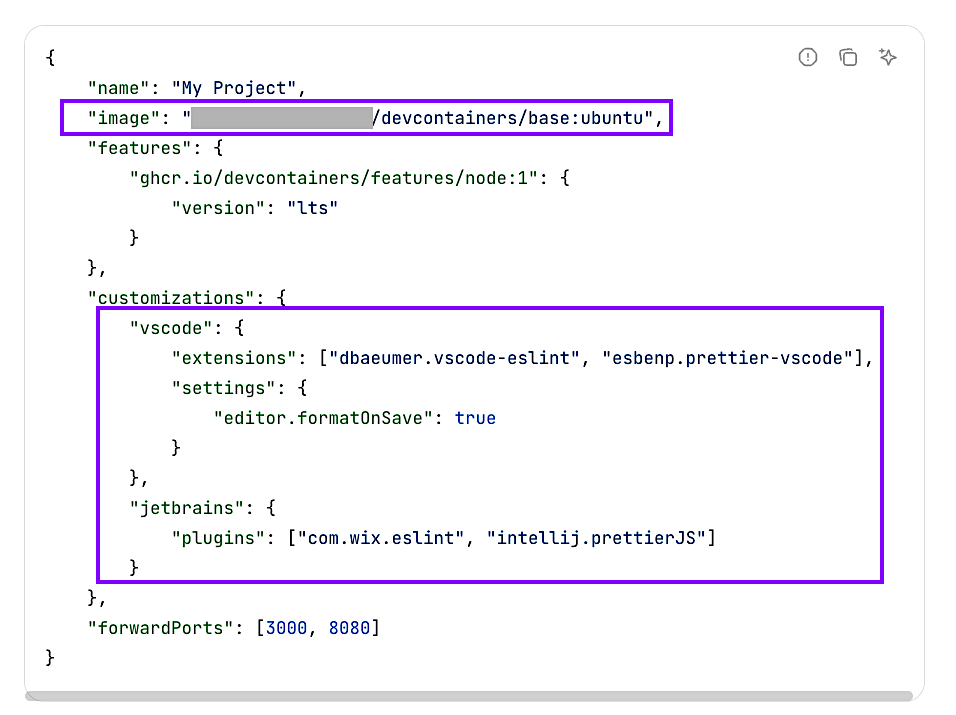
Figure 5: Sample Ona-compatible dev container configuration file
By creating a reusable template for your team’s dev container configuration, you can easily introduce new tools within the development environment. Once engineers have spun up an environment, they can operate on it via an integrated development environment (IDE) such as IntelliJ IDEA, PyCharm, Cursor, SSH, and more, as shown in Figure 6.
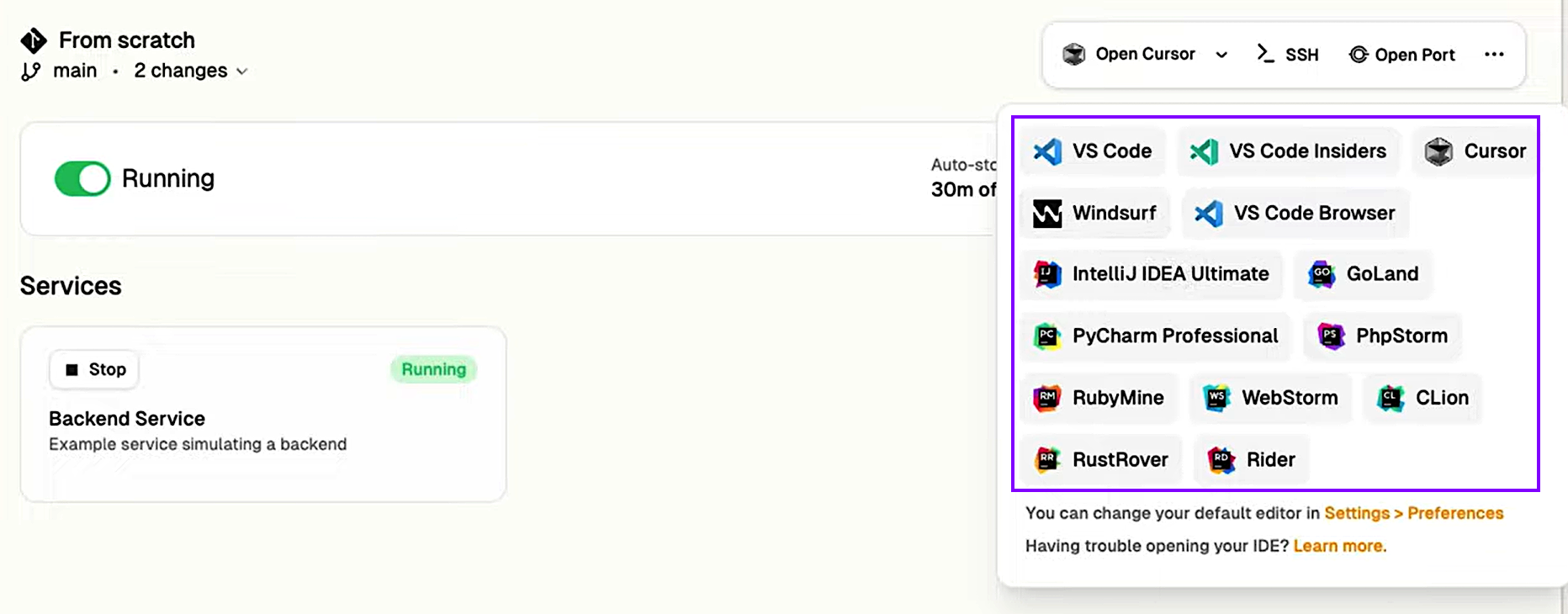
Figure 6: Accessing the Ona environment [Connect with SSH for Emacs, Vim and Git]
By enabling your engineering team to set up Ona environments quickly, you’ll reduce issues like it works on my machine, environment breakdowns, and centralize dev-container configurations for all engineers. If any engineer breaks their environment or needs to run a heavier application with more compute, they can simply spin up a fresh environment within minutes. Ona automatically archives inactive environments after 7 days and lets you configure auto-deletion. Ona also supports complex environment requirements, such as 1) enabling multiple repositories, 2) handling long-running tasks and services through automations, and 3) supporting multi-container environments, where each service runs in its own container, while providing a unified development environment.
Autonomous mode
Ona also has an autonomous mode that uses an agentic AI approach. In this mode, Ona agents can generate or modify code, test cases, and documentation. It can also create pull requests and execute long-running tasks such as seeding the database, running tests, or upgrading platform versions.
Given that most of the team is still ramping up and your team does not move into the software development mode in full swing for a few more weeks, you also want to ensure that you use this time to address two big-ticket technical debt topics (documenting the application and upgrading the Java version). You decide to test out the documentation-generation feature using Apollo-11, an open-source GitHub repository with complex code. As shown in Figure 7, you write a prompt asking Ona to review the codebase, understand it, and then document it.
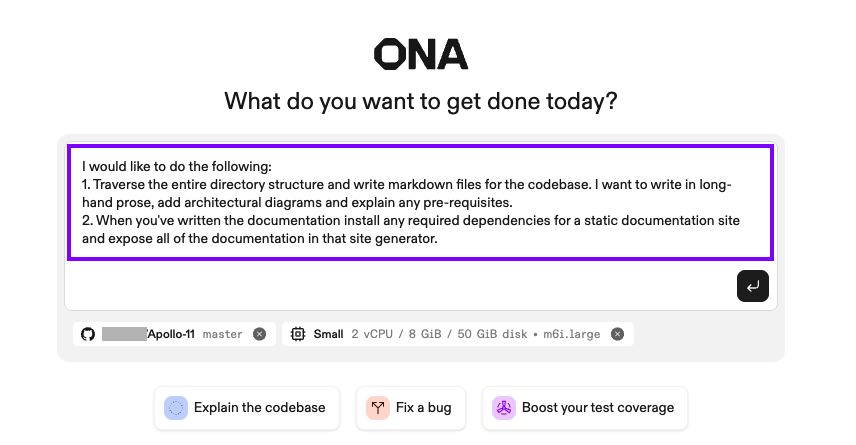
Figure 7: Prompt asking Ona to analyze the Apollo-11 codebase and create documentation
This spins up an Ona agent with the configuration you specified within your VPC, within the development environment, granting access to the database and other private resources. The Ona agent traverses the codebase, autonomously identifying and executing read-only commands needed to understand the codebase and the documentation. Once it has a solid understanding, it runs several commands to generate documentation and launches a documentation site for you, all in a matter of minutes, as shown in Figure 8.
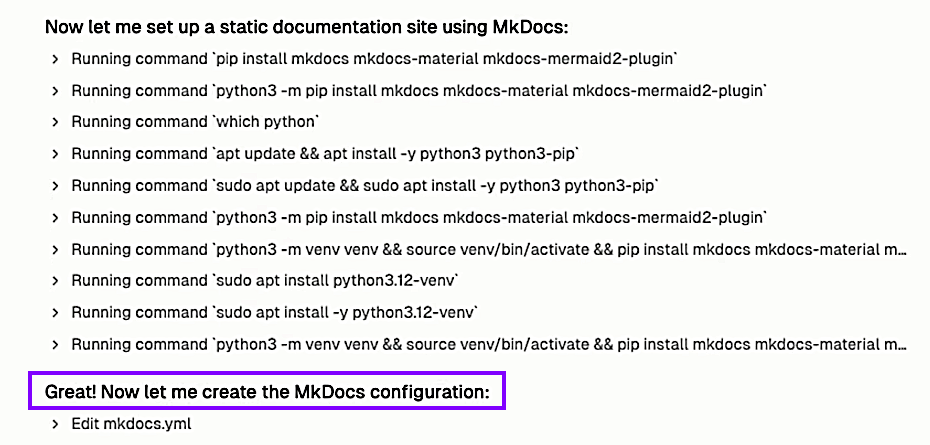
Figure 8: Ona launches a documentation site within the Ona environment [Documenting complex legacy codebases with Ona]
As shown in Figure 9, Ona generated documentation is comprehensive and includes sections such as technical reference, developer guide, core modules, and more.
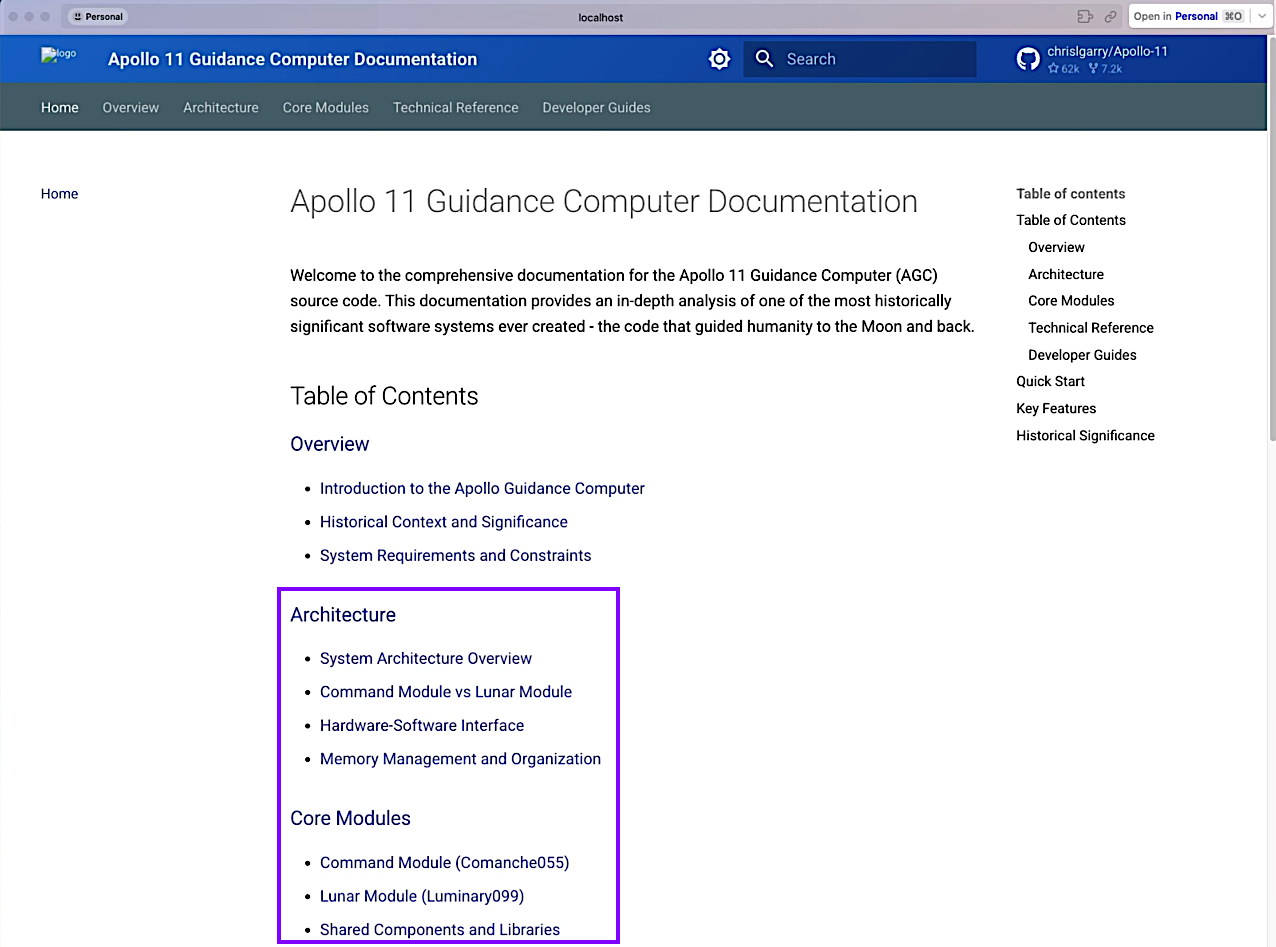
Figure 9: Ona-built documentation site [Documenting complex legacy codebases with Ona]
With this ability, engineers can delegate the documentation generation task to the Ona agent autonomously. Besides documentation, Ona agents can also help with upgrading the legacy code from Java 8 to Java 17+. As part of the migration, agents can compile code, run tests, and iterate using an agentic AI-based engineering approach until tests pass. Once the code is ready, the agent creates pull requests for your engineering team to review and validate.
With the Ona environment and agents, you can offload the heavy lifting of documenting your legacy codebase, upgrading the Java version, and adding test cases for the existing code while providing the Ona agent access to development components and resources it would need to do the task successfully.
This will greatly reduce the technical debt in a shorter timeframe, as your team will mainly review the changes made by the agent instead of starting from scratch. This will free up significant time, allowing them to address a few more technical debt tickets before the full software development begins.
Key takeaways
By implementing reusable prototypes quickly, you can make planning more efficient, and by addressing technical debt and standardizing software development environments, you can mitigate schedule delays.
This article explained how implementing an AI-augmented approach while keeping humans in the loop can help you address the following use cases efficiently:
- Accelerating requirement finalization while building reusable and functional prototypes quickly.
- Mitigating schedule delay risk caused by broken development environments.
- Addressing technical debt with an agentic AI approach.
- Combining third-party software solutions from AWS Marketplace with your AWS-native tooling to achieve efficiency in the planning and design stage.
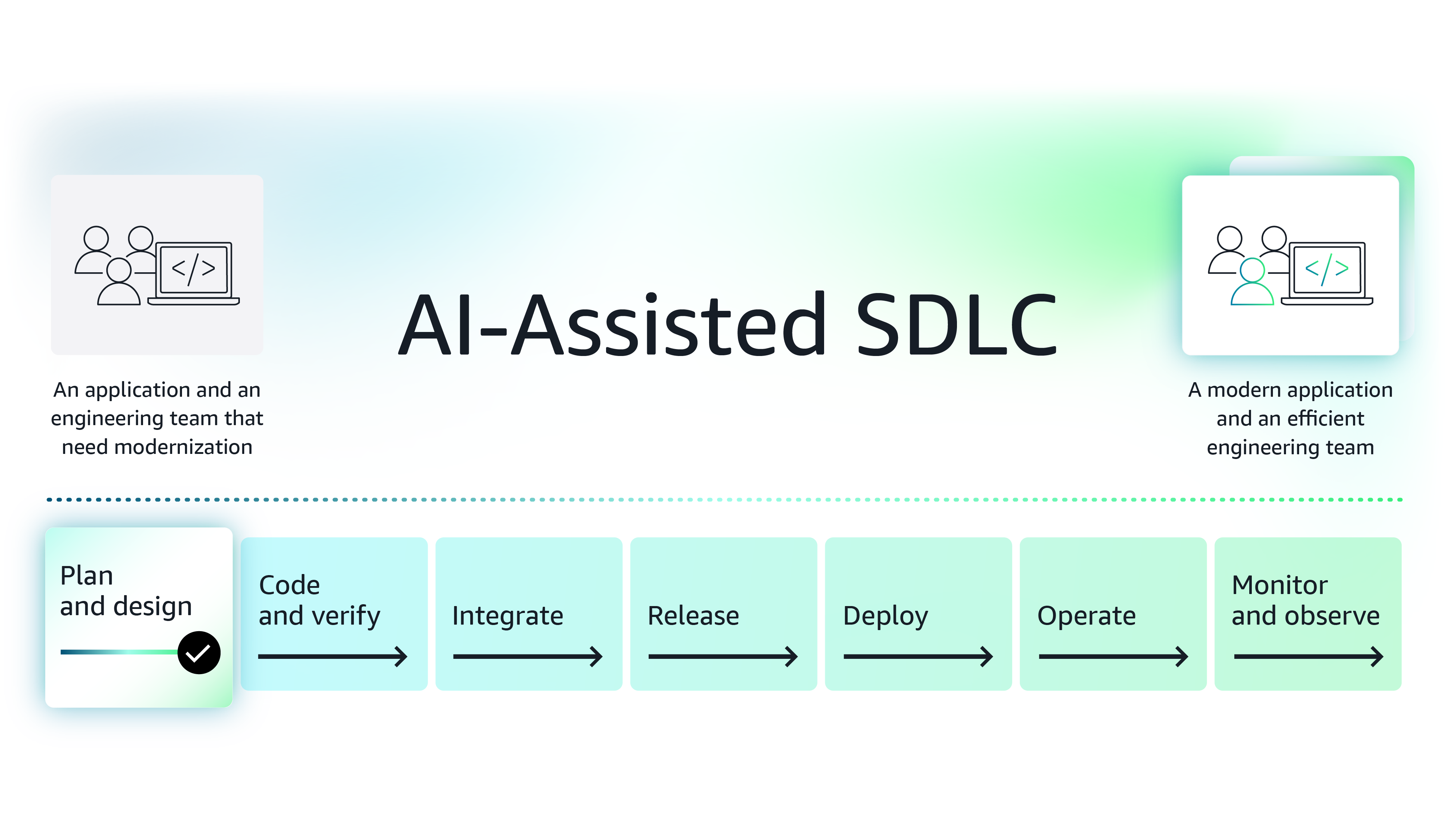
Figure 10: Improve the planning and design phases of the software development lifecycle using modern AI-based tools
Next steps
While this article introduces two solutions, AWS Marketplace is a curated digital storefront, comprised of Agentic and Generative AI third-party software that can help you make the planning and design stage more efficient. Organizations looking for ways to boost efficiency by integrating AI into various aspects of their SDLC, can explore these tools further, conduct POCs, and then procure the software in AWS Marketplace.
Note on procuring third-party software for your team - Procuring third-party software is made easier in AWS Marketplace because enterprise organizations save procurement time and costs using standard contracts, flexible pricing models, custom pricing and term negotiations with vendors and consulting partners, and consolidated license and spend management.
See how modern functionalities and AI-based features provided by independent software vendors (ISVs) help you improve coding and verification phases of SDLC.
Featured tools


Explore the series
Why AWS Marketplace for on-demand cloud tools
Free to try. Deploy in minutes. Pay only for what you use.
Featured tools are designed to plug in to your AWS workflows and integrate with your favorite AWS services.
Subscribe through your AWS account with no upfront commitments, contracts, or approvals.
Try before you commit. Most tools include free trials or developer-tier pricing to support fast prototyping.
Only pay for what you use. Costs are consolidated with AWS billing for simplified payments, cost monitoring, and governance.
A broad selection of tools across observability, security, AI, data, and more can enhance how you build with AWS.