Stabilize builds and expedite code integration with AI
Automate build pipelines, enforce security policies, and catch integration failures before they compound with AI-enhanced CI workflows.
About the series
This article is part of a multi-part Amazon Web Services (AWS)–authored series that explores the use of modern DevOps tools and AI-based features to accelerate software development and maintenance on AWS. The first article in this series introduces a fictional scenario and provides detailed background on the example.com application and the team managing it. This article focuses on the integration phase of the software development lifecycle (SDLC). You will learn how modern features and AI-based capabilities from independent software vendors (ISVs), when used alongside AWS services, can help you manage flaky tests, keep build times consistent through intelligent test splitting, and implement continuous security with pre-commit hooks, automated repository scanning, and auto-fixing of vulnerabilities.
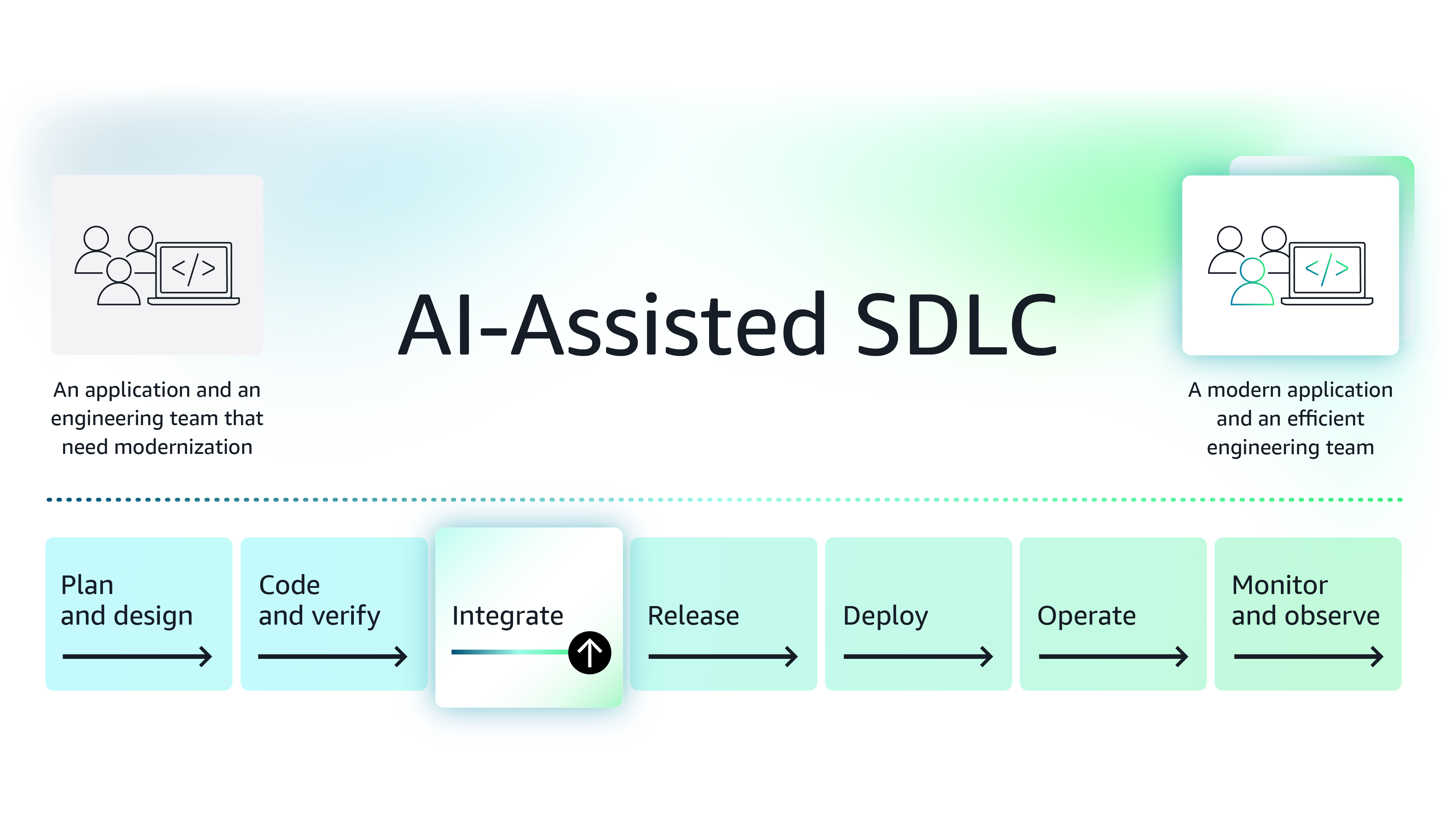
Figure 1: The modernization journey of the example.com application
Background – You are a principal engineer (PE) brought on board to add new functionalities to a legacy application, example.com. Given the condition of the application when you took over the role, you made it your goal to modernize the application and standardize the processes engineers follow. Under your leadership, the engineering team has been adopting best practices, such as working on feature-specific branches rather than the development (dev) branch, committing stable code regularly, adding test cases, and more. By isolating the code they commit during the development phase, you are enabling your team to make better progress.
While features and code changes behave as expected in an isolated feature branch, they often cause new problems when merged into the dev branch during the integration phase: 1) tests fail due to issues like dependency failures or data cleanup problems, 2) builds become unstable—sometimes passing, sometimes failing—blocking engineers because their test cases are skipped due to failures, and 3) the dev branch begins to show security issues caused by newly added or outdated libraries.
Since the integration phase has a tight deadline, any major delays often cause schedule slips. As a PE, you need to keep this phase predictable and ensure that mechanisms are in place to address the following concerns:
- Stabilize builds and manage flaky tests methodically – During the development phase, engineers make configuration changes, write test cases that sometimes depend on each other or on existing database tables and values, populate new data, or clean up data. When feature branches come together during integration, issues arise due to interdependencies. Tests fail, are skipped, or flip-flop between success and failure. All of this leads to build failures, and builds take longer because the build system, which was optimally configured for the previous stable version, must compile and test a much larger codebase.
- Implement continuous security monitoring for your code – During development, engineers sometimes introduce new open-source libraries or bring back features that were deprioritized, and over time, dependencies or container images used for deployment become outdated. These outdated dependencies create security vulnerabilities and generate high-priority tickets from the central security team. You need a proactive approach: to keep your application secure, you must implement multiple layers of security gates to ensure vulnerabilities are addressed before they reach higher-level environments.
Remove build failures
Use case 1: Stabilize builds and manage flaky tests methodically
When multiple features are integrated into the dev branch, the branch can become unstable. There are several reasons why tests may fail: 1) Tests that are not thoroughly cleaned up can cause other tests to fail, 2) updates and deletions of test data may disrupt dependent tests, and 3) certain test cases that rely on others or specific conditions switch between success and failure. When a test fails consistently, the Site Reliability Engineer (SRE) creates a ticket, ignores the test case until the ticket is addressed, and assigns it to the responsible engineer. However, flaky tests introduce the most uncertainty because they sometimes fail and sometimes pass. When multiple flaky tests are present, some are repeatedly skipped, causing code to remain untested until all tests have stabilized. Since the integration must occur within a fixed timeframe, flaky tests, combined with long build times, create delivery pressure and occasionally cause project delays.
You know from experience that your Continuous Integration (CI) agent spends most of their time in the test phase, where it runs test cases across one or more workers. Only after all test cases have run and your deployable is built does the build succeed or fail. To keep the build time short and predictable, you need to address two issues: 1) find a way to automatically handle flaky tests and 2) perform intelligent test splitting to reduce the build time.
Having learned about recent advances in this field, you begin exploring intelligent test engine platforms that integrate seamlessly with your existing continuous integration/continuous delivery (CI/CD) platform while supporting flaky test-case management and intelligent test splitting. You come across the Buildkite platform.
About Buildkite
Buildkite has a scale-out delivery platform that stands out for its test engine, which includes features like intelligent test execution and flaky test case management. With Buildkite, you can configure an automated workflow for test suites and a monitor that continuously evaluates test case performance and assigns it a flakiness score.
You decide to try the test engine feature to see if it meets your expectations. You configure an automated workflow, and as shown in Figure 2, when a test case fluctuates between success and failure across recent build runs, the monitor assigns it a higher score of 0.6, indicating flakiness. Conversely, if the test case consistently passes or fails, it receives a lower score.
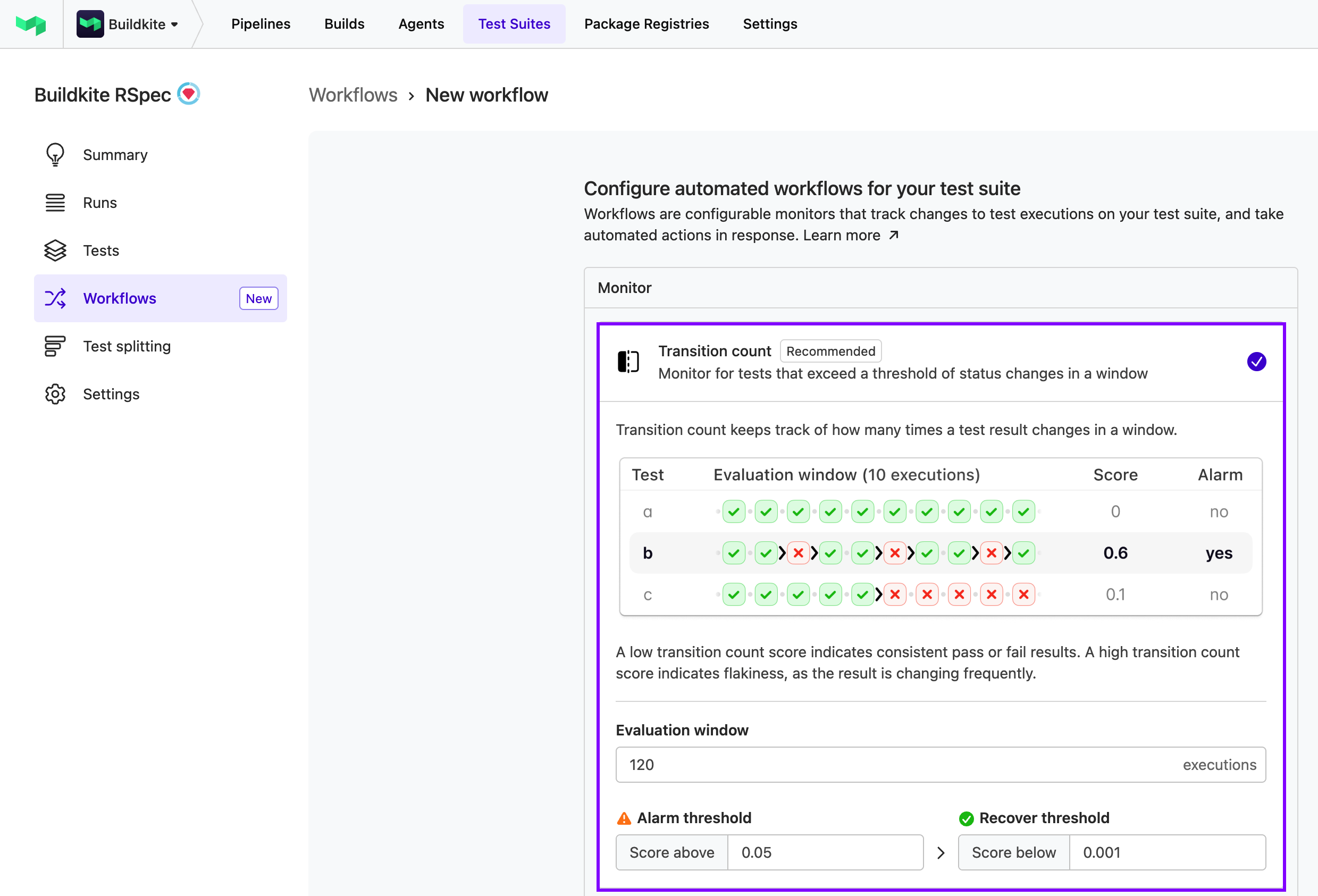
Figure 2: BuildKite assigns flakiness scores based on test consistency across builds [Introducing test engine workflows]
Next, as shown in Figure 3, you configure an alarm threshold to trigger actions such as labeling the test as flaky, muting it, and sending a Slack notification when a test case’s score exceeds the threshold.
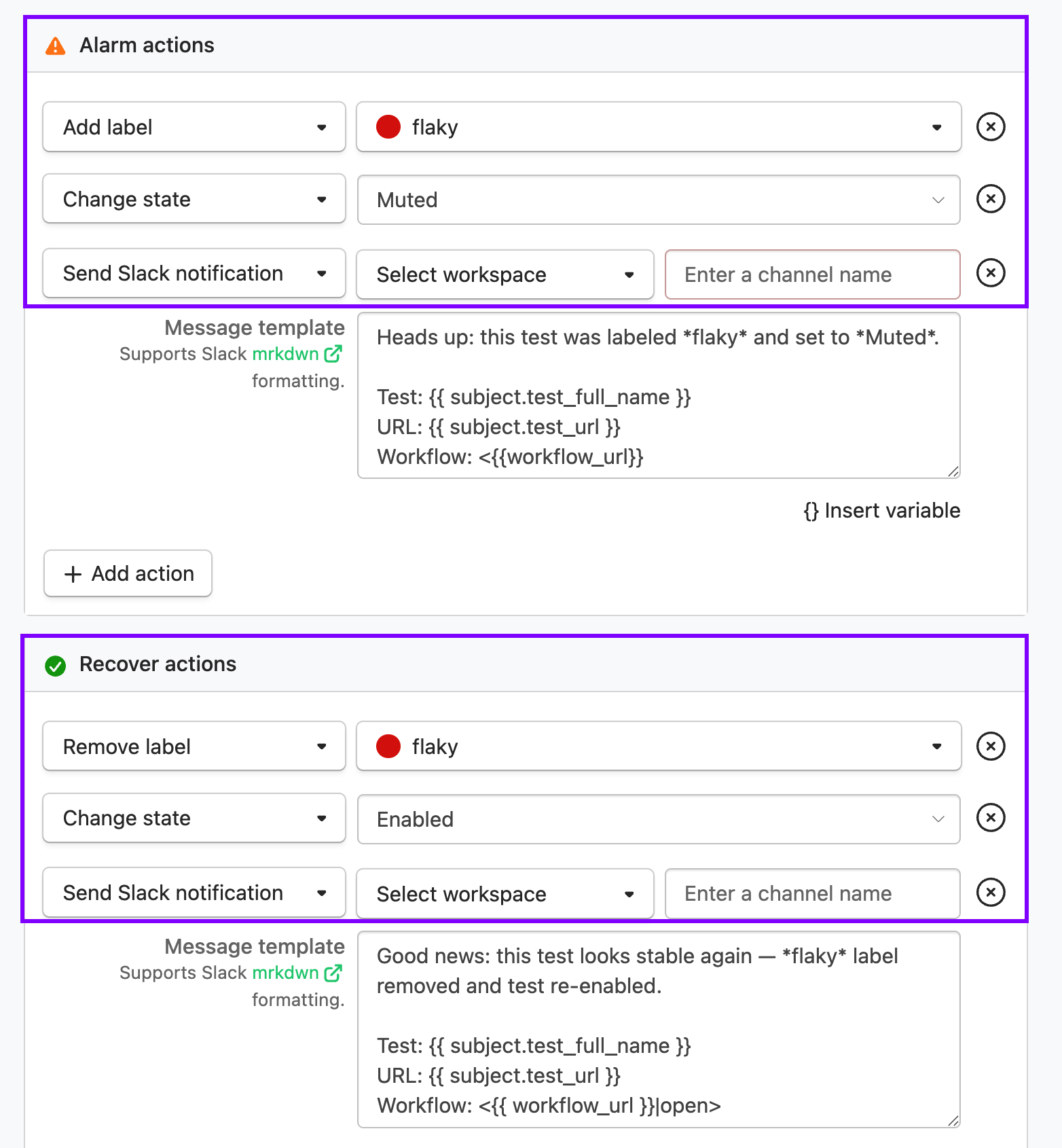
Figure 3: Configuring flakiness alarm thresholds and actions [Speed up builds with the Test Engine Client]
With workflows, you can identify flaky tests and trust the engineer to fix them. With flaky tests fixed, the builds will pass more often since each flaky test will be ignored until it is unmuted. This ensures that other engineers are not blocked due to skipped tests. With flaky tests addressed automatically, build times stabilize quickly.
Once builds have stabilized, to truly optimize build time, you need an intelligent test splitting and distribution strategy. This is where Buildkite’s test engine can help. It uses historical test performance to predict future test performance. Then it applies the bin packing algorithm to the data and identifies the best strategy for test distribution and parallelization, aiming to complete all tests within a set number of minutes, excluding overhead costs. Figure 4 shows how intelligent test splitting can help you improve build performance.
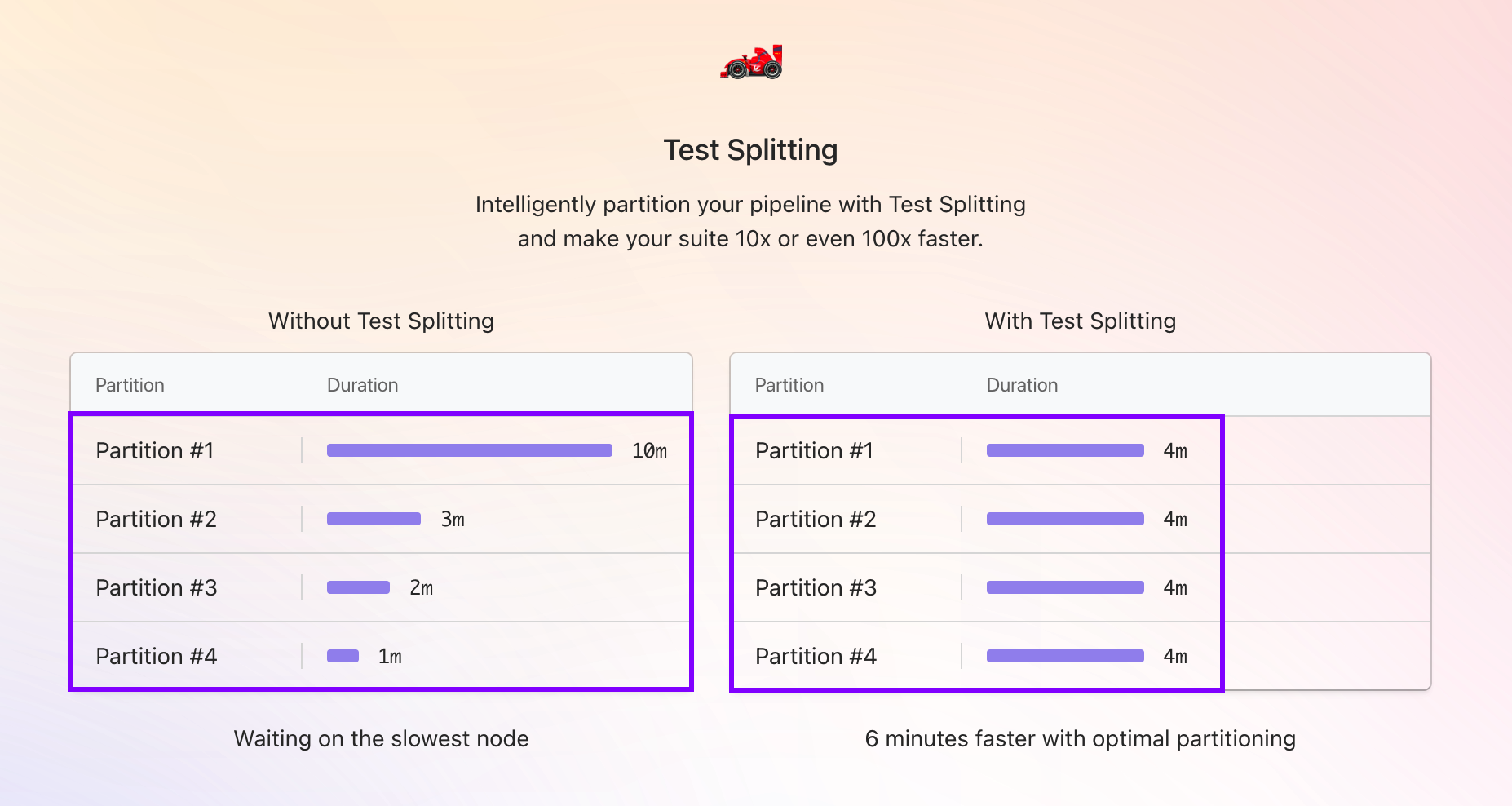
Figure 4: BuildKite’s test splitting performance comparison [Beyond basic test splitting: Buildkite’s approach to test suite parallelization]
This parallelism count approach ensures optimal utilization of your CI agents based on the current test duration estimate and helps minimize overall testing time. With short, predictable build times, integrating multiple feature branches becomes much smoother, easing pressure and helping prevent project delays.
Continuous security monitoring
Use case 2: Implement continuous security monitoring for your code
With engineers using artificial intelligence (AI) assistance for coding and troubleshooting, the rate at which new code is added to the repository is quite high. This new code also introduces open-source dependencies that pose additional security risks. Your team has faced many challenges due to security debt, and although you have taken steps to address it, you want to keep your new and existing code clean and free of vulnerabilities. Although you provided a security scanning tool in the integrated development environment (IDE) to engineers, you still need to implement additional safeguards.
You want to implement a three-pronged approach to maintain continuous security: 1) trigger scans before engineers commit code in feature branches, 2) associate automated scanning at the repository level so that code is regularly scanned and every time a pull request (PR) is created, 3) perform scans within your CI/CD pipeline and fail the build if security tests fail. Implementing these gating mechanisms will help ensure that your repository’s code remains clean and secure.
You begin exploring available options and discover Snyk, a developer security platform.
About Snyk
Snyk supports various security testing methods, including Software Composition Analysis (SCA), Static Application Security Testing (SAST), container security scanning, and dynamic application security testing (DAST). Snyk integrates with source control, container registries, container orchestrators, continuous integration tools, ticketing systems like Jira, and productivity tools such as Slack. With Snyk, you can add multiple layers of security.
With Snyk, you can set up pre-commit hooks on your feature branches to automatically scan engineers’ code before they commit. This is as simple as installing the pre-commit framework and then adding commands like the following to .pre-commit-config.yaml file.
snyk code test – to run code analysis
snyk container test – to run security tests on your container images
snyk iac test – to run security on your Infrastructure as Code components.
Next, you decide to do a quick proof of concept (POC) to explore how Snyk can protect your GitHub repository and ensure that blocking scans run before feature branches are merged. You sign up and follow the integration workflow. As shown in Figure 5, the integration workflow widget displays all your repositories. You choose an abandoned repository that has legacy code from a few years ago.
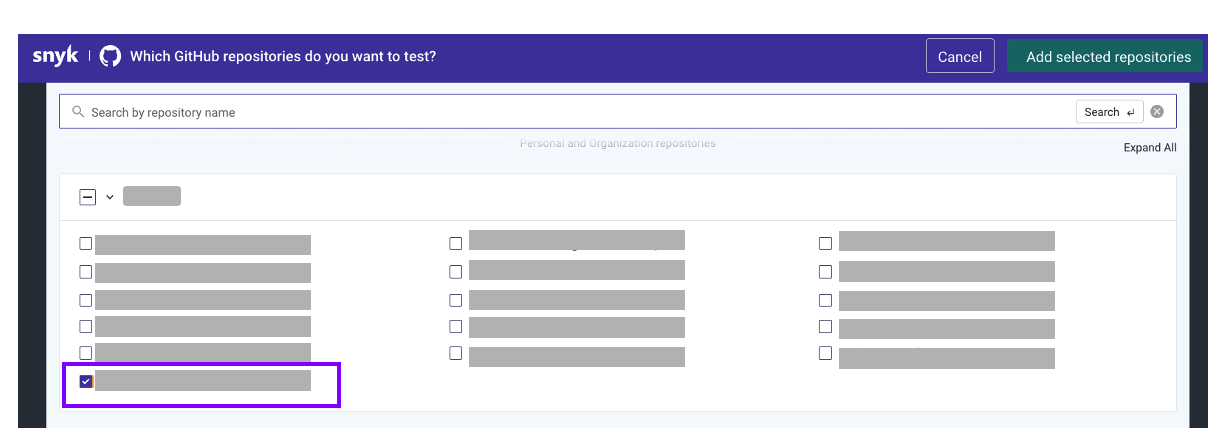
Figure 5: Snyk GitHub repository selection interface
Once you add and activate the repository, Snyk automatically triggers a scan, and within minutes, you can view the scan results. As shown in Figure 6, Snyk detected two critical and numerous high-severity security problems with the repository.
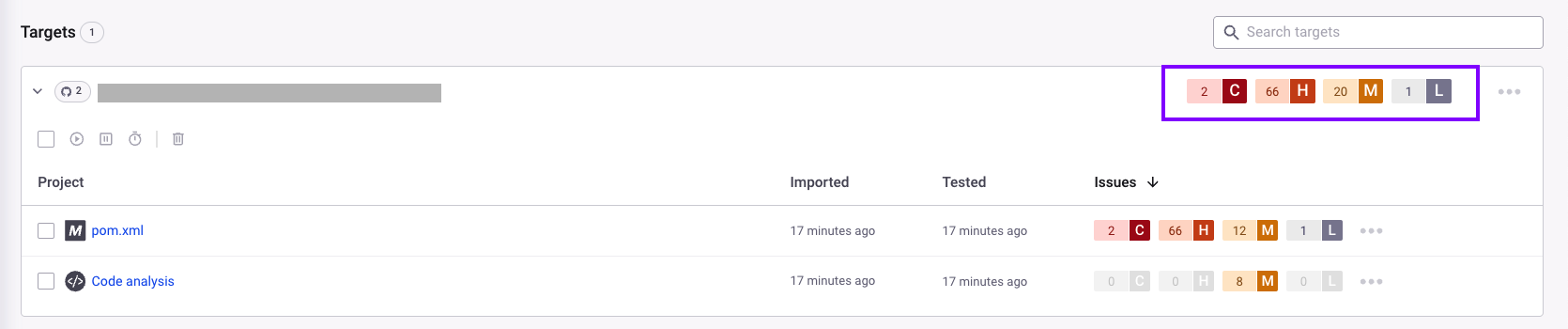
Figure 6: Snyk project dashboard with vulnerability results
You open the Pom.xml to examine these issues further. As shown in Figure 7, the detailed view lists problems, issue details, fix suggestions, and an option to auto-fix issues and create a PR. You quickly review the suggestions and choose to auto-fix, since this option lets you resolve most issues at once.
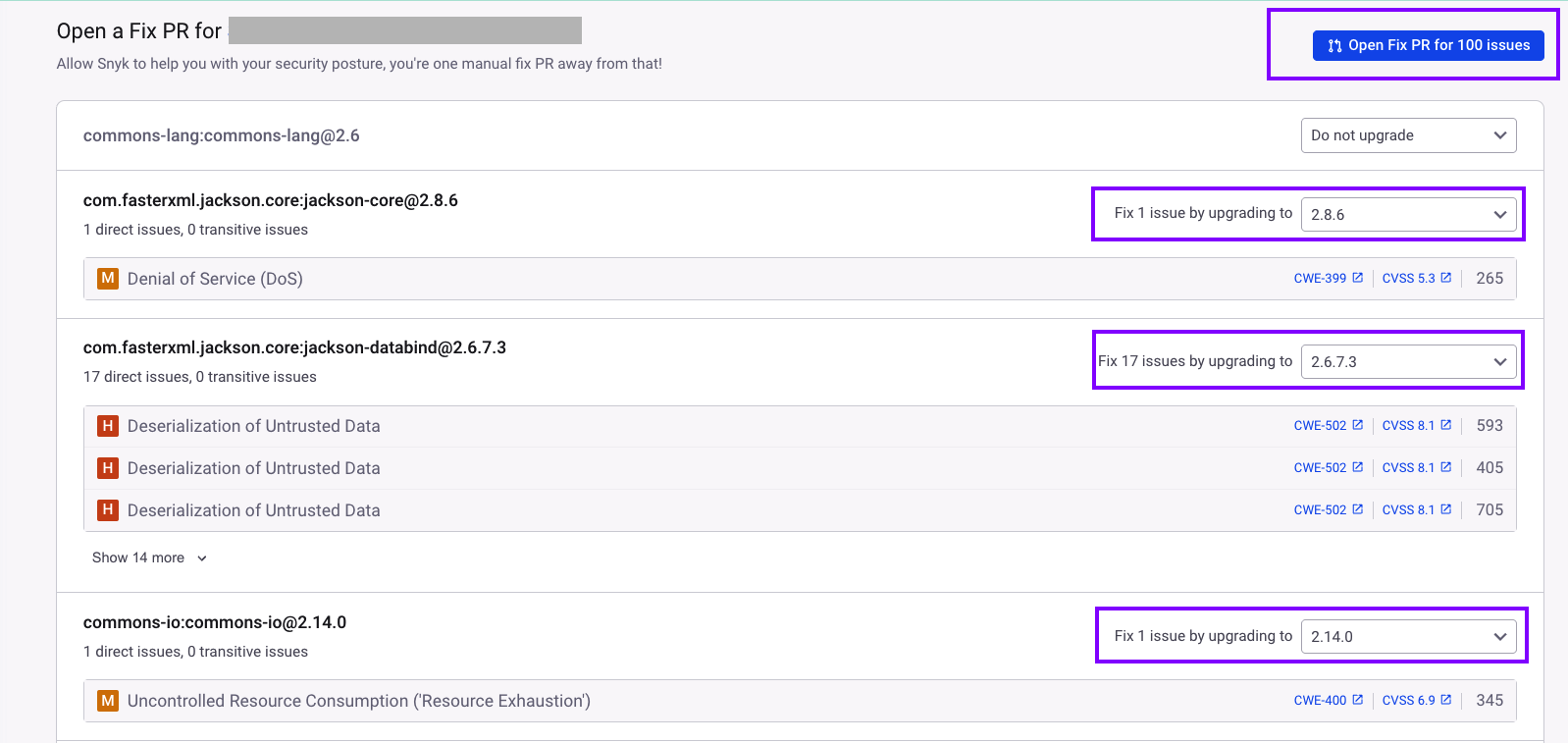
Figure 7: Snyk issue details and auto-fix option
After merging the PR, you retest to check for any remaining vulnerabilities. You notice that, as shown in Figure 8, most issues were automatically fixed by Snyk, leaving only one high-severity issue for you to review. Upon further investigation, you discover that the high-severity issue is linked to an open-source project that is no longer being maintained.

Figure 8: Snyk retest results after auto fixing issues
Snyk also reviews code and lists its findings under code analysis. Figure 9 shows how Snyk identified a CWE-23 (Path Traversal) vulnerability and suggested a fix.
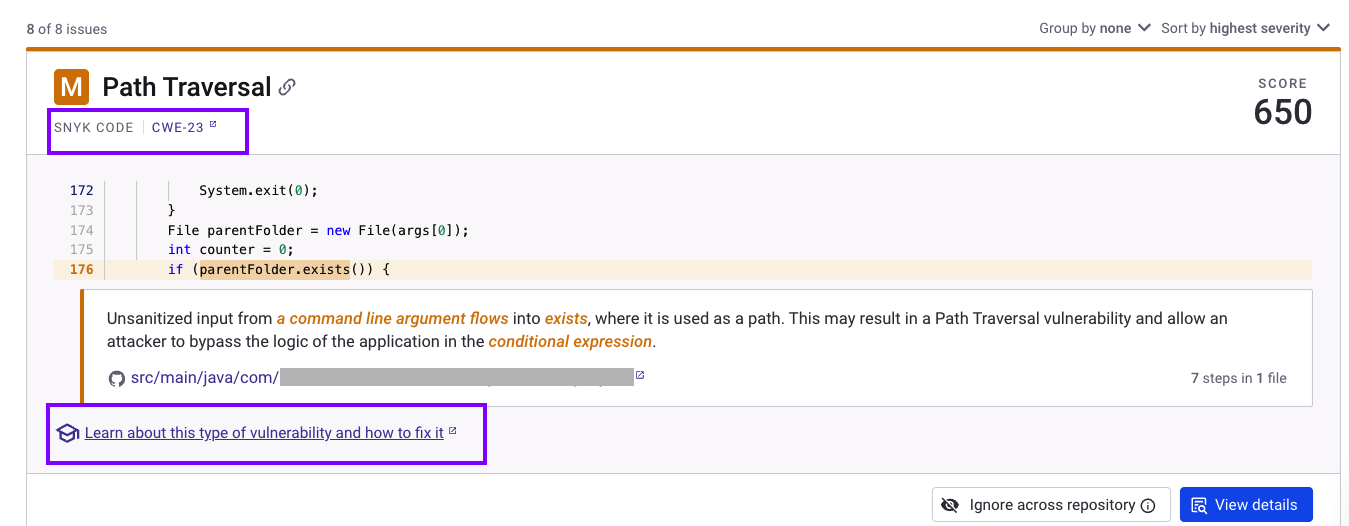
Figure 9: CWE vulnerability identified by Snyk
In short, it took you less than 30 minutes to fix a large number of vulnerabilities.
By associating your code repository with Snyk, you gain visibility into issues in your repository and the ability to resolve them. You can also seamlessly integrate Snyk with your CI pipeline, using Terraform, Jenkins, or Snyk CLI, and fail builds when issues are identified.
Key takeaways
By automatically managing flaky tests, optimizing build times with a sophisticated test engine, and implementing a shift-left approach to security, you can eliminate uncertainty during the code integration phase and reduce project risk.
This article explained how implementing an AI-augmented approach while keeping humans in the loop can help you address the following use cases efficiently:
- Stabilize builds and manage flaky tests methodically.
- Implement continuous security monitoring for your code.
- Combine third-party software solutions from AWS Marketplace with your AWS-native tooling to achieve efficiency in the integration stage.
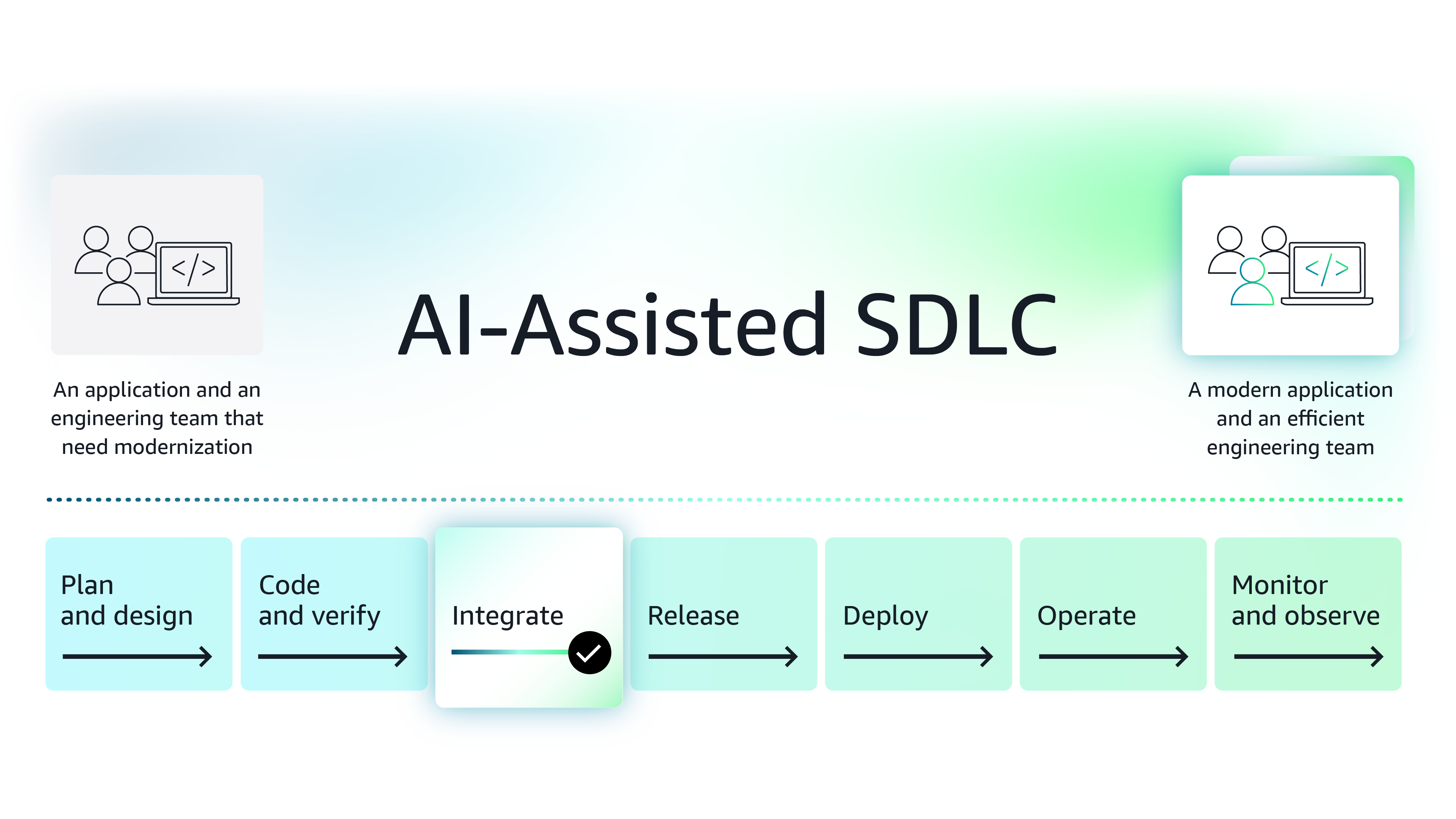
Figure 10: Improve the integration phase of the software development lifecycle using modern AI-based tools
Next steps
While this article introduces two solutions, AWS Marketplace is a curated digital storefront, comprised of Agentic and Generative AI third-party software that can help you make the integrate stage more efficient. Organizations looking for ways to boost efficiency by integrating AI into various aspects of their SDLC, can explore these tools further, conduct POCs, and then procure the software in AWS Marketplace.
Note on procuring third-party software for your team - Procuring third-party software is made easier in AWS Marketplace because enterprise organizations save procurement time and costs using standard contracts, flexible pricing models, custom pricing and term negotiations with vendors and consulting partners, and consolidated license and spend management.
See how modern functionalities and AI-based features provided by independent software vendors (ISVs) help you improve release phase of SDLC.
Featured tools
Explore the series
Why AWS Marketplace for on-demand cloud tools
Free to try. Deploy in minutes. Pay only for what you use.
Featured tools are designed to plug in to your AWS workflows and integrate with your favorite AWS services.
Subscribe through your AWS account with no upfront commitments, contracts, or approvals.
Try before you commit. Most tools include free trials or developer-tier pricing to support fast prototyping.
Only pay for what you use. Costs are consolidated with AWS billing for simplified payments, cost monitoring, and governance.
A broad selection of tools across observability, security, AI, data, and more can enhance how you build with AWS.