
Sold by: FireHydrant
Sound the alarm, assemble the team, and work the problem. FireHydrant is the only all-in-one incident management platform that helps teams manage incidents from the moment something seems off until you've learned from the retro.
Companies like DocuSign, LaunchDarkly, 1Password, Duo, Snyk, and many more use FireHydrant to reduce manual work, get everyone on the same page, and improve time to resolution.
Team-based alerting and on-call scheduling
You built it, you own it, and now you can design the schedules, rules, and escalation policies you need for it. Get ultimate control over on-call management.
Automated, unified incident response
Confidently move from declared to resolved in a shared workspace that brings your team and tools together in Slack without all the context switching.
Actionable learnings and analytics
Automatic data capture, guided retrospectives, and built-in metrics on everything from alert-to-noise to MTTX cement insight-driven improvement in your culture.
4.5
Overview
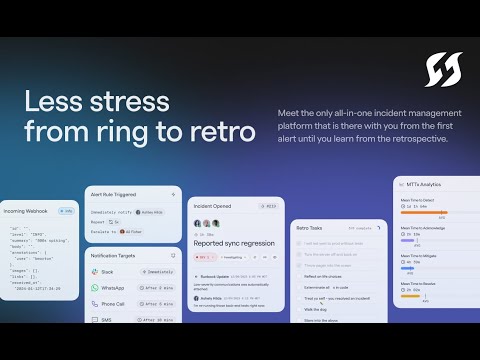
Team-based alerting and on-call scheduling You built it, you own it, and now you can design the schedules, rules, and escalation policies you need for it. Get ultimate control over on-call management.
Automated, unified incident response Confidently move from declared to resolved in a shared workspace that brings your team and tools together in Slack without all the context switching.
Actionable learnings and analytics Automatic data capture, guided retrospectives, and built-in metrics on everything from alert-to-noise to MTTX cement insight-driven improvement in your culture.
Checking the boxes? We've got you covered:
- API-first
- 25+ integrations with tools like PagerDuty, Slack, DataDog and more
- Terraform provider
- Slack-first and web UI with feature parity
- Soc II compliant
- Meaningful AI roadmap
We're all in on commercial incident management tooling -- even if it's not ours. But there are a few things that make FireHydrant the right fit over other solutions.
- Native alerting and on-call help you consolidate tools
- Built-in service catalog that rapidly reduces assembly time
- The most powerful and customizable Runbook engine on the market
- Things us devs love: Terraform, open API, 25+ integrations, Slack native
- Enterprise-grade scalability, reliability, and security
Highlights
- FireHydrant is the only incident management platform driven by deep insights into your services and the people who run them. Built atop a fully-integrated service catalog, FireHydrant allows you to instantly add service owners and experts to incidents, find recent deployments and relevant resources about every application in your stack, and prepare for operational readiness.
- FireHydrant is founded and built by developers who carried the pager. That's why it easily integrates with tools you rely on (like PagerDuty, Jira, and OpsGenie), is fully API-first, includes robust documentation, and can be easily managed with Terraform.
Details
Sold by
Categories
Delivery method
Deployed on AWS
New
Introducing multi-product solutions
You can now purchase comprehensive solutions tailored to use cases and industries.

Features and programs
Buyer guide
Gain valuable insights from real users who purchased this product, powered by PeerSpot.

Financing for AWS Marketplace purchases
AWS Marketplace now accepts line of credit payments through the PNC Vendor Finance program. This program is available to select AWS customers in the US, excluding NV, NC, ND, TN, & VT.

Pricing
Pricing is based on the duration and terms of your contract with the vendor. This entitles you to a specified quantity of use for the contract duration. If you choose not to renew or replace your contract before it ends, access to these entitlements will expire.
Additional AWS infrastructure costs may apply. Use the AWS Pricing Calculator to estimate your infrastructure costs.
Dimension | Description | Cost/12 months |
|---|---|---|
Pro - 20 Seats | For teams that view reliability as essential to their business | $6,000.00 |
Dimensions summary
This listing offers one option: the Pro plan bundled for 20 seats. You buy it as a single contract that covers a fixed block of 20 seats, rather than adding seats one at a time. Pricing does not scale per individual user within this package; you commit to the 20-seat quantity as a unit. The Pro plan is aimed at teams that treat reliability as core to their business. On-call and alerting usage may involve separate charges based on alert volume.
Top-of-mind questions for buyers
A seat is one responder license within the Pro plan. This package covers a fixed block of 20 responder seats. You commit to the full 20-seat quantity as a unit, rather than adding responders one at a time.
On-call and alerting, called Signals, is charged based on the number of alerts you send. This is separate from the seat-based Pro contract. Your seat commitment covers the plan itself, while alert volume can drive additional charges on top of it.
This package covers a fixed 20-seat block and does not scale per user automatically within the contract. To support more responders, you would need to arrange additional seats. The listing itself does not add capacity beyond the committed 20-seat quantity.
firehydrant.com
Helpful?
Vendor refund policy
All fees are non-cancellable and non-refundable except as required by law.

Legal
Vendor terms and conditions
Upon subscribing to this product, you must acknowledge and agree to the terms and conditions outlined in the vendor's End User License Agreement (EULA) .
Content disclaimer
Vendors are responsible for their product descriptions and other product content. AWS does not warrant that vendors' product descriptions or other product content are accurate, complete, reliable, current, or error-free.
Delivery details
Software as a Service (SaaS)
SaaS delivers cloud-based software applications directly to customers over the internet. You can access these applications through a subscription model. You will pay recurring monthly usage fees through your AWS bill, while AWS handles deployment and infrastructure management, ensuring scalability, reliability, and seamless integration with other AWS services.
Resources
Support
Vendor support
Product Documentation API Documentation Chagelog Contact Support System Status https://support.firehydrant.com/hc/en-us/requests/new support@firehydrant.com
AWS infrastructure support
AWS Support is a one-on-one, fast-response support channel that is staffed 24x7x365 with experienced and technical support engineers. The service helps customers of all sizes and technical abilities to successfully utilize the products and features provided by Amazon Web Services.
Updated weekly
By FireHydrant


By Squadcast Inc.
Sentiment is AI generated from actual customer reviews on AWS and G2
Functionality
Ease of use
Customer service
Cost effectiveness
Positive reviews
Mixed reviews
Negative reviews
AI generated from product descriptions
On-Call Management and Scheduling
Customizable on-call schedules, rules, and escalation policies with team-based alerting capabilities
Service Catalog Integration
Built-in service catalog that enables rapid incident assembly by identifying service owners, experts, recent deployments, and relevant resources
Incident Response Automation
Unified incident response workspace with Slack integration that consolidates team and tools to reduce context switching
API-First Architecture with Integrations
API-first design with 25+ integrations including PagerDuty, Jira, OpsGenie, DataDog, and Terraform provider support
Runbook Engine and Analytics
Customizable runbook engine with automatic data capture, guided retrospectives, and built-in metrics for alert-to-noise and MTTX analysis
AI-Powered Root Cause Analysis
Automated root cause analysis with pattern identification and repeat incident detection capabilities
Multi-Platform Integration
100+ integrations including PagerDuty, Opsgenie, Jira, GitHub, Datadog, Zendesk, Slack, Microsoft Teams, Confluence, Zoom, Backstage, plus Terraform provider, API, CLI, and webhooks
Workflow Automation and Customization
Customizable workflow builder for automating incident channel creation, on-call paging, stakeholder communications, and postmortem generation with role assignment and task management
Enterprise Security and Compliance
SOC2, GDPR, CCPA, and BAA compliance with SSO (SAML and SCIM), role-based access control, audit logs, native secrets management, and custom data retention policies
Flexible AI Model Support
Support for multiple AI providers including OpenAI, Anthropic, Google Gemini, Azure OpenAI, and Mistral AI with bring-your-own-key capability
Incident Management
Unified platform for automating and managing incident response processes with integrated workflows
On-Call Alerting
Automated on-call escalation and alert routing capabilities for incident response
Service Level Objective Tracking
SLO and error budget tracking functionality for monitoring service reliability metrics
SRE Workflow Automation
Site Reliability Engineering workflows integrated within a single platform for continuous improvement
Incident Learning and Analytics
Continuous learning from past incidents to refine service expectations and improve response processes
Standard contract
No
No
No
Customer reviews
Nicholas Mwirabua
Centralized incident workflows have improved team coordination and response times
Reviewed on Oct 20, 2026
Review from a verified AWS customer
What is our primary use case?
My main use case for FireHydrant is incident response, alerting, and coordinating teams during incidents, which helps us resolve issues faster, track incidents, and improve post-incident reviews.
FireHydrant helps me coordinate teams during incidents by centralizing incident updates, assigning roles, and keeping engineering and operational teams aligned. For example, when we experienced a production outage, we used it to coordinate responders, track progress, and share updates, reducing confusion and helping us resolve or restore services much faster.
How has it helped my organization?
FireHydrant has positively impacted my organization by improving our incident response time, team coordination, and overall operational efficiencies. Automated workflows reduce manual tasks while centralized updates help us resolve issues faster, and we've improved incident documentation and follow-up.
It has helped us reduce delays in incident response through automated alerts and faster team coordination, and we estimate saving around 10 to 30 minutes per incident by reducing manual updates and streamlining communication overall.
What is most valuable?
The best features FireHydrant offers are incident management, automated workflows, real-time team coordination, incident timelines, and post-incident reviews.
Automated workflows save our team time by handling repetitive tasks, sending notifications, and assigning responsibility automatically. They have reduced human error, improved response times, and let engineers focus on resolving incidents instead of manual coordination.
It also provides clear incident tracking and useful post-incident reviews.
What needs improvement?
FireHydrant could be improved by better integrations with monitoring tools and more customizable dashboards.
I would appreciate better integrations with Datadog, Slack, Jira, and PagerDuty. For dashboards, I would appreciate customizable incident metrics, real-time response time tracking, team performance reports, and filters by incident severity.
Improved reporting and analytics would also help teams identify recurring issues, track response times, and make incident management more efficient.
FireHydrant's AI governance and security seem very promising, but I would appreciate stronger transparency around data handling, access controls, and privacy regarding its AI capabilities.
For how long have I used the solution?
I have been using FireHydrant for three years.
What do I think about the stability of the solution?
FireHydrant is generally stable and reliable. It helps us coordinate incident response and manage workflows consistently throughout my organization.
What do I think about the scalability of the solution?
FireHydrant is a very scalable platform because it scales well as our team and incident volume grows. Its automated workflows and integrations help us manage more incidents without significantly increasing manual effort.
How are customer service and support?
For the few times that I've reached out to customer support, they've been very helpful and responsive overall, providing useful guidance when we needed our issues solved. They've been very proactive and helpful overall.
I would rate the customer support an eight out of ten.
Which solution did I use previously and why did I switch?
Before FireHydrant, we primarily used PagerDuty and Slack for incident alerts and team coordination. We switched to FireHydrant for its centralized incident management, automated workflows, and improved post-incident reviews, which helped streamline our response processes more efficiently.
How was the initial setup?
It was relatively easy to deploy FireHydrant in my environment because the initial setup and integration required some configuration, but the process was straightforward.
The configuration process was straightforward overall. Setting up incidents, workflows, alert notifications, and team roles required some initial adjustment, but the platform was flexible.
FireHydrant integrates well with other AWS services I use, especially connected to monitoring and alerting tools, where it helps us coordinate incident response and keep teams more informed.
What was our ROI?
We've seen a clear return on investment through faster incident response and reduced manual coordination. We've been able to save around 10 to 30 minutes per incident through automation and streamlined communication, improving our engineering productivity overall.
What's my experience with pricing, setup cost, and licensing?
The procurement process was relatively straightforward. Evaluating the features, pricing, and integration capabilities took some time, but the process was manageable overall.
The billing experience is generally straightforward, but clearer usage breakdowns and more transparent pricing would be very helpful.
My experience with pricing, setup cost, and licensing is very manageable and cost-efficient because the total cost depends on the organization's needs and plan, and the setup costs were manageable.
Which other solutions did I evaluate?
I evaluated other options including PagerDuty and Slack before choosing FireHydrant.
What other advice do I have?
I rate FireHydrant four out of five.
I chose four out of five because of its effective incident management, automated workflows, and team coordination, although it could improve further with more advanced analytics, integrations, and dashboard customization.
The AI outputs are generally useful for summarizing incidents and identifying patterns, but they should be reviewed by engineers for more accuracy.
My advice for others looking into using FireHydrant, based on my positive experience, is to evaluate its integration, pricing, and workflow customization options before committing, and to start with a few key workflows to measure response times and expand your team as you become more comfortable with the platform.
If public cloud, private cloud, or hybrid cloud, which cloud provider do you use?
Amazon Web Services (AWS)
Travis Edgar
Automated incident response has improved ownership clarity and data-driven decision making
Reviewed on Sep 29, 2026
Review provided by PeerSpot
What is our primary use case?
My main use case for FireHydrant is automating incident response.
I used FireHydrant to automate incident response by leveraging its integration capabilities, as well as its customization capabilities to allow me to plug in my existing observability and telemetry tooling, and then configure the platform to respond based off of the incoming telemetry. That telemetry was then used to route between various teams and products inside of the enterprise to better response and to ideally remediate automatically if possible.
How has it helped my organization?
I believe one of the biggest impacts FireHydrant had on my organization was identifying ownership across services and products and then being able to track execution.
Tracking execution and identifying ownership improved things for my teams because nobody could hide behind a "I didn't know" or "it wasn't a problem" kind of response. As long as deep observabilities were in place, so logs, metrics, and traces, identifying where the issues were and then routing to those teams was critical. This also allowed me to take a data-driven approach in identifying where further R&D needed to happen across the product suite based off of what our customers were actually doing, bypassing biases from sales teams, development teams, and others.
What is most valuable?
I think the best features FireHydrant offers are the fact that the tool itself is completely moldable in a way where I could modify the transposers to allow me to integrate anything and everything with it.
The fact that the transposers existed was really what stood out to me in that they allowed me to integrate different systems. Instead of being shoehorned into a list of specific platforms, I could add anything I wanted. They're simple JavaScript. Take an input, massage its output, trigger the automations.
What needs improvement?
I think FireHydrant can be improved by being more AI first.
The overall configurability of the platform is quite robust, so wrapping natural language interactions around it would be really helpful. I'm thinking about almost replacing SRE teams. Many of the observability platforms are automating away the SRE roles. FireHydrant could probably work in that same world, noticing what observability platforms are doing and more about the why behind it, and then using that to enrich the incident response procedures.
For how long have I used the solution?
I have been using FireHydrant at my previous company for about a year.
What other advice do I have?
FireHydrant is deployed in my organization as a hosted solution by the vendor.
I can't recall which cloud provider FireHydrant used for hosting.
I would advise others looking into using FireHydrant to really think through the cultural impact a tool like that can have on the teams. Some teams can be very possessive and resistant to change as they might be a little more legacy in design. Other teams can be quite adoptive of it because it helps them protect the customer experience.
FireHydrant's AI capabilities in terms of governance and security are fine. However, FireHydrant's AI capabilities need to be treated with scrutiny regarding accuracy and reliability of output, and for the provider to be able to instill absolute trust in the user base is very difficult. I would think that allowing the platform to grow with human in the loop feedback with the goal of reducing that feedback over time because it got it right is the right approach.
I give FireHydrant an eight out of ten because it was recently acquired, and when a product is acquired, it brings in some potential concerns. I haven't seen how the acquisition has affected the product as I'm no longer with the company.
Mohamed Haidara
Unified incident workflows have improved collaboration and reporting across our teams
Reviewed on Sep 29, 2026
Review from a verified AWS customer
What is our primary use case?
My main use case for FireHydrant was incident management, where it was plugged into our monitoring tool, DataDog. From that, we were able to trigger alerts that go into Slack channels, and from Slack channels, we can trigger and create incidents in FireHydrant. FireHydrant later helps us manage the whole incident lifecycle, including mitigation, the process, and it will also create the Zoom bridge and all of that.
FireHydrant helped me manage the incident lifecycle by providing multiple statuses for the incidents. If I recall correctly, there are incident created, mitigated, resolved, and other statuses. During the incident resolution process, we are basically reporting back our process into FireHydrant, which records that. Later, we use all this data to generate the post-incident review document, so this was one way we used FireHydrant.
We were also using FireHydrant Terraform provider to create all the necessary resources inside FireHydrant itself, which was something really valuable for us. Given that I am a senior DevOps engineer, I was managing the platform for multiple teams by mainly providing some Terraform modules that the team could use to create their services inside FireHydrant and to manage the whole incident lifecycle.
How has it helped my organization?
FireHydrant had a great impact on my organization, given we were using it consistently across all the incidents that we had. The incident reports were also consistent, and everyone was following the same template that was deployed inside FireHydrant.
I cannot recall that we tracked specific metrics, but our process was really simple. Whenever a team deploys a new service, we have a dedicated FireHydrant service attached to the actual service, creating a kind of one-to-one mapping between the service, the application, and FireHydrant services. On top of that, FireHydrant does provide metrics such as MTTR and other metrics that people follow as part of their incident management process.
What is most valuable?
I believe one of the best features FireHydrant offers is the Slack integration, which was really helpful, and on top of that, it was able to create Zoom bridges and a few other things that I do not recall anymore.
The Slack integration in particular improved our team's workflow during incidents, as Slack was our main communication tool. From Slack directly, we were able to tag some specific messages inside the incident Slack channel, and FireHydrant was able to gather the relevant Slack messages inside the incident. We were able to generate nice reports based on the conversation happening in Slack.
What needs improvement?
For improvements, I think I have nothing on top of my mind, given I am not using it currently, so nothing special to add.
Back then, I think there were some missing features in their Terraform provider, so that is the only thing that comes into my mind regarding needed improvements.
For how long have I used the solution?
I have been using FireHydrant for about three years, but currently, I am not using it anymore as I used it in my previous company.
What other advice do I have?
My advice to others looking into using FireHydrant is to properly define your services inside FireHydrant, ensuring that everyone follows the same processes and workflows to avoid inconsistencies between teams and services.
I did not use FireHydrant AI capabilities, so I have nothing to add regarding its governance and security.
I have not used the AI capabilities, so I have nothing to add regarding its accuracy and reliability of output.
FireHydrant was deployed in our organization in a public cloud environment.
We were using AWS, specifically the SaaS version of FireHydrant.
We did not purchase this via the AWS Marketplace.
I would rate FireHydrant around eight on a scale of one to ten because I think it is a great tool that does its job really well.
Which deployment model are you using for this solution?
Public Cloud
If public cloud, private cloud, or hybrid cloud, which cloud provider do you use?
Amazon Web Services (AWS)
Gunther C.
FireHydrant Makes Incident Notifications Effortless and Keeps the Right People Informed
Reviewed on May 13, 2026
Review provided by G2
What do you like best about the product?
FireHydrant makes it extremely easy to notify engineers and other stakeholders that an incident is occuring, it helps make sure the right people are pulled in and notified. Overall it does a good job of helping managers feel confident that someone can respond to an issue if one occurs.
What do you dislike about the product?
FireHydrant is really good compared to similar solutions, I don't currently have any complaints.
What problems is the product solving and how is that benefiting you?
FireHydrant solves the need for engineers to be able to respond to an incident quickly, it's ability to handle tasks like setting up a dedicated Slack channel for the incident helps cut down on extrenious steps and initial coordination efforts that would make it longer and more difficult to start focusing on addressing the root cause of the issue.
Hospital & Health Care
Seamless Communication with Team Members
Reviewed on Apr 29, 2026
Review provided by G2
What do you like best about the product?
The fast communication with team members.
What do you dislike about the product?
The downside of using Fire Hydrant was that it's had a lot of features that smaller teams didn't need.
What problems is the product solving and how is that benefiting you?
It benefits me by being able to help me communicate and notify all team members.