AWS Big Data Blog
Category: Amazon SageMaker Unified Studio
How to set up an air-gapped VPC for Amazon SageMaker Unified Studio
In this post, we explore scenarios where customers need more control over their network infrastructure when building their unified data and analytics strategic layer. We’ll show how you can bring your own Amazon Virtual Private Cloud (Amazon VPC) and set up Amazon SageMaker Unified Studio for strict network control.
Navigating multi-account deployments in Amazon SageMaker Unified Studio: a governance-first approach
In this post, we explore SageMaker Unified Studio multi-account deployments in depth: what they entail, why they matter, and how to implement them effectively. We examine architecture patterns, evaluate trade-offs across security boundaries, operational overhead, and team autonomy. We also provide practical guidance to help you design a deployment that balances centralized control with distributed ownership across your organization.
Filter catalog assets using custom metadata search filters in Amazon SageMaker Unified Studio
Finding the right data assets in large enterprise catalogs can be challenging, especially when thousands of datasets are cataloged with organization-specific metadata. Amazon SageMaker Unified Studio now supports custom metadata search filters. In this post, you learn how to create custom metadata forms, publish assets with metadata values, and use structured filters to discover those assets.
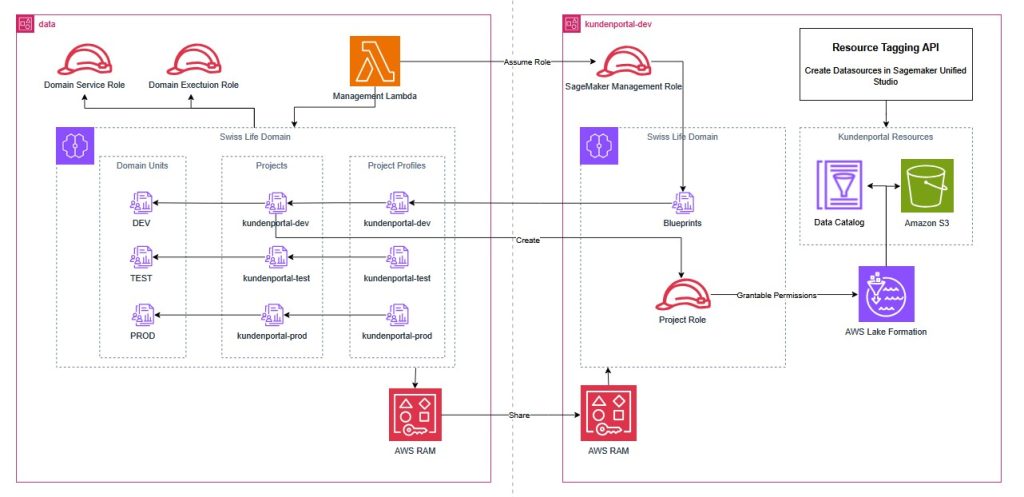
How Swiss Life Germany automated data governance and collaboration with Amazon SageMaker
Swiss Life Germany, a leading provider of customized pension products with over 100 years of experience, recently transitioned from legacy on-premises infrastructure to a modern cloud architecture. To enable secure data sharing and cross-departmental collaboration in this regulated environment, they implemented Amazon SageMaker with a custom Terraform pattern. This post demonstrates how Swiss Life Germany aligned SageMaker’s agility with their rigorous infrastructure as code standards, providing a blueprint for platform engineers and data architects in highly regulated enterprises.
Implement a data mesh pattern in Amazon SageMaker Catalog without changing applications
In this post, we walk through simulating a scenario based on data producer and data consumer that exists before Amazon SageMaker Catalog adoption. We use a sample dataset to simulate existing data and an existing application using an AWS Lambda function, then implement a data mesh pattern using Amazon SageMaker Catalog while keeping your current data repositories and consumer applications unchanged.
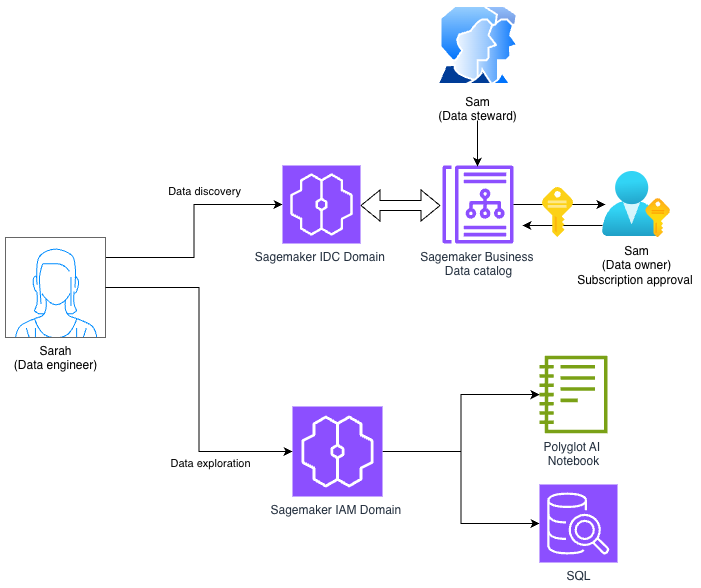
Using Amazon SageMaker Unified Studio Identity center (IDC) and IAM-based domains together
In this post, we demonstrate how to access an Amazon SageMaker Unified Studio IDC-based domain with a new IAM-based domain using role reuse and attribute-based access control.
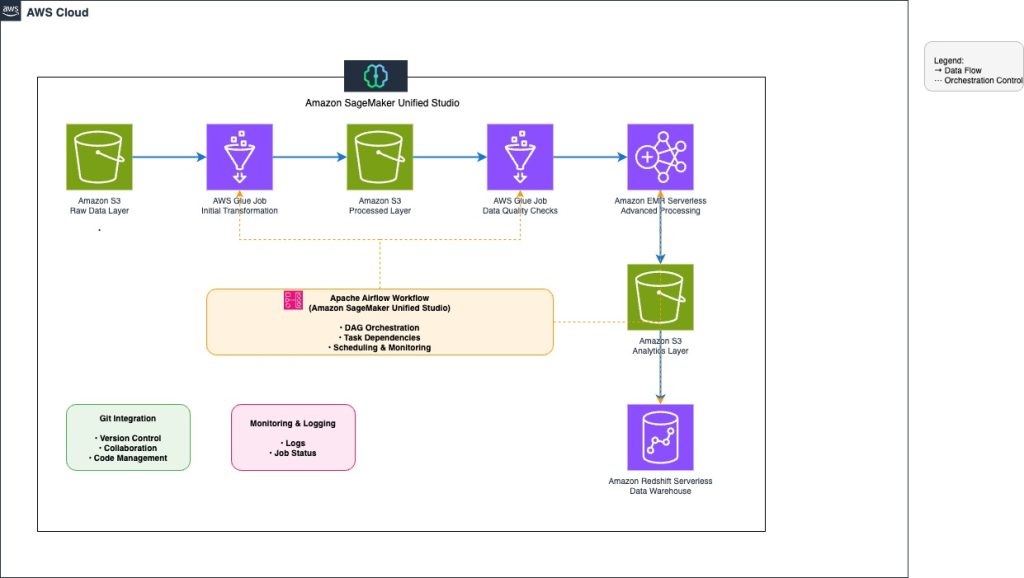
Orchestrate end-to-end scalable ETL pipeline with Amazon SageMaker workflows
This post explores how to build and manage a comprehensive extract, transform, and load (ETL) pipeline using SageMaker Unified Studio workflows through a code-based approach. We demonstrate how to use a single, integrated interface to handle all aspects of data processing, from preparation to orchestration, by using AWS services including Amazon EMR, AWS Glue, Amazon Redshift, and Amazon MWAA. This solution streamlines the data pipeline through a single UI.
Federate access to Amazon SageMaker Unified Studio with AWS IAM Identity Center and Ping Identity
In this post, we show how to set up workforce access with SageMaker Unified Studio using Ping Identity as an external IdP with IAM Identity Center.
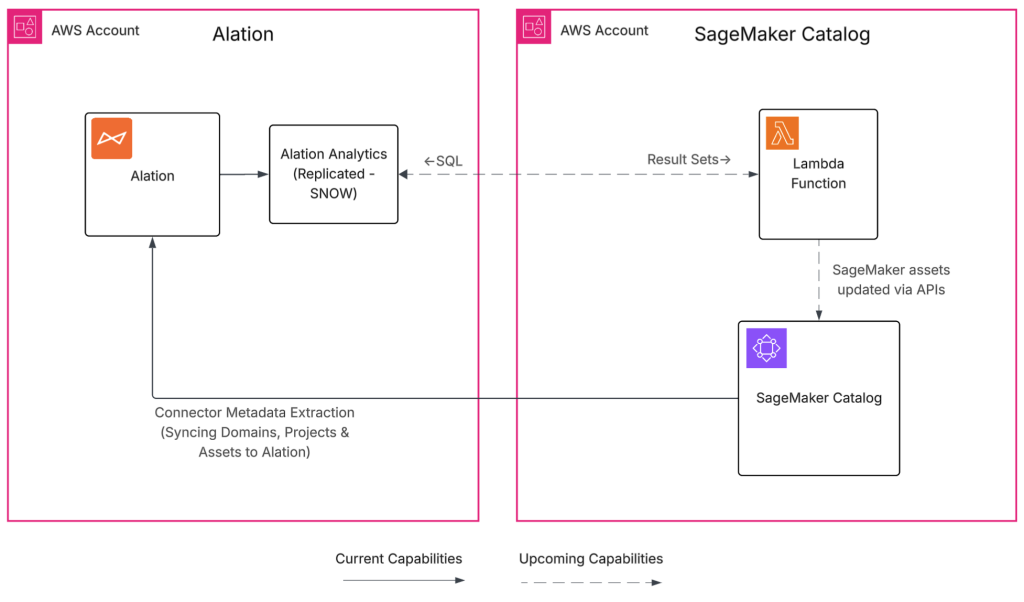
Build a trusted foundation for data and AI using Alation and Amazon SageMaker Unified Studio
The Alation and SageMaker Unified Studio integration helps organizations bridge the gap between fast analytics and ML development and the governance requirements most enterprises face. By cataloging metadata from SageMaker Unified Studio in Alation, you gain a governed, discoverable view of how assets are created and used. In this post, we demonstrate who benefits from this integration, how it works, the specific metadata it synchronizes, and provide a complete deployment guide for your environment.
Get started faster with one-click onboarding, serverless notebooks, and AI agents in Amazon SageMaker Unified Studio
Using Amazon SageMaker Unified Studio serverless notebooks, AI-assisted development, and unified governance, you can speed up your data and AI workflows across data team functions while maintaining security and compliance. In this post, we walk you through how these new capabilities in SageMaker Unified Studio can help you consolidate your fragmented data tools, reduce time to insight, and collaborate across your data teams.