AWS Big Data Blog
Category: Artificial Intelligence
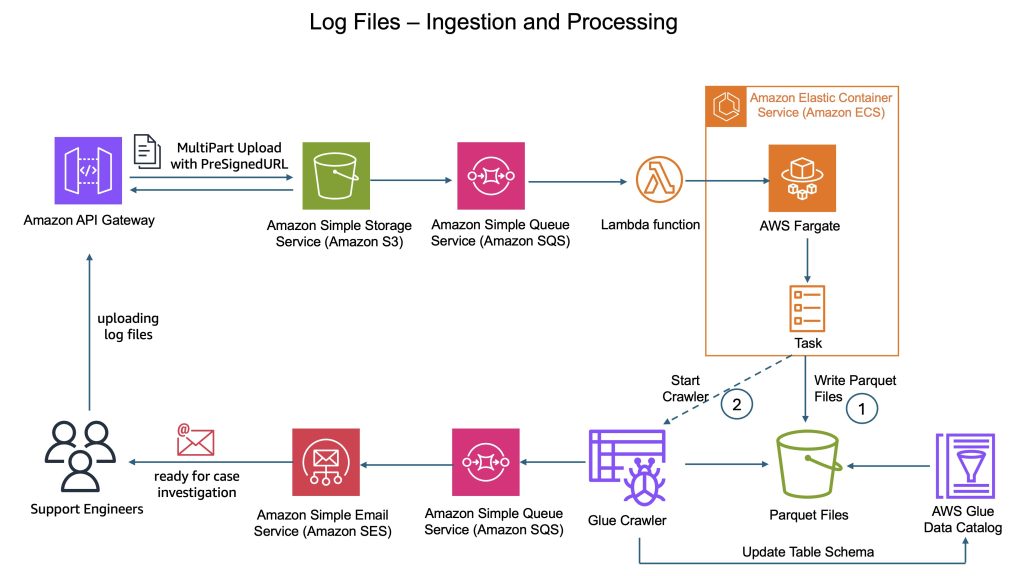
How CyberArk uses Apache Iceberg and Amazon Bedrock to deliver up to 4x support productivity
CyberArk is a global leader in identity security. Centered on intelligent privilege controls, it provides comprehensive security for human, machine, and AI identities across business applications, distributed workforces, and hybrid cloud environments. In this post, we show you how CyberArk redesigned their support operations by combining Iceberg’s intelligent metadata management with AI-powered automation from Amazon Bedrock. You’ll learn how to simplify data processing flows, automate log parsing for diverse formats, and build autonomous investigation workflows that scale automatically.
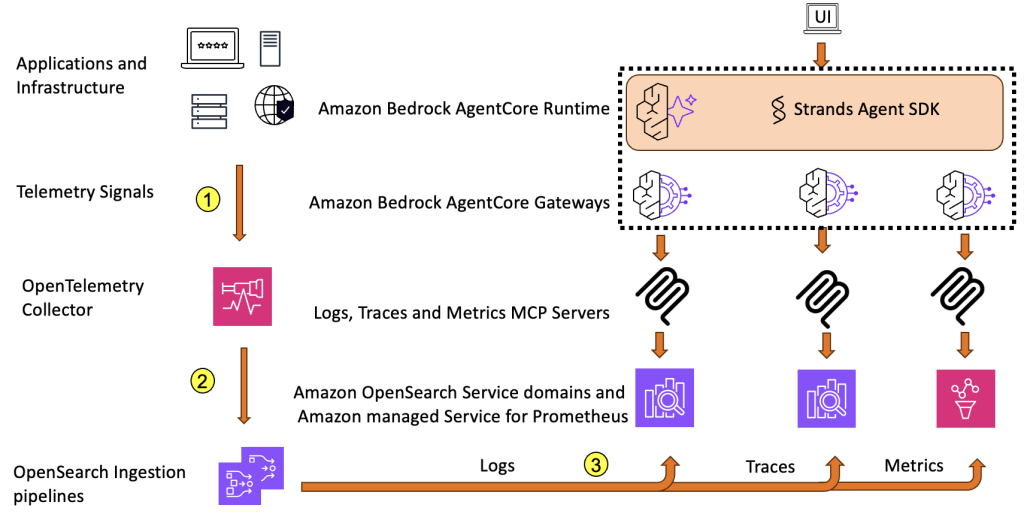
Reduce Mean Time to Resolution with an observability agent
In this post, we present an observability agent using OpenSearch Service and Amazon Bedrock AgentCore that can help surface root cause and get insights faster, handle multiple query-correlation cycles, and ultimately reduce MTTR even further.
Modernize game intelligence with generative AI on Amazon Redshift
In this post, we discuss how you can use Amazon Redshift as a knowledge base to provide additional context to your LLM. We share best practices and explain how you can improve the accuracy of responses from the knowledge base by following these best practices.
Get started faster with one-click onboarding, serverless notebooks, and AI agents in Amazon SageMaker Unified Studio
Using Amazon SageMaker Unified Studio serverless notebooks, AI-assisted development, and unified governance, you can speed up your data and AI workflows across data team functions while maintaining security and compliance. In this post, we walk you through how these new capabilities in SageMaker Unified Studio can help you consolidate your fragmented data tools, reduce time to insight, and collaborate across your data teams.
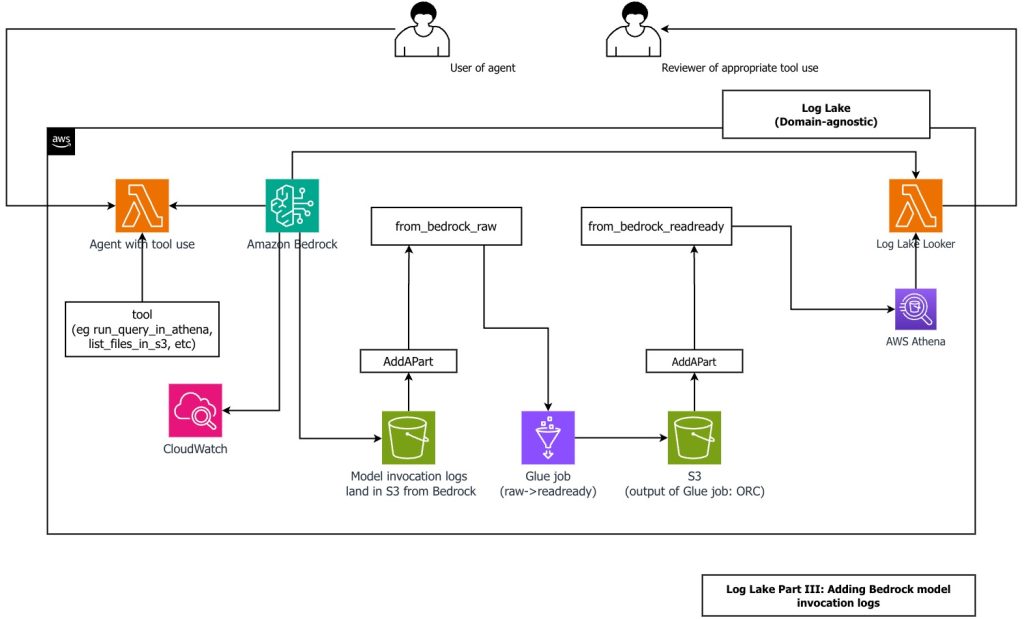
Create a customizable cross-company log lake, Part II: Build and add Amazon Bedrock
In this post, you learn how to build Log Lake, a customizable cross-company data lake for compliance-related use cases that combines AWS CloudTrail and Amazon CloudWatch logs. You’ll discover how to set up separate tables for writing and reading, implement event-driven partition management using AWS Lambda, and transform raw JSON files into read-optimized Apache ORC format using AWS Glue jobs. Additionally, you’ll see how to extend Log Lake by adding Amazon Bedrock model invocation logs to enable human review of agent actions with elevated permissions, and how to use an AI agent to query your log data without writing SQL.
Accelerate context-aware data analysis and ML workflows with Amazon SageMaker Data Agent
In this post, we demonstrate the capabilities of SageMaker Data Agent, discuss the challenges it addresses, and explore a real-world example analyzing New York City taxi trip data to see the agent in action.
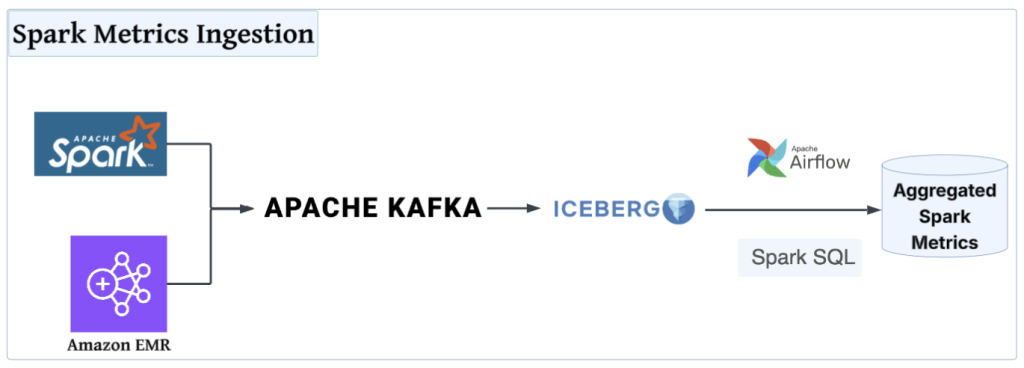
How Slack achieved operational excellence for Spark on Amazon EMR using generative AI
In this post, we show how Slack built a monitoring framework for Apache Spark on Amazon EMR that captures over 40 metrics, processes them through Kafka and Apache Iceberg, and uses Amazon Bedrock to deliver AI-powered tuning recommendations—achieving 30–50% cost reductions and 40–60% faster job completion times.
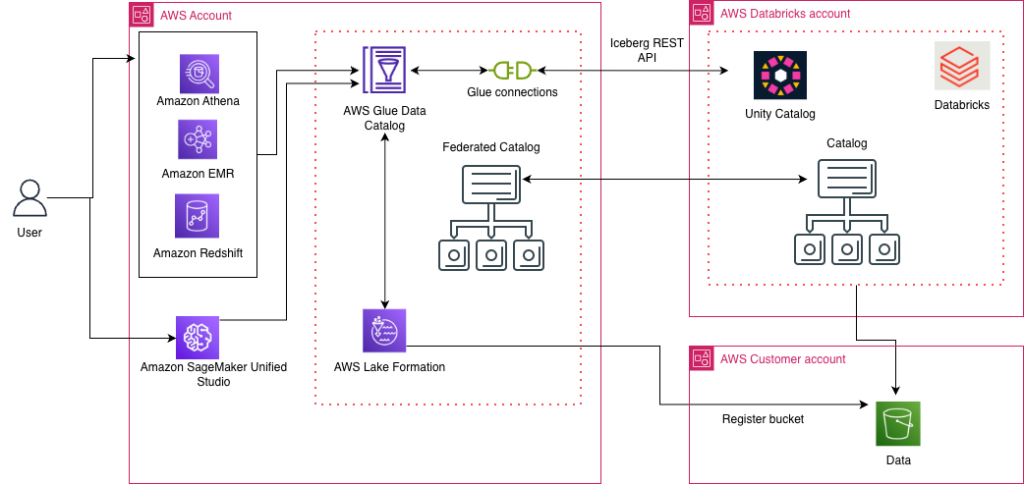
Access Databricks Unity Catalog data using catalog federation in the AWS Glue Data Catalog
AWS has launched the catalog federation capability, enabling direct access to Apache Iceberg tables managed in Databricks Unity Catalog through the AWS Glue Data Catalog. With this integration, you can discover and query Unity Catalog data in Iceberg format using an Iceberg REST API endpoint, while maintaining granular access controls through AWS Lake Formation. In this post, we demonstrate how to set up catalog federation between the Glue Data Catalog and Databricks Unity Catalog, enabling data querying using AWS analytics services.
Use Amazon SageMaker custom tags for project resource governance and cost tracking
Amazon SageMaker announced a new feature that you can use to add custom tags to resources created through an Amazon SageMaker Unified Studio project. This helps you enforce tagging standards that conform to your organization’s service control policies (SCPs) and helps enable cost tracking reporting practices on resources created across the organization. In this post, we look at use cases for custom tags and how to use the AWS Command Line Interface (AWS CLI) to add tags to project resources.
Simplified management of Amazon MSK with natural language using Kiro CLI and Amazon MSK MCP Server
In this post, we demonstrate how Kiro CLI and the MSK MCP server can streamline your Kafka management. Through practical examples and demonstrations, we show you how to use these tools to perform common administrative tasks efficiently while maintaining robust security and reliability.