AWS Big Data Blog
AWS Quick Sight now supports Email Reports and Data Labels
Today, we are excited to announce the availability of email reports and data labels in AWS Quick Sight.
Email reports
With email reports in AWS Quick Sight, you can receive scheduled and one-off reports delivered directly to your email inbox. Using email reports, you have access to the latest information without logging in to your AWS Quick Sight accounts. You also get offline access to your data with email reports. For deeper analysis and exploration, you can easily click through from the email report to the interactive dashboard in AWS Quick Sight.

Sending reports by using email
Authors can choose to send a one-time or scheduled email report to users who have access to the dashboard within an AWS Quick Sight account. You can personalize email reports for desktop or mobile layouts depending on the recipients’ preferences.
Enabling email reports for a dashboard is easy. Simply navigate to the Share menu on the dashboard page and choose the Email Report option. To send or edit the schedule of an email report on the dashboard, you must be an owner or co-owner of the dashboard.

On this screen, you can configure the email report, with options for scheduling, email details (for example, the subject line), and recipients.

After email reports are enabled for a dashboard, all users with access to the dashboard can subscribe or unsubscribe to the email reports. They can also modify layout preferences (mobile or desktop) by navigating to the dashboard page within their account. Authors also have the option to send test email reports to themselves to ensure that they have the right formatting and layout in place.

After email reports are scheduled, they’re sent at the frequency and time specified. The owner of an AWS Quick Sight dashboard can also pause the schedule of an email report or send a one-off report between scheduled sends. If there are any error or failures in the refreshes of the underlying SPICE data set associated with the dashboard, AWS Quick Sight automatically skips delivery of the report. AWS Quick Sight also sends an error report to the dashboard owner in this case.
Pricing: Email reports are available in AWS Quick Sight Enterprise Edition. For AWS Quick Sight authors, email reports are included in the monthly subscription charges; authors can receive unlimited email reports in a month. For AWS Quick Sight readers, charges for email reports follow the Pay-per-Session pricing model. Readers are billed $0.30 (one reader session) for each email report they receive, up to the monthly maximum charge of $5 per reader. Each $0.30 charge associated with an email report also provides readers with a future credit for an interactive, 30-minute AWS Quick Sight session within the calendar month. Charges for email reports and regular reader sessions both accrue to the $5 per month maximum charge for a reader.
To illustrate this, let’s consider some examples:
Cathy is an AWS Quick Sight reader and receives three email reports from her team on the first of every month. After she receives the reports, Cathy is charged $0.30 x 3 = $0.90, and she receives credits for three interactive AWS Quick Sight sessions in the month. Over the course of the month, Cathy accesses AWS Quick Sight 10 more times, viewing dashboards and analyzing data. At the end of the month, her total AWS Quick Sight charge is:
$0.90 (for 3 email reports) + 7 x $0.30 (10 reader sessions – 3 session credits from the email reports) = $3
As another example, if Chris is a heavy user of AWS Quick Sight, the reader maximum charge of $5 per month always applies. For example, suppose that he receives 3 email reports every week (12 email reports in a month). Suppose also that he accesses AWS Quick Sight once a day for every day of the month (30 sessions a month). His total charge for the month is only $5.
Availability: Email reports are currently available in AWS Quick Sight Enterprise Edition, in all supported AWS Regions—US East (N. Virginia and Ohio), US West (Oregon), EU (Ireland), and Asia Pacific (Singapore, Sydney, and Tokyo). For more details, refer to the AWS Quick Sight documentation.
Data labels
With this release, we also introduce data labels in AWS Quick Sight. With data labels, viewers of a dashboard can quickly and easily find the numeric values associated with data points on a chart without having to hover over it. Data labels provide additional benefits in email reports because they display metrics on the static visuals in the emails. Without data labels, these metrics would be visible only if you hover over visuals on the dashboard.
To access the data labels, use the Format visual option when editing a visual.
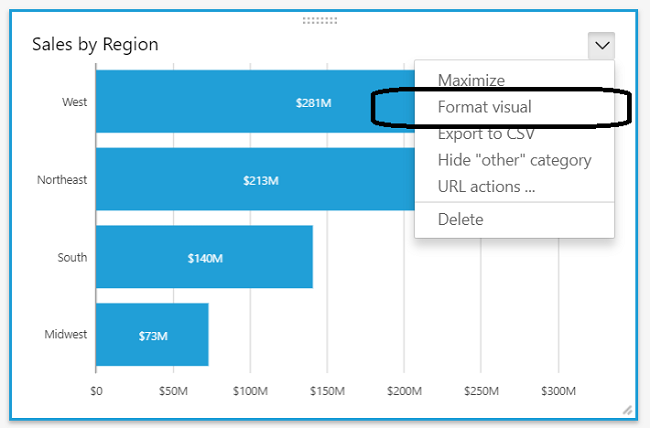
With this option, you can specify the position of the data labels within the visual, font size, font color, and other visual-specific options.

Availability: Data labels are available in both Standard and Enterprise Editions, in all supported AWS Regions. For more details, refer to the documentation.
Additional Reading
If you found this post useful, be sure to check out 10 visualizations to try in AWS Quick Sight with sample data and Analyze Amazon Connect records with Amazon Athena, AWS Glue, and AWS Quick Sight.
About the Author
 Jose Kunnackal is a senior product manager for AWS Quick Sight.