Desktop and Application Streaming
Automate copy of tags of Amazon Workspaces to hybrid activation resources in AWS Systems Manager
AWS Systems Manager allows customers to manager their Amazon Workspaces using hybrid activated managed nodes. AWS Systems Manager provides software inventories, OS patches, and configuration of windows and linux workspaces, but it is difficult to identify and map managed node to the corresponding Workspaces without any tag. This is a time-consuming process in large organizations where IT Admins manually create these tags for each managed node in Systems Manager. The task is an additional responsibility and repetitive, leading to inconsistencies and wasted time. The inconsistency in Systems Manager tags can lead to operational errors and other issues.
This blog describes how to implement an automation using Cloudformation template to copy tags from Amazon Workspaces to their corresponding managed node in Systems Manager.
| Time to read | 15 minutes |
| Time to complete | 5 minutes |
| Learning level | Expert(400) |
| Cost to complete (estimated) | $5 (can vary with interval rate) |
| Services used | Amazon Workspaces
AWS Systems Manager AWS Cloudformation AWS Lambda Amazon EventBridge |
Overview of solution
In this solution, you will reduce operational burden of manually creating tags for the Workspace’s managed nodes. To implement this automation, you will use AWS Cloudformation to automatically configure all the required AWS services in the solution.
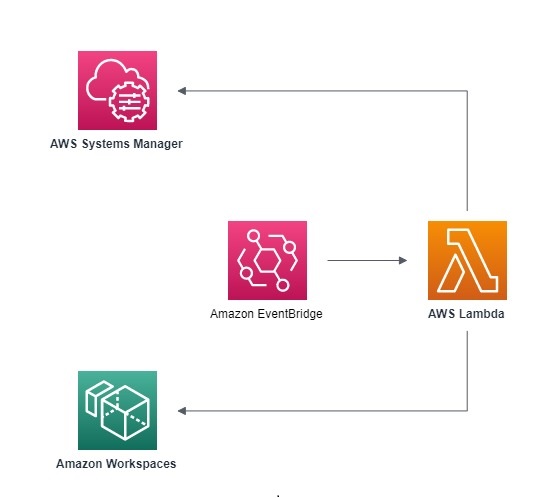
This solution uses Amazon EventBridge to invoke an AWS Lambda function on specified interval. The Lambda function then collects the Workspaces and managed nodes in Systems Manager. The Lambda Function matches both resources using the computer name, and then copies the tags of each Workspaces to its matched managed node. The Lambda function also creates the following additional tags for identification: Name, WorkspaceID, UserID, BundleID, DirectoryID, DirectoryName, and RegistrationCode.
Walkthrough
In this article, you will perform following activities:
- Use Cloudformation to deploy the solution to automate the copying tags of Workspaces to their managed node in Systems Manager.
- Cleanup resources to prevent unwanted AWS usage charges.
Prerequisites
For this walkthrough, you need the following:
- An AWS account.
- An Amazon Workspaces
- An AWS Systems Manager hybrid activation deployment for Amazon Workspaces.
- IAM permissions to create following AWS service components:
- AWS Identity and Access Management (IAM) roles and policies
- AWS Lambda functions
- Amazon EventBridge rule
- Permissions to deploy stack using Cloudformation.
- Basic familiarity with AWS Cloudformation, AWS Systems Manager, Amazon Workspaces, and Amazon EventBridge.
Step 1: Deployment of solution via AWS Cloudformation
You will use the provided Cloudformation template to deploy and configure all the required AWS services of this solution. This template cannot be used for Workspaces and managed nodes in different accounts or AWS Regions. This deployment is Region specific, and must run in the AWS Region that contains your Amazon Workspaces and hybrid activated managed nodes.
Use the following steps to deploy the solution via AWS Cloudformation:
-
- Open a notepad in your local machine.
- Copy the below Cloudformation template and paste it in your notepad.
AWSTemplateFormatVersion: '2010-09-09' Description: This automation copies user tags from workspaces to Systems Manager instances in the same account. It runs as a scheduled cron job. Parameters: IntervalRate: Type: String Description: Interval rate of Amazon Event Bridge Rule. Default: rate(24 hours) EventBridgeRuleName: Type: String Description: Provide name of the Eventbridge rule. Name of the region(for example: us-east-1) will be added as suffix. Default: Rule-Automation-WS-Tags-Collector-And-Registrar LambdaFunctionName: Type: String Description: Provide name of the lambda function. Name of the region(for example: us-east-1) will be added as suffix. Default: Fn-Automation-WS-Tags-Collector-And-Registrar IAMRoleName: Type: String Description: Provide name of the IAM role. Name of the region(for example: us-east-1) will be added as suffix. Default: Role-Automation-WS-Tags-Collector-And-Registrar Resources: cronWSTagsCollector: Type: AWS::Events::Rule DependsOn: fnWSTagsCollector Properties: Name: !Sub - '${Name}-${AWS::Region}' - Name: !Ref EventBridgeRuleName ScheduleExpression: Ref: IntervalRate State: "ENABLED" Targets: - Arn: Fn::GetAtt: [ fnWSTagsCollector, "Arn" ] Id: fnWSTagsCollector permCronForWSTagCollectorPermission: Type: AWS::Lambda::Permission DependsOn: fnWSTagsCollector Properties: Action: lambda:InvokeFunction FunctionName: Fn::GetAtt: [ fnWSTagsCollector, "Arn" ] Principal: events.amazonaws.com rWSTagsCollectorRole: Type: "AWS::IAM::Role" Properties: RoleName: !Sub - '${Name}-${AWS::Region}' - Name: !Ref IAMRoleName AssumeRolePolicyDocument: Version: "2012-10-17" Statement: - Effect: "Allow" Principal: Service: - "lambda.amazonaws.com" Action: - "sts:AssumeRole" Path: "/aws/" Policies: - PolicyName: "EC2ToSSMTaggingPolicy" PolicyDocument: Version: "2012-10-17" Statement: - Effect: "Allow" Action: - lambda:InvokeFunction - logs:CreateLogGroup - logs:CreateLogStream - logs:PutLogEvents - workspaces:DescribeWorkspaces - workspaces:DescribeWorkspaceDirectories - workspaces:DescribeTags - ssm:DescribeInstanceInformation - ssm:AddTagsToResource - ssm:ListTagsForResource - ssm:DeregisterManagedInstance Resource: "*" fnWSTagsCollector: Type: AWS::Lambda::Function Properties: FunctionName: !Sub - '${Name}-${AWS::Region}' - Name: !Ref LambdaFunctionName Handler: index.lambda_handler Role: !GetAtt [rWSTagsCollectorRole, Arn] Code: ZipFile: !Sub |+ import boto3 import logging #setup simple logging for INFO logger = logging.getLogger() logger.setLevel(logging.INFO) #define the connection region for Workspaces and SSM agent client = boto3.client('workspaces') ssmclient = boto3.client('ssm') #define Main function def lambda_handler(event, context): #declare function variables ssmdata = [] workspacesdata = [] dsdata = [] Tagdata = [] #collection of Directories information dscollection = client.describe_workspace_directories() logger.info ( dscollection ) while dscollection: dsdata += dscollection['Directories'] dscollection = client.describe_workspace_directories(NextToken=dscollection['NextToken']) if 'NextToken' in dscollection else None # Collection of SSM Managed Instance data ssmcollection = ssmclient.describe_instance_information() logger.info ( ssmcollection ) while ssmcollection: ssmdata += ssmcollection['InstanceInformationList'] ssmcollection = ssmclient.describe_instance_information(NextToken=ssmcollection['NextToken']) if 'NextToken' in ssmcollection else None # Collection of Workspaces data wscollection = client.describe_workspaces() while wscollection: workspacesdata += wscollection['Workspaces'] wscollection = client.describe_workspaces(NextToken=wscollection['NextToken']) if 'NextToken' in wscollection else None for ssminfo in ssmdata: if 'ComputerName' in ssminfo and 'mi-' in ssminfo['InstanceId']: for workspace in workspacesdata: if workspace['ComputerName'] in ssminfo['ComputerName'] : NameID = workspace['ComputerName'] WorkspaceID = workspace['WorkspaceId'] UserID = workspace['UserName'] BundleID = workspace['BundleId'] logger.info ( "Running Task for " + WorkspaceID ) Tags = client.describe_tags(ResourceId=WorkspaceID) Tagdata += Tags['TagList'] logger.info ( Tagdata ) for taginfo in Tagdata: ssmclient.add_tags_to_resource( ResourceType='ManagedInstance', ResourceId = ssminfo['InstanceId'],Tags= [taginfo]) Tagdata = [] for ds in dsdata: if ds['DirectoryId'] == workspace['DirectoryId']: DirectoryID = ds['DirectoryId'] DirectoryName = ds['DirectoryName'] RegistrationCode = ds['RegistrationCode'] ssmclient.add_tags_to_resource( ResourceType='ManagedInstance', ResourceId = ssminfo['InstanceId'], Tags=[ { 'Key': 'DirectoryID', 'Value': DirectoryID }, { 'Key': 'DirectoryName', 'Value': DirectoryName }, { 'Key': 'RegistrationCode', 'Value': RegistrationCode }, ] ) ssmclient.add_tags_to_resource( ResourceType='ManagedInstance', ResourceId = ssminfo['InstanceId'], Tags=[ { 'Key': 'Name', 'Value': NameID }, { 'Key': 'WorkspaceID', 'Value': WorkspaceID }, { 'Key': 'UserID', 'Value': UserID }, { 'Key': 'BundleID', 'Value': BundleID }, ] ) Runtime: python3.9 Timeout: '90' - Save notepad file with YAML file extension.(<filename>.yaml).
- Visit the AWS CloudFormation console.
- Ensure you have selected the AWS Region of your Workspaces deployment.
- In the navigation pane, choose Stacks.
- Choose Create stack, then choose With new resources (standard).
- On the Create stack page, select Upload a Template File.
- Select Choose File, choose YAML file that you created in step 1.
- Select Next.
- Provide any unique stack name.
- Provide the IntervalRate in the Rate Expression format. Amazon EventBridge will run this automation at interval rate specified in this section.
- Provide unique name of AWS lambda function, Amazon Eventbridge rule and IAM role. Name of the region will be added as suffix to create resources with unique name to avoid conflict for multi-region environment.
- Choose Next on the Configure stack options page.
- Review the configuration options and choose Create stack.
- Verify that the stack has a status of CREATE_COMPLETE.
The stack deployment will complete in approximately 2 minutes and it will create following resources:
- AWS Lambda function
- Amazon EventBridge Rule
- IAM Role
Step 2: Validate the creation of new Tags for hybrid activated managed node in AWS Systems Manager.
You now have an Amazon EventBridge Rule and AWS Lambda configured. Tags will be created for managed nodes in Systems Manager after the specified interval provided during the creation of stack in AWS CloudFormation. Use the following steps to validate the tags in Systems Manage:
- Visit the AWS Systems Manager console where managed nodes are present.
- In the navigation pane, choose Fleet Manager from Node Management.
- Select any of the Managed node created for Workspaces.
- Verify the created tags in Tags section.
Cleaning up
It is important to clean up unused resource to avoid unexpected usage fees. To clean up the environment, delete AWS CloudFormation stacks you created in the walkthrough. Deletion of AWS CloudFormation will delete Lambda function, EventBridge rules and associated IAM roles. You must manually delete the tags created for managed nodes in Systems Manager via console or API.
Conclusion
In this blog, you configured Amazon EventBridge with AWS Lambda functions to automatically copy AWS Workspaces tags to their corresponding Systems Manager managed nodes.
To learn more about Amazon WorkSpaces, please review the administration guide and you can get more information about hybrid activation in AWS Systems Manager using this link.
If you’d like to discuss how to configure this solution described in this blog for your specific use case, we’d love to hear from you. Just reach out to your account team.
-

Ajay Saini is a End User Compute Specialist Solution Architect. He works with his customer to help them understand the best practices, accelerate their architecture design, migrate and modernize their existing Virtual Desktop Infrastructure (VDI) to AWS. In his spare time, he enjoys travel and spending time with his family 
Brandon Mahtani is an EUC Specialist Solutions Architect who joined AWS in December of 2018 with over 20 years experience deploying desktop virtualization solutions within Higher Education as well as the Life Sciences industries.