AWS Big Data Blog
Category: Technical How-to

Implement data quality checks on Amazon Redshift data assets and integrate with Amazon DataZone
In this post, we show how to capture the data quality metrics for data assets produced in Amazon Redshift. With Amazon DataZone, the data owner can directly import the technical metadata of a Redshift database table and views to the Amazon DataZone project’s inventory. As these data assets gets imported into Amazon DataZone, it bypasses the AWS Glue Data Catalog, creating a gap in data quality integration. This post proposes a solution to enrich the Amazon Redshift data asset with data quality scores and KPI metrics.

Build a serverless data quality pipeline using Deequ on AWS Lambda
Poor data quality can lead to a variety of problems, including pipeline failures, incorrect reporting, and poor business decisions. For example, if data ingested from one of the systems contains a high number of duplicates, it can result in skewed data in the reporting system. To prevent such issues, data quality checks are integrated into […]
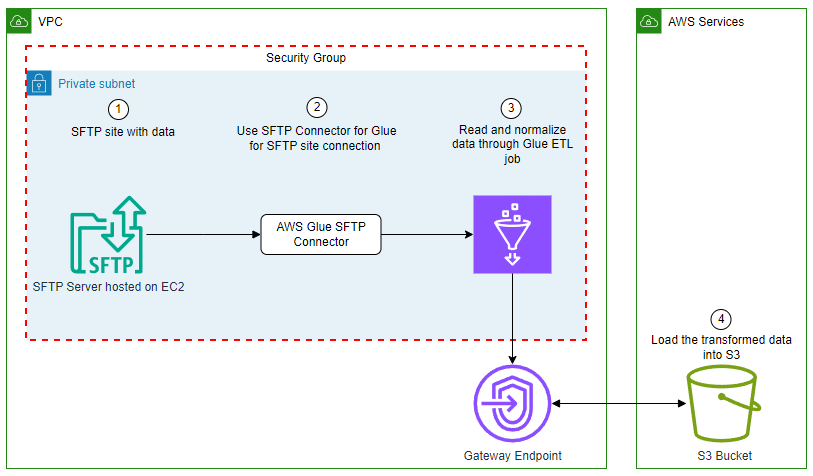
Use AWS Glue to streamline SFTP data processing
In this blog post, we explore how to use the SFTP Connector for AWS Glue from the AWS Marketplace to efficiently process data from Secure File Transfer Protocol (SFTP) servers into Amazon Simple Storage Service (Amazon S3), further empowering your data analytics and insights.

Automate Amazon Redshift Advisor recommendations with email alerts using an API
Amazon Redshift Advisor offers recommendations about optimizing your Redshift cluster performance and helps you save on operating costs. In this post, we show you how to use the ListRecommendations API to set up email notifications for Advisor recommendations on your Redshift cluster. These recommendations, such as identifying tables that should be vacuumed to sort the data or finding table columns that are candidates for compression, can help improve performance and save costs.

Migrate Amazon Redshift from DC2 to RA3 to accommodate increasing data volumes and analytics demands
As businesses strive to make informed decisions, the amount of data being generated and required for analysis is growing exponentially. This trend is no exception for Dafiti, an ecommerce company that recognizes the importance of using data to drive strategic decision-making processes. With the ever-increasing volume of data available, Dafiti faces the challenge of effectively managing and extracting valuable insights from this vast pool of information to gain a competitive edge and make data-driven decisions that align with company business objectives. The growing need for storage space to maintain data from over 90 sources and the functionality available on the new Amazon Redshift node types, including managed storage, data sharing, and zero-ETL integrations, led us to migrate from DC2 to RA3 nodes. In this post, we share how we handled the migration process and provide further impressions of our experience.

AWS Glue mutual TLS authentication for Amazon MSK
In today’s landscape, data streams continuously from countless sources such as social media interactions to Internet of Things (IoT) device readings. This torrent of real-time information presents both a challenge and an opportunity for businesses. To harness the power of this data effectively, organizations need robust systems for ingesting, processing, and analyzing streaming data at […]

Create a customizable cross-company log lake for compliance, Part I: Business Background
As builders, sometimes you want to dissect a customer experience, find problems, and figure out ways to make it better. That means going a layer down to mix and match primitives together to get more comprehensive features and more customization, flexibility, and freedom. In this post, we introduce Log Lake, a do-it-yourself data lake based on logs from CloudWatch and AWS CloudTrail.

Deliver Amazon CloudWatch logs to Amazon OpenSearch Serverless
In this blog post, we will show how to use Amazon OpenSearch Ingestion to deliver CloudWatch logs to OpenSearch Serverless in near real-time. We outline a mechanism to connect a Lambda subscription filter with OpenSearch Ingestion and deliver logs to OpenSearch Serverless without explicitly needing a separate subscription filter for it.

Integrate Amazon MWAA with Microsoft Entra ID using SAML authentication
Amazon Managed Workflows for Apache Airflow (Amazon MWAA) provides a fully managed solution for orchestrating and automating complex workflows in the cloud. Amazon MWAA offers two network access modes for accessing the Apache Airflow web UI in your environments: public and private. Customers often deploy Amazon MWAA in private mode and want to use existing […]

Federating access to Amazon DataZone with AWS IAM Identity Center and Okta
Many customers rely today on Okta or other identity providers (IdPs) to federate access to their technology stack and tools. With federation, security teams can centralize user management in a single place, which helps simplify and brings agility to their day-to-day operations while keeping highest security standards. To help develop a data-driven culture, everyone inside […]