AWS Big Data Blog
Category: Best Practices

New Amazon CloudWatch log class to cost-effectively scale your AWS Glue workloads
AWS Glue is a serverless data integration service that makes it easier to discover, prepare, and combine data for analytics, machine learning (ML), and application development. You can use AWS Glue to create, run, and monitor data integration and ETL (extract, transform, and load) pipelines and catalog your assets across multiple data stores. One of […]

AWS Clean Rooms proof of concept scoping part 1: media measurement
In this post, we outline planning a POC to measure media effectiveness in a paid advertising campaign. The collaborators are a media owner (“CTV.Co,” a connected TV provider) and brand advertiser (“Coffee.Co,” a quick service restaurant company), that are analyzing their collective data to understand the impact on sales as a result of an advertising campaign.

Prepare and load Amazon S3 data into Teradata using AWS Glue through its native connector for Teradata Vantage
In this post, we explore how to use the AWS Glue native connector for Teradata Vantage to streamline data integrations and unlock the full potential of your data. Businesses often rely on Amazon Simple Storage Service (Amazon S3) for storing large amounts of data from various data sources in a cost-effective and secure manner. For […]

Visualize Amazon DynamoDB insights in Amazon QuickSight using the Amazon Athena DynamoDB connector and AWS Glue
Amazon DynamoDB is a fully managed, serverless, key-value NoSQL database designed to run high-performance applications at any scale. DynamoDB offers built-in security, continuous backups, automated multi-Region replication, in-memory caching, and data import and export tools. The scalability and flexible data schema of DynamoDB make it well-suited for a variety of use cases. These include internet-scale […]

Implement data warehousing solution using dbt on Amazon Redshift
Amazon Redshift is a cloud data warehousing service that provides high-performance analytical processing based on a massively parallel processing (MPP) architecture. Building and maintaining data pipelines is a common challenge for all enterprises. Managing the SQL files, integrating cross-team work, incorporating all software engineering principles, and importing external utilities can be a time-consuming task that […]

Power enterprise-grade Data Vaults with Amazon Redshift – Part 1
Amazon Redshift is a popular cloud data warehouse, offering a fully managed cloud-based service that seamlessly integrates with an organization’s Amazon Simple Storage Service (Amazon S3) data lake, real-time streams, machine learning (ML) workflows, transactional workflows, and much more—all while providing up to 7.9x better price-performance than other cloud data warehouses. As with all AWS […]
Power enterprise-grade Data Vaults with Amazon Redshift – Part 2
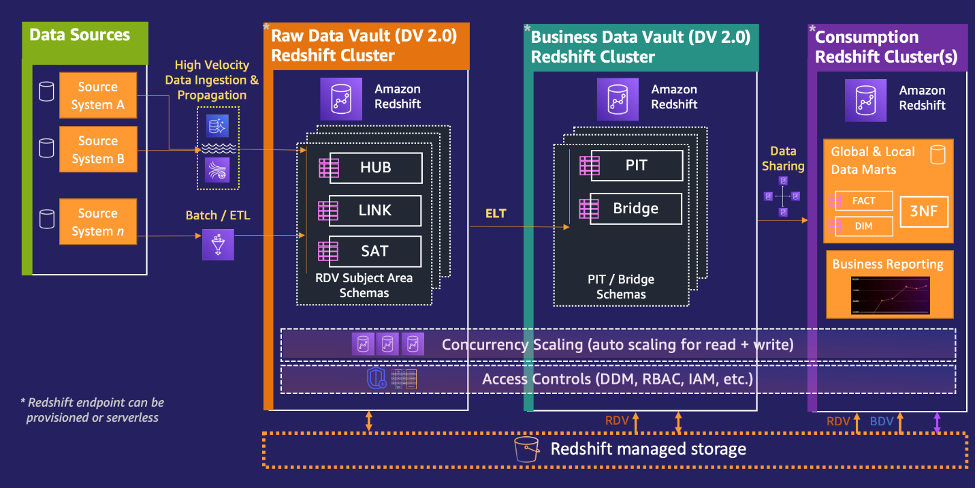
Amazon Redshift is a popular cloud data warehouse, offering a fully managed cloud-based service that seamlessly integrates with an organization’s Amazon Simple Storage Service (Amazon S3) data lake, real-time streams, machine learning (ML) workflows, transactional workflows, and much more—all while providing up to 7.9x better price-performance than any other cloud data warehouses. As with all […]
Implement fine-grained access control in Amazon SageMaker Studio and Amazon EMR using Apache Ranger and Microsoft Active Directory
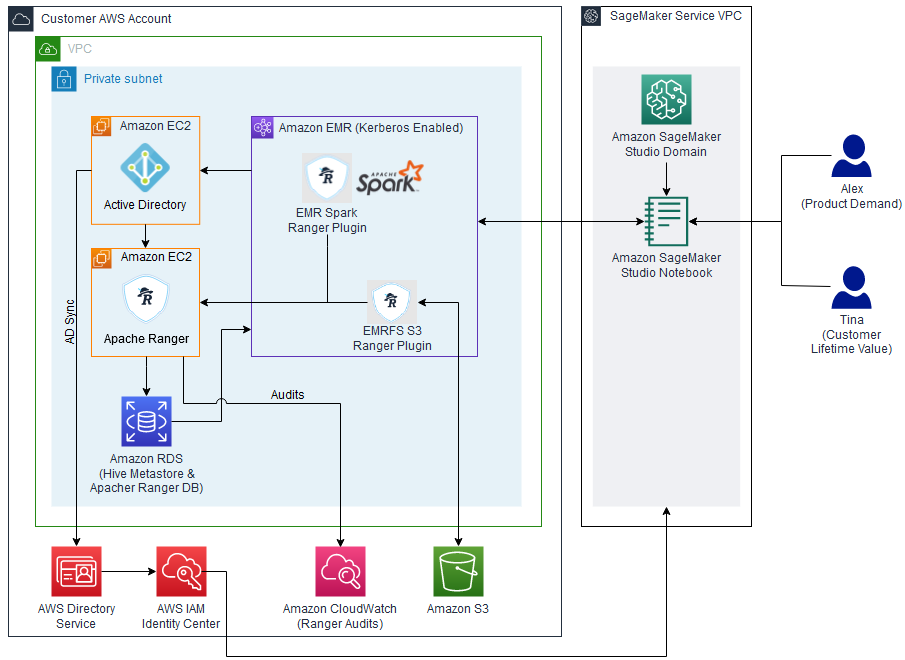
In this post, we show how you can authenticate into SageMaker Studio using an existing Active Directory (AD), with authorized access to both Amazon S3 and Hive cataloged data using AD entitlements via Apache Ranger integration and AWS IAM Identity Center (successor to AWS Single Sign-On). With this solution, you can manage access to multiple SageMaker environments and SageMaker Studio notebooks using a single set of credentials. Subsequently, Apache Spark jobs created from SageMaker Studio notebooks will access only the data and resources permitted by Apache Ranger policies attached to the AD credentials, inclusive of table and column-level access.

GoDaddy benchmarking results in up to 24% better price-performance for their Spark workloads with AWS Graviton2 on Amazon EMR Serverless
This is a guest post co-written with Mukul Sharma, Software Development Engineer, and Ozcan IIikhan, Director of Engineering from GoDaddy. GoDaddy empowers everyday entrepreneurs by providing all the help and tools to succeed online. With more than 20 million customers worldwide, GoDaddy is the place people come to name their ideas, build a professional website, […]

Enable cost-efficient operational analytics with Amazon OpenSearch Ingestion
As the scale and complexity of microservices and distributed applications continues to expand, customers are seeking guidance for building cost-efficient infrastructure supporting operational analytics use cases. Operational analytics is a popular use case with Amazon OpenSearch Service. A few of the defining characteristics of these use cases are ingesting a high volume of time series […]